

Finding the right display means prioritizing both posture and visual clarity. For an outstanding balance of fluid gaming and daily workstation comfort, the KOORUI 34 Inch 200Hz Ultrawide Curved WQHD leads our research with its 1000R curve and smooth refresh rate. If your workflow centers on single-cable laptop connectivity and heavy multitasking, check out our guide to Best External Computer Monitors for Comfort at Work for broader desktop advice.
For budget-conscious buyers who want high refresh rates without breaking the bank, the AOC 34 Inch Curved Gaming Monitor UWQHD 200Hz VA delivers sharp resolution and responsive motion control. We evaluated 7 options in October 2026 to highlight displays that protect your neck and improve desktop productivity. Check Price on Amazon →




Best Curved Monitors with Height Adjustment Buying Guide for 2026
Height Adjustment Range and Stand Ergonomics
A monitor stand with height adjustment allows you to align the top third of your display directly with your eye level. Raising your screen prevents forward head tilt and reduces neck strain during extended work hours. Most ergonomic stands offer roughly 110 millimeters of vertical travel to accommodate different desk heights.
Beyond simple height modification, look for stands that also support broad tilt and swivel adjustments. Swiveling your panel makes sharing screen content easy, while tilting helps eliminate harsh overhead light reflections. You can explore more ergonomic setup advice in our guide to Desktop & External Monitors.
Curvature Radius: 1000R vs 1500R
Screen curvature is measured by radius in millimeters, where a smaller rating like 1000R indicates a tighter curve. A 1000R bend mirrors the natural peripheral field of human sight to maximize immersion. Tighter curves keep the screen edges at equal distance from your eyes, lowering focusing fatigue.
Gentler curvatures like 1500R offer a subtle wrap around effect that works well for multi-window productivity. These moderate curves minimize horizontal head rotation while keeping straight lines natural for spreadsheets or creative design. Selecting the right curvature depends on whether you prioritize gaming depth or document editing.
Resolution and Ultrawide Aspect Ratios
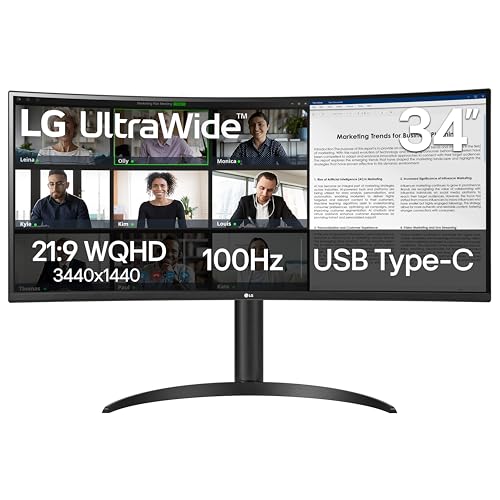
Choosing WQHD resolution at 3440×1440 pixels yields sharp text and ample screen real estate across a 21:9 aspect ratio. This extra width lets you display two full-sized application windows side by side without requiring dual physical monitors. For additional pixel density details, read our breakdown of Best High Resolution Monitors for Comfort and Value.
Standard 16:9 QHD screens operating at 2560×1440 pixels remain popular for gaming and conventional video streams. While narrower than ultrawide displays, 32-inch QHD models still offer generous vertical workspace for daily tasks. Higher resolution displays ensure crisp rendering across both software interfaces and high-definition video playback.
Refresh Rate and Motion Handling
Refresh rates between 100Hz and 200Hz make cursor movements feel noticeably smoother across your desktop. Fast frame transitions reduce motion blur in high-speed video games and improve scrolling fluidity in long documents. Combining high refresh rates with rapid response times prevents distracting ghosting artifacts behind moving objects.
Adaptive synchronization technologies like FreeSync dynamically match display output to your graphics card output. Synchronizing these frame rates eliminates visual tearing and stuttering during demanding graphics workflows or competitive gaming sessions. High refresh rates provide immediate benefits for both workplace productivity and fast-paced gaming visual quality.
USB-C Docking and Power Delivery
Single-cable USB-C connectivity simplifies your desk surface by transferring video signals and charging your connected laptop simultaneously. Built-in power delivery ratings from 65W to 90W eliminate the need for extra bulky external power bricks. USB hub integration allows mouse receivers and keyboards to connect directly through your display ports.
Multitasking functions like Picture-by-Picture allow you to view input signals from two distinct computers on one curved screen. This capability helps professionals manage dedicated work laptops and personal systems simultaneously without cluttering their desk. Modern displays serve as clean docking stations that streamline multi-device daily desktop operations.
Panel Contrast and Color Gamut Coverage
Vertical Alignment panel technology delivers high contrast ratios reaching up to 4000:1 for deep blacks and clear highlight separation. High native contrast improves viewing comfort in dim environments by preserving shadow detail without requiring excessive backlight brightness. Bright panels with HDR support ensure rich visuals across diverse ambient lighting conditions.
Wide color coverage reaching 99% sRGB or DCI-P3 standards guarantees accurate color reproduction for photos and media editing. Broad color spectrum support ensures consistent output across digital software suites and streaming entertainment content. Reliable color accuracy makes a display versatile enough for both corporate tasks and rich media consumption.
How We Evaluated
Our evaluation methodology focuses on objective specification analysis, stand adjustment ranges, panel performance metrics, and connectivity options. We compared manufacturer data sheets for curved displays to isolate models offering genuine vertical stand motion alongside broad color gamuts. This structural comparison highlights monitors that excel in daily ergonomic comfort and high-speed motion clarity.
We also examined input port variations, curvature ratings, power delivery capacity, and multitasking software tools across KOORUI, LG, KTC and more. By weighing hardware trade-offs against typical workplace and gaming demands, we identified displays that offer lasting value. Our goal is providing transparent data to help you select a display matched to your desk.
Common Mistakes to Avoid
Buying a large ultrawide display without checking its stand height travel can force you into uncomfortable sitting postures. Fixed-height stands often position screens too low, creating neck strain despite high panel quality. Always verify that the included mount or stand provides adequate vertical lift for your eye height.
Ignoring laptop charging requirements when choosing a USB-C monitor often leads to cable management disappointment. Selecting a monitor with inadequate wattage means your laptop battery might slowly drain while under heavy processing load. Check your computer power draw before buying to ensure single-cable dock compatibility.
Selecting an extreme 1000R curvature for graphic design work can distort straight lines in visual software. Tighter curves excel at gaming immersion, but milder 1500R panels preserve geometric alignment for CAD and spreadsheet editing. Aligning curvature intensity with your daily primary work tasks prevents annoying visual distortion issues.
Overlooking desk depth requirements when choosing curved monitors can leave your keyboard uncomfortably close to the screen stand. Deep stand bases and curved panels eat into workspace, so check your desk measurements before buying. You can learn more about spatial setup considerations in our guide to Best External Monitors: Choose Comfort and Value.
Buying Checklist
- Confirm the stand offers at least 100mm of vertical height adjustment.
- Verify your graphics card supports the native 3440×1440 WQHD resolution at target refresh rates.
- Check that USB-C power delivery output matches or exceeds your laptop charger rating.
- Ensure your desktop surface depth provides at least two feet of viewing distance.
- Select 1000R curvature for immersive gaming or 1500R for spreadsheet editing accuracy.
- Validate VESA mount pattern compatibility if you plan to use an aftermarket monitor arm.
- Confirm built-in display inputs include matching HDMI and DisplayPort versions for your source devices.
Final Thoughts
Selecting the ideal display requires balancing ergonomic stand range with screen resolution and input flexibility. For maximum gaming smoothness paired with a supportive height-adjustable stand, the KOORUI 34 Inch 200Hz Ultrawide Curved WQHD delivers exceptional overall speed and immersive visual depth. For more gaming display ideas, check out our guide to Gaming Monitors.
If your priority centers on reducing desktop cable clutter while maintaining healthy posture, the SAMSUNG Viewfinity S65UA Series 34-Inch Ultrawide provides built-in 90W laptop charging and automated eye care features. Meanwhile, budget-conscious buyers seeking ultra-fast refresh rates will find excellent performance in the AOC 34 Inch Curved Gaming Monitor UWQHD 200Hz VA.
Investing in proper screen height alignment protects your physical health while making daily computer tasks far more comfortable. Choose a model that matches your physical desk space, connection preferences, and visual workloads for long-term satisfaction.
Frequently Asked Questions
Why is height adjustment important on curved monitors?
Height adjustment lets you align the top of your screen with your natural eye line to maintain upright head posture. Proper height alignment prevents neck fatigue and shoulder tension during extended office work or gaming marathons.
What is the ideal viewing distance for Best Curved Monitors with Height Adjustment in 2026?
An ideal viewing distance for a 34-inch curved display sits between two and three feet from your eyes. This distance allows the display curve to match your peripheral vision without requiring excessive head movements.
Does a 1000R curve feel uncomfortable for everyday office tasks?
A 1000R curve provides an intense wrap-around effect that feels highly immersive for gaming and movies. While most users adjust quickly, professionals doing heavy line-drawing or CAD drafting may prefer milder 1500R curves.
Can I mount Best Curved Monitors with Height Adjustment on an external arm?
Most curved monitors include standard VESA mounting patterns such as 75x75mm or 100x100mm. Mounting your display on an adjustable arm offers even greater height and swivel flexibility while freeing up physical desktop space.
Is WQHD resolution sharp enough for a 34-inch ultrawide screen?
WQHD resolution at 3440×1440 pixels provides crisp text density and clear visuals on a 34-inch ultrawide canvas. It delivers substantially more workspace than standard 1080p screens without imposing extreme GPU hardware demands. You can compare display panel technologies further on our IPS, OLED & LED Panels guide.
How does USB-C power delivery work on these displays?
USB-C power delivery sends high-definition video signals from your laptop to the monitor while charging your laptop battery through one cable. High-wattage ports eliminate separate laptop charger bricks and streamline workstation organization.
What refresh rate should I target among Best Curved Monitors with Height Adjustment in 2026?
A refresh rate of 100Hz provides smooth motion for general office software and web browsing. Gamers and action video enthusiasts should target 180Hz or 200Hz for minimum motion blur and maximum competitive fluidity.
Do curved monitors help reduce eye strain during long working hours?
Curved screens maintain a consistent focal distance across the entire panel width, reducing the need for continuous eye refocusing. Combined with adjustable stand height, this design minimizes both optical and musculoskeletal fatigue.




