

Finding the Best Sound Cards Under $50 in November 2026 comes down to choosing clean output over noisy integrated audio. For most desktop users, the Cubilux 7.1 USB Surround Sound Card delivers top performance with its high sample rate support and full aluminum construction. It handles standard music listening alongside multichannel gaming effortlessly.
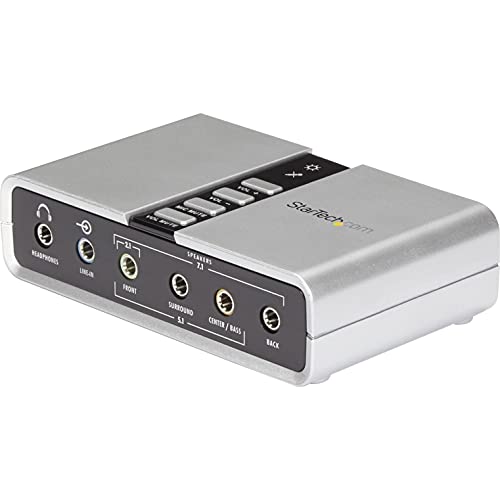
If you require dedicated physical volume controls and optical digital output, the StarTech 7.1 USB Audio Adapter serves as a capable alternative. Pairing a quality audio interface with a clean display setup from our compact PC setup guide ensures an immersive desktop experience without clutter.
Best Sound Cards Under $50 Buying Guide
Audio Sample Rates and Resolution
Sample rates define how accurately an external sound card converts digital files into analog sound waves. Standard motherboard audio often caps output at CD quality, which can limit detail in high resolution audio files. Selecting an adapter supporting 96kHz or 384kHz ensures crisp highs and natural vocal reproduction across all tracks.
Higher bit depth also expands dynamic range, preventing distortion during loud volume spikes. When combined with high quality monitors, superior sound output creates a balanced media experience for gaming and streaming. Choosing higher sample rates gives your headphones headroom to reveal subtle acoustic details.
Physical Port Selection and Inputs
External sound adapters provide dedicated jacks for distinct audio setups. Standard 3.5mm headphone ports handle simple stereo output, while full 7.1 surround systems require multiple discrete analog outputs. Having separate microphone and line in jacks allows you to connect external instruments or analog audio players directly.
Optical SPDIF ports offer pure digital pass through to home theater receivers. If your current desktop lacks adequate connections, matching port types to your existing headset or speaker system prevents the need for extra adapters. Always verify whether your microphone uses a single combined TRRS jack or separate TRS connectors.
EMI Shielding and Housing Material
Electromagnetic interference inside a computer chassis creates background hiss and static noise. Internal motherboard audio traces sit near graphics cards and power supplies, picking up unwanted electrical hum. External sound cards isolate sensitive audio circuitry outside the computer case away from hardware noise.
Aluminum alloy enclosures offer far better shielding against wireless signals and power line hum than plastic shells. Durable metal construction also dissipates heat effectively during extended playback sessions. Investing in a shielded metal adapter ensures background silence during quiet audio passages.
Onboard Controls and User Adjustments
Quick access to hardware volume adjustments improves daily convenience during intense gaming or calls. Hardware mute buttons let you silence your microphone instantly without navigating through operating system settings. Sound cards with physical buttons save time when software windows are minimized.
Software mixers allow custom channel assignment and virtual surround tweaks on compatible systems. Balancing physical controls with software customizability ensures smooth operation across different operating systems. Selecting an adapter with intuitive controls prevents accidental volume spikes during playback.
System Compatibility and Driver Setup
Plug and play operation eliminates the hassle of searching for outdated software drivers online. Modern USB sound cards work immediately across modern Windows and macOS systems using native USB audio drivers. Instant recognition makes switching between laptops and desktop towers fast and reliable.
Check operating system requirements if you run legacy computers or custom Linux builds. Modern sound cards usually dropped support for older systems like Windows 7 or XP. Pairing a plug and play sound card with efficient display options from our computer monitors guide simplifies system upgrades.
How We Evaluated
We evaluated 2 models by analyzing verified technical specifications, sample rates, connectivity options, and housing materials. Our evaluation focused on identifying units that deliver clean signal isolation and consistent driver stability without requiring expensive additions.
We compared hardware feature sets including optical SPDIF output, physical volume controls, and high resolution playback capabilities. This objective assessment ensures readers can select an affordable USB sound card tailored to their specific hardware environment.
Common Mistakes to Avoid
Buying an adapter without checking jack compatibility leads to connection issues. Combining a single plug gaming headset with separate headphone and mic inputs requires an external splitter cable.
Ignoring housing shielding is another common error when buying budget sound cards. Plastic adapters placed next to active wireless routers or heavy power cables can introduce noticeable background buzzing into your headphones.
Assuming all USB sound cards support surround sound over optical pass through leads to disappointment. Always verify whether optical outputs support multi channel audio or are limited to stereo PCM signals.
Overlooking operating system support before purchasing can cause driver errors. Always confirm that your operating system version is explicitly supported by the sound card manufacturer.
Buying Checklist
- Verify whether your headset uses separate 3.5mm TRS plugs or a single TRRS jack.
- Check if the maximum sample rate meets your listening requirements.
- Confirm the sound card features an aluminum chassis for electrical shielding.
- Ensure the adapter includes hardware volume controls if you prefer tactile adjustments.
- Determine whether you need discrete multi channel analog jacks for surround speakers.
- Check if your operating system supports standard driverless plug and play setup.
- Verify SPDIF optical input and output requirements for external receivers.
Final Thoughts
Upgrading desktop audio on a modest budget is simple with the right USB adapter. The Cubilux 7.1 USB Surround Sound Card stands out as our top overall choice thanks to its high 384kHz sampling capability and full aluminum housing. It delivers excellent signal purity for music lovers and gamers alike.
For users requiring physical control buttons and digital optical output options, the StarTech 7.1 USB Audio Adapter serves as our versatile secondary pick. Pairing clean audio with vibrant visuals like those in our OLED monitor options guide creates a complete desktop setup.
Selecting between these options depends on your specific port requirements and hardware setup. Both models offer significant upgrades over integrated motherboard audio without demanding a heavy financial investment.
Frequently Asked Questions
What is the main benefit of choosing Best Sound Cards Under $50 in 2026?
The primary benefit is isolating your audio signal from electrical noise generated inside your computer case. External USB sound cards deliver cleaner playback and clearer microphone input compared to standard motherboard audio components.
Do external USB sound cards work without installing custom drivers?
Most modern USB sound cards use standard class compliant audio drivers built directly into Windows and macOS systems. You can simply plug the device into an open USB port and start listening immediately.
Can I connect a 7.1 speaker system to a budget sound card?
Yes, provided the sound card features multiple dedicated 3.5mm analog outputs for surround channels. Models with multi port configurations let you run discrete front, rear, center, and subwoofer cables directly to your speaker system.
Will a USB sound card improve my microphone sound quality?
An external sound card reduces static background hum caused by motherboard electrical interference, resulting in noticeably clearer voice transmission during calls or gaming.
Does high resolution sample rate support make a difference for music?
Higher sample rates like 96kHz or 384kHz allow the card to reproduce subtle details present in lossless audio tracks. This results in smoother treble response and more detailed acoustic instruments.
Are budget sound cards compatible with laptop computers?
External USB sound cards work equally well on laptops and desktop computers. They offer a quick fix for broken internal headphone jacks or noisy built in audio ports.
How do sound cards complement larger desktop monitor setups?
Adding dedicated desktop audio ensures your sound matches high definition visuals when using large desktop displays, creating a complete workstation setup.
What is the difference between optical SPDIF and 3.5mm analog outputs?
Optical SPDIF transmits audio signals as light pulses, eliminating electrical ground loops completely. Analog 3.5mm outputs send electrical voltage directly to powered speakers or headphones.









