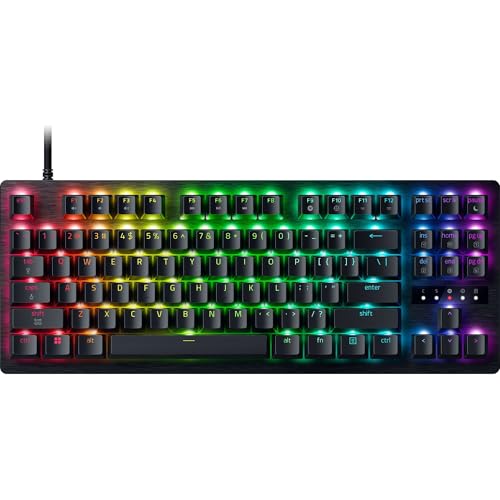

When selecting the Best Gaming Mini Keyboards for November 2026, maximizing desk real estate for competitive mouse flicks is essential. Among the 7 models we analyzed in the range, the Razer Huntsman V3 Pro Mini 60% Esports stands out as the ultimate pick for FPS players needing hyper-responsive Rapid Trigger switches. Pairing this compact form factor with low-latency responsiveness helps clear desk space, which pairs naturally with high-performance gaming monitors during intense competition.
For gamers seeking full wireless freedom alongside custom switch compatibility, the Razer BlackWidow V4 Pro 75% Wireless delivers incredible versatility as our premium runner-up choice. It provides hot-swappable sockets and integrated OLED control while preserving a compact desktop footprint for tight spaces. Check Price on Amazon →


Best Gaming Mini Keyboards Buying Guide
Selecting the Right Form Factor Layout
Choosing between 60%, 75%, and Tenkeyless layouts determines how much mouse space you reclaim on your desk. A 60% keyboard eliminates dedicated arrow keys and navigation clusters, giving competitive FPS players maximum room for broad arm movements.
Conversely, 75% and TKL layouts retain function rows and arrow keys for users who mix gaming with general office productivity. If you plan to connect multiple computer displays for work and play, a 75% layout balances ergonomics with utility.
Evaluating your daily typing requirements ensures you do not compromise workflow speed for desk space. Gamers who rely heavily on macro shortcuts or dedicated directional keys usually prefer compact TKL or 75% designs.
Switch Technology and Rapid Trigger Responsiveness
Analog optical switches represent a massive technical leap over traditional mechanical key switches in competitive gaming. By measuring precise light travel, optical sensors allow real-time adjustments to key actuation points between 0.1 mm and 4.0 mm.
Rapid Trigger technology enables key resets the instant your finger lifts slightly upward rather than requiring a fixed reset distance. This capability lets players execute rapid counter-strafing and directional changes faster than opponents using standard mechanical switches.
Tactile mechanical switches remain popular for enthusiasts who prioritize physical key feel and sound customization over pure speed. However, analog optical switches provide a distinct mechanical advantage in fast-paced competitive esports titles.
Polling Rates and Input Latency Reduction
Standard gaming peripherals send data to your computer at 1000 Hz, updating key state positions once every millisecond. Advanced esports keyboards boost hyperpolling rates up to 8000 Hz, reducing input processing delays down to a fraction of a millisecond.
Higher polling rates ensure every keystroke registration aligns perfectly with high refresh rate gaming monitors during frantic matches. While 1000 Hz remains suitable for casual play, competitive players benefit from near-zero input latency in fast-paced shooters.
Note that utilizing 8000 Hz polling consumes more system processing resources from your desktop computer. Ensure your CPU can easily handle continuous high-frequency peripheral polling without impacting frame rates.
Wireless Connectivity and Battery Management
Modern 2.4 GHz wireless technologies deliver transmission speeds rivaling traditional wired connections without cluttering your desktop. Dual-mode keyboards also include Bluetooth 5.1, allowing quick switching across secondary devices like laptops and tablets.
Battery endurance varies depending on dynamic RGB lighting levels and active wireless polling modes during extended sessions. Models featuring optimized power management can operate for hundreds of hours when per-key RGB backlighting is disabled.
If you travel frequently to local gaming tournaments, consider whether USB-C fast charging support is built directly into the keyboard. Detachable braided cables allow quick packing while ensuring reliable wired operation whenever battery reserves run low.
Acoustics and Internal Gasket Construction
Internal sound dampening foam and gasket mounting layers significantly alter typing acoustics by suppressing unwanted hollow noise. Dense sound dampening materials absorb metallic pinging artifacts from spring rebounds inside individual switch housings.
Keyboards equipped with hot-swappable socketed PCBs allow easy switch replacement without requiring tedious soldering equipment. This flexibility lets enthusiasts tune key feel, test lubricated switches, and replace worn components effortlessly over time.
Double-shot PBT keycaps offer enhanced surface texture that resists finger oil shine and key legend fading over years of heavy use. Investing in durable keycaps maintains a clean aesthetic while enhancing finger grip during tense gaming moments.
How We Evaluated
Our technical evaluation focused on analyzing verified manufacturer specifications, switch actuation ranges, layout dimensions, and connectivity options across all listed models. We categorized each product based on structural build quality, keycap material durability, polling rate capabilities, and practical setup flexibility.
We paid close attention to acoustic dampening solutions, software requirements for Rapid Trigger features, and ergonomic wrist support inclusions. This objective comparison ensures players can select ideal compact peripherals matched to their competitive priorities and workspace constraints.
Common Mistakes to Avoid
Purchasing a 60% layout without considering daily arrow key usage is a frequent misstep for general users. Navigating document lines or spreadsheet cells requires multi-key function shortcuts on 60% boards, which can slow down productivity tasks. If you work on external monitors daily, a 75% layout may fit better.
Assuming all compact gaming keyboards include hot-swappable switch sockets often leads to post-purchase frustration. Optical switch keyboards frequently utilize specialized socket designs that cannot accept traditional three-pin or five-pin mechanical switches.
Overlooking keycap material composition can result in slippery surfaces and faded key legends after several months of use. Selecting doubleshot PBT keycaps ensures superior long-term durability compared to cheaper ABS plastic alternatives.
Ignoring system resource demands associated with 8000 Hz hyperpolling can cause performance bottlenecks on older computer hardware. Verify your processor capacity before activating ultra-high polling rates during demanding gaming sessions.
Buying Checklist
- Confirm your desk dimension requirements before choosing between 60%, 75%, or TKL form factors.
- Verify whether you require dedicated arrow keys and physical function row buttons for work.
- Check if the switch technology supports Rapid Trigger and customizable analog actuation distances.
- Determine whether low-latency 2.4 GHz wireless or standard braided USB-C wired connection fits your setup.
- Ensure keycaps are constructed from textured doubleshot PBT plastic to resist oil and shine.
- Review internal acoustic features such as gasket mounting plates and sound-dampening foam layers.
- Check system processor compatibility if planning to utilize 4000 Hz or 8000 Hz hyperpolling rates.
- Confirm whether hot-swappable PCB sockets are compatible with standard 3-pin or 5-pin mechanical switches.
Final Thoughts
Selecting the ideal keyboard from our list of Best Gaming Mini Keyboards depends primarily on your preferred balance between physical size and specialized input features. For pure competitive FPS performance where rapid directional shifts matter most, the Razer Huntsman V3 Pro Mini 60% Esports delivers unmatched response with its compact footprint and analog optical switches.
If you desire wireless freedom alongside custom switch modding capabilities, the Razer BlackWidow V4 Pro 75% Wireless stands out as an outstanding premium choice for multi-device setups. Alternatively, players seeking affordable wireless performance without sacrificing arrow keys will appreciate the value offered by the Razer BlackWidow V4 TKL Wireless Gaming Keyboard.
Pairing your high-performance input gear with comfortable display accessories from our guide to HD computer monitors helps create an immersive desktop environment. Upgrading to a modern compact gaming keyboard ultimately improves desk ergonomics while providing distinct hardware advantages in competitive gaming.
Frequently Asked Questions
What makes Best Gaming Mini Keyboards superior for competitive FPS titles in 2026?
Compact keyboards reclaim vital desk area, allowing low-sensitivity FPS players to perform wide, sweeping mouse movements without striking the keyboard frame. Advanced mini keyboards also feature Rapid Trigger technology and high polling rates for faster directional inputs.
What is the main difference between 60% and 75% compact keyboards?
A 60% keyboard strips away dedicated function rows, navigation clusters, and arrow keys to achieve the smallest possible footprint. A 75% keyboard retains arrow keys and top function rows in a tightly packed layout for better daily versatility.
How does Rapid Trigger technology work on optical gaming keyboards?
Rapid Trigger resets key actuations the exact instant a key moves upward, eliminating static reset distance requirements. This allows players to tap keys repeatedly and change directions faster than on traditional mechanical switches.
Is 8000 Hz hyperpolling noticeable compared to standard 1000 Hz polling?
Hyperpolling reduces input transmission delays from 1.0 ms to 0.125 ms, providing smoother input registration when paired with high refresh rate gaming displays. While subtle, competitive esports players value this split-second responsiveness in fast games.
Are hot-swappable switches important on mini gaming keyboards?
Hot-swappable sockets let you replace individual switches without soldering, making it easy to repair faulty keys or customize sound and feel. However, optical switch keyboards often use proprietary designs that limit replacement switch choices.
Can compact gaming keyboards be used comfortably for office productivity?
Yes, though typing on 60% keyboards requires using key combinations to access arrow keys and secondary commands. Models like the Razer Pro Type Ergo Wireless Split Ergonomic RGB offer split layouts designed specifically to reduce wrist strain during long typing workdays.
Why are PBT keycaps preferred over standard ABS keycaps?
Doubleshot PBT keycaps feature a denser material composition that resists surface wear and oily shine over extended use. Their textured feel and fade-proof legend molding keep keyboards looking pristine through years of gaming sessions.
Which option stands out among Best Gaming Mini Keyboards in 2026 for travel?
The Razer Huntsman V3 Pro Mini 60% Esports is extremely easy to pack due to its compact 60% frame and detachable cable. You can also explore our general how-to guides for more peripheral setup advice.









