
Finding the right display requires balancing backlight precision, curve radius, and panel responsiveness. The Samsung 32″ Odyssey Neo G7 4K UHD 165Hz 1ms G-Sync stands as our top choice for most enthusiasts due to its 1,196 Mini-LED local dimming zones and aggressive 1000R arc.
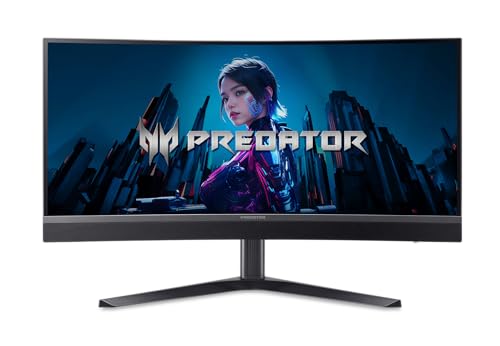
Gamers seeking high ultrawide value will appreciate the Acer Predator 34in WQHD 3440×1440 Curved 200Hz across our 5 evaluated models for November 2026. You can discover more premium options in our Gaming Monitors guide.


Best Curved Gaming Monitors with HDR1000 Buying Guide
Mini-LED Backlighting and Local Dimming Zones
True HDR performance requires granular control over screen illumination to prevent washed-out dark scenes. Mini-LED backlighting places thousands of tiny diodes behind the liquid crystal layer, dividing the screen into hundreds or thousands of independent dimming zones.
Higher zone counts directly reduce blooming artifacts around bright crosshairs, subtitles, and neon lights in dark environments. Opting for displays with over 1,000 dimming zones ensures deep black levels without sacrificing highlight punch.
Peak Brightness and True HDR Impact
The DisplayHDR 1000 tier demands sustained and peak luminance levels reaching at least 1,000 nits. This massive output allows sunlight, explosions, and magical effects to appear truly radiant rather than artificially compressed.
Standard desktop displays often top out around 300 to 400 nits, which flattens highlight details in modern titles. Investing in high-luminance panels creates dramatic contrast that makes virtual worlds pop with lifelike energy. Learn more about display standards in our 4K, 6K & 8K Monitors hub.
Curvature Radius and Immersion
Curved panels match the natural peripheral arc of human vision to reduce eye strain across wide display areas. A 1000R curve provides an intense wrap-around sensation, while a 1500R curve offers a gentler contour suitable for mixed gaming and office tasks.
Selecting the right curvature depends heavily on your viewing distance and desk depth. Aggressive curves pull the display edges into your focal field, significantly boosting immersion in flight sims and racing games.
Resolution and GPU Demands
Panel resolution dictates visual crispness but also determines the hardware power needed to maintain smooth framerates. Driving 4K UHD or Dual QHD requires high-end graphics cards equipped with substantial video memory.
Users pairing their setup with standard graphics hardware should consider WQHD ultrawides for optimal performance balance. You can explore broader productivity and panel choices through our Desktop & External Monitors section.
Refresh Rate and Motion Clarity
Fast-paced competitive titles demand high refresh rates of 165Hz to 240Hz to minimize motion blur and input delay. Swift 1ms pixel response times prevent ghosting trails during rapid camera pans.
Variable refresh rate support through AMD FreeSync Premium Pro and NVIDIA G-Sync compatibility eliminates screen tearing. This synchronization ensures fluid rendering even when complex visual effects cause framerates to fluctuate.
Port Connectivity and Bandwidth Standards
High-resolution HDR gaming at high refresh rates consumes massive display bandwidth across video cables. Modern standards such as HDMI 2.1 and DisplayPort 2.1 deliver uncompressed signals with full color depth.
Make sure your graphics card supports the required interface version to unlock full refresh rates and HDR features simultaneously. Utilizing proper cables prevents annoying signal dropouts and color subsampling compromises.
How We Evaluated
Our team evaluated 5 premium displays from leading manufacturers like Samsung, Acer to determine their real-world gaming efficacy. We cross-referenced technical specifications, local dimming zone implementations, sustained peak brightness metrics, and curvature profiles.
We examined panel response speeds, port standards, and adaptive sync stability across varied resolutions. This data-driven comparison focuses strictly on verified capabilities, helping you select hardware that matches your exact performance demands.
Common Mistakes to Avoid
Confusing basic edge-lit HDR with full-array local dimming is a frequent pitfall that ruins HDR experiences. Edge-lit screens cannot deliver localized 1,000-nit highlights without washing out adjacent black regions across the entire vertical column.
Underestimating desk depth requirements leads to uncomfortable viewing angles and excessive neck strain. Aggressive 1000R ultrawide screens require substantial surface space or heavy-duty mounting arms to achieve optimal eye relief.
Overlooking video output bandwidth often prevents gamers from running full resolution, maximum refresh rates, and 10-bit HDR simultaneously. Always verify that your graphics card has corresponding HDMI 2.1 or DisplayPort outputs.
Buying Checklist
- Confirm the display features full-array Mini-LED backlighting with at least 1,000 local dimming zones.
- Verify VESA DisplayHDR 1000 certification or a verified 1,000 nit peak brightness rating.
- Check that your desk depth accommodates the specific curve radius, such as 1000R or 1500R.
- Ensure your graphics card possesses sufficient video memory to power 4K, WQHD, or Dual UHD resolutions.
- Validate that the monitor supports AMD FreeSync Premium Pro or NVIDIA G-Sync compatibility.
- Confirm available HDMI 2.1 or DisplayPort 2.1 inputs match your PC and gaming console hardware.
- Inspect stand ergonomics for essential height, tilt, and swivel adjustments before finalizing your desk setup.
Final Thoughts
Choosing from the top curved HDR screens elevates both cinematic immersion and competitive clarity across all genres. For most enthusiasts, the Samsung 32″ Odyssey Neo G7 4K UHD 165Hz 1ms G-Sync represents the best overall balance of pixel density, Mini-LED precision, and fluid motion. Check out our IPS, OLED & LED Panels overview for deeper backlight analysis.
Gamers who prioritize panoramic field-of-view on a reasonable budget should consider the Acer Predator 34in WQHD 3440×1440 Curved 200Hz. If you require massive desktop real estate for flight simulators and multitasking, the colossal Samsung 57″ Odyssey Neo G9 (G95NC) stands unrivaled in scale and fidelity.
Whatever screen size suits your space, pair your display with a robust GPU and high-bandwidth cables to unlock its full potential. For further guidance on matching displays to work and entertainment, explore our collection of Best High Resolution Monitors for Comfort and Value.
Frequently Asked Questions
What makes Best Curved Gaming Monitors with HDR1000 stand out in 2026?
These displays combine intense 1,000-nit peak highlights with Mini-LED local dimming and wraparound curvature. This synergy delivers deep blacks, vivid colors, and superior immersion compared to standard edge-lit gaming panels.
Is a 1000R curve better than a 1500R curve for gaming?
A 1000R curve matches the human eye’s natural field of view more closely, making it exceptionally immersive for super ultrawide gaming. A 1500R curve provides a gentler bend that works well for mixed gaming and productivity workflows.
Do I need a high-end graphics card for HDR1000 gaming monitors?
Yes, pushing high resolutions like 4K or Dual QHD with full HDR rendering requires substantial GPU processing power. Modern graphics cards with HDMI 2.1 or DisplayPort outputs are necessary to maintain smooth frame rates.
What is the difference between HDR600 and HDR1000?
HDR1000 provides nearly double the peak luminance of HDR600, creating far more impactful sunbursts and reflections. Monitors in the HDR1000 tier also typically incorporate advanced Mini-LED local dimming to prevent light bleed.
Can I use these curved monitors for office work and productivity?
Super ultrawide models excel at multitasking by replacing multi-monitor setups without bezel interruptions. You can learn more about comfortable productivity setups in our Best External Computer Monitors for Comfort at Work guide.
Does Mini-LED cause blooming in dark gaming scenes?
Minor blooming can occasionally appear around tiny bright objects against pure black backgrounds. However, panels with over 1,000 local dimming zones minimize this halo effect effectively during active gameplay.
Are curved gaming screens compatible with standard VESA monitor arms?
Most models include standard 100×100 VESA mount adapters in the packaging. Because large ultrawides are heavy and front-weighted, ensure your monitor arm supports the display’s exact weight rating.
How does refresh rate impact HDR gaming performance?
A higher refresh rate like 165Hz or 240Hz ensures that fast-moving HDR scenes remain sharp and free of motion blur. Combining high refresh rates with adaptive sync keeps animations smooth during intense visual combat.









