

Audio clarity in your studio depends heavily on clean signal transmission between your interface and speakers. The Elebase 1/4 Inch TRS Instrument Cable 10FT is our top pick for most home studios because its balanced TRS design and right-angle connectors save valuable desk space while rejecting unwanted hum.
If you need an ultra-affordable dual pack for a pair of active speakers, the Birvemce 2 Pack Premium TRS Cable 10FT delivers clean audio at exceptional value. We compared 5 models for November 2026 to help you build a noise-free setup, which pairs well with our audio setup tutorials for home studio creators.

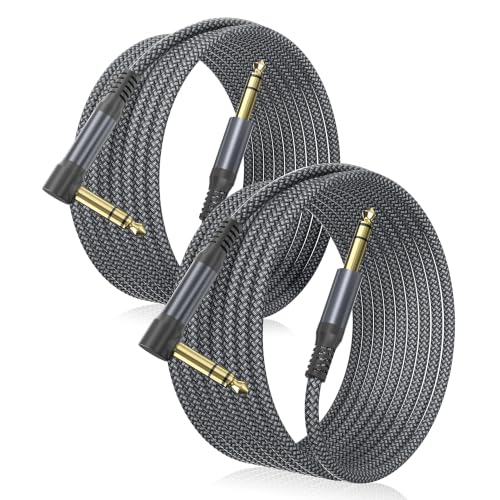


Best 1 4 Inch Cables for Studio Monitors: Clean Sound Buying Guide
Balanced TRS Versus Unbalanced TS Wiring
Studio monitors require balanced connections to prevent electromagnetic noise from contaminating audio playback. A balanced Tip-Ring-Sleeve (TRS) cable carries two copies of the audio signal with reversed polarity alongside a dedicated ground wire.
When the receiving monitor receives these dual signals, it flips the inverted signal back and cancels out common noise picked up along the wire. Using an unbalanced TS instrument cable instead leaves your audio vulnerable to radio frequency interference and electrical hum.
Always verify that both your audio interface outputs and studio monitor inputs support balanced TRS operation. Upgrading your monitoring chain creates cleaner sound when paired with desktop workstation setups that host multiple electronic devices.
Shielding Construction and Noise Rejection
Audio cables run near computer power supplies, monitors, and Wi-Fi routers that emit significant electromagnetic noise. Effective shielding wraps the internal copper conductors with dense braided wire or aluminum foil to block interference before it enters the audio path.
High quality cables feature spiral or braided oxygen-free copper shielding with coverage ratings above ninety percent. Budget cords with loose spiral shielding often allow stray radio signals and low frequency buzz to reach your studio monitors.
Investing in multilayer shielding prevents ground loops and eliminates persistent buzzing during quiet listening sessions. Clean shielding ensures transparent acoustic reproduction whether you are mixing tracks or editing podcasts at your desk.
Conductor Quality and Wire Gauge
The core conductor material directly influences signal transparency and long term conductivity in studio environments. Oxygen-free copper (OFC) remains the industry benchmark because it minimizes resistance and prevents internal corrosion over years of use.
Wire gauge, measured in AWG, determines the thickness of the internal signal-carrying conductors. Lower gauge numbers represent thicker wires, such as 12 AWG for high-current speaker lines or 16 to 24 AWG for line-level studio monitors.
While line-level signals do not demand extreme thickness, thicker copper cores provide superior mechanical strength against accidental tugs. Matching proper conductor quality with high quality audio visual gear preserves full dynamic range across all frequencies.
Connector Quality and Contact Plating
Connectors serve as the mechanical bridge between your audio hardware and the transmission cable. Solid metal plug housings with gold-plated contact points resist oxidation and maintain solid electrical contact through repeated plugging cycles.
Nickel and unplated brass connectors can develop tarnish over time, leading to crackling audio and intermittent signal drops. Gold plating prevents surface oxidation and guarantees consistent conductivity in humid home recording environments.
Strain relief boots near the connector base are equally vital for protecting delicate solder joints. Robust rubber or aluminum strain relief collars prevent the internal conductors from snapping when cables bend behind crowded equipment racks.
Cable Length and Routing Flexibility
Choosing the correct cable length keeps your studio workspace organized and protects audio fidelity. Shorter cable runs reduce overall resistance and minimize the physical surface area exposed to environmental electrical noise.
While balanced TRS cables can run long distances without significant treble loss, excess slack creates clutter behind your desk. Bundling extra long cables into tight loops can create accidental inductors that invite unwanted magnetic hum.
Measure the physical distance between your audio interface and each monitor before purchasing. Adding two or three feet of slack provides flexibility for speaker positioning without creating messy coils on the studio floor.
Outer Jacket Material and Durability
The outer jacket shields internal conductors from physical wear, pinching, and accidental chair caster damage. Braided nylon jackets offer superior abrasion resistance and resist knotting, making them ideal for desktop routing.
Heavy-duty PVC or rubber jackets provide excellent moisture resistance and flexibility for permanent floor runs. Rubber jackets lay flat easily, preventing tripping hazards in busy creative spaces and control rooms.
Highly flexible jackets make it easy to route cables through monitor arms and tight desk grommets. Stiff jackets resist bending and can put unnecessary torque on your audio interface jacks over time.
| Cable Type | Signal Type | Conductor Layout | Best Studio Application |
|---|---|---|---|
| 1/4 Inch TRS Balanced | Balanced Line Level | Tip, Ring, Sleeve (3-pole) | Studio monitors and audio interfaces |
| 1/4 Inch TS Unbalanced | Unbalanced Instrument | Tip, Sleeve (2-pole) | Guitars and mono synthesisers |
| 1/4 Inch Speaker Cable | High-Current Unshielded | Heavy 12-16 AWG Pair | Passive monitors and power amplifiers |
| XLR to 1/4 Inch TRS | Balanced Hybrid | Pin 1-3 to TRS | Interfacing studio monitors with XLR ports |
How We Evaluated
We evaluated studio monitor cables by analyzing verified technical specifications, conductor metallurgy, and shielding architecture. Our research examined balanced signal rejection efficiency, strain relief durability, and real-world connector tolerances across leading manufacturers.
We compared audio transmission characteristics and build materials across various price tiers without relying on subjective marketing claims. This data-driven analysis helps you select dependable cables that deliver transparent monitoring without introducing ground hum or signal loss.
Common Mistakes to Avoid
Confusing TS instrument cables with balanced TRS patch cords is the most widespread studio monitoring error. Using a standard two-pole guitar cable results in unbalanced operation, allowing hum and digital hash into your speakers.
Purchasing excessive cable lengths creates unnecessary clutter and invites stray electromagnetic interference. Strive to match the cord length to your actual desk dimensions to keep audio paths clean and direct.
Running audio interconnects parallel to high-voltage mains power cords can induce severe fifty or sixty hertz hum. Always cross power cables at right angles to minimize magnetic coupling into your balanced audio lines.
Ignoring connector strain relief can cause internal copper strands to fatigue and snap behind tight speaker enclosures. Choose cables with reinforced rubber boots or right-angle plugs when monitors sit close to walls.
Buying Checklist
- Verify your studio monitors feature 1/4 inch TRS or combo XLR inputs.
- Confirm your audio interface outputs support balanced line-level TRS connections.
- Choose balanced 3-conductor TRS cables rather than standard 2-conductor TS guitar leads.
- Select oxygen-free copper conductors for minimal resistance and long-lasting signal clarity.
- Ensure the cable features multi-layer braided shielding to block electromagnetic interference.
- Check that connector plugs have gold or nickel plating to resist contact corrosion.
- Measure your studio desk run and add two feet of slack for clean routing.
- Consider right-angle connectors if your studio monitors sit flush against a wall.
Final Thoughts
Achieving transparent audio reproduction in your creative room starts with clean signal interconnects. For most studio desks, the Elebase 1/4 Inch TRS Instrument Cable 10FT delivers the best overall balance of compact right-angle plugs and robust noise rejection.
Budget-conscious producers setting up a pair of active monitors will appreciate the Birvemce 2 Pack Premium TRS Cable 10FT for its dual-cable value and braided shielding. When outfitting large workspaces with best desktop monitors, the UMOKI 2PCS Professional 30 Feet 12 Gauge 1/4 Inch offers heavy-duty conductor strength for extended speaker runs.
If your monitors feature female XLR inputs, the Monoprice XLR Male to 1/4-Inch TRS Male Cable guarantees secure balanced connectivity without requiring separate adapters. Choosing the right connection style ensures clean sound reproduction across every production session.
Frequently Asked Questions
What is the difference between TRS and TS 1/4 inch cables?
TRS cables feature three contact points (Tip, Ring, Sleeve) to carry balanced stereo or differential mono signals. TS cables have only two contact points (Tip, Sleeve) and carry unbalanced mono signals that are susceptible to interference.
Why do studio monitors need balanced TRS cables?
Balanced TRS cables cancel out electromagnetic noise picked up along the wire run through common-mode rejection. This keeps your monitoring environment free from buzzing, radio interference, and computer hardware hash.
Can I use a standard guitar cable for studio monitors?
You can technically hear sound through a guitar cable, but standard guitar cords are unbalanced TS cables. Using them exposes your monitor signal to audible hum and reduces overall signal level compared to balanced TRS cords.
How does cable length affect audio quality in studio monitors?
Balanced cables can run long distances without noticeable audio loss, but excessive length increases cable resistance and desk clutter. Keeping cables between six and ten feet maintains ideal signal integrity for desktop monitoring.
Are gold-plated connectors necessary for clean studio sound?
Gold plating does not alter sound quality directly, but it prevents metal oxidation and corrosion over time. This ensures consistent electrical conductivity and stops crackling noises caused by tarnished contact surfaces.
What is the top-rated option among Best 1 4 Inch Cables for Studio Monitors: Clean Sound in 2026?
The Elebase 1/4 Inch TRS Instrument Cable 10FT is a leading choice in 2026 due to its space-saving right-angle design, robust nylon shielding, and pristine audio transmission.
Do 1/4 inch cables sound as clean as XLR connections?
1/4 inch TRS and XLR cables offer identical audio performance because both utilize three-conductor balanced wiring. You can learn more about display and workstation configurations in our computer displays guide to optimize your creative setup.
How should I route studio monitor cables to prevent buzzing?
Keep audio cables separated from AC power cords and computer power bricks. When audio and power cables must cross paths, orient them at ninety-degree angles to minimize electromagnetic coupling.









