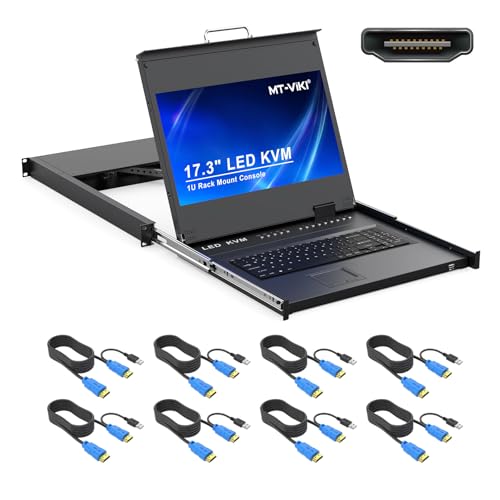
Managing multiple rack servers from a single centralized drawer requires dependable video routing and responsive hardware. The MT-VIKI® KVM Rack Mount HDMI with 17.3” LCD leads our testing due to its sharp 1080p display and seamless HDMI connectivity. Technicians seeking complete control over dense server racks will appreciate its robust steel drawer design and smooth rail operation.
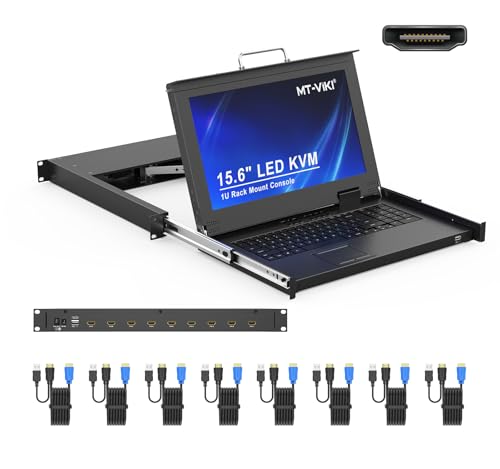
For IT environments operating legacy hardware or working within tighter budgets, the MT-VIKI Rack Mount KVM w/15.6″ LCD Monitor offers exceptional versatility with VGA connections and expansion options. We evaluated 5 top options for October 2026 to help you optimize server management. You can explore more display options in our computer monitors and displays section.


Best 8-Port KVM Switches Buying Guide for 2026
Selecting the proper rackmount console requires matching your server hardware ports with your enclosure dimensions. Modern data centers depend on reliable video signals and low-latency input devices to handle critical troubleshooting tasks.
When comparing Best 8-Port KVM Switches in 2026, focusing on video interface types, rack depth compatibility, and security protocols ensures seamless integration into your rack cabinet.
Video Interface: HDMI vs VGA
The choice between HDMI and VGA is the single most important hardware decision when shopping for rackmount consoles. Modern servers predominantly feature digital outputs like HDMI or DisplayPort, offering crisp text and 1080p video clarity.
Legacy server hardware and specialized network equipment often rely on classic analog VGA connections. Choosing an HDMI switch prevents the need for active signal converters across multiple server connections. If you work with standalone workstations, browse our recommendations for best external monitors to complement your benchtop tools.
Rack Mount Depth and Cabinet Fit
Rackmount KVM drawers require precise depth clearance within your server cabinet to allow slide rails to operate smoothly. Standard 1U console drawers typically support mounting depths ranging from 18.9 inches up to 31.8 inches.
Before buying, measure the distance between your front and rear rack rails. Ensure your cabinet leaves at least two inches behind the unit so power cables and multi-port harness lines do not bind against the back door.
Screen Size and Panel Resolution
Display size directly impacts technician comfort during prolonged troubleshooting sessions in server rooms. Compact 15.6-inch screens save space and weight, while 17.3-inch and 19-inch screens provide better legibility for multi-window system monitoring.
Opting for a 1920×1080 resolution panel yields sharp output when viewing modern operating system dashboards. Standard 1280×1024 resolutions remain effective for terminal interfaces and basic BIOS navigation tasks.
Switching Methods and System Navigation
Efficient console switches offer flexible navigation options including front-panel push buttons, keyboard hotkey shortcuts, and On-Screen Display (OSD) menus. Quick hotkey combinations allow technicians to jump between connected nodes without reaching for physical switch buttons.
Clear OSD menus simplify server naming and port organization across large rack setups. Secure installations benefit from password-protected user accounts that restrict unauthorized access to connected system terminals.
Daisy Chaining and Scalability
Growing server infrastructure often requires expansion beyond an initial eight-port limit. Select KVM consoles support cascading or daisy-chaining multiple switch modules together from a primary master unit.
Daisy-chaining allows a single monitor, keyboard, and touchpad drawer to manage up to 64 connected computers seamlessly. This configuration saves valuable 1U cabinet slots while maintaining centralized administration. Check out our server management guides for detailed rack organization ideas.
Construction Quality and Cable Accessories
Industrial server environments demand rugged construction materials that withstand frequent sliding and drawer opening. Look for console drawers built with reinforced steel shells paired with lightweight internal aluminum frames.
Complete KVM bundles that include custom multi-port cables save significant setup time and installation costs. Ensure the included cable harnesses match the required length for your specific rack layout to maintain clean cable routing.
How We Evaluated
We evaluated candidate models by reviewing published technical specifications, physical enclosure dimensions, and supported video interfaces. Our analysis compared rail mounting flexibility, keyboard durability, touchpad responsiveness, and security access features.
We prioritized builds offering complete cable accessories, straightforward switching methods, and robust rail mechanisms suitable for server room environments. This objective methodology delivers unbiased guidance tailored to network administrators and IT professionals.
Common Mistakes to Avoid
Failing to measure total rack depth before ordering leads to rail misalignment or blocked cabinet doors. Technicians often forget to account for cable bend radius at the rear of the drawer assembly.
Buying a VGA-only console for a rack filled with modern HDMI-only servers creates unnecessary cable clutter and active adapter points. Verify video output port standards on every server before choosing a console interface.
Neglecting password security settings allows open physical access to every connected node on the switch. Always configure administrator and user access levels immediately after completing physical installation.
Overlooking future server expansion can force premature hardware upgrades. If your server count is growing, choose a console model that supports daisy-chain expansion options.
Buying Checklist
- Confirm server rack depth measures between 18.9 inches and 31.8 inches across rails.
- Verify whether connected servers require native HDMI or standard VGA console connections.
- Check that your server cabinet has an open 1U height slot available for mounting.
- Ensure included cable harness lengths match your rack height and server positions.
- Validate native screen resolution matches your operating system display requirements.
- Confirm the console features front-panel USB ports for external mouse or flash drive access.
- Verify OSD menu security supports multi-level administrator and user passwords.
- Check if daisy-chain expansion is required for managing more than eight server nodes.
Final Thoughts
Deploying a reliable rackmount console drawer significantly improves server room efficiency and space management. Our top choice for modern data setups is the MT-VIKI® KVM Rack Mount HDMI with 17.3” LCD, which delivers vibrant full HD visuals alongside versatile HDMI connectivity.
For budget-conscious deployments that rely on VGA connections, the MT-VIKI Rack Mount KVM w/15.6″ LCD Monitor presents an ideal balance of compact design and expansion capability. If you prefer a larger high-definition HDMI workspace in a tight drawer frame, consider the MT-VIKI Rack Mount KVM Console w/15.6″ LCD.
Every option in our comparison provides integrated 1U drawer convenience with responsive touchpad input and multi-platform operating system compatibility. To explore high-resolution screen choices for external monitoring stations, review our guide to high resolution computer monitors.
Frequently Asked Questions
What is the main advantage of Best 8-Port KVM Switches in 2026?
Best 8-Port KVM Switches consolidate the control of eight separate computers or server nodes into a single 1U rack drawer. This configuration eliminates desk clutter, reduces energy consumption, and saves valuable server cabinet space.
Can I connect HDMI servers to a VGA KVM switch console?
Connecting HDMI servers to a VGA console requires active signal conversion adapters on every port, which can introduce latency and scaling artifacts. It is recommended to select a native HDMI console when managing modern servers with digital video outputs.
How do hotkey switching commands work on a rackmount console?
Hotkey commands allow you to switch active server views by pressing a specific keyboard key sequence, such as pressing Scroll Lock twice followed by the target port number. This permits instantaneous switching without opening the On-Screen Display menu or pressing front panel buttons.
What rack depth is required for a 1U KVM console drawer?
Most 1U KVM console drawers include adjustable telescoping slide rails that fit rack depths between 18.9 inches and 31.8 inches. Always measure the distance between your front and rear mounting posts before ordering.
How does daisy-chaining work with multi-port KVM units?
Daisy-chaining connects secondary KVM switch modules to a primary master console using dedicated cascade ports or bus cables. This setup allows technicians to control up to 64 connected servers from a single screen, keyboard, and touchpad console.
Do these rackmount consoles require special software drivers?
No software or operating system drivers are required for core KVM hardware functions. These consoles operate at the hardware level, ensuring complete compatibility across Windows, Linux, Unix, and macOS environments even during system BIOS configuration.
Why is 1080p resolution important for modern rack management?
A 1080p display resolution ensures modern graphical user interfaces, remote desktop management tools, and complex system monitoring dashboards fit clearly on screen without horizontal scrolling or distorted text. You can read more about visual display standards in our guide to high-resolution display solutions.
Are multi-level passwords supported on these server console switches?
Yes, professional KVM switches provide administrator and user access levels within their On-Screen Display settings. Administrators can restrict specific server ports and system configuration options to authorized personnel only.