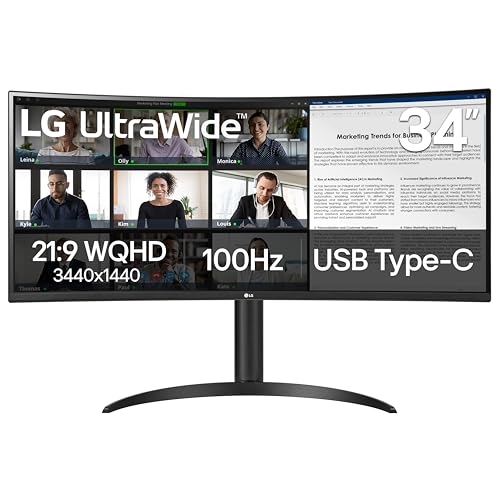

Selecting the right display can transform your daily productivity by clearing desktop clutter and expanding your digital workspace. In November 2026, our top choice among 7 evaluated Best Curved Monitors with USB-C is the LG 34U650A-B 34-inch UltraWide IPS WQHD 100Hz because of its vibrant IPS panel and robust 96W charging capability. You can explore similar options across our guide to desktop and external monitors.
For professionals needing a dedicated network connection and full peripheral expansion, the ASUS VA34VCPSR 34″ 1440P Curved Monitor serves as an outstanding runner-up with built-in Ethernet docking. Budget-conscious buyers will appreciate the Philips 34 Inch Curved Computer Monitor UWQHD for its impressive contrast and reliable daily performance.


Best Curved Monitors with USB-C Buying Guide
USB-C Power Delivery and Bandwidth
A monitor equipped with USB-C should deliver enough power to charge your connected laptop while transferring high-resolution video signals simultaneously. Basic ports supply only 15W to 65W, which works for lightweight ultrabooks but can cause battery drain on power-hungry workstations. Displays that offer 90W to 96W power delivery ensure stable charging under demanding multitasking workloads.
Beyond simple power delivery, look for displays that act as complete desktop hubs with downstream USB ports and video pass-through. A single USB-C cable eliminates redundant power bricks and reduces cable clutter across your workstation. Choosing an insufficient wattage rating forces you to keep your laptop charger plugged in constantly.
Understanding Panel Curvature Radians
Ultrawide screens benefit significantly from curved glass because the curvature maintains an equal distance between your eyes and every edge of the display. Curvature ratings such as 1000R, 1500R, and 3800R indicate the radius of the circle in millimeters if the curve continued fully. A lower number represents a steeper curve, wrapping the visual edges closer toward your peripheral vision.
Aggressive 1000R screens match the natural field of human vision and enhance immersion during extended work sessions. Gentler curves like 3800R provide a more traditional viewing angle that prevents straight lines in design apps from warping. Consider your typical viewing distance and desk depth when choosing between gentle and tight curvatures.
IPS Versus VA Panel Technology
The underlying panel technology directly impacts contrast ratios, viewing angles, and overall color fidelity. You can learn more about display characteristics in our guide to panel technology options. IPS panels excel in broad viewing angles and realistic color accuracy, making them ideal for creative work and editing.
In contrast, VA panels offer superior native contrast ratios, typically around 3000:1, which produce deep blacks in dimly lit rooms. However, VA screens may experience slight color shifting when viewed from sharp side angles. Choose IPS for team collaboration and graphic work, or VA for dark-room viewing and media entertainment.
Refresh Rate and Motion Smoothness
Higher refresh rates improve the overall fluid feel of desktop navigation, cursor tracking, and fast-paced gaming sessions. Standard 60Hz panels can feel sluggish during rapid window movements, whereas 100Hz to 120Hz displays provide noticeable smoothness for daily office tasks. Competitive gamers should seek panels operating at 240Hz for razor-sharp motion handling.
Adaptive sync technologies such as AMD FreeSync Premium ensure frame rates stay aligned between your graphics card and monitor. This synchronization eliminates screen tearing and minimizes micro-stutter during graphic intensive tasks. Explore our dedicated reviews of high refresh rate gaming displays to compare competitive options.
Integrated Docking and Multitasking Features
Many curved ultrawide monitors include integrated features like Picture-by-Picture and built-in USB hubs. Picture-by-Picture allows you to view two distinct computer sources side by side on one continuous canvas. This feature proves invaluable for users managing both a personal laptop and a company computer simultaneously.
Monitors equipped with integrated RJ45 Ethernet ports transform your screen into a true docking station with reliable wired internet access. Built-in speakers also free up valuable desk real estate by eliminating external sound hardware. Evaluating these integrated tools ensures you choose a monitor that simplifies your entire hardware ecosystem.
How We Evaluated
We analyzed published specifications, verified manufacturer technical sheets, and compared hardware features across 7 models. Our evaluation centered on power delivery wattage, panel uniformity, color gamut coverage, and connectivity convenience. We focused strictly on objective data to identify displays that offer genuine value for work and entertainment.
We paid close attention to ergonomic adjustments, including height, tilt, and swivel mechanisms that support long-term posture comfort. Port configurations and cable management options were also examined to ensure seamless integration with modern laptops. This structured comparison helps readers identify the exact trade-offs that match their daily computing demands.
Common Mistakes to Avoid
One frequent mistake is assuming every USB-C port provides adequate charging wattage for heavy productivity laptops. Selecting a monitor with only 15W power delivery means your laptop battery will drain rapidly during video calls or rendering. Always check your laptop power requirements before finalizing your monitor purchase.
Another common error is choosing an overly aggressive curve for precise architectural or spreadsheet work without testing personal comfort. Tight 1000R curvatures can bend straight gridlines visually, which some data professionals find disorienting. Matching your primary workflow to the appropriate curvature rating avoids unnecessary eye fatigue and workflow frustration.
Buyers also frequently forget to verify that their computer supports native WQHD 3440×1440 resolution over USB-C or DisplayPort. Older integrated graphics cards may struggle to drive ultrawide resolutions above standard 60Hz refresh rates. Confirming your computer hardware capabilities prevents unexpected display scaling and performance bottlenecks.
Buying Checklist
- Confirm your laptop requires 65W, 90W, or 96W of charging power to match the monitor USB-C port.
- Check whether an IPS panel for wide viewing angles or a VA panel for deep contrast suits your lighting environment.
- Choose a curvature radius like 1000R for deep focus or 3800R for traditional line consistency.
- Verify that your computer graphics card supports 3440×1440 resolution at 100Hz or higher over a single cable.
- Determine if you require an integrated RJ45 Ethernet port for stable wired office networking.
- Review stand adjustability to ensure the display includes height, tilt, and swivel capabilities for ergonomic comfort.
- Confirm Picture-by-Picture support if you plan to connect two independent computers simultaneously.
Final Thoughts
Investing in the right curved ultrawide display streamlines your desk setup while delivering immense screen real estate for multitasking. For users seeking the optimal balance of vibrant IPS color reproduction and potent 96W charging, the LG 34U650A-B 34-inch UltraWide IPS WQHD 100Hz represents our primary recommendation. It effortlessly unites power, visual fidelity, and clean connectivity in one package.
If you need an all-in-one docking station equipped with wired networking, the ASUS VA34VCPSR 34″ 1440P Curved Monitor delivers exceptional enterprise functionality. Meanwhile, budget-conscious professionals should consider the Philips 34 Inch Curved Computer Monitor UWQHD for its impressive contrast and smooth daily operation. You can compare additional workstation displays in our comprehensive guide to best external monitors.
Gamers who demand uncompromising speed alongside ultrawide real estate will find a fantastic match in the LG 34G630A-B 34-Inch Ultragear WQHD (3440 x 1440). No matter which display fits your daily schedule, transitioning to a single-cable USB-C configuration elevates both efficiency and ergonomics.
Frequently Asked Questions
Can a USB-C curved monitor charge my laptop while displaying video?
Yes, monitors with USB-C Power Delivery transmit video signals, data, and electrical power through a single connection. Make sure the monitor charging wattage equals or exceeds the power consumption of your specific laptop model.
What is the benefit of choosing Best Curved Monitors with USB-C in 2026?
Selecting Best Curved Monitors with USB-C in 2026 eliminates redundant docking stations and reduces cable clutter significantly. The panoramic curved screen matches your natural peripheral vision, reducing neck strain during long working hours.
Is a 1000R curve better than a 1500R curve for everyday productivity?
A 1000R curve matches human eye curvature more closely, creating an enveloping experience that minimizes eye refocusing across wide screens. However, a gentler 1500R curve feels more natural for users working extensively with straight lines and spreadsheets.
Does USB-C support high refresh rates like 100Hz or 240Hz at 1440p?
Modern USB-C ports with DisplayPort Alt Mode support high refresh rates easily when paired with compatible host hardware. You can learn more about high-resolution bandwidth in our guide to high-resolution screens.
What is the difference between IPS and VA panels on curved displays?
IPS panels deliver superior color accuracy and broader viewing angles, which is essential for design and photo editing. VA panels provide much higher contrast ratios and deeper black levels, making them excellent for dark room viewing and movies.
Can I connect two different computers to one ultrawide monitor?
Many ultrawide monitors include Picture-by-Picture technology that splits the display area between two video inputs. This allows you to view both machines simultaneously without needing a dual monitor configuration.
Do I need a special USB-C cable to connect my monitor?
You must use a USB-C cable rated for video transmission (DisplayPort Alt Mode) and high wattage power delivery. Standard phone charging cables only transfer low-speed data and cannot carry video signals to your display.
Is a 34-inch ultrawide monitor equivalent to a dual-screen setup?
A 34-inch 21:9 ultrawide monitor offers approximately the same usable horizontal workspace as two 24-inch screens side by side. It provides a seamless viewing experience without any bezel splitting the middle of your visual field.









