
A gaming monitor is only as good as the frames your PC or console can send it. Before you look at screens, think about the games you play and the graphics card you own. A 180Hz panel does little for a machine that runs your favorite game at 70 frames per second.
This guide is for PC and console players shopping in the budget to mid-range. All four picks are 1440p screens, which is the sweet spot for most gaming PCs right now. They’re sharper than 1080p but far easier to drive than 4K. They differ in refresh rate, panel type and shape.
How we chose
- Refresh rate and how you reach it: the listed maximum, and which port the listing says delivers it.
- Resolution and size: 2560 x 1440 at 27 inches, or 3440 x 1440 on a 34-inch ultrawide.
- Adaptive sync: FreeSync or G-Sync compatibility to reduce tearing when frame rates swing.
- Panel type: IPS for viewing angles and color, VA/HVA for contrast in dark scenes.
- Stand and warranty: adjustment range and stated warranty length.
These picks rely on manufacturer specs and owner reviews, not hands-on testing. Read how we research products for more.
Quick picks
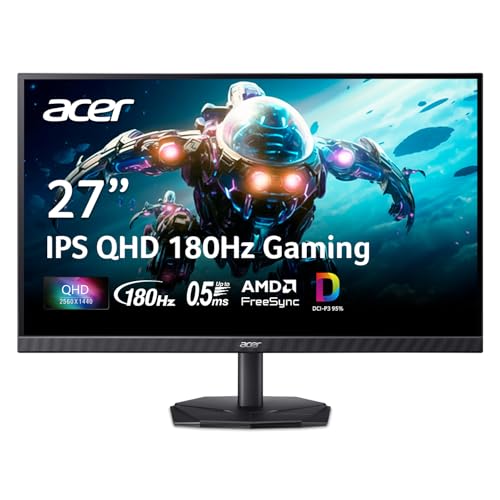
- Best overall for most players: Acer Nitro KG271U — 27-inch 1440p IPS at up to 180Hz, with the most review history of the group.
- Best ultrawide: KTC H34S5 — 34-inch 3440 x 1440 curved at 180Hz over DisplayPort, with a height, swivel and tilt stand.
- Best for dark games: KTC H27T27S — 27-inch 1440p HVA panel listing a 4000:1 contrast ratio at 144Hz.
- Best for mixed work and play: KTC H27D9 — 27-inch 1440p IPS at 120Hz with a matte finish and 120Hz over both HDMI and DisplayPort.


Comparison
| Monitor | Size / shape | Resolution | Max refresh | Panel | Listed ports | Warranty |
|---|---|---|---|---|---|---|
| Acer Nitro KG271U | 27 in, flat | 2560 x 1440 | 180Hz | IPS | 1x DP 1.2, 2x HDMI 2.0 | Not listed |
| KTC H34S5 | 34 in, 1500R curve | 3440 x 1440 | 180Hz (DP), 100Hz (HDMI) | HVA | 2x DP 1.4, 2x HDMI 2.0 | 3 years |
| KTC H27T27S | 27 in, flat | 2560 x 1440 | 144Hz | HVA | 1x DP 1.4, 2x HDMI 2.0 | 3 years |
| KTC H27D9 | 27 in, flat | 2560 x 1440 | 120Hz | IPS | 1x DP 1.4, 2x HDMI 2.0 | 3 years |
The picks in detail
Acer Nitro KG271U
This is the balanced choice. It pairs a 27-inch 2560 x 1440 IPS panel with up to 180Hz, AMD FreeSync and HDR10 support. Acer lists up to 0.5ms gray-to-gray response and 95% DCI-P3 coverage. There’s one DisplayPort 1.2 and two HDMI 2.0 inputs, so a PC and a console can stay plugged in at once. It’s rated 4.7 stars across about 950 reviews, by far the most history in this group.
Good fit if you play a mix of shooters and story games on a mid-range PC.
Skip it if you want a curved or ultrawide view, or need the stand’s adjustment range confirmed. The listing doesn’t give it.
KTC H34S5
A 34-inch 21:9 ultrawide at 3440 x 1440 with a 1500R curve. It reaches 180Hz over DisplayPort 1.4. Over HDMI 2.0 the listing caps it at 100Hz, which matters for consoles. The HVA panel lists 4000:1 contrast, 125% sRGB area, 300 nits and HDR. The stand is the most adjustable here: tilt, ±45° swivel and up to 110 mm of height. There’s PIP/PBP and a three-year warranty. Note that it shows no review history yet.
Good fit if you play racing, flight or open-world games that support ultrawide, and have a strong GPU.
Skip it if you mainly play on a console, or play competitive games that don’t support 21:9.
KTC H27T27S
This screen leans on contrast. Its HVA panel lists a native 4000:1 contrast ratio, about three times the 1300:1 listed for the IPS-based KTC H27D9. That helps in horror games and night scenes. It runs 2560 x 1440 at 144Hz with adaptive sync. KTC lists 129% sRGB area, 109% DCI-P3, 8-bit color and factory calibration. Inputs are two HDMI 2.0 and one DisplayPort 1.4. The stand tilts from -5° to 15°. Warranty is three years. The data shows no review count for this listing.
Good fit if you play darker, atmospheric games and want deep blacks on a budget.
Skip it if you want a refresh rate above 144Hz or a height-adjustable stand.
KTC H27D9
The calmest option, and the best fit if the screen is for work first. It’s a 27-inch 2560 x 1440 IPS panel at up to 120Hz, with FreeSync and G-Sync compatibility. It has a matte finish, 123% sRGB, 300 nits, 1300:1 contrast and HDR10. Both HDMI 2.0 ports and the DisplayPort 1.4 reach 120Hz, per the listing. The spec table lists a 7 ms response time, slower than the other picks. The price wasn’t listed when we checked.
Good fit if you split time between spreadsheets and casual or console games.
Skip it if you play fast competitive shooters and want 144Hz or more.
How to choose a gaming monitor
Match refresh rate to your hardware
Refresh rate is the ceiling, not a guarantee. A 180Hz screen only shows 180 frames when your system renders 180 frames. Check benchmarks for your GPU in the games you play at 1440p. If you land around 100 to 140 fps, a 144Hz screen is a sensible match. If you play esports titles at high frame rates, 180Hz or more starts to pay off. Our 144Hz monitor guide covers that tier.
Consoles have different limits
Console players should check HDMI specs. The ports listed here are HDMI 2.0. Per the listings, the KTC H34S5 caps at 100Hz over HDMI, while the H27D9 reaches 120Hz over HDMI. Ultrawide output also depends on the game and console.
Response time numbers aren’t comparable
Makers quote response time in different ways: GtG (gray-to-gray), MPRT (motion picture response time), or with an overdrive mode turned on. A “0.5ms” figure from one brand and “1ms MPRT” from another don’t measure the same thing. Treat these as claims. Owner reviews that mention ghosting or smearing tell you more.
Panel type and your games
IPS screens hold color well from an angle and suit mixed use. VA and HVA screens list higher contrast, which helps dark scenes, though some people notice smearing on dark transitions. For competitive play, refresh rate and adaptive sync matter more than panel type.
Size and seating
At a normal desk, 27 inches lets you see the whole screen without moving your eyes much. That matters in fast games. A 34-inch ultrawide is more immersive but needs a deeper desk. For other options at the 27-inch size, see our 27-inch gaming monitor picks.
Before you buy
- Use the right cable and port. Top refresh rates often need DisplayPort. Use the cable that ships with the monitor or one rated for the bandwidth.
- Set the refresh rate manually. Many monitors default to 60Hz. Change it in Windows display settings and your GPU control panel.
- Check G-Sync or FreeSync support for your graphics card brand, and turn adaptive sync on in the driver.
- Measure your desk for ultrawides. The KTC H34S5 is listed at about 27.9 inches wide.
- Check the warranty terms, including how the maker handles bright or dead pixels.
FAQ
Is 1440p or 4K better for gaming?
For most players, 1440p. It’s sharp at 27 inches and lets mid-range GPUs hit high frame rates. 4K needs a high-end card to run at high refresh rates.
Is 120Hz enough for gaming?
For console and single-player games, many people are happy at 120Hz. For competitive shooters on PC, 144Hz to 180Hz feels more responsive, if your system can keep up.
Do I need G-Sync or FreeSync?
It helps. Adaptive sync matches the screen to your frame rate and reduces tearing and stutter. All four picks list some form of it.
Is a curved monitor better for gaming?
Curves make the most sense on ultrawide screens like the KTC H34S5, where the edges are far from your eyes. On a 27-inch screen, flat or curved is mostly personal preference.




