

Competitive players seeking rapid response and pinpoint actuation should choose the Razer Huntsman V3 HE Magnetic TKL 8KHz Wired. Its magnetic Hall Effect switches and extreme polling rate deliver instantaneous feedback during intense multiplayer matches.
For players who want an affordable all-in-one setup, the Redragon S101-3 PRO Gaming Keyboard and Mouse provides dependable membrane typing alongside programmable mouse sensitivity. In November 2026, we analyzed 5 models across Redragon, RedThunder, DGG and more to match diverse gaming styles and pair seamlessly with modern gaming monitors.

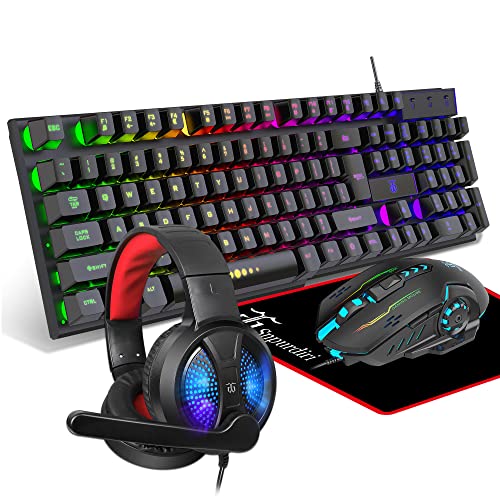


Best Gaming Mouse Keyboards: Top Desktop Gear Buying Guide
Switch Technology and Actuation Control
Keyboard switch mechanics directly dictate how quickly your keystrokes register during high-stakes gameplay. Traditional mechanical switches rely on physical metal contacts, whereas magnetic Hall Effect switches use electromagnetic sensors to detect key depth continuously.
Magnetic switches allow for Rapid Trigger technology, which resets the key the instant you lift your finger rather than waiting for a fixed reset point. This responsive design grants superior counter-strafing precision in competitive shooters, although standard membrane switches offer a quieter typing experience for casual play.
Polling Rates and Input Latency
Polling rate measures how frequently your peripheral sends data packets back to the computer. While standard desktop gear communicates at 1000Hz, advanced esports keyboards reach up to 8000Hz HyperPolling for near-instant transmission.
Higher polling rates eliminate micro-stutters between hand inputs and on-screen character actions on fast computer displays. Gamers with high-refresh monitors benefit most from this speed, though standard polling rates remain completely stable for general office workflows.
Form Factor and Desktop Ergonomics
Selecting the proper keyboard layout depends on your desk dimensions and gaming genre priorities. Full-size layouts retain the dedicated numeric keypad and arrow cluster, while tenkeyless and 65 percent frames eliminate extra keys to open up wider mouse pathways.
Low-sensitivity first-person shooter players frequently favor compact keyboards to prevent mouse collisions during broad sweep maneuvers. Pairing your layout with an ergonomic wrist rest keeps your forearms aligned when stationed at larger desktop monitors for extended evening sessions.
Mouse Sensor Precision and DPI Flexibility
A reliable optical sensor guarantees smooth cursor tracking without jitter or angle snapping across your desktop surface. High DPI ceilings let you adjust sensitivity across distinct profiles, transitioning from wide camera pans to micro-aim adjustments.
Hardware-level DPI switches enable instantaneous sensitivity adjustments without forcing you into external software menus. Consistent tracking performance ensures your crosshair lands exactly where intended, eliminating tracking skips during flick shots.
Connectivity and Battery Management
Choosing between wired and wireless peripherals comes down to your personal tolerance for cable clutter versus charging routines. Detachable braided USB-C cables ensure zero wireless interference and uninterrupted power for tournament environments.
Modern 2.4G wireless combinations utilize efficient power-saving sleep modes to stretch battery life over continuous days of operation. If you choose wireless gear, verify that internal battery capacities support your weekly gaming schedule without frequent interruptions.
Keycap Materials and Frame Construction
Peripheral longevity hinges on the materials used across the outer casing and individual keycaps. Doubleshot PBT keycaps feature textured surfaces that resist finger oil shine and prevent letter degradation over millions of clicks.
An aluminum alloy top plate adds structural rigidity, preventing deck flex when striking keys forcefully in frantic firefights. Sturdy construction also dampens internal switch resonance, producing a cleaner acoustic profile across daily typing tasks.
How We Evaluated
Our evaluation process centered on analyzing verified technical specifications, switch actuation mechanisms, and sensor accuracy across 5 desktop combinations. We compared real-world ergonomic designs, polling capabilities, and onboard memory profiles from leading peripheral brands.
We assessed build resilience by examining keycap plastics, casing materials, and driver configuration software. This systematic data comparison ensures our recommendations highlight functional reliability, low-latency responsiveness, and dependable value for diverse desktop budgets.
Common Mistakes to Avoid
Many buyers choose a full-size keyboard without measuring their available desk space, leading to cramped mouse movement and awkward arm angles. Selecting a tenkeyless or compact frame resolves this issue by granting your mouse freedom to glide naturally.
Another frequent error is prioritizing ultra-high DPI marketing numbers over sensor stability and comfortable mouse grip ergonomics. Extreme DPI settings are rarely practical in competitive titles, where consistent tracking and customizable lower steps matter far more.
Overlooking switch actuation depth can also frustrate users who need instant response in competitive shooters. Investing in adjustable magnetic switches or responsive mechanical keys ensures your physical inputs register without unnecessary travel delay.
Buying Checklist
- Confirm whether the keyboard layout matches your desk space and numeric keypad requirements.
- Check if the keyboard utilizes magnetic switches with Rapid Trigger or traditional mechanical contacts.
- Verify that the mouse sensor offers customizable DPI settings suitable for your preferred game genres.
- Examine whether the connection interface is wired USB-C or rechargeable 2.4G wireless.
- Ensure the keycaps are manufactured from durable doubleshot PBT or wear-resistant ABS polymers.
- Review onboard profile memory support so lighting and custom macro commands save directly to hardware.
- Check for ergonomic features such as integrated wrist rests or non-slip mouse side grips.
Final Thoughts
For competitive players who demand peak responsiveness, the Razer Huntsman V3 HE Magnetic TKL 8KHz Wired stands as our top overall recommendation. Its rapid trigger magnetic switches and 8000Hz polling rate give you an undeniable edge when paired with high-performance 4K and high resolution displays.
Budget-conscious gamers will appreciate the balanced performance of the Redragon S101-3 PRO Gaming Keyboard and Mouse, which delivers quiet typing and programmable macros. Meanwhile, users with compact workstations can opt for the Razer Huntsman V3 HE Magnetic Mini 65% 8KHz Wired to reclaim maximum desktop area for mouse sweeps.
Whether you choose a wireless bundle or an esports-ready wired board, matching gear to your playstyle elevates your entire desktop experience. Review your ergonomic preferences and workspace footprint carefully before selecting your next peripheral upgrade.
Frequently Asked Questions
What makes Hall Effect magnetic switches superior for gaming?
Hall Effect switches use electromagnetic sensors rather than physical metal contact leaves to register key movement. This design enables adjustable actuation depths and Rapid Trigger resets, allowing keys to register instantly upon release for faster counter-strafing.
How does an 8000Hz polling rate improve peripheral performance?
An 8000Hz polling rate transmits input data to your computer eight times faster than standard 1000Hz peripherals. This reduces input latency down to near-zero fractions of a millisecond, delivering smoother cursor tracking and instantaneous keystroke recognition.
What is the top-rated option among Best Gaming Mouse Keyboards: Top Desktop Gear in 2026?
The Razer Huntsman V3 HE Magnetic TKL 8KHz Wired ranks as the standout choice for competitive esports enthusiasts. Its magnetic switch customization, robust aluminum chassis, and rapid polling make it an elite addition to modern gaming stations.
Is a tenkeyless or 65 percent keyboard better for first-person shooters?
Both compact layouts excel in first-person shooters by eliminating the number pad to create extra mouse room. A 65 percent layout provides maximum clearance for low-DPI arm aimers, while a tenkeyless board preserves dedicated arrow and function keys.
Are wireless gaming keyboard and mouse combos fast enough for competitive play?
Modern 2.4G wireless connections provide low latency that matches conventional wired connections for most gaming genres. Wireless combos like the RedThunder K10 Wireless Gaming Keyboard and Mouse offer clutter-free desktops without noticeable input delay.
Why are doubleshot PBT keycaps preferred over standard ABS caps?
Doubleshot PBT keycaps are molded from two layers of dense plastic, preventing letters from ever wearing off. They feature a textured surface that resists oily shine, maintaining a clean aesthetic and tactile grip over millions of keypresses.
How do I customize lighting and macros without extra software?
Many gaming keyboards feature onboard hardware memory and shortcut combinations to cycle lighting modes directly from the keys. For additional optimization steps, explore our helpful setup guides to configure your desktop peripherals effectively.
What mouse DPI setting is best for precision aiming?
Most competitive shooter players use DPI settings between 400 and 1600 combined with low in-game sensitivity. This balance provides consistent crosshair tracking and pixel-level accuracy without erratic cursor jitter across wide screen areas.









