
Finding the Best High Refresh Rate Monitors for Music Production: DAW Work requires balancing expansive timeline visibility with responsive screen movement. The KTC 32 Inch 2K Computer Monitor is our top recommendation for producers who need massive horizontal arrangement space and fluid 120Hz scrolling. It delivers sharp 1440p resolution across a generous 32-inch IPS panel that keeps complex audio sessions clean and easy to navigate.
For tighter studio desks or budget-conscious setups in October 2026, the KTC 24 Inch QHD 100Hz Computer Monitor offers incredible pixel density and crisp track meters in a compact footprint. Exploring modern desktop and external monitors with high refresh rates ensures your playhead moves without distracting visual stutter.


Buying Guide for Best High Refresh Rate Monitors for Music Production: DAW Work
Refresh Rate and Playhead Smoothness
Standard 60Hz displays often produce noticeable micro-stutter when tracking fast-moving playheads and automation lines across complex timelines. Moving to a 100Hz, 120Hz, or 144Hz display transforms the editing experience by rendering waveform navigation with exceptional fluidity. This smoother motion reduces visual distraction, allowing audio engineers to make precise cuts and edits with confidence.
High refresh rates also improve cursor responsiveness when adjusting tight plugin dials and automation nodes. While music production does not require competitive gaming frame rates, the leap from 60Hz to 120Hz eliminates tracking latency in modern DAWs. The result is an immediate, tactile connection between your mouse movements and on-screen audio controls.
Screen Size and Horizontal Timeline Space
Digital audio workstations demand substantial horizontal screen area to display dozens of tracks, mixer channels, and plugin windows simultaneously. A 27-inch or 32-inch display gives you enough room to view extensive project arrangements without constant horizontal scrolling. This expansive layout accelerates your workflow during intense tracking, mixing, and mastering sessions.
Compact home studios with tight desk dimensions may benefit more from space-saving 24-inch displays that fit neatly between studio monitors. Placing acoustic speakers correctly often restricts monitor width, making screen sizing a balance between visual comfort and acoustic placement. Choosing the right display size ensures your audio monitors remain in an optimal stereo triangle.
Display Resolution and Scaling Clarity
QHD resolution at 2560×1440 pixels represents the sweet spot for music production setups across all standard monitor sizes. Choosing high-resolution screens provides 77 percent more workspace than standard 1080p without straining your graphics card. Tiny plugin parameters, compressor curves, and track labels remain crisp and fully legible across your desktop.
High pixel density prevents the blurry text and fuzzy plugin interfaces that often plague lower resolution screens. On a 24-inch or 27-inch panel, 1440p renders microscopic audio details and waveform peaks with pinpoint accuracy. This visual clarity minimizes squinting, allowing you to focus entirely on your audio balance and frequency management.
Panel Technology and Wide Viewing Angles
Studio engineers frequently shift position between master keyboards, hardware synthesizers, and outboard mixing gear during production. Investing in IPS panel technology guarantees stable color reproduction and contrast even when viewing the screen from steep angles. In contrast, standard panels may wash out or darken when viewed from outside the central sweet spot.
High-contrast panels such as HVA deliver deeper black levels that make dark DAW skins and meter levels stand out dramatically. If you produce music in dimly lit control rooms, higher native contrast helps separate muted tracks from active automation lanes. Balancing wide viewing angles with robust contrast creates an immersive and functional studio workspace.
Eye Comfort for Extended Studio Sessions
Long recording and mixing sessions often last for hours under artificial studio lighting, leading to severe visual fatigue. Monitors equipped with hardware-level anti-flicker technology and dedicated blue light filters protect your eyes during marathon editing periods. These protective features reduce headaches and dryness, keeping your focus sharp during late-night creative bursts.
Matte screen coatings and anti-glare treatments also prevent reflections from studio lamps and outboard gear displays. By diffusing ambient room light, an anti-glare screen ensures track meters and spectrograms remain readable in any environment. Prioritizing eye health allows audio producers to sustain peak productivity without suffering physical strain.
Connectivity and Studio Integration
Modern studio computers often host audio interfaces, MIDI controllers, and external hardware synthesizers alongside multiple video displays. Having flexible video inputs like DisplayPort 1.4, HDMI 2.0, and Mini DisplayPort simplifies connecting laptops, Mac systems, and desktop audio workstations. Versatile ports allow seamless switching between dedicated production computers and personal machines without cable swapping.
Standard VESA mount compatibility is another crucial consideration for positioning screens cleanly on articulated monitor arms. Floating your display above your mixing desk frees valuable desktop space for audio interfaces, monitor controllers, and keyboard controllers. A clean setup improves acoustic reflections and keeps essential production tools within arm reach.
How We Evaluated
Our evaluation process focused on analyzing verified technical specifications, panel performance metrics, and ergonomic versatility across 5 models from brands like KTC. We examined how refresh rates between 100Hz and 144Hz translate to timeline fluidity and cursor responsiveness within popular digital audio workstations. Each monitor was assessed for resolution clarity, color space coverage, port selection, and eye-care features that benefit extended studio sessions.
We also analyzed physical dimensions and VESA mounting options to determine how well each screen integrates alongside studio reference monitors. By comparing contrast ratios, viewing angles, and brightness ratings, we identified models that excel in dark control rooms as well as brightly lit home studios. This data-driven analysis highlights the practical trade-offs between panel sizes, refresh speeds, and physical desk footprints.
Common Mistakes to Avoid
Choosing an oversized display without checking your acoustic speaker placement is a frequent mistake in music studios. Large 32-inch monitors can block the direct sound path between your nearfield studio monitors and your ears, distorting stereo imaging. Always measure your desk space to ensure your screen fits comfortably inside your acoustic listening triangle.
Overlooking refresh rate benefits because audio production is not video gaming is another common misconception. Stuttering 60Hz playheads create unnecessary visual fatigue when scrubbing through complex audio tracks and dense MIDI arrangements. Upgrading to a 100Hz or 120Hz display delivers smooth timeline tracking that significantly improves editing comfort.
Settling for 1080p resolution on displays 27 inches or larger results in low pixel density and cramped plugin interfaces. Full HD screens force excessive scrolling and blur fine track labels, slowing down complex mixing sessions. Opting for 1440p QHD ensures that plugin windows, track automation, and mixer channels remain crisp and spacious.
Ignoring port versatility and mounting options can complicate your audio workstation wiring. Without multiple modern inputs and VESA compatibility, integrating secondary screens or floating monitors above hardware gear becomes difficult. Verify that your chosen display includes compatible DisplayPort or HDMI connections before finalizing your studio upgrade.
Buying Checklist
- Confirm the display offers at least 100Hz or 120Hz refresh rate for smooth playhead motion.
- Select 2560×1440 QHD resolution to ensure ample horizontal timeline space and sharp plugin text.
- Measure the width between your studio monitors to prevent the display from obstructing stereo audio imaging.
- Choose an IPS panel if you frequently move around the studio to maintain accurate viewing angles.
- Verify the presence of flicker-free backlighting and low blue light modes for eye comfort during long sessions.
- Check for 100mm x 100mm VESA mount compatibility if you plan to use an articulated desk arm.
- Ensure the monitor includes DisplayPort 1.4 or HDMI 2.0 ports matching your computer audio workstation outputs.
- Evaluate the screen finish to confirm anti-glare coating reduces reflections from studio lighting.
Final Thoughts
Upgrading your studio visual setup with the right high refresh rate display dramatically improves everyday audio workflow and editing comfort. The KTC 32 Inch 2K Computer Monitor stands out as our top overall recommendation, offering an expansive 32-inch canvas and fluid 120Hz movement that accommodates massive arrangement windows effortlessly.
Producers managing tighter desk spaces or looking for outstanding value will appreciate the KTC 24 Inch QHD 100Hz Computer Monitor. It delivers razor-sharp 1440p pixel density and ultra-smooth playhead tracking in a compact size that sits perfectly between nearfield studio monitors. You can also explore best quality computer monitors to compare alternative workstation setups.
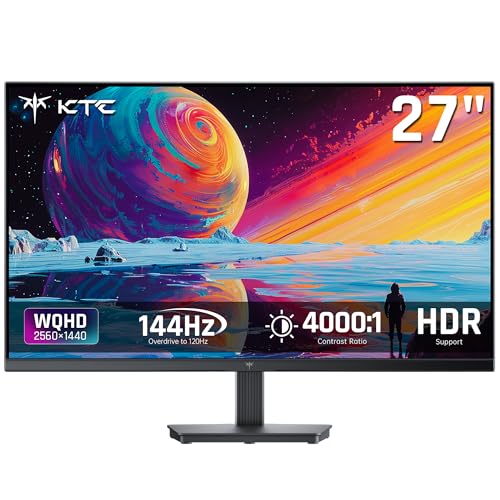
If you frequently work in dim control rooms and prefer high-contrast visuals, the KTC 27 Inch QHD Computer Monitor is an ideal specialized choice. Its impressive 4000:1 contrast ratio and responsive 144Hz refresh rate make dark DAW themes and intricate waveforms exceptionally easy to read.
Frequently Asked Questions
Does a high refresh rate really help with music production and DAW work?
Yes, a higher refresh rate significantly improves playhead motion, automation curve rendering, and spectrum analyzer fluidity. Upgrading from 60Hz to 120Hz or 144Hz eliminates visual stutter during fast timeline scrubbing, making editing feel substantially more responsive and less fatiguing on your eyes.
What is the top-rated option among Best High Refresh Rate Monitors for Music Production: DAW Work in 2026?
The KTC 32 Inch 2K Computer Monitor is a leading choice for studio producers seeking vast arrangement space and smooth 120Hz operation. Its 1440p IPS display provides exceptional clarity, broad viewing angles, and ample room for complex multi-track DAW projects.
Is 1440p QHD better than 4K for digital audio workstations?
For many audio producers, 1440p represents an ideal balance because it provides generous screen space without requiring heavy operating system scaling. Some legacy audio plugins do not scale gracefully on 4K screens, making 1440p displays exceptionally reliable and easy to read out of the box.
How does monitor size affect studio monitor speaker placement?
A screen that is too wide can block the direct line of sight between your nearfield studio speakers and your listening position, causing acoustic diffraction. Choosing a 24-inch or 27-inch display helps maintain a proper equilateral listening triangle in compact studio spaces.
Can I use gaming monitors for professional music production?
Modern gaming monitors work exceptionally well for audio production because their high refresh rates and low response times enhance timeline smoothness. Features like adaptive sync and blue light reduction translate directly into a cleaner, more comfortable editing workflow.
Why are IPS panels recommended for recording studios?
IPS panels offer wide 178-degree viewing angles, ensuring colors and contrast remain consistent when you step away from the center desk to play an instrument. This consistency allows you to monitor levels and transport controls clearly from anywhere in your studio.
How does a 120Hz monitor reduce eye strain during mixing sessions?
Higher refresh rates produce smoother screen redraws, reducing the micro-stutters that your brain unconsciously works to track. When combined with flicker-free backlighting and anti-glare coatings, 120Hz displays significantly lessen eye fatigue during long mixing sessions.
Do high refresh rate monitors require a dedicated graphics card for DAW software?
Most modern integrated graphics processors on Intel, AMD, and Apple Silicon chips easily support 1440p displays at 120Hz or 144Hz via DisplayPort or HDMI 2.0. You do not need an expensive discrete graphics card simply to run high refresh rates in music production software.




