
Finding the ideal setup to eliminate reflections requires balancing surface treatment with display quality. When choosing from the Best Matte Screen Monitors in November 2026, the BenQ Programming Monitor RD280UG 28.2″ 4K stands out as our top recommendation due to its specialized nano-matte panel and ergonomic height adjustment. You can explore more choices in our guide on Desktop & External Monitors to complement your desk setup.
If you require a flexible workstation for travel, the UPERFECT 16″ 2.5K Portable Monitor QLED serves as the premier budget alternative. Across our analysis of 7 models, it delivers sharp QHD resolution and exceptional color accuracy without breaking the bank.


Best Matte Screen Monitors Buying Guide
Anti-Glare Coating and Surface Treatment
Surface finishes directly dictate how ambient light scatters across your display screen. A high-quality anti-glare coating diffuses incoming light rays to prevent mirror-like reflections in bright environments. This treatment helps prevent optical glare during intensive workday sessions.
Heavy matte treatments can occasionally introduce a slight graininess or haze to white backgrounds. Advanced nano-matte panels solve this by scattering light uniformly without degrading overall image sharpness. Selecting modern panel coatings preserves clarity while suppressing distracting room reflections.
Contrast Ratio and Panel Technology
Panel choice determines how dark blacks appear when viewing content alongside anti-glare layers. In-Plane Switching panels excel in color consistency, whereas Vertical Alignment panels achieve deeper static contrast ratios. Learn more about display panel characteristics in our IPS, OLED & LED Panels overview.
Matte coatings can visually soften black levels if backlighting is insufficient or weak. Selecting displays with high contrast ratios ensures text stays crisp and deep tones remain saturated. High static contrast keeps visual elements sharp under varying studio lights.
Peak Brightness and Ambient Light Handling
Luminance rating determines how effectively a monitor overrides intrusive room lighting during daylight hours. Standard office displays produce modest brightness levels that may struggle against direct windows. Adequate peak brightness ensures clean visual output without straining your eyes.
Portable displays designed for outdoor or travel use often push brightness up to higher levels. High luminance paired with a non-reflective coating provides effortless readability anywhere you work. That combination keeps screen details sharp in demanding lighting environments.
Resolution and Aspect Ratio for Productivity
Display resolution controls your visual real estate and text sharpness for daily tasks. Opting for high resolution displays ensures sharp lines and eliminates visible pixel structure behind anti-glare layers. Discover elevated pixel density options in our guide to 4K, 6K & 8K Monitors.
Taller aspect ratios such as 3:2 or 16:10 provide vertical screen height for code and documents. Extra vertical lines reduce constant scrolling, improving ergonomic posture over long working sessions. This expanded headroom makes reading dense documents far more comfortable.
Color Accuracy and Gamut Coverage
Content creators require strict color fidelity that remains uncompromised by surface coatings. Look for monitors offering full sRGB or DCI-P3 gamut coverage alongside low Delta E calibration ratings. Professional color spaces ensure reliable visual representation across all digital media workflows.
Professional displays utilize internal hardware processing to maintain color uniformity across the entire panel. Factory calibration guarantees that what you edit on screen matches final export files. Reliable color performance prevents costly re-renders and corrections down the line.
How We Evaluated
We analyzed technical specifications, manufacturer test data, and verified owner feedback across 7 candidates. Our evaluation prioritized anti-glare performance, color fidelity, panel brightness, and long-term ergonomic comfort under real office lighting.
Every model was assessed against typical user workloads, including programming, graphic design, and general office productivity. We filtered out displays with aggressive graininess or inadequate contrast to ensure balanced visual clarity.
Common Mistakes to Avoid
A frequent error is assuming high brightness alone can overcome reflective glossy screen surfaces. Without proper diffusion, powerful light sources still create blinding specular reflections that cause eye strain.
Another mistake involves selecting low-resolution panels with heavy matte coatings. Lower pixel density makes the anti-glare texture more noticeable, leading to fuzzy text and reduced visual clarity.
Buyers often ignore ergonomic stand adjustments when setting up displays near bright windows. Tilt, swivel, and height adjustments allow you to angle the screen away from direct reflection paths easily.
Buying Checklist
- Verify the monitor features a genuine anti-glare or matte panel finish.
- Confirm screen brightness reaches at least 300 nits for typical office spaces.
- Check that resolution matches your screen size, aiming for 1440p or 4K.
- Ensure display inputs match your computer ports, such as USB-C or DisplayPort.
- Validate color gamut coverage if performing photo or video editing tasks.
- Confirm stand ergonomics permit height, tilt, and swivel adjustments.
- Check for low blue light certification and flicker-free backlight operation.
Final Thoughts
Choosing from the Best Matte Screen Monitors transforms your workspace into a comfortable, glare-free environment. For software developers and heavy text users, the BenQ Programming Monitor RD280UG 28.2″ 4K delivers incredible vertical space and effective nano-matte light diffusion. You can also explore Best External Computer Monitors for Comfort at Work to review additional desk setup choices.
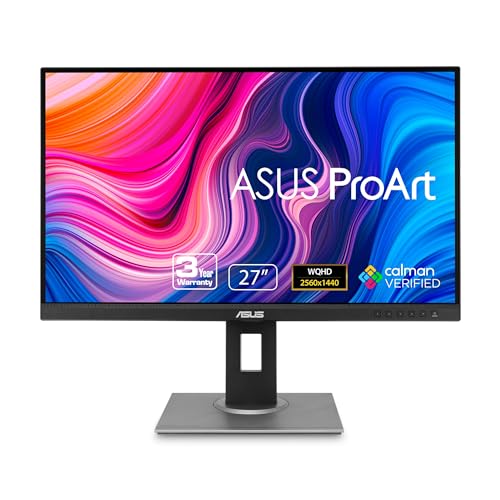
For color-critical creative tasks on a static desk, the ASUS ProArt Display PA278QV 27” WQHD (2560 x 1440) offers ideal factory calibration. If you need portable anti-glare performance, the UPERFECT 16″ 2.5K Portable Monitor QLED provides remarkable value and sharpness on the go.
Aligning display brightness and panel resolution with your typical room lighting ensures a setup that protects your vision. Investing in quality anti-glare technology keeps your focus sharp without distracting glare.
Frequently Asked Questions
Why should I choose Best Matte Screen Monitors over glossy displays?
Matte screens feature a textured finish that scatters incoming ambient light to reduce reflections. This surface treatment minimizes eye strain and glare, making them far easier to view near windows or under bright overhead lights.
Do matte screen monitors reduce image sharpness or color contrast?
Modern matte screens diffuse light without causing noticeable image degradation. High-resolution panels maintain sharp text and accurate colors while eliminating distracting mirror-like reflections.
What features define the top options among Best Matte Screen Monitors in 2026?
Key characteristics include high peak brightness, wide color gamut coverage, and advanced anti-glare panel treatments. You can browse our Best Hi Res Monitors for Productivity and Comfort guide for high-density screen options.
Is a matte screen monitor suitable for graphic design and video editing?
Yes, professional graphic design monitors frequently feature matte panels to maintain color consistency across varying room lighting. They ensure reflections do not obscure subtle details or skew color perception.
How do portable matte monitors perform under direct outdoor sunlight?
Portable matte monitors with high peak brightness ratings cut through direct daylight effectively. Combining 500 to 1200 nits with a matte coating keeps text readable outdoors.
What is the best way to clean a matte monitor screen safely?
Use a soft microfiber cloth slightly dampened with distilled water or clean screen solution. Avoid harsh chemicals like ammonia or alcohol, which can damage sensitive anti-glare coatings over time.
Are curved monitors available with matte screen finishes?
Yes, curved displays often feature anti-glare matte treatments to reduce reflections across their wide panels. This combination provides immersive viewing without glare off the curved glass surface.









