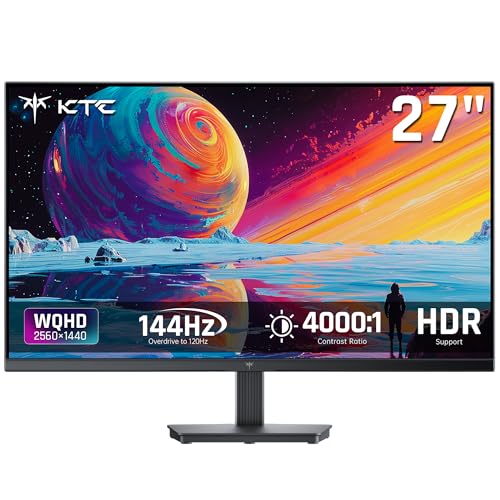

Setting up a dual or triple display rig requires thin bezels and consistent color across panels. For most players seeking Best Monitors for Multi Monitor Gaming in October 2026, the KTC 27 Inch QHD Computer Monitor delivers an ideal mix of sharp 1440p resolution and smooth high refresh rates. You can also explore specialized displays in our guide to gaming monitors to find setups tailored for competitive play.
If you need a more budget friendly configuration to tile side by side, the KTC 24 Inch QHD 100Hz Computer Monitor provides clear 2K visuals in a compact frameless housing. Its narrow edges ensure your field of view stays unified across multiple screens without distracting gaps.


Best Monitors for Multi Monitor Gaming Buying Guide
Bezel Width and Display Alignment
When building a multi screen layout, bezel thickness dictates how seamless your virtual dashboard appears. Ultra thin bezels minimize the black bars that divide your field of view during gameplay.
Choosing monitors with identical edge dimensions prevents misalignments along display borders. Matching panel heights ensures target crosshairs and split screen elements line up without visual distortion.
Refresh Rate and Adaptive Sync
High refresh rates maintain crisp motion across every display in your matrix. Running synchronized refresh rates above 100Hz eliminates stuttering when panning cameras in fast action titles.
Adaptive sync technology prevents screen tearing by matching display frame output to your graphics card speed. You can learn more about display sync features in our panel technology guide.
Panel Technology and Viewing Angles
Side monitors sit at slight angles relative to your central seating position. IPS panels provide wide 178 degree viewing angles that preserve color accuracy and brightness from edge to edge.
High contrast panels excel in dark gaming environments by keeping shadows detailed. Selecting displays with strong color gamuts guarantees rich hues across every section of your expanded desk setup.
Resolution and Desktop Space
A QHD 1440p resolution provides crisp details without placing extreme hardware demands on your graphics card. Higher pixel counts expand workspace for streams, inventory menus, and chat windows.
Balancing pixel density across displays prevents scale mismatching when moving windows between screens. If you want to compare different display specs, check out our guide to the best high resolution monitors.
VESA Mounts and Stand Ergonomics
Stock stands often take up valuable desk space when placing three displays side by side. Standard 100mm VESA compatibility allows you to mount monitors on articulated multi screen arms.
Ergonomic adjustments let you match screen heights and tilt angles precisely. Proper positioning reduces neck strain during long gaming sessions while keeping cable routing clean and organized.
How We Evaluated
We evaluated 5 models from top brands like KTC by analyzing key specifications critical for multi display performance. Our comparison examined refresh rates, panel architecture, bezel dimensions, and mounting flexibility.
We prioritized displays that deliver balanced performance across extended desktop arrays. By matching resolution formats and visual clarity, our evaluation highlights reliable monitors for multi screen setups.
Common Mistakes to Avoid
Mixing different panel resolutions across adjacent displays creates annoying window scaling issues. Mouse cursors jump unexpectedly when moving between screens with mismatched pixel densities.
Ignoring physical bezel thickness is another frequent error that breaks immersion. Thick frames create wide gaps that disrupt continuous motion across open world titles.
Failing to verify available graphics card video outputs can stall your build. Ensure your graphics processor offers enough DisplayPort and HDMI connections to support your intended monitor count.
Buying Checklist
- Verify your graphics card has sufficient DisplayPort and HDMI ports.
- Check that all displays feature matching resolution ratings.
- Confirm bezel designs are ultra thin on three sides for clean tiling.
- Ensure monitors feature standard 100mm VESA mounting patterns.
- Select IPS panels to maintain color accuracy at side viewing angles.
- Validate that refresh rates match across every screen in your setup.
- Confirm desk width and mounting arm weight capacities meet display specs.
Final Thoughts
Building a multi screen rig transforms your gaming space into an immersive command center. For top overall performance, the KTC 27 Inch QHD Computer Monitor delivers fast refresh rates and high contrast. If you want to read more about versatile screens, explore our guide on best external monitors.
Gamers shopping for high value should consider the KTC 24 Inch QHD 100Hz Computer Monitor for its compact footprint and clear QHD panel. Alternatively, those desiring expansive screen real estate will appreciate the KTC 32 Inch Monitor 2K Monitor or the KTC 32 Inch 2K Computer Monitor.
If color consistency across wide angles is your primary priority, the KTC 27 Inch Computer Monitor offers fast IPS performance. You can also view our full collection of desktop external monitors to complete your setup.
Frequently Asked Questions
What makes the Best Monitors for Multi Monitor Gaming in 2026 ideal for multi screen setups?
Monitors built for multi screen setups feature ultra thin bezels that minimize gaps between displays. They also provide wide viewing angles so images remain clear when viewed from side positions.
Should all screens in a multi monitor gaming setup be identical?
Using identical monitors ensures matching colors, refresh rates, and screen heights. Mismatched screens can create visual disconnections and awkward window scaling when moving content across displays.
Is 1440p resolution good for multi monitor gaming?
QHD 1440p resolution delivers sharp visuals without overwhelming your graphics processor. It offers a great balance between image quality and frame rate performance across extended screens.
Do I need IPS panels for multi monitor setups?
IPS panels are recommended because they maintain accurate color and contrast at wide angles. Since outer monitors sit at an angle to your eyes, IPS prevents color shifting. You can learn more in our best HDMI monitors guide.
Can I mount 5 monitors on desktop monitor arms?
Most gaming monitors include standard VESA mounting points for monitor arms. Be sure to check the weight capacity of your arm stand before securing multiple panels.
What graphics card connections are needed for multi monitor gaming?
You will need a graphics card with multiple DisplayPort or HDMI ports. Modern GPUs typically support three to four simultaneous digital video outputs.
Does running multi monitors reduce gaming frame rates?
Running games stretched across multiple screens increases rendering workload on your GPU. Gaming on one central screen while using secondary screens for chat or stream apps has a minimal impact on performance.
What size monitor works best for a triple screen setup?
Displays measuring 24 to 27 inches are ideal for triple screen setups without overwhelming desktop space. 32 inch monitors provide massive real estate but require deep desks for comfortable viewing.




