

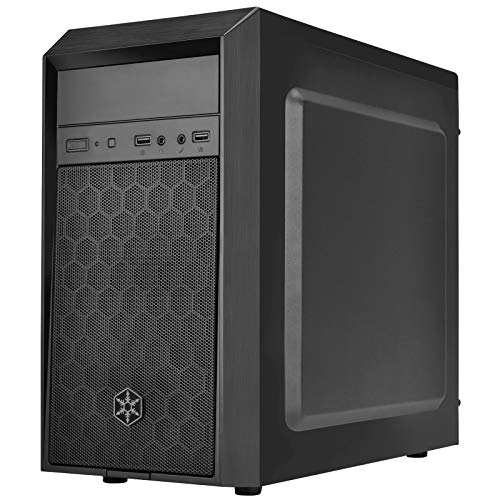
Finding modern computer enclosures that accommodate optical disc drives or hot-swap caddies can be challenging today. The Silverstone Technology FARA 513 High Airflow ATX is our top pick for October 2026 because it merges contemporary high-airflow mesh with a clean 5.25-inch external bay. It fits full-size graphics cards and modern motherboards without compromising front intake ventilation.
For builders prioritizing budget or compact footprints, the Zalman T6 ATX Mid Tower Computer PC Case delivers essential expansion at entry-level pricing. If you are setting up a dedicated workstation, pairing your rig with one of the best desktop monitors creates a highly productive environment. Check Price on Amazon →





Best PC Cases That Have 5.25 Drive Bays: Optical Builds Buying Guide
External Bay Configuration and Clearance
External 5.25-inch drive bays allow you to install Blu-ray burners, DVD drives, fan controllers, or hot-swap storage bays directly into the front chassis. You should confirm how many external slots your planned peripherals require before selecting a case. While single-bay enclosures handle standard disc tasks, multi-bay setups let you run dual optical drives alongside removable hard drive racks.
Depth clearance behind the bay is equally vital because optical drives measure between 170mm and 200mm in length. In tight enclosures, long disc drives can extend directly over motherboard headers or collide with upper cable routing cutouts. Measuring the gap between your chassis front frame and motherboard edge prevents annoying assembly obstacles.
Front Panel Airflow and Radiator Support
Traditional optical cases often featured solid front doors that choked cooling intake fans. Modern designs utilize perforated mesh panels that draw ample fresh air across internal components while keeping bay access open. Maintaining unrestricted front airflow is critical for cooling power-hungry graphics cards and multi-core processors under load.
If you plan to install an all-in-one liquid cooler, check radiator mounting points carefully. Installing a front-mounted 240mm or 280mm radiator often requires removing the 5.25-inch drive cage entirely. Selecting a chassis with top radiator mounts ensures your liquid cooling system operates without sacrificing external drive functionality.
Motherboard Compatibility and Layout
Chassis dimensions dictate which motherboard form factors will fit inside without clearance headaches. Standard ATX mid-towers provide ample room for expansion cards, while micro-ATX and mini-ITX frames save precious desk space. You can review our detailed how-to guides to understand how motherboard sizing impacts component selection.
Take note of the motherboard SATA port orientation before making your final purchase. Certain compact enclosures restrict right-angle SATA connectors when an ATX board sits flush against the chassis frame. Verifying clearance near the motherboard perimeter guarantees easy cable routing during your build.
GPU Length and Power Supply Space
High-performance graphics cards have grown significantly in length and thickness over recent hardware generations. An internal drive cage situated directly behind the front panel can restrict maximum GPU clearance. Checking maximum supported GPU length ensures your high-end graphics card fits comfortably alongside your optical hardware.
Power supply clearance is another critical dimension to inspect during the planning phase. Long modular power supplies need ample room for cable exits, especially in cases with lower drive cages. Choosing an enclosure with a generous basement area makes cable management far more straightforward.
Chassis Specification Comparison
| Chassis Model | Form Factor | 5.25 Bays | Max GPU Length | Type-C Support |
|---|---|---|---|---|
| Silverstone Technology FARA 513 High Airflow ATX | ATX | 1 | 390mm | Yes |
| Silverstone Technology FLP02 Retro-Inspired Tower | ATX | 3 | 386mm | Yes |
| anidees AI Raider XL Full Tower Tempered Glass | XL-ATX / E-ATX | 12 | 530mm | Yes |
| Silverstone Precision PS16 Micro-ATX & Mini-Itx | Micro-ATX | 1 | 320mm | No |
| Zalman T6 ATX Mid Tower Computer PC Case | ATX | 1 | 280mm | No |
Comparing these key specifications helps you balance internal capacity with external desk footprint. Choosing the right frame ensures you will not encounter clearance bottlenecks when upgrading components in the future.
Front Panel Connectivity and Noise Control
Contemporary desktop builds benefit greatly from fast front panel input and output connections. Having USB Type-C and USB 3.0 ports located on the top or front panel simplifies external backups and peripheral access. Enthusiasts building powerful rigs for gaming monitors will appreciate having rapid connectivity right within arms reach.
Optical drives spin at thousands of revolutions per minute, creating noticeable chassis vibrations during media playback or disc ripping. Sturdy steel chassis frames and rubberized drive mounting points absorb these acoustic vibrations effectively. Enclosures with reinforced side panels prevent disc drive resonance from disturbing your quiet work environment.
How We Evaluated
We evaluated 10 optical-ready computer cases by analyzing verified manufacturer specifications, drive bay modularity, and internal component clearances. Our evaluation prioritized models that balance external bay utility with contemporary airflow designs, radiator mounting options, and graphics card compatibility.
We also analyzed structural materials, front panel port selection, and overall chassis flexibility across various price tiers from top brands like Thermaltake, Zalman, SilverStone and more. By comparing layout dimensions and thermal potential, we identified enclosures that accommodate modern hardware without compromising traditional media functionality.
Common Mistakes to Avoid
Overlooking radiator clearance is the most frequent mistake when building inside an optical-capable chassis. Many builders purchase 240mm or 360mm liquid coolers only to discover that the front radiator obstructs the 5.25-inch drive bay. Always verify whether your cooling setup can be mounted on the top panel instead.
Another common error is ignoring motherboard edge clearance and SATA port orientation. Cases with tight internal boundaries can block right-angle SATA cables when a full-width ATX motherboard is installed. Choosing standard straight cables or verifying chassis clearance eliminates connection headaches.
Finally, builders often forget to measure optical drive depth against modern graphics cards and power supply routing channels. Extended optical drives or fan controllers can crowd upper motherboard connectors if the chassis lacks sufficient top clearance. Double-check your peripheral depths before securing internal hardware.
Buying Checklist
- Confirm the chassis provides the exact number of 5.25-inch external bays required for your drives.
- Check maximum graphics card length to ensure modern triple-fan GPUs fit with drive cages installed.
- Verify that top or front radiator mounts do not physically block optical bay hardware.
- Inspect front I/O ports for modern USB Type-C and high-speed USB 3.0 connectivity.
- Measure CPU cooler height clearance if you plan to install a large tower air cooler.
- Check motherboard form factor support to ensure your ATX or Micro-ATX board fits comfortably.
- Ensure the chassis uses sturdy steel construction to dampen spinning optical disc vibrations.
Final Thoughts
Choosing an optical-ready enclosure no longer requires sacrificing modern airflow or sleek desktop aesthetics. The Silverstone Technology FARA 513 High Airflow ATX stands out as our top overall recommendation, offering excellent ventilation, modern USB Type-C connectivity, and seamless optical integration for everyday builds.
If you are working with strict budget limits, the Zalman T6 ATX Mid Tower Computer PC Case delivers essential expansion and dependable steel construction at an attractive price point. Builders handling enterprise disc archiving or massive storage arrays should consider the anidees AI Raider XL Full Tower Tempered Glass for its unmatched twelve-bay capacity.
Completing your customized system with one of the best quality computer monitors ensures that your high-performance desktop setup delivers both visual clarity and operational comfort. Take time to measure your components carefully to build an optical system tailored to your exact workflow.
Frequently Asked Questions
Can modern PC cases with 5.25 drive bays fit large graphics cards?
Yes, many contemporary enclosures support full-length graphics cards alongside optical drives. Models like the Silverstone Technology FARA 513 accommodate GPUs up to 390mm in length, providing ample clearance for modern multi-fan gaming cards.
Why should I choose Best PC Cases That Have 5.25 Drive Bays in 2026?
An integrated 5.25-inch bay allows you to use internal Blu-ray burners, DVD drives, hot-swap hard drive bays, and front audio panels without cluttering your desk with external USB cables. They provide permanent, high-speed SATA connections for reliable physical media archiving.
Can I install a liquid cooler in a case with a 5.25 drive bay?
Liquid cooling is possible, but radiator placement requires attention to detail. Installing a top-mounted 240mm or 280mm radiator allows you to liquid-cool your CPU while keeping the front optical drive bay completely accessible.
Do optical drive cases cause unwanted noise and vibration?
Spinning optical discs generate vibrations, but cases built with sturdy SGCC steel or rubberized mounting grommets absorb these acoustic disturbances. Selecting a chassis with solid structural framing keeps media playback quiet.
How does front panel airflow work on cases with optical drive slots?
Modern enclosures position the 5.25-inch bay at the very top of the front panel, leaving the rest of the fascia open with perforated mesh. This layout allows intake fans to draw fresh air across your graphics card and processor unhindered.
What accessories can I put in a 5.25 drive bay besides optical drives?
A 5.25-inch bay can house multi-drive 2.5-inch SSD hot-swap cages, manual fan speed controllers, memory card readers, or supplementary front I/O breakout boxes. Pairing versatile storage with modern computer monitors & displays helps create a complete productivity workstation.
Are optical drive bays compatible with standard SATA power and data cables?
Internal 5.25-inch optical drives use standard SATA data cables connected to your motherboard and SATA power leads from your power supply. Cable management channels behind the motherboard tray allow you to route these cables cleanly out of sight.




