

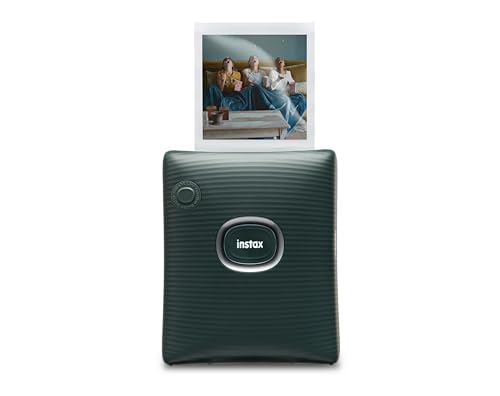
The Fujifilm Instax Square Link Smartphone Printer is our top recommendation for anyone wanting creative physical photos on demand. We analyzed 3 models across October 2026 from brands like KODAK, Fujifilm to find options that balance detail and ease of use. If you enjoy hands-on digital crafts, our How To guides provide additional creative workflow ideas.
For everyday scrapbooking on a budget, the KODAK Mini 2 Retro 2×3 Portable Photo Printer delivers laminated dye-sublimation prints in a pocket-sized package. Users looking for larger desktop output will appreciate the KODAK Dock Plus 4×6 Photo Printer for standard framing sizes.

Best Quality Instant Printers for Smartphones: Vivid Prints Buying Guide for 2026
Selecting the right mobile printer requires understanding how different print technologies affect image clarity, long-term durability, and overall operating costs. Modern smartphone cameras capture stunning detail, but converting those digital files into physical prints demands hardware that reproduces rich color profiles accurately.
Print Technology: Dye Sublimation vs Instant Film
Dye-sublimation systems, such as KODAK 4PASS technology, transfer three separate color ribbons onto paper before applying a protective clear overcoat. This multi-pass process ensures water resistance and prevents fingerprint smudges over decades of album storage. You can read more about visual color fidelity in our guide to IPS, OLED & LED panels.
Instant film printers rely on chemical development sealed within the border of each sheet, producing a classic nostalgic aesthetic. While film prints look charming, dye-sublimation hardware generally achieves finer tonal gradients and sharper edge definition. Your choice between them depends on whether you prefer modern digital precision or retro visual warmth.
Output Dimensions and Aspect Ratios
Pocket printers typically produce 2×3 inch or square 2.44×2.44 inch prints that fit neatly inside wallets, planners, and personal journals. These smaller dimensions match mobile social media formats and work well for quick gifts or scrapbook collages. However, tiny sheets cannot showcase expansive landscape shots or high-resolution group portraits effectively.
Desktop docking units produce standard 4×6 inch photographs suitable for traditional picture frames and formal photo albums. Generating larger prints requires more desk space and stationary power, making them less suitable for travel. Reviewing your display intentions beforehand ensures you pick an aspect ratio that fits your projects.
Wireless Connectivity and Companion App Software
Most mobile printers rely on Bluetooth pairing to receive images directly from iOS and Android devices without complex local network setups. Dedicated companion apps let you crop framing, adjust brightness levels, and apply creative decorative stickers before sending the file. Seamless software integration prevents print errors and saves costly consumable paper.
Advanced software tools also enable interactive augmented reality features, such as embedding scannable QR codes onto physical prints. These codes link physical photos to video clips or personalized voice messages stored online. Checking app store ratings and regular firmware update support guarantees long-term device compatibility.
Portability and Battery Endurance
True portable photo printers feature integrated lithium-ion batteries capable of handling dozens of prints per single charge. Devices designed for on-the-go use easily slip into backpacks or jacket pockets for parties and travel gatherings. For users pairing mobile editing with larger displays, check out our insights on desktop and external monitors.
Stationary dock printers trade away battery freedom for uninterrupted power from a standard wall outlet. These desktop units often include direct physical docks that charge your smartphone while processing high-volume print runs. If you print primarily at home, a stationary unit eliminates battery degradation worries completely.
Consumable Cartridges and Ongoing Maintenance
Operating costs for mobile printers depend entirely on proprietary paper and ribbon cartridge bundles sold by each manufacturer. All-in-one cartridges combine the ribbon and photo paper into a single drop-in unit, eliminating messy ribbon threading and dirty rollers. Checking replacement pack sizes helps you calculate the long-term cost per physical print.
Instant film cartridges require careful storage away from high heat and direct sunlight to prevent chemical degradation. Dye-sublimation packs are generally more resilient against ambient moisture but still require clean handling to avoid dust specks. Investing in well-sealed bundles ensures consistent color saturation across every batch.
| Printer Model | Print Format | Print Process | Power Type |
|---|---|---|---|
| Fujifilm Instax Square Link | Square Instant Film | Optical Film Exposure | Rechargeable Battery |
| KODAK Mini 2 Retro | 2×3 Inch Photo | 4PASS Dye Sublimation | Rechargeable Battery |
| KODAK Dock Plus | 4×6 Inch Photo | 4PASS Dye Sublimation | AC Wall Adapter |
How We Evaluated
We analyzed 3 models within the price range, focusing on verified specifications, print mechanisms, and physical format versatility. Our evaluation assessed dye-sublimation lamination against instant chemical film to understand how each technology handles color reproduction and fading over time. We also examined smartphone companion app reliability, Bluetooth stability, and physical portability metrics.
Our comparison prioritized practical ownership factors, such as cartridge replacement convenience and print completion times. By studying manufacturer technical data across brands like KODAK, Fujifilm, we identified which devices deliver dependable results for distinct mobile workflows. This data-driven framework ensures clear, objective guidance for every type of mobile photographer.
Common Mistakes to Avoid
Many buyers overlook the fundamental difference between chemical instant film and laminated dye-sublimation prints. Expecting razor-sharp borderless digital rendering from instant film often leads to disappointment because film emphasizes vintage, softer tones. Matching your aesthetic preference to the underlying print engine prevents mismatched expectations.
Another frequent error is failing to calculate ongoing consumable cartridge costs before committing to a specific hardware platform. Some compact printers appear affordable initially but feature expensive proprietary refills with limited sheet counts per pack. Always inspect replacement bundle options to verify the long-term price per photo fits your budget.
Purchasing a stationary home docking station when you need a battery-powered travel printer is another common oversight. Desktop dock printers require a dedicated wall outlet and cannot operate outdoors or during casual social outings. Confirming the physical power requirements ensures the hardware aligns with your intended printing environments.
Buying Checklist
- Confirm whether the printer uses all-in-one dye-sublimation cartridges or proprietary instant film packs.
- Verify mobile app compatibility with your specific smartphone operating system version.
- Check physical dimensions and weight if you plan to carry the unit in bags or pockets.
- Confirm the power source provides built-in battery charging for mobile travel or requires an AC wall outlet.
- Check the photo dimensions to ensure prints match your journals, frames, or scrapbooks.
- Ensure the print processing time per sheet aligns with your event or workflow needs.
- Check that replacement paper and ribbon packs are readily available from authorized retailers.
- Confirm wireless pairing protocols support stable Bluetooth connections without local Wi-Fi dependencies.
Final Thoughts
Finding the right smartphone printer comes down to choosing between vintage analog charm and crisp, long-lasting digital detail. The Fujifilm Instax Square Link Smartphone Printer is our top overall pick for creative social sharing and unique augmented reality features. Its portable build and square film format offer an engaging, tactile experience for photo enthusiasts.
If you prefer compact travel convenience with durable, water-resistant prints, we recommend the KODAK Mini 2 Retro 2×3 Portable Photo Printer as the best portable value. For larger desktop framing needs, the KODAK Dock Plus 4×6 Photo Printer provides full-size prints and simultaneous device charging. For more hardware reviews and display tips, explore our guide on the Best Quality Monitors.
Frequently Asked Questions
What makes Best Quality Instant Printers for Smartphones: Vivid Prints stand out in 2026?
Modern units combine advanced thermal transfer or instant chemistry with intuitive smartphone apps for effortless mobile editing. They provide instant tactile memories while offering lamination coats that shield colors against moisture and fading.
How does 4PASS dye sublimation work compared to traditional inkjet printing?
Dye-sublimation printers use thermal ribbons to apply yellow, magenta, and cyan dye layers directly onto specialized photo paper. A final transparent laminate layer seals the image to resist water, dust, and fingerprint smudges.
Can I use third-party photo paper in these instant smartphone printers?
No, most mobile printers require proprietary paper cassettes or film cartridges tailored specifically to the internal heating elements and dimensions. Using unapproved paper can jam mechanical rollers and void manufacturer warranties.
How long do prints from these compact printers last?
Laminated dye-sublimation prints can maintain their vibrant colors for decades when kept in standard photo albums away from direct sunlight. Instant chemical film also lasts for many years when stored in cool, dry indoor conditions.
Do I need an active internet connection to print from my phone?
No, these printers communicate directly with your smartphone over local Bluetooth wireless signals or physical docking ports. You only need internet connectivity when downloading the companion mobile application or accessing online cloud storage.
What is the average print time for a smartphone photo printer?
Most compact dye-sublimation and instant film printers generate finished prints in approximately 50 to 60 seconds per sheet. This multi-stage process ensures proper ribbon application and lamination before ejecting the finished photo.
Can I preview and edit photos before sending them to print?
Yes, manufacturer companion apps allow you to crop images, adjust exposure, apply filters, and add decorative borders prior to printing. If you frequently inspect high-resolution digital media, consider pairing your workflow with 4K, 6K & 8K monitors for accurate previewing.
How many prints can a portable printer produce on a single battery charge?
Rechargeable portable models generally produce between 20 and 100 prints per charge depending on battery capacity and ambient operating temperatures. Desktop dock models plug directly into wall power to handle continuous, uninterrupted printing sessions.




