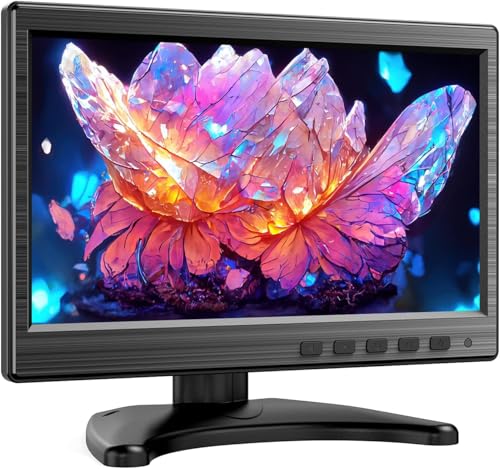

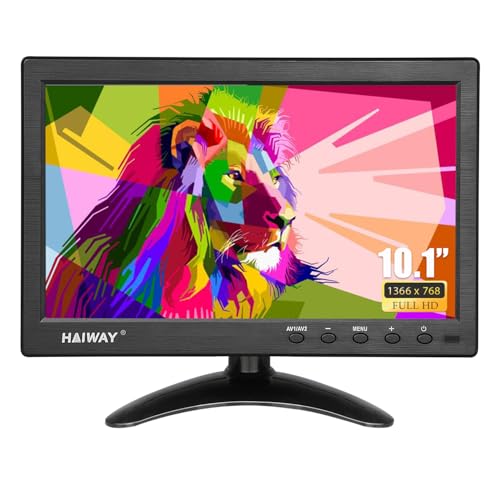
Monitoring CCTV feeds requires a dedicated screen that runs reliably without consuming valuable counter space. For crisp visuals and flexible inputs, the Jexiop 12.5 inch Security Monitor,Small Monitor serves as the top pick for modern surveillance setups. If you need complete legacy video cables included in the box, the Eyoyo 10.1 Inch Security Monitor 1366×768 offers a versatile alternative.
We evaluated 6 models in November 2026 to find reliable options from brands like Eyoyo, Haiway, Miktver and more. Whether you manage a home security recorder or a commercial workstation, matching port types and screen dimensions ensures seamless continuous operation. You can also explore our guide on small monitor for PC setups for secondary desk screens.



Best Security Camera Monitors under $75: Compact Displays Buying Guide
Video Input Compatibility and Legacy Ports
Security systems rely on diverse video outputs depending on their hardware generation. Older analogue systems use BNC coaxial cables or composite RCA connectors, while modern NVR setups favor HDMI or VGA outputs. Choosing a monitor equipped with native BNC and AV ports saves you from buying active signal converters.
Modern multi-input displays let you connect multiple recording units to a single screen. You can switch between your primary digital recorder and legacy cameras using an included remote control or physical buttons. Checking that your monitor matches your existing cables prevents unexpected setup delays.
Native Resolution and Image Scaling
Compact surveillance screens range in resolution from 1024×600 up to Full HD 1920×1080. A higher native resolution produces clearer image details, which makes reading on-screen timestamps and identifying license plates much easier. When high-resolution feeds pass into lower-resolution panels, the video downscales without losing core movement tracking.
For multi-camera split-screen views, higher pixel density prevents individual camera tiles from appearing pixelated. A 1080p panel provides sharp divisions across four or eight camera channels on a single display. For single-camera spot monitors, entry-level resolutions remain entirely adequate for general security awareness.
Aspect Ratio: 16:9 vs 4:3
Modern IP security cameras record in widescreen 16:9 format to capture broad outdoor areas. Matching a widescreen camera with a 16:9 monitor preserves proper object proportions without black bars. Older analogue systems output standard 4:3 video, which looks best on dedicated 4:3 display panels.
Displaying a 4:3 analogue feed on a widescreen panel can stretch figures horizontally unless the monitor supports aspect ratio adjustment. Dedicated 8-inch square panels preserve original geometry for vintage equipment and server racks. Selecting the correct ratio keeps your live camera feeds true to life.
Mounting Options and Space Efficiency
Desk placement is standard, but tight security desks benefit greatly from wall mounting. Most compact surveillance monitors feature rear 75x75mm VESA patterns for attachment to articulating arms or flat wall plates. Wall mounting keeps valuable counter space clear for keyboards, mice, and logbooks.
Lightweight frames weighing under one kilogram place minimal stress on mounting brackets. Sturdy desktop stands with non-slip base pads prevent accidental tipping during daily adjustments. If you require larger screens for multi-tasking, explore our recommendations for best quality monitors across different desk layouts.
Display Brightness and Viewing Angles
Surveillance monitors often sit high on equipment shelves or mount at off-center angles. Panels featuring 178-degree wide viewing angles prevent washed-out colors and dark shadows when viewed from the side. Consistent visibility ensures guards or homeowners can check camera feeds from across the room.
Screen brightness ratings between 300 and 400 cd/m² keep footage clear under bright office lighting or near windows. Anti-glare panel coatings reduce ambient reflections from overhead fluorescent fixtures. Proper luminance ensures that nighttime infrared feeds remain crisp and readable in high-contrast scenes.
Power Supply Flexibility and Reliability
Surveillance screens operate continuously, requiring dependable power adapters that remain cool under load. External DC adapters keep excess heat away from internal display electronics, improving panel longevity. Efficient circuit designs consume minimal electricity during around-the-clock operation.
Certain models include 12V vehicle power cables alongside standard household adapters. This dual-power capability suits mobile surveillance vehicles, security trailers, and off-grid solar cabins. Having versatile power inputs ensures dependable deployment across diverse monitoring environments.
| Monitor Type | Standard Aspect Ratio | Optimal Use Case | Primary Input Types |
|---|---|---|---|
| Widescreen (10.1″ – 12.5″) | 16:9 Widescreen | Modern IP Cameras & NVRs | HDMI, VGA, USB |
| Legacy Compact (8.0″) | 4:3 Traditional | Analogue CCTV & Server Racks | BNC, AV, VGA |
| High-Luminance Panels | 16:9 Widescreen | Bright Retail Counters & Vehicles | HDMI, BNC, 12V DC |
How We Evaluated
We evaluated manufacturer technical specifications, connector options, and display panel capabilities across 6 compact monitors. Our analysis prioritized video input versatility, physical mounting dimensions, and continuous operation reliability. We examined how each display manages diverse signal formats without introducing noticeable video lag.
Our review compared included accessory packages, such as cables, remote controls, and mounting brackets. We assessed viewing angles and aspect ratios to ensure practical utility for commercial surveillance desks and home security closets. This systematic evaluation identifies dependable displays that offer genuine value for money.
Common Mistakes to Avoid
Overlooking native video connectors is a common error when purchasing compact surveillance screens. Connecting an analogue BNC camera to an HDMI-only display requires external conversion boxes that add clutter and cost. Always verify that the screen provides physical ports matching your recorder outputs.
Ignoring viewing angles can make wall-mounted monitors difficult to see from seated positions below. Displays with narrow viewing angles produce inverted colors and dark images when viewed off-axis. Choosing IPS or wide-angle panels guarantees clear visibility from any vantage point in the room.
Expecting high-end gaming or graphic design color accuracy from dedicated security panels leads to disappointment. Surveillance screens prioritize signal stability, legacy port support, and compact footprints over wide color gamuts. Learn more about specialized screens in our guide on quality computer monitors for general desktop use.
Failing to check VESA hole spacing before ordering wall brackets creates installation delays. Compact monitors utilize 75x75mm mounting patterns rather than larger standard television brackets. Confirming mount dimensions ensures quick and secure attachment to existing monitor arms.
Buying Checklist
- Confirm whether your security recorder uses HDMI, VGA, or BNC video connections.
- Check that the screen resolution supports your required camera detail and multi-channel grid.
- Verify that the monitor includes a 75x75mm VESA pattern if wall mounting is planned.
- Ensure the panel features wide viewing angles for off-center or elevated viewing.
- Confirm the screen brightness reaches at least 300 cd/m² for illuminated spaces.
- Check whether built-in stereo speakers are needed for audio-enabled camera feeds.
- Verify that the package includes necessary video cables and a remote control.
- Ensure the power supply matches your location, such as standard AC or 12V vehicle power.
Final Thoughts
For maximum visual clarity across multi-camera layouts, the Jexiop 12.5 inch Security Monitor,Small Monitor delivers an impressive 1080p panel with wide viewing angles. Its slim chassis and crisp resolution make it an outstanding central display for security desks and server management stations.
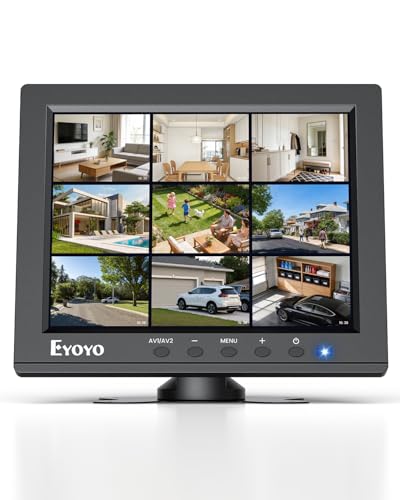
If your setup requires legacy analog connections alongside modern digital inputs, the Eyoyo 10.1 Inch Security Monitor 1366×768 provides comprehensive cables and an image flip function. For tight server cabinets running classic feeds, the Eyoyo 8″ Small Security Monitor, 1024×768 4:3 LCD preserves proper aspect ratios without distortion.
Budget-conscious setups needing reliable BNC connections will appreciate the Miktver 10.1-Inch Security Monitor with HDMI VGA for steady everyday monitoring. If you ever require larger workspaces for full security command stations, check out our guide to large screen computer monitors for expansive display options.
Frequently Asked Questions
Can Best Security Camera Monitors under $75: Compact Displays run continuously 24/7?
Yes, these compact surveillance screens are engineered for long-running security monitoring tasks. Their low power consumption and external power supplies prevent heat accumulation during non-stop operation.
What is the top pick for Best Security Camera Monitors under $75: Compact Displays in 2026?
The Jexiop 12.5 inch Security Monitor,Small Monitor stands out in 2026 for its sharp 1080p resolution and slim profile. It provides clean visuals across both desktop stands and wall installations.
Why do security monitors feature BNC ports?
BNC connectors link directly to traditional CCTV cameras and legacy security multiplexers. Having native BNC input eliminates the need for external signal converters and simplifies video routing.
Can I use these small security monitors as a second PC screen?
You can connect these screens via HDMI or VGA to serve as compact secondary displays for chat apps or system statistics. For standard office workflows, our guide on small monitor for PC models provides additional alternatives.
What is the difference between 4:3 and 16:9 security monitors?
A 4:3 monitor matches older analog camera feeds without stretching the image horizontally. Widescreen 16:9 displays align with modern HD IP cameras and multi-channel video grids.
Do these compact monitors include built-in audio speakers?
Most compact security screens include integrated stereo speakers to monitor microphone-enabled camera channels. They allow quick audio verification without requiring external speakers or dedicated headphone amplifiers.
Can I mount a compact security monitor to a wall?
Most units feature standard 75x75mm VESA mounting patterns on the rear panel. This allows easy installation onto articulating wall brackets, server cabinets, or vehicle mounts.
What does the mirror flip function do on surveillance displays?
The image flip function inverts the screen output horizontally or vertically. This feature is crucial when mounting screens upside down or when monitoring rear-view vehicle cameras.









