Finding the Best WiFi Extender for Cameras requires balancing range coverage and steady throughput so video feeds never drop. The TP-Link AX3000 WiFi 6 Range Extender is our top pick because it provides up to 2,400 square feet of coverage with high-speed WiFi 6 connectivity. This makes it ideal for handling multiple high-definition security feeds through exterior walls without signal degradation.
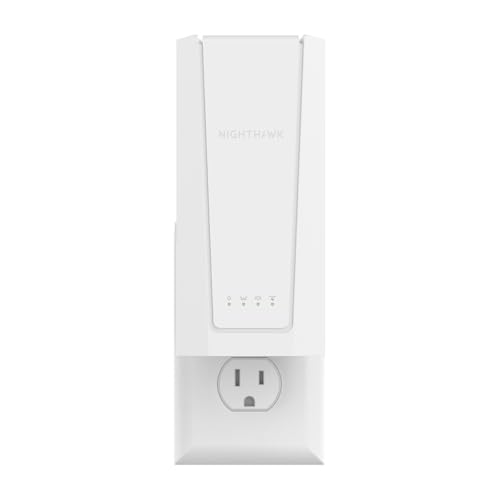
If you need an affordable solution for a single outdoor camera, the TP-Link AC1200 WiFi Extender delivers reliable dual-band performance at an accessible entry price. For larger properties with modern WiFi 7 routers, the NETGEAR WiFi 7 Range Extender (EXS25) offers ultra-fast throughput for demanding surveillance setups. You can also explore our general How To tutorials to optimize connected tech across your property.


Best WiFi Extender for Cameras Buying Guide for 2026
Bandwidth and Wireless Standards
Wireless security cameras transmit uninterrupted video data that demands consistent bandwidth from your home network. Modern devices utilizing WiFi 6 or WiFi 7 standards process multiple data streams simultaneously without congesting the signal channel. Selecting an extender with dual-band support allows cameras to operate on less congested frequency bands.
Older WiFi 4 or legacy extenders can restrict performance, causing video stuttering or missed motion events. Choosing the Best WiFi Extender for Cameras with modern protocols ensures low latency for live streams and fast cloud uploads. Upgrading your wireless backbone keeps your home monitoring reliable even when other family members stream video.
Coverage Area and Physical Obstacles
Outdoor cameras are frequently mounted on brick exteriors, garage eaves, or fence posts far from the main router. Building materials like brick, concrete, and low-emissivity glass significantly diminish wireless signals as they pass outdoors. Placing an extender near an inside wall closest to the exterior camera helps bridge this difficult physical gap.
Models featuring directional high-gain antennas and beamforming focus signal energy directly toward distant outdoor nodes. This targeted transmission compensates for wall attenuation and distance, maintaining a stable link for remote security gear. Check our guide on Desktop & External Monitors for setting up dedicated monitoring displays indoors.
Network Capacity and Device Density
Smart home security ecosystems often involve multiple cameras, doorbells, floodlights, and motion sensors broadcasting at once. Each connected device consumes continuous airtime, which can quickly saturate a low-capacity range booster. Extenders rated for 32 to 80 simultaneous connections prevent network congestion from dropping camera feeds.
High device capacity ensures that adding new smart plugs or sensors will not compromise your existing security recording. A robust booster handles heavy background traffic effortlessly while maintaining dedicated bandwidth for priority camera streams. This reliability is vital for perimeter defense systems that monitor entry points constantly.
Ethernet Ports for Wired Access Points
Some wireless cameras feature physical Ethernet jacks or connect to powerline adapters for zero-latency video transmission. Extenders equipped with Fast Ethernet, Gigabit, or 2.5 Gig ports can operate as dedicated access points or hardware bridges. Connecting a camera base station directly to the extender Ethernet port ensures maximum stream stability.
Using access point mode converts a wired wall jack into a fresh wireless hotspot right near your outdoor security perimeter. This configuration completely eliminates wireless degradation between the router and the extender, delivering peak speeds to your cameras. You can discover more technical setup guides in our Computer Monitors & Displays section.
Smart Roaming and Mesh Compatibility
Standard extenders often create separate network names that force mobile devices and cameras to reconnect manually. Extenders equipped with EasyMesh or Smart Roaming mirror your existing SSID name so connected gear switches automatically. This prevents battery-powered security cameras from disconnecting when transitioning between network nodes.
Seamless roaming ensures that handheld devices checking camera feeds experience zero buffering while moving around the property. It also simplifies setup, as cameras do not need to be reconfigured to a new network password. Choosing mesh-compatible hardware future-proofs your entire home network infrastructure effortlessly.
How We Evaluated
We evaluated 5 products from top brands like TP-Link, NETGEAR, FRWRJQ to determine which range boosters best serve home security installations. Our team analyzed key specifications including maximum wireless bandwidth, coverage square footage, antenna design, and device density ratings. We specifically focused on features that impact video stream stability through exterior walls and over long distances.
Our objective analysis prioritized extenders offering modern WPA3 security protocols, seamless roaming capabilities, and versatile setup options. We compared entry-level budget models against high-end WiFi 7 units ranging from $21.99 – $129.00 to identify optimal value for various home layouts. This data-driven evaluation ensures you can select a booster tailored to your specific camera deployment needs.
Common Mistakes to Avoid
Placing the extender too far from the main router is a frequent error that degrades camera performance. If the extender receives a weak signal from the router, it will only retransmit a degraded link to your cameras. Position the booster midway between your primary router and the exterior camera for maximum throughput.
Ignoring wireless frequency bands can also create unnecessary video lag on security monitors. The 2.4 GHz band penetrates exterior walls better but offers lower speeds, whereas the 5 GHz band provides higher bandwidth over shorter distances. Matching your camera frequency requirements to the appropriate extender band prevents connection bottlenecks.
Expecting a range extender to increase your baseline internet speed is another common misconception. Extenders expand the physical coverage area of your existing network but cannot exceed the bandwidth supplied by your internet service provider. Focus on signal stability and coverage range rather than expecting faster speed test numbers.
Buying Checklist
- Verify your camera supports the 2.4 GHz or 5 GHz band offered by the extender.
- Check that the extender coverage rating matches or exceeds the distance to your furthest camera.
- Ensure the extender includes WPA2 or WPA3 encryption to protect private video streams.
- Confirm the presence of an Ethernet port if you plan to connect a camera bridge or hub.
- Select an EasyMesh or Smart Roaming model if you want to retain a single network name.
- Look for high-gain adjustable antennas if signals must pass through thick exterior masonry.
- Choose a unit with adequate device capacity to handle all your smart home security accessories.
Final Thoughts
Selecting the Best WiFi Extender for Cameras ensures that your home security system maintains continuous recordings without video blackout. For most homeowners, the TP-Link AX3000 WiFi 6 Range Extender represents the ideal balance of wide coverage, modern WiFi 6 speeds, and dependable multi-device handling. Its beamforming technology efficiently projects signal through exterior walls to keep distant security cameras fully online.
Budget-conscious users with basic coverage requirements will find great value in the TP-Link AC1200 WiFi Extender, which expands coverage reliably without unnecessary complexity. Alternatively, those building a high-bandwidth surveillance network with multi-gigabit hardware should consider the NETGEAR WiFi 7 Range Extender (EXS25) for ultra-fast, future-proof operation.
No matter which model you choose, proper placement halfway between your router and cameras remains essential for optimal performance. Explore our reviews on Best External Monitors to build a complete control desk for viewing your security feeds. Investing in a reliable signal booster gives you total peace of mind knowing your property remains actively monitored.
Frequently Asked Questions
Will the Best WiFi Extender for Cameras in 2026 work through brick walls?
Yes, quality extenders with high-gain antennas and beamforming can push wireless signals through exterior brick walls. Placing the extender on an interior wall directly opposite the outdoor camera delivers the best signal penetration. Utilizing the 2.4 GHz frequency band also helps signals pass through dense building materials more effectively than 5 GHz bands.
How many cameras can connect to a single range extender?
Modern range extenders can support anywhere from 32 to 80 connected devices simultaneously depending on hardware specifications. However, live high-definition video streams consume substantial bandwidth, so limiting each extender to four to six high-resolution cameras ensures optimal performance. Overloading a booster with too many continuous HD feeds can lead to dropped frames or delayed alerts.
Does a WiFi extender slow down camera streaming speeds?
Extenders retransmit wireless signals, which can naturally reduce maximum potential throughput by up to 50 percent on single-band connections. However, dual-band and WiFi 6 extenders minimize this reduction by using separate channels for communication. The gain in signal stability and coverage far outweighs any minor speed loss for security camera recording.
Can outdoor security cameras connect to a mesh extender?
Outdoor security cameras connect seamlessly to mesh-compatible extenders that share your main router network credentials. Mesh technology allows cameras to maintain a stable link under a single WiFi name without requiring manual network switching. Learn more about display configurations in our guide to the Best HDMI Monitors.
Where is the best place to plug in a camera signal booster?
The optimal position for a signal booster is halfway between your primary wireless router and the outdoor camera. Ensure the location receives a strong signal from the main router while maintaining a clear line toward the camera. Avoid placing the extender behind large metal appliances or deep inside metal utility cabinets.
Do WiFi extenders work with battery powered security cameras?
WiFi extenders work exceptionally well with battery-powered cameras by reducing the power needed to maintain a weak connection. When a camera spends less energy searching for a distant router signal, its internal battery lasts significantly longer. A strong boosted signal allows battery cameras to wake up and start recording motion events faster.
Is WPA3 security necessary when choosing the Best WiFi Extender for Cameras?
WPA3 security provides advanced encryption that protects your private video streams from unauthorized wireless eavesdropping or intrusion. While WPA2 remains widely secure and compatible, WPA3 is recommended for modern security camera installations in 2026. Choosing an extender supporting both standards ensures compatibility with both old and new security hardware.