

When upgrading your desk layout, selecting from the Best Monitor Stands for Gaming Setups in October 2026 improves your daily ergonomic comfort. For single screen users wanting premium build quality, the Ergotron – Upgraded LX Pro Premium Monitor Arm offers exceptional stability for heavy ultrawide displays. Pairing a reliable mount with high-refresh displays from our gaming monitors category creates a streamlined battle station.
If you prefer a budget-friendly single screen option, the HUANUO FlowLift™ Pro Monitor Arm for 13–32″ provides reliable mechanical spring tension and simple calibration. Gamers running dual screens can rely on the HUANUO FlowLift™ Dual Monitor Stand to hold two displays securely off the desk surface.



Best Monitor Stands for Gaming Setups Buying Guide
Weight Capacity and VESA Compatibility
Matching your monitor weight to the mounting arm capacity prevents unexpected screen sagging or joint slip during long gaming sessions. Most modern gaming screens follow standard VESA hole patterns of 75x75mm or 100x100mm, which align directly with standard mounting plates. Exceeding the specified load limit weakens the tension mechanism over time and endangers your display hardware.
Heavy ultrawide displays demand high capacity articulation joints that keep tilt angles locked in place when you adjust viewing positions. Checking both minimum and maximum weight limits ensures lighter displays generate enough downward force to allow height changes. Selecting compatible mounting patterns simplifies setup without requiring third-party adapter plates or custom brackets.
Mounting Type: Desk Clamp vs. Grommet vs. Freestanding
Desk clamps provide robust support by gripping the outer edge of your desktop without requiring permanent modifications or drilling. High quality dual C-clamp bases distribute clamping force evenly across wood surfaces, preventing desk surface deformation under heavy loads. However, glass tops or desktops with lower support beams require alternate mounting methods to ensure structural safety.
Grommet mounts secure the monitor arm through a drilled hole or cable pass-through, giving ultimate stability against accidental knocks. If you rent your space or prefer not to attach hardware to your furniture, freestanding bases with heavy glass or steel platforms offer zero-installation stability. If you want to explore high resolution panel upgrades, check out our guide on high resolution monitors for panel dimensions.
Articulation and Tension Adjustment Mechanisms
Full motion articulation lets you swivel, tilt, and rotate your screens to achieve optimal viewing angles for competitive gaming or streaming. Gas spring arms move silently with minimal effort, but mechanical spring designs offer superior longevity without risk of pressure loss. Visual tension windows take the guesswork out of calibration by showing exact tension alignment during initial setup.
Proper tension balance allows one-finger height adjustment while holding heavy monitors firmly in place once positioned. Tightening tilt joints prevents top-heavy displays from dipping forward during intense typing or gameplay actions. Flexible arms also enable quick rotation into portrait orientation, which works exceptionally well for secondary chat screens or programming windows.
Cable Management and Desktop Organization
Integrated cable channels routing along upper and lower arm segments conceal power leads, DisplayPort cords, and peripheral wires out of sight. Elevating your screens off the desk surface instantly frees up valuable real estate for audio interfaces, mousepads, and external accessories. Keeping cables secured within internal tracks also prevents snagging when adjusting monitor positions during active play.
Cluttered wiring reduces visual appeal and increases accidental unplugging risks when pulling monitors closer to your seating position. Built-in routing clips simplify maintenance when swapping peripherals or updating display hardware in your setup. Pair your tidy desk environment with high clarity displays listed in our external computer monitors overview.
Integrated Connectivity and Utility Features
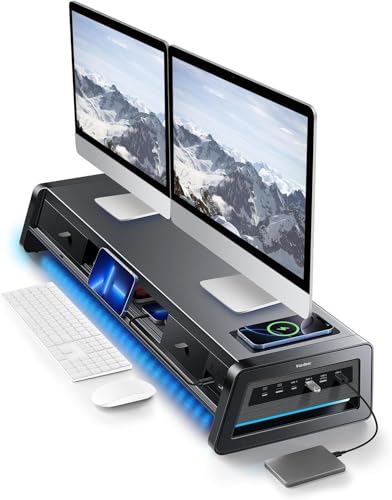
Advanced desktop risers expand basic monitor elevation by integrating multi-port USB hubs, wireless charging pads, and ambient lighting strips. Having high-speed USB ports directly accessible on your desk platform speeds up flash drive access and controller charging. Built-in storage drawers help clear small office tools, spare adapters, and memory cards from your primary workspace.
While integrated risers take up a rectangular footprint on your desk surface, their multi-tier design provides storage space underneath the main platform. Choosing between an articulating arm and a feature-rich desktop riser depends on whether you prioritize screen movement or workstation organization. Both options reduce neck strain by raising display centers directly to natural eye level.
How We Evaluated
We analyzed technical documentation, structural material specifications, weight capacities, and mounting mechanism designs across leading monitor stands. Our comparison focused on structural stability, VESA pattern compatibility, cable routing design, and joint adjustability. We examined manufacturer warranties, desk thickness tolerances, and user feedback regarding long-term tension retention.
Every recommendation reflects objective evaluation of performance parameters against typical gaming desktop configurations. By balancing mechanical spring reliability, desk clamp safety, and ergonomic motion ranges, we identified mounts that suit diverse display sizes and budget levels. Our aim is to provide practical guidance without relying on exaggerated promotional claims.
Common Mistakes to Avoid
One frequent error is failing to weigh your monitor without its factory stand before selecting a mounting arm. Factory stands add significant weight, leading buyers to purchase heavier mounts than necessary or miscalculate their screen payload. Always check the net screen weight against the arm minimum and maximum weight ratings.
Another mistake is ignoring desktop material strength and edge construction when installing heavy clamp systems. Hollow core desks or thin glass tops can crack under concentrated clamping pressure without extra reinforcement plates. Inspecting your desk thickness and under-desk support beams prevents installation conflicts before buying.
Finally, gamers often overlook cable length requirements when elevating screens on long articulating arms. Full arm extension requires longer power and video cables to prevent strain on monitor ports during movement. Leaving sufficient cable slack inside management tracks ensures smooth arm movement without pulling connectors loose.
Buying Checklist
- Verify screen net weight excluding the original factory base.
- Confirm VESA pattern alignment (75x75mm or 100x100mm) on monitor rear panel.
- Measure desktop thickness to ensure clamp or grommet base fit.
- Check under-desk clearance for crossbeams or obstruction panels.
- Determine whether single arm, dual arm, or desktop riser best fits your setup.
- Confirm cable lengths allow full arm movement without port tension.
- Ensure weight falls within minimum and maximum arm rating thresholds.
Final Thoughts
Selecting the ideal monitor stand elevates your gaming experience while keeping your desk organized and comfortable during extended sessions. For single screen setups requiring top tier build quality and long term reliability, we recommend the Ergotron – Upgraded LX Pro Premium Monitor Arm for its solid construction and fluid repositioning. Gamers seeking an affordable single monitor mount with visual tension indicators will appreciate the value offered by the HUANUO FlowLift™ Pro Monitor Arm for 13–32″.
For dual screen configurations, the HUANUO FlowLift™ Dual Monitor Stand provides smooth dual arm adjustment and secure mounting. If you prefer all-in-one storage with device charging over screen articulation, the Vaydeer All-in-One Dual Monitor Stand Riser with 2 transforms your desktop into an organized hub. For more setup advice, explore our how to guides and check our analysis of desktop external displays.
Frequently Asked Questions
Why should I invest in the Best Monitor Stands for Gaming Setups in 2026?
Dedicated monitor stands elevate your screens to eye level, reducing neck, shoulder, and back fatigue during long sessions. They free up desktop space under your monitors for gaming accessories and keep cables organized.
Are all monitor arms compatible with every gaming monitor?
Most gaming monitors use standard VESA patterns of 75x75mm or 100x100mm. You must confirm your screen features VESA mounting holes and stays within the arm weight and screen size limits.
Is a desk clamp or grommet mount better for gaming setups?
Desk clamps attach quickly without drilling, making them ideal for standard wooden desks. Grommet mounts require a hole in the desk but offer superior stability, especially on setups prone to shaking.
Can a monitor arm support heavy curved or ultrawide monitors?
Yes, provided the arm weight rating matches your monitor weight without its original base. Ultrawide screens shift the center of gravity forward, so choosing high load capacity mounts is essential.
What is the difference between gas spring and mechanical spring monitor arms?
Gas springs offer smooth, effortless motion but can lose pressure over many years of heavy use. Mechanical springs use steel coil tension for long lasting reliability and consistent support without pressure loss.
Can I mount a monitor stand on a glass desk?
Clamping monitor arms directly onto glass desks is generally not recommended due to risk of shattering under high stress. Freestanding monitor risers or specialized glass-safe bases are safer alternatives for glass surfaces. For display choices, review our HD computer monitors comparison.
How do I set the correct tension on my monitor arm?
Mount your screen first, then turn the tension adjustment screw using the provided hex key until the monitor stays at any height without drifting up or sliding down.
Do dual monitor stands allow individual screen adjustment?
Dual monitor stands with independent arms allow each screen to tilt, swivel, and rotate separately. Dual stands with fixed horizontal bars adjust both screens together along the central pole.


