

Choosing the best external computer monitors can feel overwhelming – the wrong screen causes neck strain, poor posture and eye fatigue during long workdays. Buyers waste money on flickery, unadjustable panels that don’t support comfortable viewing. If you sit for hours, the right external monitor can reduce discomfort and make your workspace more productive.
This guide to the best external computer monitors covers budget to premium picks with a focus on adjustability, ergonomic stands, eye‑care features and long‑term durability. We tested for resolution, refresh rate, connectivity and real-world comfort so you get value for money and a screen that supports healthier posture and longer focus.
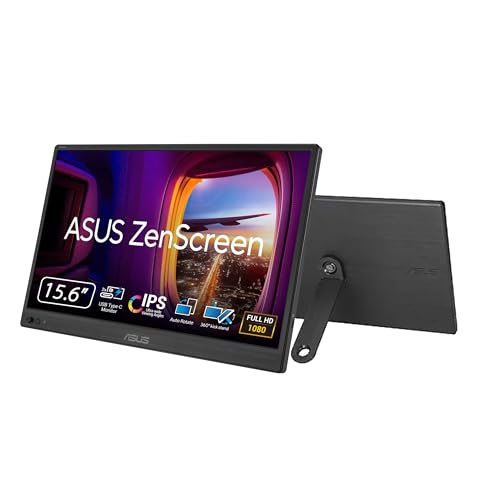
Best Overall: ASUS ZenScreen 15.6” Portable USB-C Monitor – lightweight FHD IPS with USB‑C plug‑and‑play and a 360° kickstand for mobile dual‑screen setups
Best Budget: Samsung 27” Borderless IPS Business Monitor – affordable 100Hz panel with eye‑saver mode and ergonomic tilt for reduced fatigue
Best Premium: Samsung 27″ Curved Essential S3 Monitor – 1800R curve and advanced eye comfort for immersive, posture‑friendly viewing
Best for Long Hours: HP 27″ Series 3 FHD Monitor – Eyesafe certification and IPS panel built for reliable, low‑strain all‑day use



Buying Guide
Screen size and resolution: match the display to the job
Pick a screen size and resolution based on how you work. For text-heavy tasks and spreadsheets, higher pixel density (4K on smaller screens or 1440p on mid‑sized monitors) makes fonts and UI elements crisper. For general office work, a 24-27″ Full HD monitor is often the best balance of cost and usable space. Consider viewing distance: larger screens or ultrawides need more desk depth or a greater viewing distance to stay comfortable. If you need extra screen real estate, our guide to the best large computer monitors can help you find a spacious option that fits your workspace.
- Checklist: choose higher resolution for detailed work, larger screens for multitasking, and avoid cramming a very large monitor too close to your eyes.
- Tip: if you plan a multi‑monitor setup, match resolutions and vertical sizes to reduce eye and neck strain.
Panel type and color accuracy: who needs wide gamut?
The panel technology (IPS, VA, TN) affects color consistency and viewing angles. IPS panels offer the most accurate colors and wide viewing angles, making them a good default for most users. If you do photo or video editing, prioritize monitors with good sRGB or Adobe RGB coverage and look for factory calibration or calibration support. For color-critical workflows, the best quality computer monitors offer factory-calibrated panels and wide gamut coverage.
- Checklist: IPS for color and angles; VA for higher contrast if you watch a lot of video; check advertised color coverage and calibration options for content creators.
- Real‑world note: casual office users rarely need wide gamut-stability and a neutral color profile are more useful than HDR claims.
Refresh rate and response time: balance smoothness with practicality
Higher refresh rates (100Hz and above) and faster response times benefit gaming and fast‑moving content, but they are less important for static office tasks. If you split time between work and gaming, a 100-120Hz monitor provides snappier cursor and window movement without compromising productivity. For a display that excels at both, check out our picks for the best monitor for work and gaming.
- Checklist: 60Hz is fine for typical office use; choose 100Hz+ if you want smoother motion for gaming or scrolling; lower response time reduces ghosting in fast scenes.
- Tip: prioritize overall ergonomics and panel quality before chasing very high refresh rates for non‑gaming uses.
Connectivity and power delivery: fewer cables, less hassle
Make sure the monitor has the ports you need-DisplayPort or HDMI for video, plus USB‑C if you want single‑cable docking. Monitors that provide USB‑C power delivery can charge your laptop while acting as an external display, which simplifies travel and home setups.
For a versatile single‑cable option, consider the LG 27UP850K-W, which includes USB‑C with power delivery to streamline connections.
- Checklist: choose USB‑C with PD for laptop docking, keep HDMI/DisplayPort for desktops, and look for extra USB ports if you need hubs.
- Compatibility tip: verify PD wattage and display protocols (DisplayPort over USB‑C vs. Alt Mode) to ensure your laptop is supported.
Ergonomics and adjustability: protect your neck and eyes
Adjustability matters more than most buyers expect. Height, tilt, swivel and pivot control how comfortably you position the screen relative to your eyes and keyboard. For all-day comfort, the best computer monitor for office work combines ergonomic adjustability with flicker-free technology. VESA mount compatibility lets you add a monitor arm later if your workflow changes. Also look for eye care features-flicker‑free backlights and low‑blue‑light modes-to reduce fatigue during long sessions.
- Checklist: prioritize height adjustment and tilt for proper ergonomic alignment; choose VESA if you might use an arm; prefer screens with anti‑glare coatings and eye‑comfort modes.
- Practical tip: a properly positioned monitor should place the top third of the screen roughly at eye level to minimize neck strain.
Portability, build quality and warranty: match the monitor to how you move
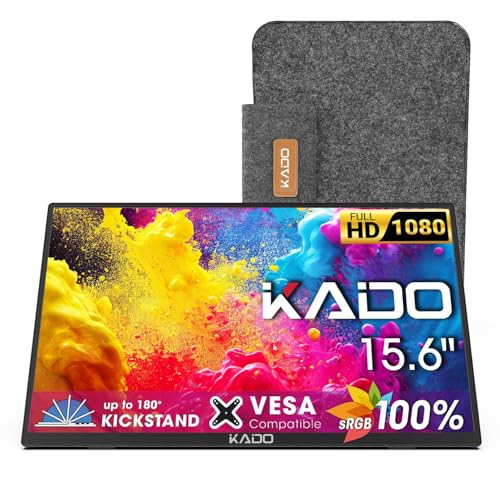
If you need a monitor for travel or frequent reshuffling between home and office, look for a lightweight, bus‑powered model with an integrated kickstand and solid case. Durable construction and a clear warranty give peace of mind for daily use. Portable displays often trade some ergonomics for compactness, so consider how you’ll mount or prop the screen.
As a travel‑friendly example, the ASUS ZenScreen 15.6″ Portable Monitor offers dual USB‑C and mini‑HDMI connectivity with a built‑in stand-useful if you frequently work from cafes or shared spaces.
- Checklist: choose bus‑powered USB‑C for lightweight setups, metal or reinforced frames for longevity, and prioritize warranty length if you expect heavy use.
- Value reminder: a slightly higher upfront cost for better build quality and warranty often pays off over several years of daily use.
FAQ
Which external monitor is best for long hours of work?
Look for an IPS panel with good viewing angles, flicker-free backlight and low-blue-light or comfort modes to reduce eye strain during long sessions. An adjustable stand or VESA mount helps you set a proper ergonomic height and tilt to avoid neck and shoulder pain. If you also want a single-cable dock for laptops, a USB-C monitor with power delivery can simplify your setup. For travel-friendly options, explore our roundup of best external monitors that balance portability with performance. For a roomy, color-accurate option that supports long workdays, consider the LG 27UP850K-W 27-inch Ultrafine 4K, which includes USB-C power delivery and ergonomic adjustments.
IPS vs VA vs TN panels – which one should I pick for productivity and color work?
IPS panels are the safest choice for productivity and color work because they offer wide viewing angles and generally better color consistency. VA panels deliver deeper blacks and higher contrast, which some users prefer for media consumption but they can have slower pixel response. TN panels are fastest for competitive gaming but typically have poorer color and viewing angles, so they’re less ideal for color-critical tasks. For most office and creative users, an IPS monitor is the best balance of color accuracy and usability.
Are expensive monitors worth the extra money?
It depends on your needs: higher prices usually buy better resolution, wider color gamut, HDR support, stronger stands and connectivity like USB-C with power delivery. If you do photo or video editing, color-critical work, or need a high-res display for multitasking, investing more can save time and improve accuracy. For general web browsing, documents and spreadsheets, a mid-range monitor often gives excellent value. Consider what features you’ll actually use before spending extra on premium options.
What features matter most when choosing the best external computer monitors?
Prioritize resolution (higher for detailed work), panel type (IPS for color), and ergonomic adjustability to protect posture and comfort. Check ports – HDMI, DisplayPort and USB-C with power delivery are especially useful for modern laptops and docking setups. Other helpful features include built-in speakers (if you lack external ones), refresh rate for smoother motion, and eye-care modes like flicker-free and low blue light. If you want a compact 4K option with good features, the Dell 27 Plus 4K (S2725QS) is a solid example.
How long do monitors last and what maintenance keeps them working well?
Most modern monitors last several years; lifespan depends on usage, backlight type and how often they’re powered on. To extend life, keep vents clear, avoid leaving static images on for long periods, and use power-saving settings when idle. Clean screens gently with a microfiber cloth and manufacturer-recommended cleaner, never spray liquid directly onto the panel. Also check warranty terms – some models, like the Philips 271V8LB, advertise extended advance-replacement coverage that can be useful for long-term reliability.
Final Verdict
After comparing the lineup, the strongest monitors stood apart through balanced image quality, versatile connectivity and durable build-traits weaker options sacrificed to hit price. Prioritize panel type and color accuracy for creative work, refresh rate for smoother motion, adjustable ergonomics and VESA compatibility for comfortable setups, plus a solid warranty and manufacturer support for long-term value. The top performers consistently combined practical adjustability, clear port layouts and dependable construction.
Comments are closed.
No reviews yet. Be the first to share your experience!