Choosing among the Best Condenser Microphones for Gaming in September 2026 comes down to voice clarity, background isolation, and desktop convenience. Our top overall choice for game chat and live streaming is the Logitech Creators Blue Yeti USB Microphone for PC. It features multi-pattern pickup arrays and custom vocal filters to deliver professional studio sound right out of the box.
For budget-conscious players who want a full boom arm package, we recommend the FIFINE AmpliGame A6T USB Gaming Microphone Kit. It brings instant tap-to-mute features, vibrant RGB lighting, and clear cardioid voice pickup at an affordable price point. If you want to optimize your complete battlestation display alongside audio gear, check our Gaming Monitors category guide for matching accessories.



Best Condenser Microphones for Gaming Buying Guide
1. Polar Patterns and Voice Isolation
Polar patterns dictate how your microphone picks up sound from different directions around the capsule. Most gaming environments benefit from a cardioid polar pattern, which focuses capture on sound directly in front of the grille while rejecting noise from behind. This pattern reduces audible mechanical keyboard clicks, PC fans, and ambient room reverberation from reaching your team.
Some premium USB microphones offer multiple selectable polar patterns like stereo, bidirectional, and omnidirectional. While cardioid remains ideal for single-player voice chat, having multi-pattern flexibility lets you pivot the microphone for co-op podcasting or desk interviews. You can learn more about optimizing desk space in our How To tutorials section.
2. USB versus XLR Connectivity
USB connectivity provides true plug-and-play operation across Windows, Mac, and console systems without requiring external audio hardware. You simply connect the included cable to an available port, set the input device, and start talking. USB microphones build the analog-to-digital converter directly into the chassis for quick setup.
Hybrid USB and XLR designs allow your audio setup to evolve as your broadcasting needs grow. Using USB keeps your desk setup clean for daily voice calls, while adding an XLR output lets you interface with mixers and hardware preamps later. Dual-output flexibility protects your investment if you decide to upgrade to dedicated audio gear down the line.
3. Onboard Hardware Controls and Monitoring
Having physical control knobs directly on your microphone body speeds up audio adjustments mid-game. Instant top-mounted tap-to-mute buttons allow quick silences without alt-tabbing away from active gameplay. Physical gain knobs let you adjust microphone input sensitivity instantly when game action grows quiet or intense.
Zero-latency headphone monitoring jacks let you hear your voice in real time through your headset. This direct feedback prevents you from shouting over game audio and helps you verify your voice clarity constantly. Integrated monitoring knobs also balance game soundtrack volume with incoming voice feedback easily.
4. Noise Cancellation and DSP Filtering
Condenser capsules are naturally sensitive to room noise and mechanical vibrations. Modern gaming microphones combat ambient sounds using onboard hardware AI filtering or software digital signal processing. Enabling active noise suppression blocks steady background sound like air conditioners and desk fans automatically.
Software vocal suites allow deeper audio customization, including high-pass filters, vocal equalizers, and voice modulation. Applying light noise gating keeps your microphone channel silent when you are not actively speaking. Combining physical shock mounts with hardware filtering gives you clean broadcast vocal sound without extra background buzz.
5. Boom Arm Mounting and Desktop Ergonomics
Desk placement directly affects both your vocal projection and your desktop workspace organization. Included desktop stands offer immediate stability, but they can pick up keyboard keystrokes transmitted through your desk surface. Boom arms allow elevated placement, bringing the capsule closer to your mouth while clearing desk room.
Suspension shock mounts use elastic bands to decouple the microphone chassis from physical impacts. When paired with external pop filters, these mounting kits eliminate harsh popping plosive sounds on spoken letters. For ideas on organizing your workspace monitor layout, explore our Desktop & External Monitors guide.
6. Audio Resolution and Sample Rates
Audio resolution determines how accurately the microphone converts your voice into digital data packets. Standard CD-quality recording operates at 16-bit and 44.1 kHz, which suffices for clear team voice chat. Higher specs like 24-bit and 48 kHz capture broader dynamic detail for streaming and video recording.
Choosing a microphone with high signal-to-noise ratio ensures low self-noise during quiet spoken passages. Higher acoustic SPL thresholds prevent voice distortion when speaking loudly during intense gaming moments. High-resolution digital converters deliver clean, natural vocal representation for your stream audience.
How We Evaluated
We analyzed 5 leading products using technical specification data, capsule polar responses, hardware connectivity options, and ergonomics. Our analysis evaluated pickup accuracy, noise suppression capabilities, and onboard control responsiveness across popular desktop operating systems.
We prioritized microphones that offer reliable hardware controls, clean analog-to-digital conversion, and robust mounting support. Each model was assessed on setup simplicity, value, and voice clarity for gaming voice chat, streaming, and podcast creation.
Common Mistakes to Avoid
Placing a condenser microphone too far from your mouth forces you to crank hardware gain levels high. High gain settings pick up computer fan noise, room echo, and keyboard clicks instead of clean vocal sounds. Keep your microphone between two and six inches from your mouth for best results.
Skipping physical shock mounts or boom arms often leads to unwanted desk thumps in your voice stream. Vibrations from typing or moving your mouse travel up rigid desktop bases directly into sensitive condenser capsules. Using elastic shock mounts isolates your microphone chassis from desk contact noise effectively.
Relying entirely on aggressive software noise gates can make your vocal delivery sound unnatural and clipped. Overly aggressive software filters cut off the beginnings and ends of spoken words unexpectedly during fast conversations. Balance moderate hardware gain levels with mild noise filtering for balanced sound clarity.
Buying Checklist
- Confirm your desk thickness supports C-clamp boom arm brackets under two inches thick.
- Verify your operating system supports standard plug-and-play USB input devices without custom drivers.
- Ensure the microphone features a dedicated hardware tap-to-mute button with a visual LED indicator.
- Check that zero-latency 3.5mm headphone monitoring is built into the microphone chassis.
- Decide whether you need multi-pattern polar pickup options or a dedicated cardioid capsule.
- Confirm an elastic shock mount or pop filter is included to suppress desktop vibrations.
- Verify if your setup benefits from dual USB and XLR output flexibility for future upgrades.
Final Thoughts
Selecting among the Best Condenser Microphones for Gaming requires matching your acoustic environment with the right capsule features. For top vocal versatility and broadcast software support, we recommend the Logitech Creators Blue Yeti USB Microphone for PC. Its multi-pattern pickup array and internal voice processing suite provide outstanding sound flexibility for any gaming room.
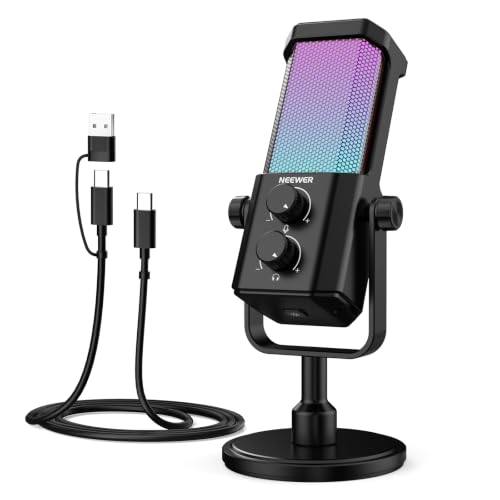
Gamers looking for maximum value with an included boom arm setup will appreciate the FIFINE AmpliGame A6T USB Gaming Microphone Kit. It combines quick touch controls, eye-catching RGB lights, and clean voice pickup in an accessible desktop package. If noisy rooms are your main concern, the NEEWER UM01 AI Noise Canceling USB Microphone handles active noise isolation reliably.
Pairing a dedicated microphone with high-quality visual displays elevates your gaming experience. Read our Computer Monitors & Displays guide to build an ergonomic and immersive battle station.
FAQs
What makes Best Condenser Microphones for Gaming effective in 2026?
Condenser microphones feature sensitive lightweight diaphragms that capture nuanced vocal detail and crisp high frequencies. In 2026, built-in USB digital signal processing and active noise suppression help these mics deliver broadcast vocal clarity even in noisy home gaming environments.
Why is a cardioid pattern best for gaming microphones?
Cardioid polar patterns pick up sound directly in front of the capsule while rejecting noise coming from the back and sides. This directional pickup pattern prevents mechanical keyboard clicks, desk bumps, and system cooling fan sounds from entering your voice chat channel.
Do USB gaming microphones require dedicated audio interface hardware?
USB gaming microphones do not require external audio interfaces or preamps. They contain internal digital conversion circuits, allowing plug-and-play operation when plugged into PC, Mac, or PlayStation USB ports.
What is the benefit of dual USB and XLR output options?
Dual output options allow you to use quick USB connections for casual gaming calls, while retaining XLR compatibility for studio mixers or hardware audio interfaces. This versatility lets you upgrade your setup over time without replacing your core microphone.
How does hardware AI noise reduction improve voice chat?
Hardware AI noise reduction chips process audio signals directly onboard to filter out repetitive background noise like fan buzz or typing. This onboard processing keeps your voice clear without taxing your computer’s CPU performance during intense gaming sessions.
Can a boom arm improve condenser microphone sound quality?
Using a boom arm elevates the microphone off your desk surface, bringing the capsule closer to your mouth while dampening desk vibrations. Closer positioning allows you to lower gain levels, which reduces background room noise significantly.
Is zero-latency monitoring necessary for streaming setups?
Zero-latency monitoring lets you hear your exact vocal output through headphones in real time without audio delay. This feature prevents inadvertent shouting and helps you maintain consistent vocal volume throughout long streaming broadcasts. You can also explore our 4K, 6K & 8K Monitors category for high-clarity streaming screen choices.
How do pop filters help clear up voice audio?
Pop filters block fast bursts of air caused by spoken plosive consonants like P and B sounds before they strike the mic capsule. Suppressing these air blasts prevents loud low-frequency thumps and clipping in your game chat and recording audio.