
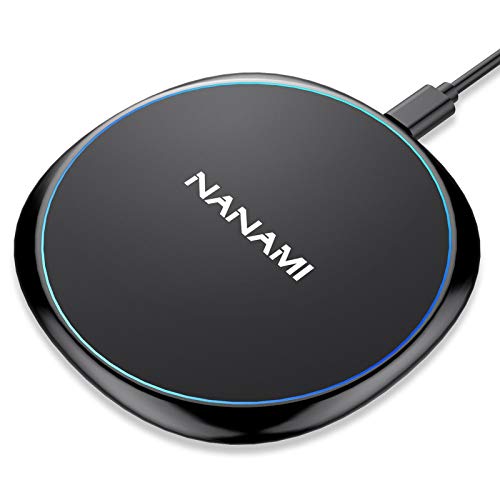
Finding the ideal power station for your mobile device requires balancing physical stability, charging speed, and safety circuits. For most users seeking reliable daily operation, the NANAMI Fast Wireless Charger stands out as our top pick due to its dual-coil architecture and comfortable angled stand design.
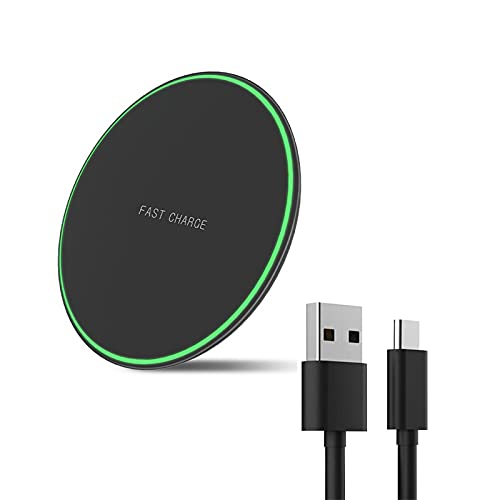
If you prefer a low-profile flat surface that fits easily into a travel bag or slim nightstand area, the Wireless Charger for Samsung Galaxy serves as an excellent flat pad alternative. Check out our comprehensive How To guides for more practical tech setups across your workspace.


Best Galaxy S7 Wireless Chargers Buying Guide for 2026
Form Factor and Desk Ergonomics
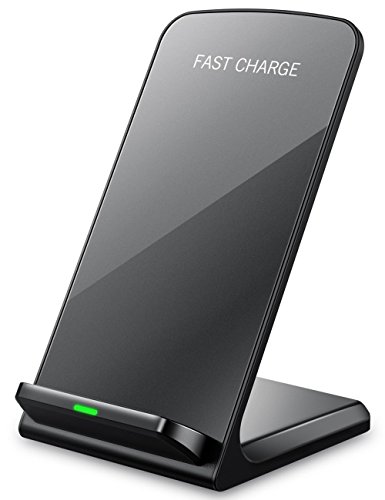
Choosing between an angled upright stand and a flat pad shapes how you interact with your device while charging. Stand designs hold the phone screen at a comfortable viewing angle of roughly sixty degrees. This placement allows you to check incoming notifications, make video calls, or unlock the screen without lifting the device from its base.
Flat charging pads occupy less vertical room and stay discreet on a cluttered desk or bedside table. They are easier to slip into a laptop sleeve when traveling between offices or hotel rooms. However, picking up a phone from a flat pad breaks the charging connection until you set it back down.
Coil Architecture and Alignment Tolerances
The physical internal coils inside a wireless charger dictate how precisely you must position your phone. Upright stands typically integrate two overlapping internal coils positioned vertically. This dual-coil configuration generates a broad inductive field that powers your device whether held in portrait or landscape position.
Flat pads rely on a single centered internal induction coil that requires accurate device alignment. If you knock the phone slightly off center during the night, power transfer may drop or stop entirely. Selecting a pad with anti-slip silicone rings helps lock your handset in the ideal central position throughout the night.
Charging Speed Modes and Power Brick Requirements
Wireless induction power operates across distinct wattage tiers depending on the underlying receiver chip. Standard wireless charging delivers five watts of output power, which works well for overnight battery replenishment. Fast charging modes step up to ten watts or higher when connected to a compatible wall adapter block.
To unlock faster wireless speeds, the base unit must draw power from a Quick Charge 2.0 or 3.0 power brick. Plugging your wireless pad into a standard five-volt USB computer port caps the speed to basic levels. Investing in an adequate wall adapter ensures your hardware achieves its maximum potential charging speed.
Case Thickness and Material Compatibility
Modern inductive charging bases push power directly through protective phone cases up to five millimeters thick. Standard materials like thermoplastic polyurethane, clear polycarbonate, and flexible rubber present minimal resistance to magnetic fields. You can leave standard daily protective covers on without suffering power loss.
However, cases incorporating metal plates, magnetic mounts, socket grips, or credit card slots disrupt power transfer. Foreign object detection sensors will automatically shut off power to prevent excessive heat buildup near metal. Explore our desktop accessory reviews for more tips on organizing clutter-free workspaces.
Form Factor Comparison Matrix
| Feature Criteria | Vertical Charging Stand | Flat Charging Pad |
|---|---|---|
| Primary Use Case | Desk Work & Video Calls | Nightstand & Travel Use |
| Coil Array | Dual Coils (Wide Field) | Single Centered Coil |
| Orientation Flexibility | Portrait and Landscape | Flat Horizontal Placement |
| Thermal Dissipation | Passive Upright Airflow | Surface Contact Dissipation |
Thermal Controls and Overnight Safety Circuits
Wireless energy transmission inherently produces low levels of operational heat during fast charging cycles. Quality charging docks feature integrated microchips that monitor internal coil temperature in real time. If temperatures rise above safe operational thresholds, the controller regulates current flow to keep the battery cool.
Overvoltage protection and short-circuit prevention circuits provide essential safeguards for long-term battery health. Intelligent chargers automatically cut active power once the connected battery reaches full charge capacity. This automated shutoff prevents unnecessary stress on older lithium-ion cells left plugged in overnight.
LED Indicator Behavior and Sleep Compatibility
Status indicators tell you whether power is flowing correctly or if alignment needs adjusting. Bright blue or green lights help confirm successful power transfer when setting down your device at a desk. However, excessively intense status lights can disrupt sleep patterns when placed on a bedside nightstand.
Many modern charging pads feature automatic light timers that turn off the LED status light after ten seconds of active charging. Other designs use soft dimming bulbs that remain non-intrusive in dark rooms. Checking light behavior ensures your charger will not create unwanted room illumination while sleeping.
How We Evaluated
We analyzed each charging device by evaluating verified technical specifications, coil layout efficiency, structural build quality, and thermal regulation mechanisms from manufacturer data. We carefully cross-referenced user experiences across varying environment settings, focusing on daily alignment stability and power output consistency.
Our evaluation process prioritizes practical functionality, safety features, and long-term durability. By analyzing coil configuration, surface anti-slip textures, and power adapter requirements, we aim to provide an objective breakdown of how each model performs on desks and nightstands.
Common Mistakes to Avoid
Using a low-output USB power block is the most frequent mistake buyers make with fast wireless chargers. Connecting a ten-watt wireless pad to an old five-volt wall adapter caps charging output, leaving your device replenishing at standard legacy speeds.
Ignoring metal attachments on phone cases is another common error that interrupts charging functions. Magnet plates for car mounts and metal ring holders trigger foreign object protection, forcing the charger to flash error lights and cease charging.
Setting a phone carelessly onto a single-coil flat pad often leads to an uncharged device by morning. A slight offset can prevent the induction coils from locking on properly, so double-checking the status indicator light before walking away is essential.
Expecting wireless fast charging to match high-wattage wired cables can lead to unrealistic expectations. Wireless induction prioritizes convenience and port preservation over raw charging speed, operating slightly slower than direct cable connections.
Buying Checklist
- Confirm your wall adapter supports Quick Charge 2.0 or 3.0 standards for fast wireless output.
- Check that your daily phone case thickness remains under five millimeters.
- Verify that your phone case is free of metal plates, magnet rings, and card slots.
- Determine whether an upright stand or flat pad form factor fits your desk layout better.
- Select a dual-coil stand model if you frequently switch between portrait and landscape modes.
- Look for nightstand-friendly models with soft or self-dimming LED status lights.
- Ensure the charging surface includes non-slip rubber pads to prevent accidental phone movement.
- Check the included cable type and length to verify it reaches your nearest power outlet.
Final Thoughts
Choosing the right power accessory comes down to your personal desk workflow and space constraints. For complete versatility on a busy work desk, the NANAMI Fast Wireless Charger offers our top recommendation thanks to its dual-coil architecture and stable viewing angle.
If you want a low-profile pad that blends seamlessly into minimalist nightstands or travel bags, the Wireless Charger for Samsung Galaxy provides reliable single-coil output in an ultra-thin frame. Meanwhile, value-conscious buyers will appreciate the Fast Wireless Charger Stand for Samsung Galaxy S25 for its solid performance and thermal safety protections.
Investing in reliable wireless charging hardware keeps your workspace tidy while protecting your device battery. Explore our recommendations for external monitor setups to further improve your home office ergonomics.
Frequently Asked Questions
What is the main benefit of choosing Best Galaxy S7 Wireless Chargers in 2026?
Using a wireless charger eliminates wear and tear on your device charging port while keeping your desk free of tangled cables. It allows you to place your phone down for instant power replenishment without plugging in cables repeatedly throughout the day.
Are stand-style chargers better than flat charging pads?
Stand chargers hold your screen upright, making it easier to read notifications and conduct hands-free video calls while powering up. Flat pads occupy less vertical space, making them ideal for compact nightstands and travel bags. Learn more in our HDMI desk hardware guides.
Does wireless charging harm phone battery longevity over time?
Modern wireless chargers include intelligent temperature regulation and automated full-charge shutoff functions to safeguard battery health. Keeping your device within normal operating temperatures prevents excessive degradation during daily power sessions.
Why does the LED indicator light flash blue or red on my charger?
A flashing LED indicator usually signals misalignment between the phone and internal charger coils, or the presence of a foreign object. Removing metal attachments, magnetic plates, or thick cases will typically restore steady charging operation.
Can I charge my phone with a thick protective case on?
Most quality wireless chargers transmit power through standard plastic, rubber, or TPU cases up to five millimeters thick. However, cases containing metal components, credit card slots, or magnetic rings will block wireless energy transfer.
What type of wall adapter plug is needed for fast wireless charging?
To achieve fast wireless output speeds, you must connect your charging base to a Quick Charge 2.0 or 3.0 wall adapter block. Standard basic USB ports often lack sufficient output wattage to trigger fast wireless charging modes.
Is it safe to leave a phone on a wireless charger overnight?
Yes, built-in overcharge protection circuits automatically stop current transfer once your phone battery reaches full capacity. The charger enters a low-power trickle mode, ensuring your device stays safe throughout overnight charging cycles.
Do dual-coil wireless stands charge faster than single-coil stands?
Dual coils expand the active charging area rather than increasing raw charging speed. This allows you to position your phone vertically or horizontally without worrying about strict center alignment.