

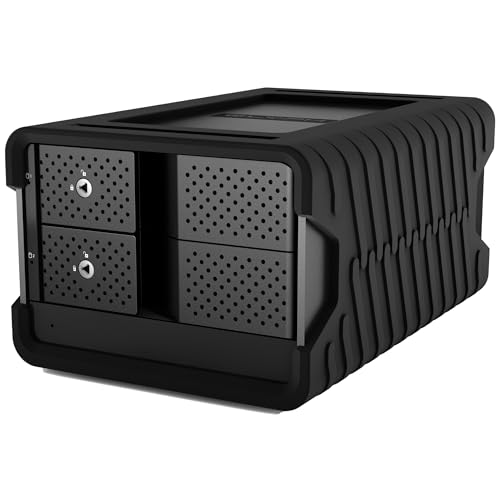
We analyzed 10 models for November 2026 to identify top desktop storage systems. For professional creators and power users who need high speed and maximum reliability, the Glyph Production Technologies Blackbox PRO RAID delivers exceptional enterprise class performance.
If you require a budget friendly modular approach or flexible diskless storage, the TERRAMASTER D2-320 USB RAID Enclosure 2-Bay offers impressive speeds without high upfront hardware costs. Combining multiple drives in a single enclosure simplifies workflow setups alongside desktop external storage setups.





Best RAID External Hard Drives Buying Guide
Hardware RAID vs Software RAID Configurations
Hardware RAID controllers handle array calculations independently from your primary operating system. This dedicated hardware processing prevents system slowdowns during intensive file writes and ensures stable background rebuilds if a disk fails.
Software RAID depends entirely on system host resources, which can introduce performance overhead during heavy multitasking. Choosing a hardware RAID solution guarantees reliable data protection without taxing your primary computer processor.
RAID 0, RAID 1, and Multi-Drive Redundancy
RAID 0 strips data across multiple drives to double transfer performance, but offers zero fault tolerance. If one physical drive in a RAID 0 array breaks down, all stored data is permanently lost.
RAID 1 mirrors identical data onto two drives, halving usable capacity while offering robust hardware redundancy. Larger multi-bay arrays support RAID 5 or RAID 6, balancing overall storage capacity with multi-drive fault tolerance for demanding environments.
Interface Bandwidth and Connection Types
Connection protocol dictates whether your array achieves full drive performance. Thunderbolt 3 interfaces deliver up to 40Gbps bandwidth, making them essential for multi-stream 4K editing and multi-drive desktop arrays.
Standard USB-C 10Gbps ports provide plenty of speed for two-bay desktop hard drives. Pairing fast storage devices with optimal workstation displays such as best external monitors ensures an efficient workspace setup.
Drive Mechanics and Active Thermal Cooling
Enterprise 7200 RPM mechanical drives deliver faster sustained read speeds than standard desktop drives. However, higher drive rotation generates thermal energy that requires active cooling fan designs inside the enclosure chassis.
Aluminum enclosures with temperature controlled internal fans prevent drive throttling during long transfers. Maintaining optimal temperatures extends internal hard drive lifespan and prevents hardware read errors over extended operation.
Pre-Configured Arrays vs DIY Diskless Enclosures
Pre-configured desktop arrays work out of the box with matched drives and manufacturer warranties. They save setup time for creative professionals who need instant storage without configuration headaches.
Diskless enclosures let you select custom mechanical drives or SATA SSDs. This modular approach allows future drive upgrades and customized storage limits when building out high resolution workstations.
How We Evaluated
We analyzed hardware specifications, theoretical bandwidth throughput, enclosure cooling designs, and array controller feature sets across current storage options. We focused on real-world reliability, interface support, drive replacement accessibility, and practical setup steps.
Our comparison highlights hardware RAID processing efficiency, enterprise component integration, and long term data protection standards. This data driven breakdown ensures clear recommendations for creators, home offices, and enterprise settings.
Common Mistakes to Avoid
Assuming RAID 0 acts as a reliable backup is a frequent error. RAID 0 provides speed enhancement only, so a single disk failure destroys every file stored across the entire unit.
Connecting a high speed array to an underpowered USB hub starves the enclosure of necessary interface bandwidth. Always plug your RAID storage directly into host computer motherboards or certified expansion cards.
Neglecting drive cooling in quiet workspace environments can lead to thermal throttling. Ensure your enclosure sits in an open desk area where active fan exhaust remains unblocked.
Buying Checklist
- Confirm whether you need hardware RAID or software RAID processing.
- Select your preferred operating mode such as RAID 0 speed or RAID 1 mirroring.
- Verify interface compatibility with Thunderbolt 3, USB-C, or USB 3.0 ports.
- Check if the package includes enterprise class 7200 RPM mechanical drives.
- Determine if you prefer pre-formatted plug-and-play drives or diskless enclosures.
- Inspect enclosure thermal management for active cooling fans and aluminum heatsinks.
- Ensure hot-swappable drive tray access for quick maintenance.
Final Thoughts
Selecting among the Best RAID External Hard Drives comes down to your capacity needs and fault tolerance requirements. For demanding media production requiring maximum performance, the Glyph Production Technologies Blackbox PRO RAID delivers top tier hardware execution.
Users seeking immense storage capacity for archival backups should consider the massive multi-bay SanDisk Professional 208TB G-RAID Shuttle 8. Meanwhile, the TERRAMASTER D2-320 USB RAID Enclosure 2-Bay represents an exceptionally flexible budget option for custom drive setups.
For more detailed setup guides and peripheral reviews, check out our resource center. Visit our comprehensive how-to storage guides to refine your digital workflow.
FAQs
What is the primary benefit of Best RAID External Hard Drives in 2026?
The primary benefit lies in combining multiple physical disks into a single volume for superior transfer speeds or mirrored redundancy. Hardware RAID offloads storage calculations from your computer processor, keeping your system fast.
Is RAID 1 a substitute for a complete backup strategy?
RAID 1 mirrors data across two physical drives, protecting against single disk hardware failures. However, it does not protect against accidental file deletion or malware infection, so offsite backups remain necessary.
What is the difference between hardware RAID and software RAID?
Hardware RAID relies on a dedicated controller chip inside the external enclosure to manage drive operations. Software RAID uses host computer operating system resources, which can slow down system performance during intensive file rendering.
Can I use a RAID external drive with both Mac and Windows?
Yes, most external RAID units support formatting for both macOS and Windows platforms right out of the box. Formatting the drive with ExFAT allows cross platform read and write access without repartitioning.
Which option works best for video editing among Best RAID External Hard Drives?
High capacity Thunderbolt arrays running RAID 0 or RAID 5 deliver the sustained transfer speeds required for editing high bit-rate footage. Pairing fast arrays with 8K video production displays ensures seamless timeline playback.
What happens when a drive fails in a RAID 1 system?
In a RAID 1 system, the secondary drive retains a complete copy of all your files. You can replace the damaged hard disk with a new drive, and the enclosure will rebuild the mirrored pair automatically.
Are diskless RAID enclosures hard to configure for beginners?
Modern diskless enclosures feature tool-free drive bays and hardware switches or simple software utilities. Inserting drive mechanisms and selecting RAID modes usually takes only a few minutes.
Why do high capacity RAID drives require active cooling fans?
Enterprise 7200 RPM mechanical drives generate substantial heat during continuous read and write operations. Active cooling fans prevent drive overheating, avoiding thermal throttling and premature hardware failure.









