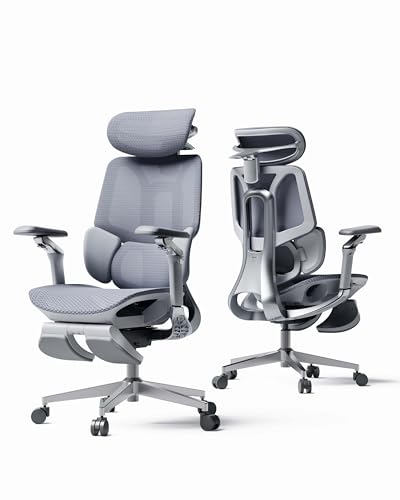
Programmers spending eight or more hours coding need dedicated spinal and arm support to prevent fatigue. For September 2026, our top recommendation is the Hbada E3 Pro 2026 Edition Ergonomic Office Chair because of its responsive 3-zone lumbar wings and 720-degree armrests. It keeps your posture aligned while working alongside your best desktop monitors throughout long sprints.
If you want a more streamlined alternative for a smaller space, consider the Hbada E3 Air 2026 Ergonomic Office Chair. This model provides essential dynamic lumbar pressure relief and automatic weight-sensing recline tension at an accessible entry point.

Best Chairs for Developers: Ergonomic Desk Support Buying Guide for 2026
Dynamic Lumbar Support and Spinal Alignment
Software engineers often alternate between leaning forward during intense debugging and leaning back during video calls. A chair with dynamic multi-zone lumbar wings automatically pivots to fill the gap across the L1 to L5 vertebrae without manual knob twisting.
Static cushions quickly compress and fail to support your lower back as your posture shifts throughout the workday. Choosing adaptive floating lumbar support prevents spinal slouching and significantly reduces chronic lower back tension.
Multi-Directional Armrest Adjustments
Typing on mechanical keyboards and navigating multiple screens requires flexible elbow and forearm stabilization. Modern ergonomic chairs with multi-axis rotation allow armrests to pivot inwards, preventing wrist strain and shoulder elevation.
Look for armrests that adjust in height, depth, and angle to match the height of your desk surface. When your forearms rest naturally parallel to the floor, you reduce carpal tunnel pressure while viewing your computer monitors and displays.
Seat Pan Depth and Pressure Distribution
Seat depth determines whether your thighs receive adequate support without cutting off circulation behind your knees. An adjustable seat pan allows taller developers to extend the base while shorter users can slide it back.
Proper clearance of two to three fingers between the seat edge and your calves ensures healthy blood flow. High-elasticity mesh seating further distributes body weight evenly across the pelvis to eliminate painful pressure hotspots.
Weight-Sensing Recline Mechanisms
Manual tilt-tension knobs can be cumbersome to dial in, often resulting in sudden drops or stiff resistance. Gravity-sensing chassis mechanisms calculate recline tension automatically according to your body mass for effortless movement.
A wide recline angle reaching up to 140 degrees lets you transition smoothly between focused typing and relaxed code review. Built-in locking stages keep the backrest stable whenever you pause to think through complex system architectures.
Multi-Axis Headrest Ergonomics
Neck strain is common among developers who look back and forth across large high resolution displays all day. A dual-axis headrest that adjusts vertically and pivots in depth keeps your cervical spine properly cradled.
Without proper neck support, your head naturally drifts forward, placing excessive load on upper back muscles. Synchronized headrest lifting ensures continuous contact whether you sit upright or recline for a mental break.
Mesh Breathability and Frame Durability
Solid leather and thick foam cushions trap body heat during long coding sessions, leading to uncomfortable warm spots. High-tensile CloudMesh promotes continuous passive ventilation, keeping your back cool and dry throughout summer afternoons.
Ensure the core structural base and gas lift comply with strict BIFMA standards and Class 4 certifications. Sturdy steel frames and reinforced casters guarantee long-term stability without creaking under daily developmental workloads.
How We Evaluated
We evaluated each ergonomic desk chair by analyzing structural specifications, adjustment ranges, and verified material durability standards. Our comparison focused on lumbar mechanics, armrest mobility, weight-sensing chassis performance, and seat depth versatility for different heights.
We also examined base construction materials, gas cylinder safety ratings, and manufacturer structural warranties. This objective data helps software engineers choose dependable desk seating tailored to demanding multi-monitor workflows.
Common Mistakes to Avoid
Many buyers choose chairs with fixed armrests that cannot rotate inwards for keyboard and mouse usage. This mistake forces forearms to hover unsupported, leading to rotator cuff strain and wrist fatigue over time.
Another common error is ignoring seat depth adjustability, which causes poor circulation for tall or petite programmers. Without proper pan depth settings, your lower back loses contact with the lumbar support system completely.
Purchasing cheap foam cushions instead of high-elasticity mesh often leads to sagging and heat accumulation. Over time, compressed foam fails to distribute pelvic pressure, resulting in sore tailbones during extended coding marathons.
Finally, overlooking recline tension calibration can make leaning back feel unstable or overly rigid. Chairs with gravity-sensing mechanisms eliminate manual guessing, providing balanced resistance regardless of user size.
Buying Checklist
- Verify the gas lift has an SGS Class 4 safety certification.
- Check that the lumbar support offers vertical and depth adaptability.
- Confirm the armrests provide rotational and height adjustments for typing.
- Ensure the seat pan slides forward and back to fit your leg length.
- Review the backrest recline angle to ensure it reaches at least 135 degrees.
- Confirm the mesh fabric offers high tensile elasticity and breathability.
- Check that the base is constructed from heavy-duty steel or reinforced alloy.
Final Thoughts
Investing in dedicated desk seating transforms your daily workflow and preserves your physical health over years of software engineering. For the most versatile ergonomic package, we recommend the Hbada E3 Pro 2026 Edition Ergonomic Office Chair for its expansive 720-degree armrests and adaptive 3-zone lumbar wings. It pairs effortlessly with our curated best quality monitors for an optimized developer setup.
If you prefer a lighter office aesthetic that blends into modern decor, the Hbada E3 Pro 2026 Edition Ergonomic Office Chair in grey provides identical pro-tier adjustability. Meanwhile, developers seeking essential posture correction at a practical price point should consider the Hbada E3 Air 2026 Ergonomic Office Chair.
Take time to fine-tune your seat height, headrest angle, and lumbar position upon unboxing your new chair. Consistent ergonomic alignment keeps you comfortable, focused, and free from fatigue through every complex coding sprint.
Frequently Asked Questions
What makes Best Chairs for Developers: Ergonomic Desk Support different from standard office chairs?
Developer chairs emphasize multi-directional armrest positioning, floating lumbar alignment, and breathable mesh to support prolonged sitting. Standard desk chairs often lack seat depth adjustments and active back tracking needed for intensive coding sessions.
How does dynamic 3-zone lumbar support relieve lower back pain?
Dynamic 3-zone lumbar systems use flexible lateral wings that pivot automatically as your torso shifts. This ensures continuous, gapless contact along the lumbar curve without requiring manual knob readjustments throughout the day.
Why are multi-angle rotating armrests important for programming?
Programmers angle their forearms inward when typing on compact mechanical keyboards. Armrests with wide rotational ranges support elbows directly beneath the body, eliminating shoulder shrugging and forearm fatigue.
What is the benefit of a gravity-sensing recline mechanism in 2026?
Gravity-sensing chassis systems automatically balance tilt resistance based on user weight without manual tension dials. This delivers smooth, controlled reclining whether you lean back slightly for thinking or fully for resting.
Is breathable CloudMesh better than traditional leather padding for coding?
Breathable mesh allows airflow across your back and thighs, preventing sweat buildup during long hours at your desk. High-elasticity mesh also distributes body weight evenly, reducing pressure on the tailbone compared to degrading foam.
How should I adjust my chair when using multiple monitors?
Set your seat height so your eyes align naturally with the top third of your IPS and OLED display setups. Adjust your headrest forward slightly to support your neck when swiveling between multiple development screens.
What height range do these ergonomic developer chairs support?
Models with adjustable backrests, customizable seat pans, and multi-stage gas lifts accommodate users from 5 feet 1 inch up to 6 feet 5 inches. This wide compatibility range ensures proper ergonomic fit across diverse body types.
What is the top-rated option among Best Chairs for Developers in 2026?
The Hbada E3 Pro 2026 Edition Ergonomic Office Chair is our top-rated selection due to its 720-degree armrests, 4D headrest, and comprehensive 5-year structural warranty.