

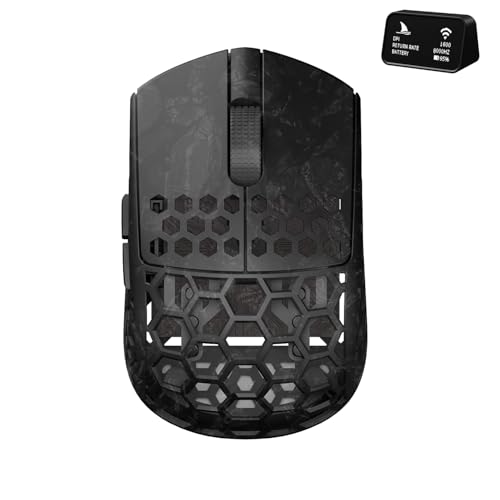
For competitive players prioritizing rapid flicks and micro-adjustments, the Darmoshark M5Air Mini Fingertip Grasp Gaming Mouse is our top recommendation for September 2026. Its specialized 31-gram carbon fiber chassis and 8K polling rate provide unmatched control when paired with responsive gaming monitors.
If you want a versatile tournament-grade alternative with extended battery life, the Razer Viper V3 Pro Wireless Esports Gaming Mouse offers stellar 54-gram balance. Budget-conscious gamers can also consider the Logitech G305 Lightspeed Wireless Gaming Mouse for dependable wireless performance across 5 evaluated contenders.


Best Gaming Mouse for Finger Tip Grip: Fast Aiming Buying Guide
Total Weight and Chassis Agility
Fingertip aiming relies entirely on finger articulation rather than whole arm or wrist momentum. A mouse weighing under 60 grams reduces inertia and allows instant directional stops during intense shooter duels. Selecting a heavier chassis can slow reaction times and strain small hand muscles over extended sessions.
Ultralight designs like carbon fiber or honeycomb frames minimize wrist fatigue without sacrificing structural rigidity. When paired with high refresh rate displays like 4K and high resolution displays, lower weight directly translates into crisp visual tracking. You should always balance featherlight construction against your comfort preference for grip firmness.
Shell Geometry and Hump Height
Fingertip grip players need a low rear profile so the palm never collides with the shell during downward pulls. A flat back provides the vertical clearance required for finger-drawn vertical recoil control in competitive shooters. High-hump mice force your hand into a palm grip and restrict downward micro-adjustments.
Narrow side walls with subtle inward curves provide solid anchor points for the thumb, ring, and pinky fingers. Symmetrical shapes generally offer the most consistent finger placement across various hand sizes. Checking overall length ensures your fingertips rest comfortably near the front switches without stretching.
Sensor Precision and Lift-Off Distance
Modern competitive sensors like the PAW3950 and Focus Pro series deliver flawless 1:1 tracking without hardware acceleration. Accurate sensors ensure that every microscopic finger twitch translates faithfully to your crosshair on screen. Poor tracking algorithms introduce jitter and smoothing that degrade precision during rapid flick shots.
Customizable lift-off distance prevents unwanted pointer drift when repositioning your mouse during low-sensitivity swipes. Serious players often calibrate sensor height to under one millimeter to keep cursor movement completely static while repositioning. Consistent surface compatibility on both cloth and glass pads guarantees reliable tracking during clutch tournament rounds.
Polling Rate and Wireless Latency
Standard gaming mice communicate at 1000 Hz, which sends position updates every millisecond to your operating system. Advanced models now support 4000 Hz or 8000 Hz polling rates to deliver sub-millisecond report intervals for buttery smooth cursor paths. Using higher polling rates requires a capable computer processor and smooth desktop and external monitors to see real benefits.
Proprietary wireless protocols deliver lag-free transmission that rivals traditional wired connections. Stable 2.4 GHz dongles prevent packet drops and interference in crowded wireless environments. Choosing a mouse with robust wireless tech ensures consistent input timing during critical competitive encounters.
Switch Responsiveness and Actuation Feel
Optical switches utilize light beams to register inputs, completely eliminating mechanical bounce delay and double-click issues. Fast actuation times around 0.2 milliseconds give fingertip aimers a distinct timing advantage in rapid-fire scenarios. Mechanical switches offer satisfying tactile feedback but can wear down faster over millions of intense clicks.
Light actuation force prevents your fingertips from displacing the crosshair when tapping the primary buttons. Crisp switch tensioning guarantees swift reset cycles for semi-automatic weapon fire. Evaluating switch durability ensures your investment maintains consistent click feel throughout months of rigorous daily gameplay.
Battery Architecture and Weight Distribution
Rechargeable lithium-ion batteries keep the total mouse weight centered and light for optimal balance during fast flicks. Replaceable AA setups provide immense battery life extending up to hundreds of hours without needing a cable. However, internal battery placement can shift the center of mass toward the rear if not properly engineered.
USB-C quick charging lets you replenish hours of wireless playtime during a brief tournament intermission. Flexible paracord charging cables ensure you can continue playing comfortably even if the battery runs low mid-match. Assessing power management software helps you customize sleep timers to maximize battery longevity between recharges.
How We Evaluated
We evaluated each mouse by comparing verified technical specifications, sensor architectures, and chassis weights across Logitech G, Razer, Darmoshark. Our objective analysis focused on shell dimensions, button switch latencies, and wireless polling stability to determine practical suitability for fingertip grip aiming styles.
We also assessed weight distribution balance, surface glide characteristics, and companion software capabilities for each featured device. By examining trade-offs between battery longevity and overall mass across the $29.99 – $129.99 spectrum, we identified reliable options tailored for competitive gamers.
Common Mistakes to Avoid
Choosing a mouse with a tall rear hump is a frequent mistake because it prevents downward finger articulation during recoil control. Fingertip aimers require low-profile designs that leave ample clearance between the palm and the chassis.
Overlooking overall mouse weight can lead to excessive muscle strain and slower flick corrections during intense matches. Heavy shells exceeding 80 grams create unnecessary inertia that combats nimble finger movements.
Ignoring switch actuation weight can cause unintentional crosshair shifting whenever you press the primary buttons. Stiff switches force downward pressure that displaces your aim during precision sniper shots.
Relying on Bluetooth connections for fast-paced gaming introduces noticeable input delay and unstable polling rates. Always utilize dedicated 2.4 GHz wireless dongles or high-speed wired modes to ensure low latency tracking.
Buying Checklist
- Confirm total weight sits ideally between 30 and 65 grams for minimal finger inertia.
- Verify the mouse hump height is low enough to prevent palm contact during micro-adjustments.
- Check that the optical sensor supports minimum 1000 Hz polling and flawless high-DPI tracking.
- Ensure optical or high-durability mechanical switches offer light actuation and crisp reset travel.
- Confirm the wireless connection uses a dedicated 2.4 GHz USB dongle rather than high-latency Bluetooth.
- Inspect battery specifications to balance total operating hours against overall chassis mass.
- Verify companion software allows custom DPI steps, polling rate selection, and lift-off adjustment.
- Check that glide skates use pure PTFE material for smooth movement across your mouse pad.
Final Thoughts
Selecting the right pointer for fingertip grip fundamentally changes your aiming speed and tracking consistency in competitive gaming. The Darmoshark M5Air Mini Fingertip Grasp Gaming Mouse stands out as our top overall choice thanks to its featherlight 31-gram carbon fiber body and bleeding-edge 8K polling capabilities.
For competitive esports players wanting exceptional optical switches and balanced handling, the Razer Viper V3 Pro Wireless Esports Gaming Mouse delivers championship-caliber tracking. If you are shopping on a strict budget, the Logitech G305 Lightspeed Wireless Gaming Mouse provides dependable wireless gaming performance at an accessible entry point.
Before making a final choice, review our How To setup guides to optimize your sensitivity settings and Windows pointer precision. Pairing an ultralight mouse with the right peripherals will unlock your true aiming potential across all your favorite fast-paced titles.
Frequently Asked Questions
Why is an ultralight mouse essential for fingertip grip aiming?
Ultralight mice reduce the physical inertia required to start and stop sudden cursor movements using only your fingers. This allows for lightning-fast micro-corrections and prevents hand fatigue during marathon gaming sessions.
Which pick is best among Best Gaming Mouse for Finger Tip Grip: Fast Aiming in 2026?
The Darmoshark M5Air Mini Fingertip Grasp Gaming Mouse is the leading choice in 2026 for pure fingertip aimers due to its 31-gram weight and 8K polling rate.
How does mouse hump height affect fingertip grip players?
A lower rear hump ensures that your palm does not bump into the back of the mouse when pulling downward. This open space provides the vertical clearance needed to control weapon recoil purely with finger flexion.
Are optical switches better than mechanical switches for fast aiming?
Optical switches actuate via light beams to achieve virtually zero debounce delay and prevent accidental double clicks over time. They also offer light, consistent clicks that keep your crosshair steady during frantic clicking.
Does higher polling rate improve fingertip aiming accuracy?
Higher polling rates such as 4000 Hz and 8000 Hz reduce input delay and create smoother cursor trajectories on modern high refresh gaming monitors. However, 1000 Hz remains the competitive standard and offers outstanding responsiveness with lower battery consumption.
Can ergonomic mice work for fingertip grip users?
While symmetrical mice are generally preferred for fingertip grip, lightweight ergonomic options like the Razer DeathAdder V3 Pro Wireless Gaming Mouse can work well for players with larger hands who desire slight contouring.
How often should I replace mouse feet on a lightweight gaming mouse?
Pure PTFE mouse skates typically last between six and twelve months depending on your play frequency and mouse pad texture. Replacing worn skates restores effortless glide, which is crucial for maintaining fine finger-level tracking precision.
Should I use Bluetooth or 2.4 GHz wireless for competitive gaming?
You should always use 2.4 GHz wireless or wired mode because Bluetooth introduces input lag and caps polling rates at lower frequencies. Dedicated wireless dongles ensure instantaneous communication between your mouse and computer.


