
Preserving teaching materials, office records, and personal photos requires a dependable thermal laminator that heats up fast and prevents document jams. When evaluating the Best Laminators in October 2026, the Fellowes Saturn™ 125 Thermal Laminator Machine stands out as our top recommendation for busy classrooms and professional environments. It features a fast one-minute warm-up phase alongside advanced jam detection sensors that protect critical paper items during high-volume jobs.
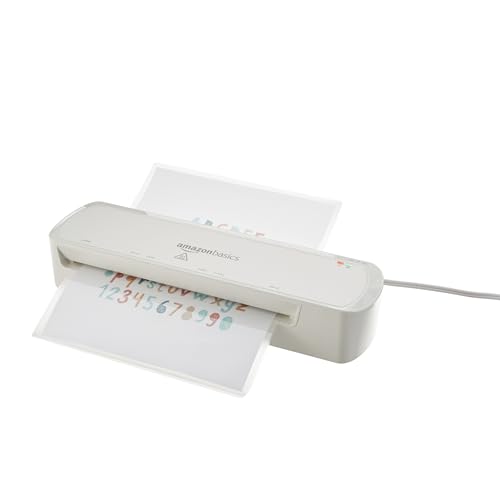
For budget-conscious buyers or home users who need basic document protection, the Amazon Basics 9-Inch Thermal Laminator Machine delivers incredible simplicity and reliable performance. You can explore more productivity resources across our How To guides to organize your home workplace efficiently. Below, you will find our complete comparison of 7 top options available on the market today.


Best Laminators Buying Guide for 2026
Entry Format and Throat Width
The entry width of a laminating machine determines the maximum document size you can process without folding or trimming. Standard desktop units usually feature a nine-inch entry slot, which accommodates standard letter, legal, and photo paper sizes effortlessly. These compact machines fit easily on crowded desks and offer plenty of capacity for routine daily filing tasks.
If you frequently work with oversized items like posters, instructional banners, or ledger sheets, a wide-format 13-inch throat is essential. Models with wider feeds also allow you to run small items, like business cards or flashcards, side by side to save time. Choosing the right feed width prevents unnecessary document trimming and expands your creative project possibilities.
Warm-Up Speed and Heating Systems
Heating technology determines how quickly a machine reaches operating temperature and how evenly heat transfers to pouches. Traditional thermal units can require three to five minutes to warm up before displaying a ready indicator light. Waiting for slow heating elements can create annoying bottlenecks during busy work sessions.
Modern quick-heat systems use advanced heating elements to reach operating status in as little as 60 seconds. Fast warm-up capability saves valuable time when you need to laminate a single document before heading out. High-grade rollers also maintain consistent internal temperatures to prevent cloudy patches and unsealed pouch edges.
Pouch Thickness Compatibility
Laminating pouch thickness is measured in mils, with one mil representing one thousandth of an inch. Basic document protection typically uses 3-mil pouches, which maintain document flexibility while offering protection against spills and mild surface wear. Most entry-level laminators operate smoothly with standard 3-mil film.
For heavy-duty items like ID badges, outdoor signage, or reusable classroom worksheets, 5-mil pouches provide superior rigidity and tear resistance. Select a machine equipped with multi-thickness heat selectors to ensure adequate melting of thicker pouches. If you also maintain an ergonomic desk setup with external computer monitors for comfort, keeping durable reference cards nearby improves daily productivity.
Using a 5-mil pouch on a 3-mil heat setting will result in incomplete adhesion and cloudy film transparency. Conversely, applying high heat to thin film can cause scorching or severe paper curling inside the housing. Dual-temperature controls allow you to switch settings reliably based on your specific film choice.
Jam Prevention and Release Mechanisms
Paper jams occur when pouches feed crookedly or bunch up around internal roller assemblies. A severe jam can ruin important original documents and potentially overheat the internal motor if left unchecked. Look for models equipped with active jam sensors or dedicated manual release levers.
Manual ABS release levers physically unlatch the drive gears so you can manually slide out misfed pouches safely. Advanced models include automatic reverse functions or sensor alarms that instantly halt operation when misalignments occur. These protective features safeguard sensitive original papers and extend the service life of your equipment.
Hot vs. Cold Laminating Options
Thermal laminating uses heated rollers to melt thermal adhesive, creating a permanent, crystal-clear protective bond over paper. Heat lamination works perfectly for standard printed pages, certificates, and sturdy photographic paper. However, high thermal application can damage heat-sensitive items like thermal receipts or delicate photos.
Cold lamination relies on pressure-sensitive adhesive pouches that require no thermal element to form a tight seal. Selecting a dual-mode laminator gives you total flexibility to handle standard thermal sheets alongside heat-sensitive documents. Having access to cold mode protects irreplaceable family heirlooms and delicate prints from heat damage.
Setting up an organized home workplace with hi res monitors for productivity and a clear laminating station makes project management effortless. Having access to dual-temperature modes ensures every paper format receives appropriate protective treatment.
Specification Overview
| Feature | Standard 9-Inch Unit | Wide 13-Inch Unit |
|---|---|---|
| Maximum Entry Width | 9 Inches (Letter / Legal) | 13 Inches (A3 / Posters) |
| Average Warm-Up Time | 3 to 5 Minutes | 60 Seconds to 3 Minutes |
| Supported Pouch Thickness | 3 mil to 5 mil | 3 mil to 5 mil |
| Primary Use Case | Home & Small Office | Classrooms & Large Offices |
How We Evaluated
Our evaluation process focuses on analyzing key performance specifications, structural features, and functional versatility across leading thermal laminators. We carefully assessed entry slot width, rated warm-up speeds, motor output, and jam-clearing mechanisms from official manufacturer data. This structured approach allows us to compare real-world utility across home, office, and classroom environments objectively.
We also analyzed thermal roller configurations and temperature selection controls to determine document finish quality and long-term durability. By examining pouch thickness support and safety auto-off functions, we identified which models offer maximum value and operational convenience. Our goal is to provide clear, data-driven recommendations without relying on promotional claims.
Common Mistakes to Avoid
One common error is inserting the open end of a laminating pouch into the feed slot first. Always feed the sealed edge into the machine first to prevent air bubbles and adhesive leakage inside the rollers. Inserting open edges leads directly to severe roller jams and uneven pouch seals.
Another mistake is failing to wait for the ready indicator light before feeding your initial document. Feeding pouches into underheated rollers results in cloudy, incomplete lamination that easily peels apart. Give the machine sufficient time to reach stable thermal equilibrium before starting your task.
Users also frequently overlap small items inside a single pouch or cut pouches before running them through rollers. Exposed adhesive from pre-cut film sticks directly to internal heating components, causing sticky buildup and persistent jams. Always laminate intact pouches first and trim around your items afterward.
Buying Checklist
- Confirm the maximum throat width matches your largest intended document dimensions.
- Verify that the unit supports 5-mil film if you require extra rigid protection.
- Check the listed warm-up speed to ensure it fits your daily workplace workflow.
- Ensure the machine features an accessible ABS jam release lever or automatic reverse switch.
- Look for cold laminating mode support if you plan to process heat-sensitive documents.
- Confirm the presence of an auto shut-off timer to save energy and enhance safety.
- Verify that essential starter pouches or basic finishing tools are included in the box.
Final Thoughts
Selecting the right machine from the Best Laminators available in 2026 depends on document size requirements and operational frequency. For high-volume teaching environments and busy offices, the Fellowes Saturn™ 125 Thermal Laminator Machine is our top overall pick. Its rapid 60-second InstaHeat feature and advanced jam detection prevent costly downtime during big projects.
If you need maximum versatility for larger posters and craft sheets, the multi-functional 13 Inch Laminator Machine offers impressive performance with dual hot and cold settings. Meanwhile, home users seeking essential document protection will appreciate the affordable Amazon Basics 9-Inch Thermal Laminator Machine. Exploring reliable desktop setups like our recommended desktop display solutions helps maintain an organized and efficient working environment.
FAQs
What entry width do I need for Best Laminators in 2026?
A standard 9-inch entry slot is perfect for processing letter, legal, and photo paper sizes. If you work with oversized posters or wish to process multiple smaller items side by side, opt for a 13-inch model.
How long do thermal laminating machines take to warm up?
Standard entry-level units typically require three to five minutes to reach operating temperature. High-speed units with rapid heating technology warm up in just 60 seconds, significantly reducing wait times.
What is the difference between 3 mil and 5 mil laminating pouches?
3-mil film provides flexible protection ideal for general paperwork and standard documents. 5-mil film creates a thicker, more rigid barrier designed for heavy-handling items like ID cards and outdoor signage.
Can I laminate photos safely in a thermal laminator?
Yes, standard photographic paper handles thermal lamination well on modern machines. However, delicate or vintage photographs should be laminated using cold mode or thermal settings specifically designed for photo media.
What should I do if a paper jam occurs inside the machine?
Turn off the power immediately and press the ABS release lever to disengage internal rollers. Carefully pull the trapped pouch out from the rear or front feed opening while holding down the release mechanism.
Why is cold laminating mode useful on modern devices?
Cold laminating mode utilizes pressure-sensitive pouches that do not require heat to seal. This process protects heat-sensitive thermal prints, receipts, and delicate artwork from heat damage. You can read more about workspace optimization in our guide to high resolution computer monitors for your office setup.
Do thermal laminators turn off automatically when left idle?
Many modern units include auto-shutoff safety functions that turn off heating elements after 30 minutes of inactivity. This feature saves electricity and eliminates potential overheating hazards in busy workplaces.
Can I cut a laminating pouch before running it through rollers?
No, you should never trim pouches before passing them through a laminator. Pre-cutting exposes inner glue surfaces that stick to hot rollers, creating messy residue and severe machine jams.