

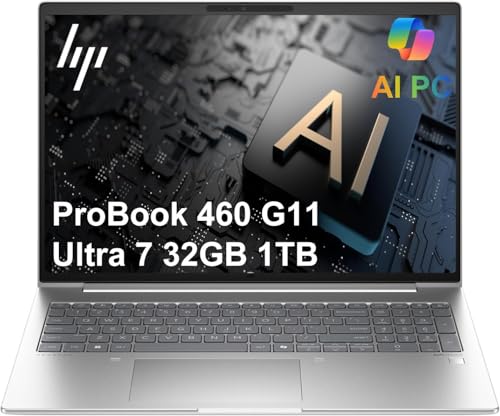
Choosing the right hardware makes a significant difference when handling complex financial models and managing dense spreadsheet applications daily. The HP ProBook 460 G11 16″ Laptop stands out as our top pick for balance, security, and multitasking speed. Check out our detailed guide on Best External Computer Monitors for Comfort at Work to build an ergonomic office setup.
For professionals seeking an affordable entry point without sacrificing core functionality, the Lenovo ideaPad 15.6″ FHD Laptop Computer delivers essential performance for general ledger work and tax reporting. In this guide, we evaluated 7 models for November 2026 to pinpoint the Best Laptops for Accounting Professionals across all budgets.



Best Laptops for Accounting Professionals Buying Guide for 2026
System RAM and Multitasking Capacity
Accounting applications like QuickBooks, SAP, and Excel continuously consume system memory when opening massive workbooks or data queries. Having at least 16GB of high-speed RAM prevents stuttering, while 32GB allows seamless switching between heavy database applications.
Lower memory limits force the operating system to swap data to the hard drive, creating frustrating delays during tax season. Investing in expandable memory ensures your laptop handles future software updates without system slowdowns.
Processor Performance and Calculation Speed
Complex macro recalculations and financial simulations rely heavily on multi-core processor performance to finish tasks quickly. Modern Intel Core Ultra and AMD Ryzen processors feature dedicated neural engines that speed up background data processing.
Higher clock speeds ensure that data validation scripts run smoothly alongside modern operating systems like Windows 11 Pro. Pairing a modern processor with a secondary display from our Desktop & External Monitors collection enhances overall workplace productivity.
Display Size and Aspect Ratio
Viewing multi-column financial reports requires ample vertical and horizontal visual space to reduce constant scrolling. A 16-inch or 17-inch display with a 16:10 aspect ratio offers significantly more spreadsheet rows than traditional widescreen monitors.
Crisp anti-glare panel finishes help minimize eye fatigue during extended audit sessions under bright office overhead lighting. If you plan to pair your laptop with home displays, explore our guide on Best Hi Res Monitors for Productivity and Comfort.
Keyboard Ergonomics and Numeric Keypad
Data entry speed drops dramatically when financial professionals lack access to an integrated physical numeric keypad on their keyboard. Full-size layouts allow accountants to input numerical figures rapidly without altering finger placement across standard alpha rows.
Tactile key travel and comfortable key spacing prevent physical strain when working long hours during monthly closeouts. Backlit keys further assist typing accuracy when operating in dimly lit flight cabins or late-night remote environments.
Security Features and Data Encryption
Financial records contain sensitive client data that must remain protected against unauthorized access and digital breach attempts. Hardware features like TPM 2.0 security chips, fingerprint readers, and webcam privacy shutters provide multi-layer protection.
Enterprise software environments demand operating systems like Windows 11 Pro to enforce BitLocker encryption and secure remote access. Choosing hardware built with military-grade testing ensures structural resilience alongside digital data defense.
Storage Speed and Drive Capacity
Solid state drives using PCIe NVMe interfaces allow accounting software to boot instantly and retrieve large data files quickly. A 1TB drive provides plenty of space for archived client files, tax records, and local database backups.
Low-capacity storage drives quickly become congested, which impacts overall system responsiveness and file transfer rates. Prioritizing solid-state technology guarantees long-term durability compared to legacy spinning hard drives.
| Feature | Minimum Recommended | Ideal Specification |
|---|---|---|
| RAM | 16GB DDR4 / DDR5 | 32GB DDR5 |
| Storage | 512GB NVMe SSD | 1TB PCIe 4.0 SSD |
| Display | 15.6-inch FHD (1920×1080) | 16-inch WUXGA / 17-inch IPS |
| Security | TPM 2.0 & Fingerprint | TPM 2.0, Fingerprint & Privacy Shutter |
How We Evaluated
We conducted an in-depth analysis of technical specifications across modern enterprise laptops to evaluate performance for accounting work. Our evaluation focused on processing speed, memory efficiency, display clarity, keyboard ergonomics, and built-in hardware security features.
By analyzing real-world hardware capabilities from official product documentation, we identified which laptops balance speed, mobility, and value. This objective approach ensures our recommendations address the real demands of tax preparation, auditing, and corporate finance.
Common Mistakes to Avoid
Purchasing a ultra-compact laptop without a physical numeric keypad often slows down numerical data entry during heavy data work. Always verify keyboard specifications if keying numbers forms a primary part of your daily routine.
Choosing models with only 8GB of non-upgradable RAM creates severe bottlenecks when running multiple enterprise databases simultaneously. Make sure your chosen system contains enough memory to handle growing file sizes over several years.
Overlooking display aspect ratios can lead to unnecessary scrolling when reviewing long ledger sheets and financial statements. Opting for a 16:10 display ratio provides extra vertical space that dramatically improves visual workflow efficiency.
Ignoring hardware security modules leaves sensitive client records vulnerable during travel or public Wi-Fi usage. Look for integrated security tools like fingerprint readers and firmware TPM protection to keep data secure.
Buying Checklist
- Verify the processor features at least 4 to 8 high-performance cores for fast calculations.
- Confirm system memory meets or exceeds 16GB RAM for efficient multi-application workflows.
- Check if the keyboard includes a dedicated numeric keypad for comfortable data entry.
- Ensure the display features an anti-glare coating to reduce eye strain in brightly lit offices.
- Validate that firmware TPM 2.0 is included for drive-level data encryption capability.
- Select a system with a solid-state drive offering at least 512GB or 1TB capacity.
- Confirm essential ports like USB-C, USB-A, and HDMI are built-in without requiring extra adapters.
- Check weight and battery life ratings if you regularly travel between client office locations.
Final Thoughts
Choosing from the Best Laptops for Accounting Professionals comes down to matching your daily software requirements with appropriate hardware capability. For overall productivity, security, and speed, we highly recommend the HP ProBook 460 G11 16″ Laptop. If you are looking for guidance on setting up an effective home workspace, explore our resources in the How To section.
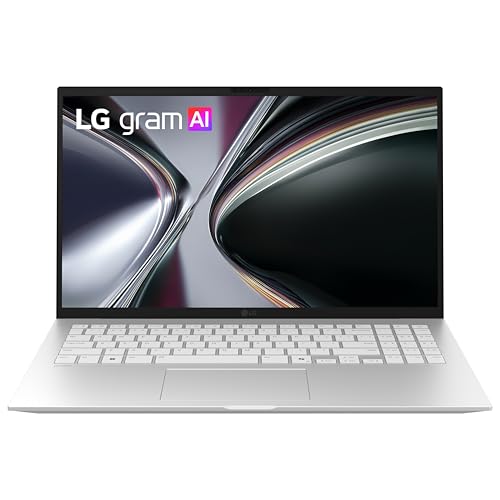
Professionals who prioritize extreme portability without sacrificing screen real estate should select the LG gram Pro 16-inch Thin and Lightweight Dual AI. Meanwhile, budget-conscious users will find excellent value in the reliable Lenovo ideaPad 15.6″ FHD Laptop Computer.
For more display advice to complement your new business laptop, feel free to browse our detailed breakdown on Best High Resolution Computer Monitors for Work. Investing in proper hardware ensures smooth performance throughout tax season and beyond.
Frequently Asked Questions
How much RAM is needed for Best Laptops for Accounting Professionals in 2026?
We recommend a minimum of 16GB RAM for smooth multitasking across financial software and web applications. Choosing 32GB RAM is ideal if you manage massive spreadsheets or complex databases regularly.
Is a dedicated numeric keypad essential for accounting work?
While not strictly mandatory, a dedicated numeric keypad significantly increases numerical entry speed and accuracy. Most 15.6-inch and 16-inch laptops include full keypads for efficient financial data input.
Which operating system is best for accounting laptops?
Windows 11 Pro is preferred in corporate finance due to native BitLocker encryption and seamless enterprise software compatibility. Check out our guide on Computer Monitors & Displays to expand your Windows desktop setup.
Do accounting laptops require powerful dedicated graphics cards?
No, standard financial modeling and database tasks rely primarily on processor cores and system memory. Integrated graphics solutions from Intel or AMD handle dual external monitors and daily computing tasks easily.
Why is display screen size important for accounting tasks?
Larger screens offer additional vertical space and higher resolutions, letting you view more spreadsheet columns simultaneously. A 16-inch screen balances portability with excellent visual clarity for detailed file reviews.
Are cloud accounting apps lighter on system hardware requirements?
Cloud accounting apps reduce local storage needs, but web browsers still consume high amounts of system RAM. Having a fast processor and sufficient memory ensures cloud dashboards load quickly without stuttering.
What security features should accounting laptops have?
Look for hardware features such as TPM 2.0 security chips, fingerprint authentication, and physical webcam shutters. These protections keep confidential financial records safe during office work and remote travel.









