

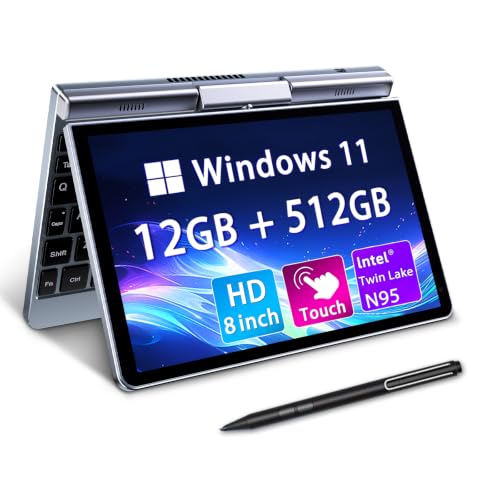
For mobile professionals needing full desktop capability in an ultraportable chassis, the 8″ Mini 2-in-1 Touchscreen Laptop, Intel N95 is our top recommendation. It balances strong multi-core processing with generous memory to handle spreadsheets and browsing on the move.
Budget-minded shoppers should look at the Dell Latitude 3190 11.6″ HD 2-in-1 Touchscreen for dependable daily assignments and sturdy convertible use. You can also review our guide on Best External Monitors if you plan to connect your mini laptop at a desk.



Best Mini Touch Screen Laptops: Compact Power Picks Buying Guide
Selecting the right compact machine requires balancing tiny physical dimensions against real computing performance. Our evaluation of 5 models across KOOTIGERS, Dell, KOOFORWAY and more reveals key criteria every buyer must weigh before deciding.
Screen Size and Touch Precision
Mini laptops feature display sizes ranging from 8 inches up to 13 inches. An 8-inch panel delivers extreme portability for cramped spaces, but tiny interface elements require precise digitizer response or active stylus input.
Look for multi-touch support and high-density panels that render small system fonts clearly. If you spend hours reading text, pairing your compact machine with Best HD Computer Monitors at your workstation prevents excessive visual fatigue.
Processor Efficiency and Thermal Design
Compact enclosures provide limited interior room for heat dissipation. Modern quad-core processors like the Intel N95 achieve clock speeds up to 3.4GHz while keeping power draw low enough for compact chassis designs.
Fanless cooling creates silent operation during meetings and lectures but may throttle under continuous heavy rendering. Evaluate your routine tasks so you choose an architecture optimized for sustained productivity without excessive heat buildup.
Form Factor and 360-Degree Hinge Durability
A versatile 2-in-1 convertible hinge lets a device rotate seamlessly between standard laptop typing and handheld tablet mode. Strong metal hinges prevent screen wobble when tapping buttons or using active styluses during presentations.
CNC-machined aluminum frames resist flex and protect sensitive internal boards better than plastic shells. This durability is essential if you frequently stow your miniature PC into backpacks or travel luggage without padded sleeves.
Memory Capacity and Storage Speed
Modern desktop operating systems demand sufficient memory to keep multiple browser tabs and office suites running concurrently. Aim for at least 8GB to 12GB of LPDDR5 RAM to avoid sluggish background reloading.
Fast solid-state storage ensures rapid boot times and quick app loading. Opting for a 512GB or 1TB M.2 SSD gives you plenty of local headroom for offline documents, media libraries, and essential software.
Battery Endurance and USB-C Fast Charging
Smaller chassis footprints inevitably limit internal battery pack dimensions. Most mini laptops deliver between 4 and 6 hours of continuous active use, while larger ultraportables can reach up to 16 hours.
Universal USB-C charging support makes mobile travel significantly easier by allowing you to share power banks and wall adapters. Rapid charging capabilities that restore full power in two hours keep downtime to an absolute minimum.
Port Connectivity and Display Output
Physical ports on compact computers are precious real estate. Ensure your chosen model includes a full-featured USB-C port, standard USB-A, and a dedicated HDMI output for connecting external gear.
Adding an external display can turn your portable unit into an expansive desktop rig. Learn more about optimal desktop setups in our guide to Best Desktop Monitors for extended office sessions.
How We Evaluated
We analyzed 5 leading compact laptops by examining verified technical specifications, user ergonomics, hardware efficiency, and physical durability. Our data-driven evaluation compared memory configurations, real-world port selections, and screen resolutions across KOOTIGERS, Dell, KOOFORWAY and more.
We focused on how well each system handles everyday multi-tasking, office workflows, and travel scenarios. This objective review identifies the strengths and practical trade-offs of each miniature computer to help you make an informed decision.
Common Mistakes to Avoid
One frequent mistake is assuming tiny keyboards offer the exact key spacing of standard desktop keyboards. Compact 8-inch laptops require a brief adjustment period, so plan on using external peripherals for typing extended essays.
Another error is overlooking RAM limits on base configurations. Buying a system with only 4GB of memory can severely restrict Windows 11 multi-tasking, making 8GB or 12GB configurations far better long-term investments.
Buyers also frequently forget to verify external video output capabilities. Always confirm that your device supports HDMI or DisplayPort over USB-C if you intend to link it with secondary monitors at home.
Buying Checklist
- Confirm the screen size and resolution match your mobility and eyesight requirements.
- Check that the processor provides at least four physical cores for smooth multi-tasking.
- Verify that the memory is at least 8GB or 12GB to handle modern desktop software.
- Ensure internal SSD storage provides 128GB to 1TB of space for your personal files.
- Check for 360-degree hinge flexibility if you plan to use the device as a handheld tablet.
- Confirm USB-C charging support for universal compatibility with portable power banks.
- Review available physical ports including USB-A and HDMI for connecting external accessories.
- Check that active stylus or digital pen support is included if you take handwritten notes.
Final Thoughts
When mobility and versatile touch navigation are your main priorities, the 8″ Mini 2-in-1 Touchscreen Laptop, Intel N95 stands out as the best overall choice. Its 12GB of RAM and large storage provide impressive multi-tasking capabilities in an extraordinarily compact form factor.
For students and cost-conscious users needing solid construction, the Dell Latitude 3190 11.6″ HD 2-in-1 Touchscreen represents unbeatable practical value. If you require premium battery life and high-end processing, the Apple 2026 MacBook Neo 13-inch Laptop with A18 Pro delivers exceptional all-day performance.
For additional setup ideas and display pairing suggestions, explore our How To category to maximize your portable workstation efficiency.
Frequently Asked Questions
Can mini touch screen laptops run full desktop operating systems in 2026?
Yes, modern mini laptops run full versions of Windows 11 Pro or macOS. This allows you to run standard desktop applications such as Microsoft Office, full web browsers, and creative tools without mobile operating system restrictions.
What is the top-rated option among Best Mini Touch Screen Laptops: Compact Power Picks in 2026?
The 8″ Mini 2-in-1 Touchscreen Laptop, Intel N95 ranks as the top-rated choice for compact power. It combines 12GB of fast memory with an ultra-portable CNC metal chassis and versatile 2-in-1 stylus support.
Are 8-inch laptop keyboards comfortable for long typing sessions?
Keyboards on 8-inch devices are optimized for quick emails, taking notes, and mobile navigation. For typing long documents or extended coding sessions, pairing the unit with a full-sized external keyboard is recommended.
How long does the battery typically last on mini 2-in-1 laptops?
Most 8-inch to 11-inch mini convertible laptops deliver between 4 and 6 hours of continuous productivity. Larger ultraportable models with high-efficiency processors can achieve up to 16 hours of battery life on a single charge.
Can I connect a mini touch screen laptop to an external desktop display?
Most mini laptops feature HDMI ports or DisplayPort-enabled USB-C ports for easy connection to external monitors. Check our recommendations for Best HDMI Monitors to set up a comfortable dual-screen workstation.
Do mini touchscreen laptops support stylus pen input for handwriting?
Many convertible mini laptops include active stylus pen support with pressure sensitivity. This feature makes them excellent tools for digital signing, sketching, and taking handwritten lecture notes directly on the screen.
Is 12GB of RAM necessary for a mini laptop?
Having 12GB of RAM provides substantial breathing room for Windows 11 multi-tasking and prevents browser tab reloading. While 4GB works for basic tasks, 12GB guarantees smoother overall performance across demanding business applications.
How do mini touch screen laptops handle heat during continuous use?
Compact laptops utilize energy-efficient mobile processors and metal chassis materials that dissipate heat passively or via quiet miniature fans. They remain comfortable for standard office tasks while regulating performance under prolonged workloads.




