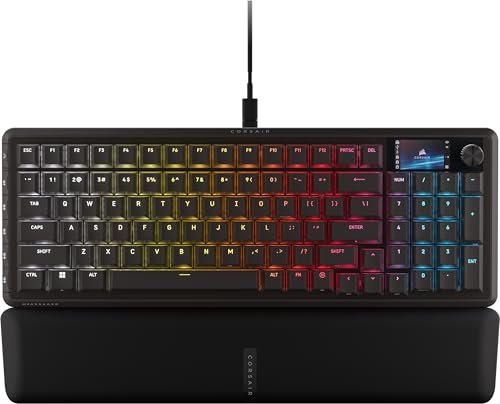
Finding the right peripheral starts with matching key switches to your preferred typing feel and response speed. The Corsair K65 Plus Wireless RGB 75% Mechanical leads our list because it combines pre-lubricated linear switches with excellent sound dampening in a compact form factor. It gives gamers and everyday typists an ultra-smooth keystroke experience while keeping desktop real estate wide open for mouse movement.
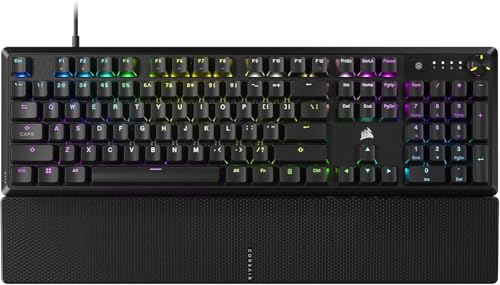
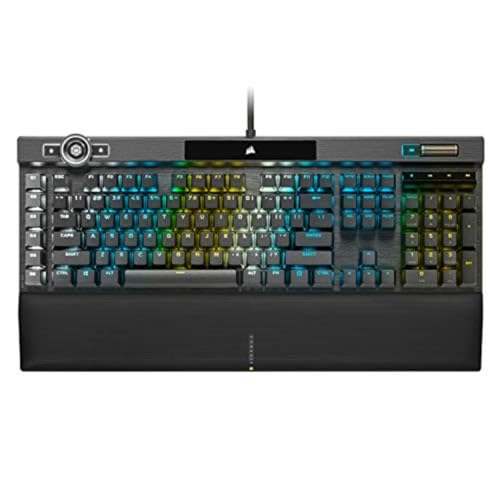
If you require rapid competitive responses, the Corsair K70 PRO TKL RGB Tenkeyless Mechanical delivers adjustable magnetic switches with instant reset points for precision movement. Budget-conscious users can look toward the CORSAIR K70 CORE RGB Mechanical Wired, which provides solid mechanical switches and dedicated rotary media controls. To complete your workstation upgrade, consider pairing your new board with dedicated gaming monitors for maximum visual fluidity.



Best Corsair Keyboards Buying Guide
Mechanical vs. Magnetic Hall Effect Switches
Selecting the proper switch mechanism defines your typing texture and input response during intense gaming sessions. Standard mechanical switches utilize physical contacts that actuate at fixed distances, offering consistent tactile feedback across every stroke. High-end linear options come pre-lubricated to eliminate scratchiness and deliver clean key movement.
Magnetic Hall Effect switches replace traditional contacts with magnetic sensors to measure travel distance continuously. This technology enables rapid trigger functionality, allowing keys to reset instantly the moment your finger releases pressure. Gamers who prioritize fast directional changes in competitive shooters benefit significantly from this adjustable magnetic actuation tech.
Layout Options and Desk Space
Keyboard form factors range from massive full-sized boards down to compact footprint designs tailored for minimalists. Full-size layouts retain the traditional number pad and dedicated arrow cluster, making them ideal for heavy data entry and productivity workloads. However, large boards restrict available space for broad mouse sweeps during fast-paced aiming.
Tenkeyless and 75 percent layouts eliminate the numeric pad to reclaim valuable physical desk real estate. These compact frames preserve arrow keys and primary function rows while optimizing hand positioning for ergonomic comfort. Choosing smaller layouts helps create clean desktop arrangement options that accommodate low-sensitivity mouse gaming.
Keycap Materials and Surface Durability
The material composition of keycaps determines how well your keyboard resists wear over years of daily typing. Standard ABS plastic keycaps feel smooth initially, but they can develop permanent shiny patches from skin oils over time. Double-shot ABS construction improves legend clarity, though surface wear remains a long-term potential drawback.
Sublimated PBT keycaps offer superior textured grip and resistance to surface shine and oil degradation. The high-density plastic maintains its crisp surface feel and legend readability through millions of intense keystrokes. Investing in PBT keycaps guarantees your keyboard preserves its premium appearance and tactile quality over time.
Polling Rates and Signal Latency
Input latency measures how quickly your keystroke signals transmit from the mechanical switch to your system computer. Standard gaming keyboards operate at a 1,000Hz polling rate, reporting key status updates once every single millisecond. This speed provides plenty of responsiveness for standard daily tasks and casual gaming workflows.
Advanced performance models utilize hyper-polling microprocessors capable of reporting at rates up to 8,000Hz. This high reporting frequency reduces input delay to microscopic fractions of a millisecond for competitive reflex gaming. While high polling rates require extra processing power, they eliminate input bottlenecks during intense tournament matches.
Acoustic Sound Dampening and Insulation
Hollow keyboard cases can amplify metallic pinging sounds and harsh echoing noises during rapid typing sessions. Modern internal design incorporates multiple layers of sound-dampening foam to absorb unwanted high-frequency vibrations. These internal dampeners create a deeper, quieter acoustic profile that enhances overall typing comfort.
Factory pre-lubricated switches and stabilized stems further reduce unwanted rattling noises from wider modifier keys. Combining multi-layer foam insulation with lubricated stabilizers yields a premium, subdued sound that will not disrupt nearby office colleagues. Typists who spend long hours writing appreciate the subdued noise profile of dampened mechanical frames.
Stream Deck and Software Macro Integration
Broadcasting content and managing complex creative applications requires quick access to multi-step custom key commands. Integrated software platforms let users program intricate macro sequences and rebind key functions to specialized hotkey buttons. Premium models even incorporate physical LCD screens and multi-function rotary dials directly into the chassis frame.
Direct Elgato Stream Deck compatibility turns physical keyboard G-keys into full streaming broadcast control centers without extra hardware setup. Content creators can trigger OBS scenes, mute microphone channels, and switch lighting presets with single button taps. Following dedicated how-to setup tutorials makes configuring these software integrations simple and rapid.
How We Evaluated
Our evaluation process focuses strictly on analyzing verified technical specifications, switch actuation data, and acoustic dampening designs across 10 models. We evaluated polling rate performance, keycap material durability, and switch actuation adjustments across diverse price points ranging from $39.99 – $349.00. This data-driven approach isolates structural quality and software features without relying on subjective manufacturer marketing claims.
We also analyzed practical ergonomics, wireless connection stability, and multi-platform software ecosystem compatibility. By examining long-term material wear indicators alongside input latency specs, we identified which keyboard designs provide genuine utility for specific user needs. Our goal is delivering objective purchasing guidance based on physical product construction and verifiable performance benchmarks.
Common Mistakes to Avoid
One common mistake is purchasing magnetic switches with rapid trigger capabilities when your primary workload consists of standard document typing. Magnetic actuation excels in fast twitch games, but ultra-sensitive reset points can lead to accidental typos during everyday writing tasks.
Another frequent error is selecting full-size keyboards without measuring available desk space for comfortable mouse operation. Oversized boards force your mouse pad outward, causing shoulder strain during prolonged competitive gaming sessions where lower sensitivity mouse sweeps are required.
Buyers also frequently overlook keycap plastic composition, picking smooth ABS keycaps that quickly develop uncomfortable shiny surface oils. Choosing durable double-shot PBT keycaps ensures your key surfaces maintain their textured grip and legend clarity across years of heavy daily use.
Finally, ignoring acoustic dampening features can lead to loud metallic case pings that prove distracting during late-night gaming. Checking for internal sound-dampening foam layers guarantees a much quieter, more satisfying acoustic profile in shared living spaces.
Buying Checklist
- Confirm whether linear, tactile, or adjustable magnetic switches best fit your gaming or typing habits.
- Verify physical desk dimensions to determine if a 75 percent, TKL, or full-size layout is needed.
- Check keycap material specs to select double-shot PBT for long-term shine resistance.
- Ensure the keyboard supports required connection types like low-latency 2.4GHz wireless or USB hyper-polling.
- Look for internal foam dampening layers if quiet acoustic performance is a primary home or office requirement.
- Confirm software compatibility with iCUE or Elgato Stream Deck for custom macro programming.
- Verify whether a magnetic detachable wrist rest is included if hand positioning comfort matters.
Final Thoughts
Choosing the ideal peripheral depends entirely on balancing your primary gaming genres with everyday typing comfort. For most users, the Corsair K65 Plus Wireless RGB 75% Mechanical represents the best overall balance of compact design, acoustic insulation, and multi-device wireless convenience. Its smooth linear switches and quiet dampening foam deliver a superior out-of-the-box experience.
Competitive esports players needing absolute speed will find the Corsair K70 PRO TKL RGB Tenkeyless Mechanical ideal due to its rapid trigger magnetic switch adjustments. Meanwhile, gamers seeking maximum value can confidently pick the CORSAIR K70 CORE RGB Mechanical Wired for its solid aluminum top plate and smooth pre-lubricated keys. If you want high visual clarity alongside desktop performance, pairing your keyboard with Best External Computer Monitors for Comfort at Work creates an ergonomic gaming workspace.
Frequently Asked Questions
What makes magnetic Hall Effect switches different from traditional mechanical switches?
Magnetic switches use sensors to track physical travel distance continuously rather than relying on touching metal contacts. This design allows custom actuation points and rapid trigger resets, allowing instant key reactivation for high-speed competitive gaming actions.
Which layout size is top recommended among Best Corsair Keyboards in 2026?
Compact 75 percent and TKL layouts are highly popular in 2026 because they save desk space for mouse movement while retaining key function rows. Full-size layouts remain preferable for users who frequently perform numeric data entry and budget management tasks.
Are PBT keycaps noticeably better than standard ABS keycaps?
PBT keycaps feature a denser material structure that naturally resists surface shine, grease accumulation, and physical wear over extended usage. ABS keycaps tend to develop slippery shiny spots much faster, though double-shot molding keeps legend letters from fading.
How does Elgato Stream Deck integration benefit content creators?
Direct Stream Deck software support allows users to map streaming commands, audio muting, and scene switches to physical macro G-keys. This integration eliminates the need for separate desktop control modules, streamlining stream management directly on your primary board.
Do high hyper-polling rates like 8,000Hz actually improve gaming performance?
Hyper-polling reduces signal latency down to sub-millisecond levels by sending keystroke data to your PC up to eight times faster than standard boards. While casual gamers may not notice a dramatic difference, competitive players benefit from cleaner input consistency during fast movements.
Can wireless gaming keyboards match the response speed of wired models?
Modern 2.4GHz wireless connections deliver ultra-low latency that matches standard 1,000Hz wired connections without perceptible lag. Premium wireless boards also provide Bluetooth modes for multi-device switching alongside wired USB connections for simultaneous battery charging.
Why is sound dampening foam important in mechanical gaming keyboards?
Internal sound dampening foam absorbs metallic case echoes and vibrations produced when mechanical switches strike the aluminum mounting plate. This results in a deeper, quieter typing sound that improves tactile enjoyment and reduces ambient room noise for nearby family members.
How do membrane keyboards compare to mechanical options for gaming setups?
Membrane keyboards utilize rubber domes to offer quiet keypresses and cost-effective spill resistance, making them ideal for budget-conscious gamers. Mechanical keyboards offer greater individual key durability, precise tactile actuation points, and customizable switch mechanisms. If you are configuring high-resolution computer displays, choosing the right keyboard switch feel enhances overall desktop comfort.