

Picking the best monitor for your eyes is tougher than it seems – persistent eye strain, headaches, blurry vision and poor posture from the wrong height or glare turn productive days into pain. Many end up wasting money on bright, flickery panels that increase fatigue. We’ll help you choose smarter.
These picks range from budget to premium and focus on eye-care features, anti-glare coating, blue-light reduction, flicker-free tech and height/tilt adjustability. We evaluate comfort for long hours, color clarity, durability and value so you can find the best monitor for your eyes without guesswork.
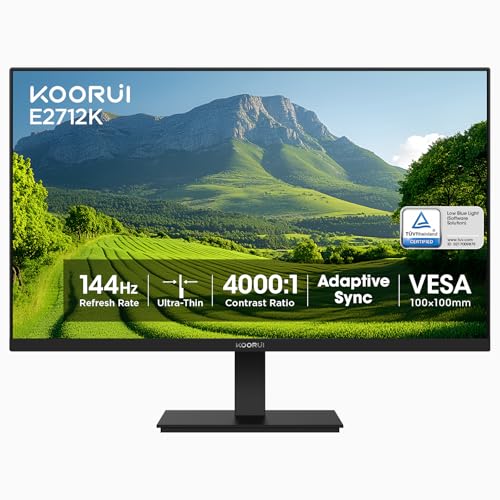
Best Overall: KOORUI 27″ 144Hz VA Eye-Care Monitor – TÜV-certified eye care, high contrast and ergonomic tilt
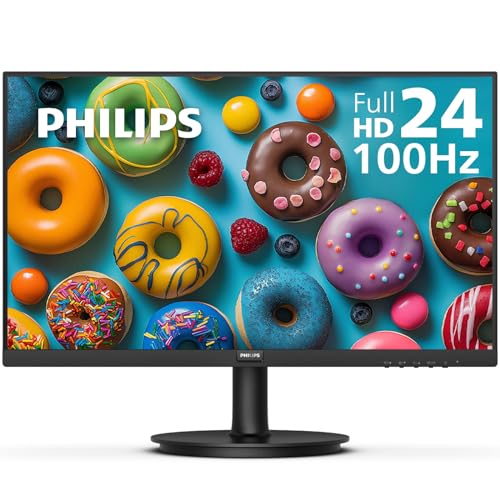
Best Budget: Philips 24″ 100Hz Eye-Care Monitor – flicker-free panel and 4-year advance replacement warranty
Best Premium: Samsung 32″ Odyssey G55C Curved QHD Monitor – curved QHD, HDR10 and reduced eye fatigue
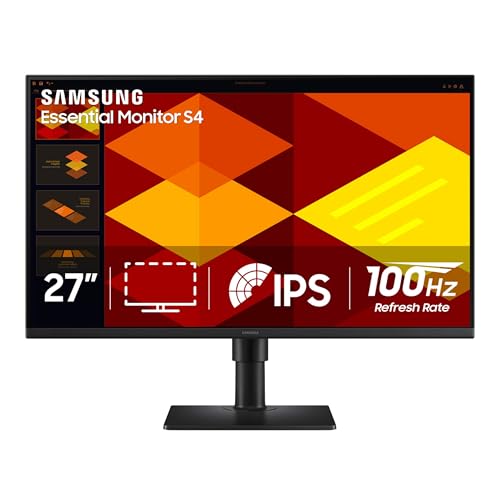
Best for Long Hours: Samsung 32″ S3 Curved FHD Monitor – eye-saver modes and reliable all-day comfort


Buying Guide
Panel type, resolution, and pixel density
The panel and resolution determine how sharp and comfortable text and small details appear, which is why they are central to selecting the best computer monitors for eye strain. IPS panels offer the widest viewing angles and stable colors at typical desk positions, while VA panels deliver higher contrast for deeper blacks. Higher resolution increases clarity-QHD (2560×1440) on a 27-32″ screen yields noticeably crisper text than FHD at the same size.
- Choose IPS for long-form reading, photo editing, and consistent color; choose VA if contrast and deeper blacks matter more.
- Aim for a pixel density (PPI) that keeps text crisp without scaling-QHD on 27″ is a common sweet spot.
- Curved QHD monitors can reduce eye movement across very wide displays; consider one if you use large, ultrawide or 32″ screens.
Example: the Samsung Odyssey G55C 32-inch pairs a QHD panel with high refresh rates and a curved 1000R shape, which many users find easier on the eyes when working across large spreadsheets or wide timelines.
Blue-light reduction, flicker-free tech, and certifications
Look for low-blue-light modes and flicker-free backlighting-both reduce eye fatigue during extended use. Independent certifications (for example TÜV Rheinland eye-care) are helpful indicators that a monitor’s modes are designed to cut harmful short-wavelength light and minimize PWM flicker, making them essential in any best computer monitor for office work search.
- Flicker-free backlights reduce subtle screen flicker at all brightness settings; important if you are sensitive to headaches or eye strain.
- Low-blue-light modes reduce the amount of high-energy visible blue light; use them for evening work but verify color-critical work with the mode off.
- Check for third-party certifications if long daily sessions are common for you.
Example: the KOORUI 27-inch Gaming Monitor advertises TÜV Rheinland eye-care certification plus FreeSync and a high contrast VA panel-features that combine to lower strain during long sessions.
Ergonomics and adjustability
Adjustability is one of the most important factors for eye comfort. The monitor should allow you to position the top of the screen at or slightly below eye level and keep the screen 20-30 inches from your face to avoid neck strain and excessive upward gaze.
- Height adjustment and tilt are essential; swivel and pivot add flexibility if you share the screen or work in portrait mode.
- VESA compatibility lets you mount the monitor on an arm for precise positioning and improved posture.
- Built-in cable management and a stable base help keep your setup tidy and reduce incidental glare from surrounding surfaces.
Tip: If you frequently change seating or use multiple users, prioritize a stand with a wide range of height and tilt to maintain proper viewing distance and angle.
Anti‑glare coatings, curvature, and ambient lighting
Reflections and glare force your eyes to refocus constantly and increase fatigue. Matte (anti‑glare) coatings diffuse reflected light and are generally better for bright rooms, which is why the best anti glare computer monitors rely on this finish. Curved panels can reduce the need for large eye movements on wider screens, but they can emphasize reflections if lighting is poorly placed.
- Choose a matte/anti‑glare screen for brightly lit rooms; position lights to the side rather than directly above or behind you.
- For multi-monitor or ultrawide setups, a gentle curve helps maintain a uniform viewing distance across the screen.
- Keep monitor brightness matched to room lighting-too bright or too dim both contribute to strain.
Brightness, contrast, refresh rate, warranty and value
Proper brightness and contrast let you read text easily without squinting. High refresh rates reduce motion blur in moving content, which can make scrolling and panning feel smoother and less fatiguing-an important feature in the best monitor for work and gaming. Finally, warranty and build quality affect long-term reliability and peace of mind.
- Brightness: look for a panel that reaches comfortable luminance for your workspace; many office users are fine with 250-350 nits.
- Contrast: higher static contrast helps with discernibility of dark text on light backgrounds-VA panels typically offer higher contrast ratios.
- Refresh rate: 60Hz is adequate for static tasks; 100Hz+ improves perceived smoothness for scrolling, video and casual gaming.
- Warranty and replacement policies matter-longer coverage reduces the risk and cost of early failures.
Budget-conscious buyers should also consider warranty length: the Philips 24-inch monitor includes a four-year advance replacement warranty, which can be valuable if you rely on the monitor for many hours daily.
FAQ
What’s the best chair for long hours at a monitor if I want to protect my eyes?
Choose a chair that promotes a neutral spine-good posture reduces neck and eye strain during long sessions. Look for adjustable lumbar support, seat height and tilt, and armrests you can align with your desk so the monitor sits at eye level. A breathable seat with firm support helps you stay comfortable without slouching, which keeps your gaze steady and reduces dry eyes. If you spend all day at the screen, consider a headrest and easy recline so you can take micro-breaks without disrupting posture.
Mesh vs padded chairs: which is better for long screen sessions?
Mesh chairs are breathable and keep you cooler during long sessions, which helps prevent fidgeting and visual discomfort. Padded chairs often provide more immediate cushioning and can be more comfortable if you prefer a softer seat. The real win for eye comfort is firm lumbar support and adjustability-both mesh and padded models can offer that at different price points. Choose mesh if you run hot or move a lot; choose padded if you need extra pressure relief, but always test for lumbar fit. Also consider durability and easy-to-clean materials so long-term maintenance doesn’t affect your setup or posture.
Are expensive ergonomic chairs worth it to reduce eye fatigue?
Higher-priced ergonomic chairs often justify their cost with better adjustability, durable materials, and finer lumbar support-all of which help maintain posture and reduce eye strain over time. However, expensive doesn’t automatically mean better: a budget chair with the right adjustments can outperform a pricey model that doesn’t fit your body. Prioritize features like seat height, lumbar depth, arm adjustability, and tilt tension rather than the brand name. If possible, try before you buy or choose retailers with good return policies to ensure the chair actually reduces fatigue during long monitor use.
What monitor features matter most for reducing eye strain?
Focus on flicker-free backlights, a low-blue-light mode or certification, adjustable brightness, and an anti-glare (matte) finish to reduce reflections. Contrast and panel type matter: VA panels give deeper blacks that can reduce pupil strain in dim rooms, while IPS panels keep colors consistent at different viewing angles. Higher refresh rates and variable refresh tech can make motion smoother and reduce visual fatigue during gaming or video work, though brightness and flicker control are more important for general eye comfort. As an example of those features combined, the KOORUI 27‑inch 144Hz Monitor offers a VA panel, 4000:1 contrast and TÜV Rheinland eye‑care certification, making it a solid all-around eye-friendly choice; always calibrate brightness to your room and use software blue‑light filters if needed.
How long do eye-friendly monitors last and what maintenance do they need?
Most modern monitors last about 3-7 years depending on panel type, usage hours, and build quality. LED backlights and quality internal components extend lifespan, while running at extreme brightness constantly can shorten it. Maintain your monitor by cleaning the screen gently with a microfiber cloth and manufacturer‑recommended cleaner, avoiding harsh solvents, and keeping vents free of dust. Use a surge protector, install firmware updates when available, and replace the monitor if you notice persistent backlight bleed, color shifts, or flicker that calibration and software fixes can’t resolve.
Final Verdict
Across testing the strongest monitors stood out for proven eye-care features (TÜV/blue-light filters, flicker-free backlights), ergonomic adjustability, and balanced panels that deliver contrast without excessive brightness. Weaker options lacked certification, had limited tilt/height adjust or poor anti-glare control. Prioritize eye-care certifications, adjustable stands or VESA support, anti-glare panels, and appropriate resolution/refresh rate for your use-these reduce strain and improve long-term comfort. The top performers combined certified low-blue-light/flicker-free panels, solid ergonomics, and reliable build quality, earning their place among the best quality monitors available.
🏆 Best Overall: KOORUI 27 Inch Gaming Monitor 144Hz VA Eye Care
💰 Best Budget: Philips 24-Inch 100Hz Frameless FHD Monitor with Eye Care
⭐ Best Premium: SAMSUNG Odyssey G55C 32-inch QHD 1000R Curved Gaming Monitor


Comments are closed.
No reviews yet. Be the first to share your experience!