For gamers wanting ultra-fast input speeds and elite build quality, the Corsair K100 RGB Optical-Mechanical Wired stands out as our top overall choice in October 2026. It features hyper-fast optical switches, dedicated macro keys, and smooth integration alongside high-refresh gaming displays.
If you prefer a compact desktop footprint or require wireless flexibility, the Corsair K60 RGB TKL RGB Tenkeyless and Redragon K556 PRO Wireless RGB Mechanical offer outstanding value across the $42.39 – $74.99 price spectrum. We compared 6 leading options to help you find the Best RGB Mechanical Keyboards with Optical Switches for your desk setup.


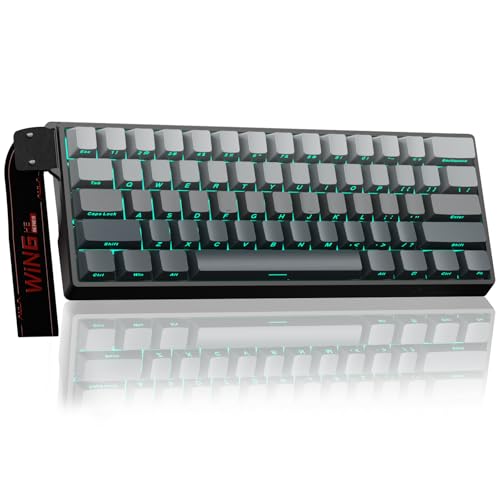


Best RGB Mechanical Keyboards with Optical Switches Buying Guide
Optical vs. Traditional Mechanical Switches
Traditional mechanical switches rely on metal contact points that touch to complete an electrical circuit. Over time, physical wear can lead to key chatter or delayed debounce timing.
Optical switches replace physical contacts with a beam of infrared light that registers a keystroke instantly when interrupted. This light-based mechanism eliminates physical friction points and significantly reduces mechanical wear.
Most optical switches boast durability ratings reaching 150 million keystrokes. When paired with high-performance PCs and quality desktop monitors, optical technology provides noticeably smoother linear travel and faster input execution.
Actuation Distance and Rapid Trigger Sensitivity
Actuation distance measures how far a key must travel downward before registering an input. Standard mechanical keys actuate between 1.5mm and 2.0mm, whereas competitive optical switches shorten this actuation to 1.0mm.
A shorter travel distance means faster reaction times during fast-paced competitive gaming sessions. Advanced magnetic optical hybrid designs take performance further by offering rapid trigger functionality.
Rapid trigger allows keys to reset instantly upon upward movement rather than requiring a full return to neutral position. This permits near-instantaneous counter-strafing in first-person shooters and complex skill execution in battle arenas.
Polling Rate and Hyper-Processing
The polling rate dictates how frequently your keyboard reports keystroke data to your computer per second. Standard gaming keyboards operate at a 1000Hz polling rate, transmitting data once every millisecond.
Top-tier optical keyboards push polling rates up to 4000Hz or 8000Hz, cutting signal delay down to sub-millisecond levels. While an 8000Hz hyper-polling rate places slightly more workload on your system processor, it ensures zero input latency during chaotic combat scenarios.
Combining high polling rates with rapid actuation guarantees that your physical inputs translate directly into immediate in-game actions without signal bottlenecking.
Form Factor and Layout Options
Choosing the right keyboard layout depends heavily on your available desk space and routine tasks. Full-size keyboards include a dedicated number pad, arrow cluster, and function keys, making them versatile for work and macro-heavy gaming.
However, full-size boards consume substantial desk space and force wider arm placement. Compact tenkeyless (TKL) and 60% layouts strip away the number pad and extraneous keys to maximize mouse movement area.
Players who focus primarily on action titles prefer compact frames because they lower shoulder strain and create an ergonomic layout for low-sensitivity mouse swiping.
RGB Lighting, Software, and Customization
Dynamic per-key RGB backlighting enhances both the aesthetic appeal and nighttime usability of your setup. Advanced companion software suites allow you to program custom color gradients, game-reactive lighting pulses, and multi-layer profile setups saved directly to internal keyboard memory.
Beyond visual flair, web-based drivers and onboard software let you remap keybindings, program intricate macros, and adjust rapid trigger sensitivity thresholds on the fly. Look for durable PBT keycaps or double-shot legends to ensure lighting shines clearly without fading over long periods of heavy use.
| Feature Criteria | Standard Mechanical | Optical-Mechanical | Hall Effect Magnetic |
|---|---|---|---|
| Actuation Method | Metal contacts | Infrared light beam | Magnetic sensor |
| Typical Actuation | 1.5mm to 2.0mm | 1.0mm to 1.5mm | Dynamic (0.1mm to 4.0mm) |
| Debounce Delay | 5ms to 10ms | 0ms (Instant signal) | 0ms (Instant signal) |
| Durability Rating | 50 million keystrokes | 100-150 million keystrokes | 100+ million keystrokes |
How We Evaluated
Our evaluation methodology centers on objective technical comparisons across manufacturer specifications, actuation performance metrics, and build construction. We analyzed switch actuation points, polling rate capabilities, frame materials, and switch durability ratings across 6 current models from brands like SteelSeries, Corsair, Redragon and more.
We prioritized key layout versatility, driver responsiveness, macro software features, and total value within the $42.39 – $74.99 price range. By assessing real-world ergonomic considerations alongside switch technical specs, we identified which models deliver genuine competitive advantages for specific gaming and typing demands.
Common Mistakes to Avoid
One common mistake is purchasing an ultra-short 1.0mm optical actuation keyboard without accounting for typing habits. Typists who rest heavy fingers on keys may experience accidental keypresses during everyday document creation until they adapt to the light activation pressure.
Another error is overlooking desk ergonomics and form factor constraints. Buying a full-size board for a compact desk restricts mouse rotation angles, while picking a 60% board when you frequently handle spreadsheets forces constant reliance on function key layers.
Finally, many buyers fail to check software compatibility before customizing complex macros or lighting sync. Selecting boards with cloud-based or light web-based drivers avoids heavy background software footprint while keeping custom key profiles intact across multiple computers.
Buying Checklist
- Verify whether you prefer linear, tactile, or clicky switch feedback.
- Check key switch actuation distance (1.0mm ultra-fast versus standard 1.5mm+).
- Confirm keyboard form factor (Full-size, Tenkeyless TKL, or 60% compact) fits your desk space.
- Ensure board polling rate supports at least 1000Hz, with up to 8000Hz for high-end esports.
- Determine if you require multi-device wireless connectivity or lower latency wired USB connections.
- Check for dynamic per-key RGB illumination and customizable lighting software options.
- Confirm whether keycaps use durable double-shot PBT or light-transmitting ABS material.
- Look for hot-swappable switch sockets if you plan to swap custom switches in the future.
Final Thoughts
Selecting the ideal optical keyboard depends on your primary use cases, desk space, and performance expectations. For maximum feature set, dedicated macro keys, and premium construction, the Corsair K100 RGB Optical-Mechanical Wired represents our premier recommendation for high-performance setups paired with high-performance gaming rigs.
Gamers seeking a compact, lightning-fast desk setup will find exceptional value in the Corsair K60 RGB TKL RGB Tenkeyless. Meanwhile, competitive shooter players focused on rapid trigger action should look directly at the Aula WIN60 HE – 60% Mechanical Gaming Keyboard.
If wireless versatility on a budget is your main priority, the Redragon K556 PRO Wireless RGB Mechanical delivers tri-mode switching and hot-swappable sockets. For users who enjoy custom display metrics, the SteelSeries USB Apex 5 Hybrid Mechanical rounds out our top recommendations for 2026.
Frequently Asked Questions
Are optical switches better than traditional mechanical switches for gaming in 2026?
Optical switches offer faster input response times because they use light beams rather than physical metal contact points to register keystrokes. This light-based technology eliminates electrical debounce delay and extends overall switch lifespan significantly compared to standard mechanical switches.
What is rapid trigger technology on modern optical mechanical keyboards?
Rapid trigger technology dynamically resets the switch the moment it begins traveling upward, rather than waiting for it to cross a fixed reset point. This permits instantaneous repeated keypresses and faster counter-strafing in competitive first-person shooters.
Do optical keyboards feel different from normal mechanical keyboards?
Linear optical switches feel exceptionally smooth because there are no internal metal contact blades rubbing together during key travel. However, tactile and hybrid optical switches maintain a familiar tactile bump while preserving the speed advantages of light-based actuation.
Can you swap keycaps on optical mechanical keyboards?
Most optical mechanical keyboards feature standard MX-style cross stems, making them fully compatible with aftermarket keycap sets. Always verify keycap layout compatibility, especially for bottom-row keys, before purchasing custom PBT keycap sets.
What makes an 8000Hz polling rate beneficial on Best RGB Mechanical Keyboards with Optical Switches?
An 8000Hz polling rate updates keystroke positioning to your PC eight times faster than standard 1000Hz keyboards. When paired with high-refresh rate displays like compact gaming monitors, hyper-polling lowers total input latency down to sub-millisecond speeds.
Do optical mechanical keyboards require special software to run RGB lighting?
Most optical boards include onboard shortcuts for basic RGB presets and brightness control without software. However, creating complex lighting profiles, programming macros, or adjusting custom switch actuation points requires the manufacturer companion software or web driver.
Are optical mechanical keyboards noisy for office environments?
Noise levels depend on switch construction rather than optical technology itself. Linear optical switches operate quietly, whereas blue clicky hybrid switches produce audible clicking sounds. Opting for linear switches with sound-dampening foam ensures quiet typing.