For demanding 3D animation, rigging, and complex scene lighting in Autodesk Maya, the Dell Precision 7780 Mobile Workstation 17.3″ FHD stands out as the ultimate powerhouse for October 2026. Packed with an Intel Core i9 processor, 128GB of memory, and NVIDIA RTX Ada graphics, it easily handles intense viewport playback and heavy Arnold renders.
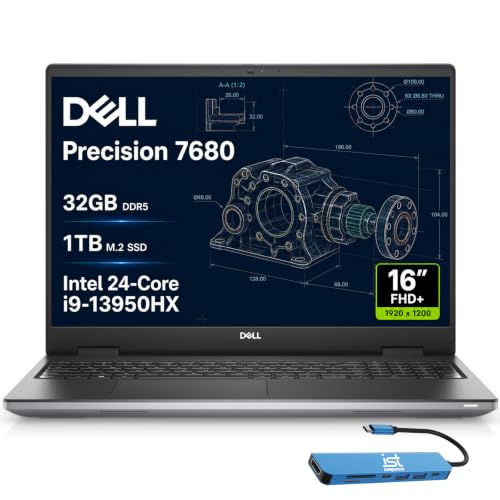
Creators who need reliable multi-screen connectivity and high-speed processing on a balanced budget will appreciate the Dell Precision 7680 Laptop, 16″ FHD. Pairing your mobile workstation with best external monitors provides the expansive screen real estate needed for detailed animation timelines and node graphs.

Best Laptops for Maya Animation: Pro 3D Render Picks Buying Guide
Dedicated GPU and Video Memory Capacity
Maya relies heavily on dedicated graphics processing units to drive the Viewport 2.0 interface smoothly during animation playback. When working with complex character rigs, skinning deformers, and dense polygonal meshes, insufficient video memory leads to stuttering frames and viewport lag.
For production workflows and GPU-accelerated rendering engines like Arnold GPU, Redshift, or V-Ray, aim for at least 8GB to 12GB of VRAM. Professional workstation GPUs, such as NVIDIA RTX Ada generation cards, offer certified stability and specialized drivers that prevent viewport crashes during critical render sequences.
Multi-Core and High Single-Core Processor Performance
The central processor dictates how quickly Maya executes procedural tasks, character evaluation graphs, and physics simulations. Single-core clock speed determines your interactive animation frame rate, while high core counts drastically reduce CPU rendering times.
Modern high-performance chips, such as Intel Core i9 HX series processors, provide the balanced architecture required for both real-time rigging and sustained background computations. Choosing a processor with high boost clocks ensures your interactive viewport remains responsive even under heavy scene complexity.
System RAM Capacity and Memory Bandwidth
3D scene files quickly consume system memory once you load high-resolution texture maps, Alembic caches, and multiple character instances. While 16GB might suffice for lightweight polygon modeling, professional Maya animation requires a baseline of 32GB to avoid swapping data to the hard drive.
Studios working with uncompressed simulations and dense production environments often require 64GB or 128GB of memory. High-bandwidth DDR5 configurations, including next-generation CAMM memory modules, maximize data throughput between the processor and your active project assets.
Thermal Architecture and Sustained Workloads
Long render sessions push both CPU and GPU to maximum power limits for extended periods, generating substantial internal heat. Laptops with inadequate thermal engineering will throttle clock speeds to protect components, significantly stretching out your project delivery timelines.
Workstation chassis engineered with dual-fan cooling chambers and comprehensive heat dissipation maintain consistent boost frequencies without thermal throttling. Selecting a dedicated mobile workstation chassis ensures reliable performance when you leave heavy render batches running overnight.
Display Fidelity and External Monitor Connectivity
Animators require accurate color representation and clear contrast to evaluate subtle lighting cues and material shaders accurately. Checking panel specifications for high sRGB or DCI-P3 color gamut coverage ensures your final visual output matches broadcast and cinema standards.
Studio setups often require pairing your machine with high resolution studio displays to expand node editors and curve graphs. Look for laptops equipped with Thunderbolt 4, HDMI, and USB-C display outputs that support multi-monitor setups at full refresh rates.
High-Speed NVMe Storage and Cache Speeds
Maya project directories often contain gigabytes of cached particle data, texture atlases, and sequential EXR image files. Slow storage interfaces bottleneck file opening times, asset referencing, and autosave intervals, disrupting your creative rhythm during tight deadlines.
Solid-state drives utilizing PCIe NVMe Gen4 interfaces provide the multi-gigabyte transfer speeds necessary for instant asset loading. Investing in at least 1TB of fast internal storage provides sufficient room for your operating system, software plugins, and active project caches.
How We Evaluated
We analyzed hardware specifications, thermal envelopes, and component synergy across 3 models from top manufacturers like HP, Dell. Our evaluation prioritized real-world Maya requirements, including Viewport 2.0 responsiveness, memory bandwidth, ISV application certification, and multi-display expandability.
We examined verified architecture data, component power limits, and port versatility to determine how each system balances computational muscle against thermal efficiency. This data-driven review approach highlights practical strengths and trade-offs without relying on synthetic marketing claims.
Common Mistakes to Avoid
Relying on integrated graphics instead of a dedicated GPU is the most frequent error when selecting an animation laptop. Integrated graphics share system memory and lack the dedicated compute cores required to maintain smooth viewport playback on complex character rigs.
Underestimating system RAM is another common pitfall that causes severe workflow interruptions. When memory limits are exceeded during heavy scene loading, Maya frequently crashes or slows to a crawl as data is forced into disk paging files.
<nPrioritizing ultra-thin chassis designs over thermal cooling capacity often results in aggressive thermal throttling during rendering. Compact laptops may boast impressive spec sheets, but inadequate airflow quickly reduces processing speeds under prolonged multi-core render loads.
Forgetting to verify external monitor ports can restrict your studio workspace flexibility. Connecting multiple displays, such as best high resolution monitors, requires dedicated Thunderbolt or high-bandwidth HDMI connections directly from the GPU.
Buying Checklist
- Confirm the processor features high single-core boost clock speeds for smooth interactive rigging.
- Verify the dedicated graphics card carries at least 8GB to 12GB of dedicated VRAM for stable Arnold GPU rendering.
- Ensure the laptop includes a minimum of 32GB RAM, with 64GB or 128GB preferred for heavy production scenes.
- Check that internal storage utilizes high-speed PCIe NVMe M.2 SSDs for fast project asset loading.
- Inspect the thermal cooling design to verify adequate dual-fan ventilation for sustained render passes.
- Confirm the availability of Thunderbolt 4 or HDMI 2.1 ports for multi-monitor studio expansion.
- Verify ISV certification support to ensure driver stability across professional 3D digital content creation suites.
- Ensure the operating system is Windows 11 Pro to support enterprise-grade security and advanced workstation memory limits.
Final Thoughts
Selecting the right laptop for 3D animation requires balancing raw computational power, GPU memory, and reliable thermal stability. For professional animators and technical directors demanding zero compromise on complex scenes, the Dell Precision 7780 Mobile Workstation 17.3″ FHD is our premier overall recommendation with its 128GB RAM and RTX 3500 Ada graphics.
If you require high-end multi-threaded processing power and modular CAMM memory in a slightly more compact footprint, the Dell Precision 7680 Laptop, 16″ FHD delivers exceptional workstation-grade performance for studio workflows. Pairing either powerhouse with best desktop monitors establishes an ergonomic, dual-screen production environment suited for full-time animation.
For beginners or design students starting their 3D journey on a tighter budget, the HP OmniBook 3 16 inch Laptop PC, 2K Touchscreen provides an accessible platform for learning modeling basics and introductory scene design. Selecting a system tailored to your current project scope ensures reliable productivity and creative freedom.
Frequently Asked Questions
What are the primary hardware requirements for Maya animation in 2026?
Autodesk Maya requires a multi-core processor with high single-core clock speeds, at least 32GB of RAM, and a dedicated GPU with 8GB or more of VRAM. High-speed NVMe storage and robust thermal management are also essential to sustain demanding viewport and rendering tasks.
How much RAM is recommended for Best Laptops for Maya Animation: Pro 3D Render Picks?
While 16GB is the bare minimum for simple polygon modeling, 32GB is strongly recommended for professional character animation and rigging. For complex studio environments containing massive texture sets, particle simulations, and high-density caches, upgrading to 64GB or 128GB prevents memory bottlenecks.
Does Maya render faster on CPU or GPU?
Arnold and other industry renderers support both CPU and GPU rendering, but GPU rendering offers substantially faster preview times when paired with modern RTX cards. CPU rendering remains vital for complex production scenes that exceed available GPU video memory limits.
Can you run Autodesk Maya on a budget laptop?
Budget laptops with entry-level hardware can handle basic 3D asset creation, low-poly modeling, and introductory animation exercises. However, detailed character skinning, complex particle dynamics, and heavy production rendering will require a dedicated workstation with professional-tier graphics and expanded memory.
Why are professional workstation GPUs preferred over standard gaming cards for Maya?
Professional workstation GPUs feature ISV-certified drivers engineered specifically to eliminate viewport artifacts and software crashes in 3D applications. They also offer enterprise-grade memory configurations and optimized double-precision floating-point performance for stability during critical studio workflows.
Do 3D animators need an external display when using mobile workstations?
While high-end mobile workstations feature sharp built-in displays, connecting external panels significantly improves workflow productivity. Exploring IPS, OLED and LED panels allows animators to keep timeline curves, outliners, and rendering previews open simultaneously on expansive screens.
What is the top-rated option among Best Laptops for Maya Animation: Pro 3D Render Picks in 2026?
The Dell Precision 7780 Mobile Workstation 17.3″ FHD is our top-rated workstation choice for high-end animation and heavy rendering. Its combination of an Intel Core i9 processor, 128GB of RAM, and NVIDIA RTX Ada graphics provides unmatched mobile performance for professional animators.
How does thermal throttling impact 3D rendering times?
When internal temperatures exceed safe limits during continuous rendering, the system automatically drops clock speeds to prevent overheating. This performance drop can double or triple render completion times, making robust cooling systems a critical consideration for animation workstations.