

Finance professionals handling dense spreadsheets and simultaneous trading platforms require exceptional text clarity and ample visual workspace. For most financial workflows, the Dell Pro P P2726H 27″ Full HD (1920 x 1080) stands out as the premier dual-screen setup thanks to its 120Hz refresh rate, versatile USB-C connectivity, and certified eye comfort technology.
If your accounting desk requires maximum workspace without a middle bezel split, the Samsung 49” Business Curved Ultrawide Dual QHD delivers an expansive single-panel alternative that acts like two seamless displays side by side. For compact workstation desks prioritizing value, exploring our guide on Best HD Computer Monitors: Compare Comfort and Value can also help balance budget constraints.


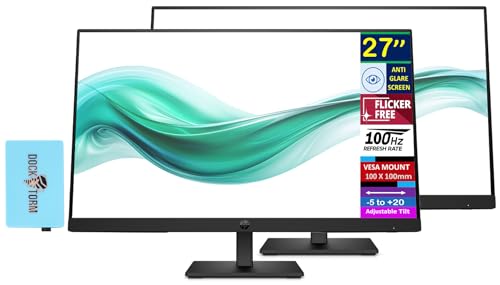


Best Banking Dual Monitors Buying Guide
Screen Size and Aspect Ratio
Selecting the right screen dimensions determines how many spreadsheet columns and financial reports you can view side by side. Standard dual 24-inch setups offer comfortable visual width without forcing excessive neck rotation during rapid data verification tasks.
Moving up to dual 27-inch screens gives you extra room for complex financial modeling and multi-window multitasking. Alternatively, a 49-inch curved 32:9 ultrawide matches two 27-inch QHD monitors side by side, eliminating the center bezel gap entirely for panoramic financial charts.
Panel Technology and Viewing Angles
Banking applications demand consistent color and sharp font clarity from wide angles because your eyes shift across displays constantly. In-Plane Switching (IPS) panels deliver 178-degree viewing angles, preventing contrast loss and washed-out text on your secondary side monitor.
Vertical Alignment (VA) panels provide deeper black levels and higher native contrast ratios, which benefit dark-mode financial software and data terminal interfaces. To explore the fundamental differences between these panel structures, consult our breakdown of IPS, OLED & LED Panels.
Eye Care and Blue Light Filtering
Financial analysts often spend over ten hours per day reviewing bright white backgrounds and dense numerical sheets. Hardware-level low blue light filtering reduces visual fatigue without turning white cells into a distracting yellow hue.
Flicker-free backlights and anti-glare matte coatings eliminate annoying office light reflections that cause afternoon headaches. You can discover more display designs built for long workdays in our review of Best External Computer Monitors for Comfort at Work.
Connectivity and Port Selection
Modern workstation laptops benefit immensely from monitors featuring integrated USB-C hubs with Power Delivery. A single USB-C cable transmits video signals, network data, and laptop charging power, keeping your trading desk organized and uncluttered.
DisplayPort Out support allows for daisy-chaining multiple screens from a single computer port using Multi-Stream Transport (MST). Ensure your chosen pair includes HDMI and DisplayPort inputs to match your enterprise desktop or docking station outputs seamlessly.
Refresh Rates and Motion Clarity
While 60Hz displays were once the standard for office environments, 100Hz and 120Hz refresh rates dramatically improve document navigation. High refresh panels keep fine text legible while rapidly scrolling through multi-thousand-row spreadsheets and real-time market data feeds.
Fluid cursor movements also reduce visual hesitation when dragging figures across dual displays during intensive financial reconciliations. The smoother motion creates a noticeably calmer, more responsive computing experience during peak trading and reporting hours.
Ergonomic Stands and VESA Compatibility
Proper screen height and angle adjustments protect your neck and upper back during long financial auditing sessions. Fully adjustable factory stands allow precise height, tilt, swivel, and 90-degree pivot adjustments for vertical ledger reading.
If your monitors share a shallow office desk, standard 100x100mm VESA mounting compatibility lets you mount both screens on an articulated arm. This setup frees up desktop space for physical calculators, document stands, and enterprise keyboard accessories.
| Monitor Setup | Screen Size | Refresh Rate | Key Finance Advantage |
|---|---|---|---|
| Dell Pro P P2726H Dual Pack | 2x 27-inch FHD | 120Hz | USB-C 15W ports and EasyRead mode |
| Samsung Business Ultrawide | 49-inch Dual QHD | 120Hz | Seamless 32:9 view with 90W USB-C hub |
| HP Series 3 Pro 24″ Bundle | 2x 24-inch FHD | 100Hz | Included dual monitor arm for clean ergonomics |
| ViewSonic Dual Pack Head-Only | 2x 24-inch FHD | 120Hz | DisplayPort daisy chaining and SuperClear IPS |
How We Evaluated
We analyzed 10 monitor configurations by comparing manufacturer technical specifications, panel specifications, and connectivity standards. Our evaluation prioritized spreadsheet legibility, multi-monitor bezel thickness, refresh rate smoothness, and hardware-level eye care technologies.
We assessed mounting versatility and workspace footprint to ensure each recommendation accommodates standard corporate desks and home trading offices alike. Every selection was balanced against build quality, ergonomic adjustability, and connectivity reliability across modern business laptops.
Common Mistakes to Avoid
A common error is choosing displays with thick side bezels that create a wide visual divide between your primary and secondary spreadsheets. Look for three-sided micro-edge designs to ensure seamless cursor transitions and uninterrupted financial data tracking across screens.
Another frequent oversight is ignoring your computer’s video output bandwidth and connector types before purchasing dual displays. Confirm whether your laptop requires a dedicated dock or supports DisplayPort daisy chaining to avoid running mismatched cables and low resolutions.
Finally, purchasing screens without height adjustability or standard VESA mounts forces poor posture and neck strain during heavy reporting cycles. Investing in flexible mounting solutions ensures both screens sit precisely at eye level for comfortable all-day financial analysis.
Buying Checklist
- Confirm your workstation laptop or PC supports dual independent video outputs via HDMI, DisplayPort, or USB-C.
- Select IPS or wide-angle VA panels to prevent text contrast fading when viewing your secondary side screen.
- Verify hardware low-blue-light certification to avoid yellow screen tinting while auditing financial statements.
- Check your desk depth to ensure 24-inch or 27-inch dual screens sit at a comfortable focal distance.
- Confirm 100x100mm VESA mount compatibility if you plan to install an articulated dual monitor desk arm.
- Check for a 100Hz or 120Hz refresh rate to maintain crisp text clarity while scrolling large spreadsheets.
- Verify USB-C power delivery wattage if you want a single-cable docking connection for your business laptop.
- Ensure ultra-thin bezels to minimize the center gap between your two side-by-side monitors.
Final Thoughts
Equipping your workstation with the right displays transforms daily banking and accounting productivity by providing organized, legible screen real estate. The Dell Pro P P2726H 27″ Full HD (1920 x 1080) remains our top overall choice, offering fluid 120Hz motion, front-accessible USB-C ports, and exceptional eye comfort certification. You can compare additional office-ready display configurations across our Desktop & External Monitors catalog.
For analysts who want to bypass bezel splits entirely, the Samsung 49” Business Curved Ultrawide Dual QHD delivers an expansive workspace with 90W laptop charging. If you prefer a budget-friendly dual setup with fluid performance, the ViewSonic VA2456A-MHD_H2 24 Inch 1080p Dual Pack offers 120Hz IPS panels and daisy-chaining at exceptional value. Discover more high-density choices in our guide on Best Hi Res Monitors for Productivity and Comfort.
Frequently Asked Questions
Why are dual monitors essential for banking and financial modeling?
Dual monitors allow financial professionals to keep source documents, balance sheets, and active financial models open simultaneously. This side-by-side arrangement minimizes app switching, reduces calculation errors, and significantly speeds up daily accounting reconciliations.
Is a 49-inch curved ultrawide better than two separate monitors for finance?
A 49-inch ultrawide replaces two 27-inch monitors with a continuous display that has no center bezel gap. It simplifies cable management and lets you stretch massive timeline charts across the full screen, though dual physical monitors allow easier window snapping in certain operating systems.
What refresh rate is best for reading financial spreadsheets?
A refresh rate of 100Hz or 120Hz is ideal for financial work because it keeps text sharp and legible while scrolling through thousands of spreadsheet rows. Standard 60Hz screens often cause text blurring during rapid navigation, leading to greater eye fatigue over long work shifts.
Can I connect Best Banking Dual Monitors to a laptop using a single cable?
Yes, you can connect dual monitors using a single cable if the primary display supports DisplayPort daisy chaining via MST or acts as a USB-C docking hub. Your laptop must feature a Thunderbolt or USB-C port with DisplayPort Alt Mode support to drive both video streams.
Which panel type is superior for long financial accounting hours?
IPS panels are widely considered best for financial multi-monitor setups due to their consistent contrast and wide 178-degree viewing angles. High-contrast VA panels are also suitable, especially for professionals who prefer dark mode interfaces in trading terminals.
Do higher refresh rates reduce eye strain during data entry in 2026?
Higher refresh rates reduce eye strain by rendering smoother cursor movements and preventing text stutter during fast scrolling in 2026. When combined with flicker-free backlights and hardware blue light reduction, high refresh rates keep your eyes relaxed during long workdays.
How do I mount Best Banking Dual Monitors to save desk space?
You can mount your displays using an articulated dual monitor desk arm that attaches to standard 100x100mm VESA patterns on the back of each screen. For detailed installation advice and layout setups, check out our step-by-step How To guides.
Are 24-inch or 27-inch monitors more practical for banking operations?
Dual 24-inch monitors work best on compact desks with shallow viewing depths, offering clear 1080p density without overwhelming your field of view. Dual 27-inch displays are ideal for larger corporate desks where viewing multiple data columns simultaneously is a daily requirement.








