

Finding the right printer for screen printing transparency films requires dense black ink distribution and wide media handling. We evaluated 4 options for October 2026 to highlight the HP DesignJet T210 Large Format 24-inch Plotter as the top overall choice for modern print shops. It combines clean line accuracy with effortless roll feeding for large screen film output.
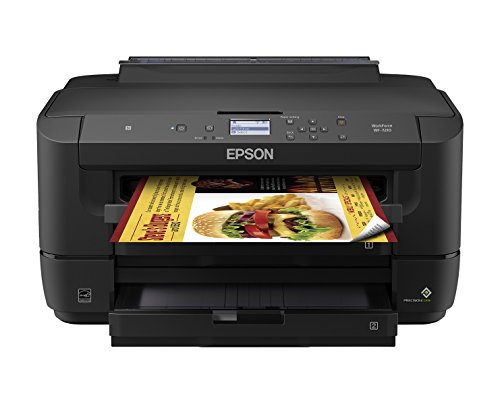
If you need high ink capacity on a desktop budget, the Canon imagePROGRAF TC-21 24″ stands out as an efficient alternative. For smaller desktop setups paired with best large screen computer monitors, the WorkForce WF-7210 Wireless Wide-format Color offers solid 13×19-inch cut sheet printing.


Best Computer Printers for Screen Printing Buying Guide
Ink Density and Black Opacity
Screen printing film positives require maximum optical density to block ultraviolet light completely during exposure. Standard inkjet printers sometimes output translucent blacks that allow light bleed through screen emulsions. Choosing a unit with deep black pigment or dye formulas prevents washed-out stencils.
High ink density ensures clean halftones and razor-sharp line artwork without pinholes. When upgrading your graphic design station, pairing capable hardware with best quality monitors helps you catch fine line defects before sending jobs to print.
Max Print Width and Media Handling
Print size limits determine the maximum screen dimensions your shop can expose. Wide-format printers handling 24-inch to 36-inch rolls allow you to output full poster artwork and large garment films on single sheets. Desktop units usually cap output at 13×19 inches.
Roll feeding mechanisms eliminate manual paper reloading for long production runs. Integrated horizontal cutters trim completed transparency sheets cleanly without disturbing the remaining roll. Ensure your workspace accommodates the physical footprint of wide-format hardware.
Resolution and Fine Halftone Accuracy
High DPI resolution ratings determine how cleanly raster images translate onto positive film. Printers with precise droplet control render fine halftone dots and thin vector lines without feathering. Crisp dot reproduction prevents detail loss on high mesh screens.
Advanced printheads maintain consistent dot alignment across the full media width. Proper driver settings enable raster image processors to output smooth gradients. Verifying detailed digital artwork on best quality computer monitors ensures your files match the physical print output.
Software Integration and Driver Controls
Dedicated print drivers streamline file preparation for complex screen separation workflows. Software features like PDF error checking and auto-nesting optimize film transparency usage. Drag-and-drop file submission saves valuable setup time during busy production days.
Network connectivity allows multiple graphic design stations to submit separation files seamlessly. Wi-Fi and Ethernet options give staff flexibility when sending print jobs across the shop. Reliable driver software reduces misprints and film media waste.
Maintenance Efficiency and Ink Running Costs
High-volume film printing requires manageable ink consumption and routine head maintenance. Refillable tank systems and high-capacity cartridges significantly drop cost per print over time. Automated maintenance routines keep printheads clear without consuming excessive ink.
Large starter ink bottles minimize initial setup expense for new print shops. Efficient ink delivery systems protect print nozzles from drying out during idle periods. Calculating long-term consumable costs prevents budget surprises as production scales up.
How We Evaluated
We analyzed key technical specifications, ink handling capabilities, and media versatility across top printer brands. Our evaluation focused on black ink density potential, line quality precision, media width limits, and total cost of operation. We prioritized hardware features essential for reliable film positive output in screen printing environments.
Software integration, driver controls, and network connectivity options were carefully evaluated for daily shop workflows. We cross-referenced official hardware parameters with actual media constraints to ensure realistic performance recommendations. This objective analysis helps printers choose equipment tailored to their artwork scales.
Common Mistakes to Avoid
Selecting a standard desktop printer without checking wide-format roll support limits your artwork size. Screen printers often outgrow 13×19-inch sheet formats quickly when expanding into jacket or poster graphics. Investing in a 24-inch or 36-inch roll plotter prevents costly hardware upgrades later.
Using light-density default print settings often produces translucent films that cause emulsion burn failures. Always adjust media weights and ink coverage controls inside the driver software to maximize black opacity. Neglecting ink density adjustments leads to ruined screens and wasted exposure time.
Skimping on maintenance routines allows dried ink to block fine printhead nozzles. Frequent nozzle clogs cause missing lines and banding across halftone film patterns. Choosing printers with efficient maintenance cycles keeps printheads clean without wasting valuable ink.
Buying Checklist
- Confirm the printer supports your required film roll width up to 24 or 36 inches.
- Verify black ink density settings inside driver options for maximum exposure blocking.
- Check if the unit features an automatic sheet feeder alongside roll media support.
- Ensure software compatibility with your vector graphics software and RIP workflow.
- Review total starter ink capacity included in the box to lower initial operating costs.
- Confirm Gigabit Ethernet or Wi-Fi connectivity for multi-computer design stations.
- Verify physical desk or floor stand dimensions before placing hardware in your shop.
Final Thoughts
Choosing the right hardware streamlines your film positive production and protects screen stencil quality. For most screen printing shops, the HP DesignJet T210 Large Format 24-inch Plotter delivers the ideal mix of precision line work, compact 24-inch roll handling, and easy software integration.
If you want to minimize consumable costs out of the box, the Canon imagePROGRAF TC-21 24″ provides outstanding value with its generous ink supply. Print shops tackling oversized textile graphics will benefit from the massive roll capacity of the HP DesignJet T630 Large Format 36-inch Plotter.
For smaller studios operating on tight desk spaces alongside best small monitor for pc setups, the WorkForce WF-7210 Wireless Wide-format Color offers reliable 13×19-inch sheet output. Matching your printer choice to your shop media dimensions ensures consistent exposure success.
Frequently Asked Questions
What Is the Top Option for Best Computer Printers for Screen Printing in 2026?
The HP DesignJet T210 Large Format 24-inch Plotter is widely considered the top overall pick for 2026. It offers precise line accuracy, roll media feeding, and efficient driver software for printing transparent film separations.
Can Standard Inkjet Printers Produce Screen Printing Film Positives?
Yes, standard inkjet printers can create film positives if they support high ink density output. You must use compatible waterproof transparency films and configure print drivers for heavy black ink coverage.
Why Is Black Ink Opacity Crucial for Screen Printing Films?
Black opacity determines how effectively the film blocks UV light during stencil exposure. Weak black ink lets light bleed through film positives, causing emulsion washout issues and soft stencil edges.
What Is the Difference Between Roll Feed and Sheet Feed Printers?
Roll feed printers handle long continuous media rolls for oversized graphics and automated cutting. Sheet feed printers use pre-cut film pages, which suit smaller graphics up to 13×19 inches.
Do You Need a RIP Software for Screen Printing Film Output?
While basic vector separations print using standard drivers, RIP software improves halftone control and black ink density. Dedicated software optimizes dot placement for intricate halftone screens and gradients.
Is a 24-Inch or 36-Inch Printer Better for Screen Printing?
A 24-inch printer satisfies most garment and standard poster film requirements. A 36-inch printer suits high-volume commercial shops creating oversized textile films and large architectural graphics.
How Does Monitor Setup Impact Graphic Preparation for Printing?
Using properly calibrated screens like best white monitors helps designers inspect fine lines and halftone density before output. Accurate visual previews reduce costly misprints on physical film rolls.
How Can Print Shops Reduce Ongoing Ink Costs for Film Positives?
Selecting printers with continuous ink systems or high-volume refill bottles lowers long-term expenses. Efficient maintenance routines also reduce wasteful head cleanings that consume valuable ink reserves.





