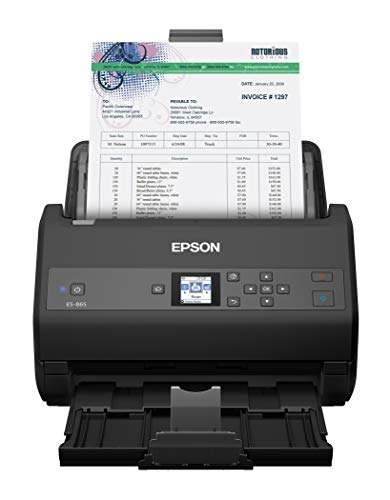
Finding the ideal scanner to convert paper stacks into searchable digital archives requires balancing speed, paper capacity, and reliable feeding mechanisms. For most busy environments, the Epson Workforce ES-865 High Speed Color Duplex stands out as our top recommendation for October 2026. It delivers speeds up to 65 pages per minute alongside a high daily duty cycle, and you can find more workspace setup tips in our how-to section.
If you need high-volume efficiency on a moderate budget, the Epson Workforce ES-400 II High-Speed Color Duplex delivers exceptional value. It features a reliable 50-sheet document feeder and robust optical character recognition software for smooth daily document capture. Readers looking for a balance of network connectivity and rapid processing will find great options across our top choices.



Best High Speed Document Scanners Buying Guide for 2026
Scanning Speed and Daily Duty Cycle
Scanning speed is measured in pages per minute for single-sided pages and images per minute for double-sided documents. High performance models offer speeds ranging from 35 to 70 pages per minute, which dramatically cuts down processing time. Evaluating your average batch size ensures you select hardware that maintains pace without overheating.
Daily duty cycle indicates how many pages a scanner can safely process per day without causing mechanical strain. Standard office units support 3,000 to 4,000 sheets daily, while heavy-duty scanners handle 7,000 to 10,000 sheets easily. Exceeding recommended duty cycles often leads to frequent paper jams and reduced component lifespan over time.
Automatic Document Feeder Capacity
The automatic document feeder, or ADF, determines how many pages you can load at once before starting a batch scan. Feeder capacities typically range from 50 to 100 sheets depending on the physical frame of the device. Larger trays allow staff to initiate lengthy scanning tasks without needing to manually replenish paper every minute.
Media versatility within the feeder is equally essential when managing mixed document types. Superior feed mechanisms handle delicate paper, standard letter sheets, heavy cardstock, and rigid plastic ID cards in a single batch. Organizing your station alongside clear desktop external displays makes managing large batches far more comfortable.
Optical Character Recognition and Software Compatibility
Optical Character Recognition converts scanned image files into searchable text documents like PDFs, Word files, and Excel spreadsheets. High quality OCR software saves hundreds of hours by making digitized text instantly searchable across your network. Look for scanner software bundles that automate file naming and folder organization during ingestion.
Driver support is another critical software consideration for business integration. Standard TWAIN, ISIS, and WIA drivers ensure that your scanner communicates directly with third-party document management systems. Without universal driver support, integrating scanned files into proprietary database software becomes unnecessarily complex.
Network Connectivity and Standalone Functions
Modern scanners provide flexible connection options ranging from direct USB cables to wired Gigabit Ethernet and dual-band wireless networks. Networked units allow multiple users across an office workgroup to share a single scanner without running direct cables. This flexibility reduces hardware redundancy across departments while keeping file transfers fast.
Standalone scanning features enable users to route documents straight to cloud destinations, network folders, or email recipients via onboard touchscreens. Devices equipped with PC-free scanning remove the need for a dedicated computer sitting right next to the unit. Viewing digital documents side-by-side on wide hi res monitors for productivity further streamlines file verification.
Paper Protection and Anti-Jam Sensors
Paper jams remain the leading cause of frustration during high-speed scanning operations. Premium scanners incorporate ultrasonic multi-feed sensors that detect when two or more pages stick together as they pass through. When a double feed occurs, the machine pauses instantly to prevent missing critical information.
Advanced skew detection and active brake roller systems help feed misaligned sheets smoothly while preventing torn pages. These protective technologies protect valuable original documents, such as historical records or original signatures, from physical damage. Investing in strong paper protection features preserves sensitive paperwork while keeping workflows uninterrupted.
Duplex Scanning and Image Processing
Single-pass duplex scanning uses dual image sensors to capture both sides of a page simultaneously as it moves through the feeder. This single-step technology doubles operational speed while reducing wear on mechanical feed rollers compared to older reversing mechanisms. Duplex scanning ensures blank back pages can be automatically detected and removed on the fly.
Intelligent image processing algorithms automatically correct common scan defects before saving the final file. Features like auto-crop, dynamic background smoothing, color enhancement, and hole-punch removal ensure clean digital records. High-resolution sensors ensure clear text extraction even from faint background images.
How We Evaluated High Speed Scanners
We evaluated the market leading document scanners by analyzing official manufacturer technical specifications, driver architecture, duty cycle ratings, and sheet feeder engineering. Our comparison focused on real-world office requirements, evaluating feed reliability across varied paper weights, continuous scanning speeds, and cloud integration flexibility.
We prioritized models that deliver robust software bundles, certified TWAIN drivers, and advanced paper protection mechanisms. By cross-referencing user feedback on feed reliability with operational feature sets, we established clear recommendations across budget, network, and high-volume enterprise categories.
Common Mistakes to Avoid
One common mistake is underestimating your daily scanning volume and selecting a low duty cycle scanner for high-demand tasks. Running a desktop scanner beyond its rated sheet limit causes premature roller wear and frequent double-feeds. Always choose a machine rated above your estimated peak daily scanning requirements.
Another frequent error is ignoring driver compatibility when selecting hardware for specialized business software. Consumer scanners without standard TWAIN or ISIS drivers cannot communicate directly with enterprise document management platforms. Verifying driver compatibility before purchase prevents software bottlenecks down the line.
Buyers also frequently overlook media feeder flexibility when handling mixed document batches. Attempting to feed thick ID cards or fragile receipts into a standard flat feeder path can damage both the document and internal rollers. Selecting a unit with versatile feed rollers ensures seamless processing of varied paper thicknesses.
Finally, neglecting software capability leads to inefficient manual file management after scanning. A scanner with weak OCR software requires staff to manually name, sort, and convert files into searchable formats. Choosing hardware backed by intuitive capture software automates filing and saves considerable labor time.
High Speed Document Scanner Buying Checklist
- Confirm that the scanner pages per minute (PPM) rating matches your volume goals.
- Verify that the peak daily duty cycle exceeds your maximum estimated daily paper intake.
- Ensure the automatic document feeder (ADF) capacity holds your average batch size.
- Check for TWAIN, ISIS, or WIA driver support for seamless software integration.
- Look for built-in OCR capability to create searchable PDF and editable office files.
- Determine whether you need USB, Wi-Fi, or Gigabit Ethernet network connectivity.
- Inspect paper protection features such as ultrasonic double-feed detection and skew correction.
- Confirm single-pass duplex scanning capabilities for fast double-sided document processing.
Final Thoughts
Upgrading your office digitizing workflow with one of the Best High Speed Document Scanners in 2026 dramatically boosts productivity and reduces physical storage clutter. Selecting the right hardware ensures your team can convert bulky paper files into organized, searchable digital assets without operational delays.
For high-volume administrative tasks, we strongly recommend the Epson Workforce ES-865 High Speed Color Duplex due to its 65 ppm processing speed and high daily capacity. If your office requires flexible network sharing and wireless cloud scanning, the Brother ADS-4900W Professional Desktop Scanner delivers outstanding performance. Meanwhile, budget-conscious buyers will appreciate the compact efficiency of the Epson Workforce ES-400 II High-Speed Color Duplex.
Complementing your digital setup with quality workspace peripherals, such as ergonomic external computer monitors for comfort, creates a seamless digital workspace environment. Take time to review your daily document throughput and network setup before selecting the model that best fits your workflow.
Frequently Asked Questions
What scan speed should I look for in Best High Speed Document Scanners in 2026?
For active offices, look for scan speeds of at least 35 to 50 pages per minute (PPM). Heavy-duty environment recommendations start at 60 PPM or higher to process large batches quickly. Higher PPM ratings keep scanning bottlenecks from slowing down daily operations.
What is the difference between single-pass duplex and double-sided scanning?
Single-pass duplex scanners use two internal sensors to capture both sides of a page simultaneously in one pass. Older duplex scanners flip paper mechanically, which takes longer and increases paper jam risks. Single-pass models reduce mechanical wear while operating twice as fast.
Why is daily duty cycle important when selecting a document scanner?
Daily duty cycle defines the maximum number of pages a scanner is built to process daily without hardware degradation. Operating within rated duty cycle limits prevents motor overheating and extends roller lifespan. Exceeding this figure regularly can lead to frequent paper jams.
Do high speed document scanners require a connected computer to work?
Not all units require a computer. Many modern scanners feature built-in Wi-Fi, Ethernet, and touchscreens that allow direct scanning to email, network folders, or cloud storage services like Google Drive. This allows staff to quickly process documents directly from the device.
What software features are essential for desktop document scanning?
Essential software features include Optical Character Recognition (OCR), automatic blank page deletion, auto-cropping, and auto-rotation. These tools turn raw image scans into searchable, structured documents automatically. Automated file indexing further saves administrative time.
Can high speed document scanners process plastic ID cards and receipts?
Yes, most professional desktop scanners handle mixed media including embossed plastic cards, drivers licenses, and thin receipts. Dedicated straight-through paper paths prevent thick or small items from jamming inside. This versatility allows offices to scan varied documents in a single session.
How does ultrasonic double feed detection protect paper documents?
Ultrasonic sensors use sound waves to detect air pockets when multiple pages enter the feeder together. The scanner immediately stops feeding to prevent missed pages or physical damage to original documents. This feature is crucial when processing stacks of thin or sticking pages.
What display equipment works best alongside a high speed scanner workflow?
Pairing your scanner setup with secondary computer displays allows operator teams to review scanned images on one screen while indexing files on another. Dual-screen setups improve accuracy and speed up document verification. This creates a comfortable and efficient digitizing workflow.