Finding the right platform to control PC games from a sofa or bed requires generous surface space and solid wrist support. The Couchmaster Lapboard³ with HORIZONLIGHT RGB Bar stands out as our top pick for dedicated living room gamers due to its integrated USB hub, custom RGB lighting, and rock-solid stability across wide furniture. Pairing this setup with proper gaming monitors ensures low-latency visuals while you kick back on your couch.
If you prefer a lightweight memory foam design without external wiring, the Septsun 26″ Extra Wide Lap Desk Pillow offers impressive comfort as our top value choice. We evaluated 5 top models in October 2026 to find the best balance of ergonomic wrist alignment and mouse surface area.


Best Lapdesk for Gaming Keyboard and Mouse Buying Guide
Surface Area and Width Requirements
A full-size mechanical keyboard typically spans 17 to 18 inches in total width. If your lapdesk lacks sufficient lateral space, your mouse tracking area becomes severely restricted during low-DPI gaming sessions. We recommend selecting a tray that measures at least 25 inches across to accommodate both peripherals comfortably.
Compromising on tray width forces awkward arm positioning and reduces mouse movement range. Wide platforms ensure that your wrist stays aligned with your elbow during rapid mouse swipes. Gamers who utilize compact tenkeyless or 60-percent keyboards can manage with narrower designs without sacrificing mouse pad area.
Cushion Density and Ergonomic Arm Support
Soft cushion bases distribute peripheral weight across your legs to prevent uncomfortable pressure points. High-density furniture foam offers firmer support that resists sagging over extended multi-hour gaming sessions. Contoured side bolsters elevate your forearms to maintain neutral joint angles while typing and aiming.
Low-grade foam compresses rapidly under pressure and transfers keyboard vibrations directly into your lap. Choosing high-density 50D memory foam or dual-cushion padded bases ensures long-term structural integrity. Proper forearm alignment prevents upper back tension and shoulder fatigue when playing on deep sofas or soft beds.
Peripheral Connectivity and USB Integration
Managing wired keyboards, mice, and headsets from a couch quickly leads to tangled cables across your living room. Lapdesks with integrated USB hubs simplify cable management by consolidating device connections into a single host line. For higher resolution setups, linking your PC to desktop displays demands clean cable routing across your room.
Active USB 3.0 hubs supply adequate power for RGB backlighting and fast polling rates. Without localized ports, long extension cables can disconnect unexpectedly during intense gameplay. Selecting a lapboard with powered passthrough keeps your controllers, mouse, and lighting equipment connected reliably.
Stability and Leg Support Mechanics
Rigid folding legs and soft cushion bases serve distinct physical gaming environments. Folding metal or aluminum legs work exceptionally well on firm mattresses or flat floors by providing spacious clearance for your legs. Padded cushion bases excel on plush sofas where rigid legs might wobble on uneven cushions.
Weight distribution dictates overall tray stability during aggressive mouse flicks. Heavy solid trays require balanced weight distribution so they do not tip when you lean forward. Verifying leg lock mechanisms or wide foam bases ensures your high-end gaming gear remains perfectly secure.
Surface Materials and Mouse Tracking Precision
The top material determines whether optical sensors track smoothly without needing an external mouse pad. Textured synthetic leather and micro-weave fabric surfaces offer consistent friction for precise aiming in competitive titles. Smooth wood veneers require dedicated mouse pads to prevent optical sensor jitter.
Full-coverage mouse pads integrated into the desktop eliminate slipping edges during low-sensitivity gaming. Easy-to-clean leatherette surfaces resist liquid spills and sweat build-up during long matches. Choosing heat-resistant materials also protects your legs from heat generated by gaming laptops resting on the board.
Tilt and Height Adjustability
Adjustable incline angles reduce wrist extension and neck strain while viewing distant display screens. Trays with multi-position tilt locks let you match the angle of your lap to your seating position. Combining a tilted surface with an integrated wrist ledge keeps your keyboard from sliding forward.
Fixed flat surfaces force users to hunch forward when sitting on low-profile couches. Height-adjustable legs allow you to align the surface height with your natural elbow position. This adjustability ensures optimal posture whether you are sitting upright or reclining during casual sessions.
| Desk Feature | Cushion Base | Foldable Legs | Integrated USB |
|---|---|---|---|
| Best Surface | Plush Sofas & Beds | Firm Mattresses & Floors | Dedicated PC Stations |
| Primary Benefit | Vibration Dampening | Maximum Leg Clearance | Clean Cable Management |
| Weight Profile | Ultra Lightweight | Moderate Weight | Heavy Duty Platform |
How We Evaluated
We evaluated candidate lapdesks by analyzing technical specifications, physical dimensions, material density, and peripheral compatibility data. Our analysis prioritized structural stability, mouse surface area, cable management features, and long-term ergonomic comfort for couch-based PC gaming setups.
Each option was assessed based on real-world usability across different furniture types, including soft sectional couches, firm mattresses, and office chairs. We examined weight distribution, joint articulation, thermal insulation properties, and customer feedback regarding build quality to ensure reliable recommendations.
Common Mistakes to Avoid
Choosing a lapdesk with insufficient width is a frequent error among PC gamers. Buyers often measure only their keyboard width, forgetting that mouse tracking requires an additional 8 to 10 inches of horizontal room. Always calculate the combined width of your keyboard and mouse pad before making a purchase.
Selecting rigid desk legs for soft sofa cushions frequently results in an unstable platform. Deep sofa cushions sink unevenly, making flat cushion bases or wide foam blocks far more stable than thin metal legs. Reserve folding legs for firm mattresses or solid floor surfaces.
Ignoring cable management features can create dangerous tripping hazards across living room spaces. Unsecured peripheral cords drag against clothing and pull light mice off the tracking surface. Opt for lapdesks with built-in channels or USB hubs to maintain clean cord routing.
Overlooking wrist rest height can cause unnatural joint bending during prolonged typing sessions. A wrist rest that is too high forces your hands upward, compressing carpal nerves over time. Ensure the wrist barrier matches your keyboard’s front profile for neutral alignment.
Buying Checklist
- Confirm the total tray width measures at least 25 inches to fit your keyboard and mouse.
- Verify whether the surface material supports direct optical mouse tracking without extra pads.
- Check if the base cushion utilizes high-density foam to prevent sinking on soft couches.
- Ensure integrated wrist rests feature smooth, non-abrasive padding to protect your arms.
- Select models with built-in USB hubs if you use multiple wired peripherals.
- Confirm leg clearance height allows comfortably sitting cross-legged if using rigid legs.
- Inspect safety stopper ledges to verify they prevent keyboards from sliding at tilted angles.
- Review total lapdesk weight to guarantee comfortable portability around your home.
Final Thoughts
Setting up a comfortable living room battlestation starts with choosing a board tailored to your seating environment and equipment choices. For dedicated couch gamers seeking ultimate connectivity and RGB aesthetics, the Couchmaster Lapboard³ with HORIZONLIGHT RGB Bar delivers an uncompromised desktop experience right from your sofa. You can also explore our guide on external computer monitors for comfort to refine your living room screen positioning.
If you want lightweight foam cushioning with contoured forearm support, the Septsun 26″ Extra Wide Lap Desk Pillow is an outstanding choice that eliminates strain during extended sessions. Those seeking adjustable height and angle versatility on beds or floors will appreciate the flexible design of the SAIJI Laptop Desk for Bed and the padded surface of the FoldWise 2-in-1 Bed & Lap Desk with Soft Cushion.
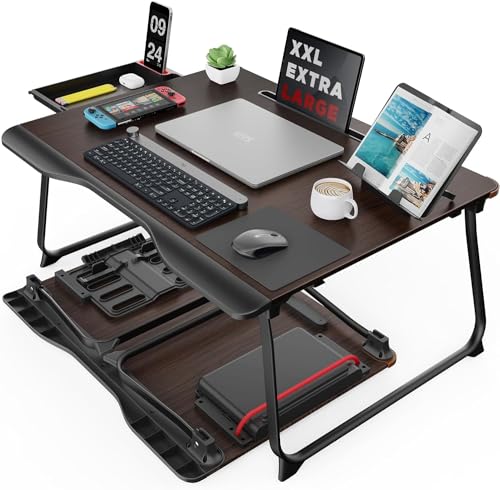
For gamers who prefer full-surface mouse tracking in a simple package, the Extra Large Lap Laptop Desk provides full PU leather coverage at an accessible price point. Choosing the right lapboard transforms casual couch sessions into precise, ergonomic gaming experiences. Check out our additional how-to guides to further upgrade your desk and living room posture.
Frequently Asked Questions
What is the top choice for the Best Lapdesk for Gaming Keyboard and Mouse in 2026?
The top choice depends on your feature preferences, but models with wide surfaces and high-density bases lead the market in 2026. Dedicated lapboards featuring integrated USB hubs and firm foam support offer the best balance of stability and peripheral connectivity for couch gaming.
How wide should a lapdesk be for a gaming keyboard and mouse?
A lapdesk intended for gaming peripherals should measure between 24 and 27 inches wide. This dimension accommodates a standard full-size keyboard while leaving 8 to 10 inches of dedicated space for smooth mouse tracking.
Are cushion bases better than folding legs for couch gaming?
Cushion bases are generally superior for soft couches because they mold to uneven cushions and absorb movement. Folding legs excel on firm mattresses or flat floors where rigid upright support is required.
Can optical gaming mice track directly on lapdesk surfaces?
Many modern lapdesks incorporate synthetic leather or micro-texture fabric tops that support direct optical tracking. However, smooth glossy surfaces or plain wood veneers still require a dedicated mouse pad for accurate sensor performance.
Do lapdesks prevent laptop and peripheral overheating?
Yes, solid lapdesk surfaces block heat transfer to your lap while keeping ventilation ports clear. Padded bottom cushions insulate your legs from hot electronics while allowing airflow around device chassis.
How do I manage long peripheral cables when gaming from a sofa?
Using a lapdesk with an integrated USB hub allows you to plug your mouse, keyboard, and headset directly into the board. A single active extension cable then runs cleanly from the board to your PC or console. Pairing your setup with high quality high resolution monitors helps maintain crisp display output across long cable distances.
Is memory foam durable enough for heavy gaming setups?
High-density memory foam rated at 50D or higher retains its shape under heavy keyboards and arm weight. Lower density foams can sag over time, so checking foam specifications ensures long-lasting ergonomic support.
Can wireless keyboards and mice be used effectively on lapdesks?
Wireless peripherals work exceptionally well on lapdesks by eliminating cable clutter entirely. Many lapdesks include built-in slots or tray edges to keep wireless dongles, phones, and accessories organized securely.