

When selecting the Best Mini ITX Cases with USB-C Ports in September 2026, overall layout flexibility and port speed take top priority. The Fractal Design Terra Graphite stands out as our top recommendation due to its premium anodized aluminum construction, adjustable spine for component clearance, and fast front panel connection. It fits seamlessly into modern workspaces alongside high quality setup accessories like those in our desktop external displays guide.
For builders seeking maximum cooling performance on a moderate budget, the PCCOOLER CPS K101 Mini ITX PC Case delivers an impressive four-sided mesh layout with room for triple slim fans. Budget-conscious builders assembling an ultra-compact home office PC or HTPC will find the Goodisory A09 Black Typec(10g)+USB3.0 Black to be an effective lightweight choice.



Best Mini ITX Cases with USB-C Ports Buying Guide
Front Panel USB-C Header Standards and Bandwidth
Front panel Type-C headers vary significantly between motherboard standards and chassis internal cables. Some cases utilize a standard USB 3.2 Gen 1 motherboard header rated for 5Gbps transfer rates. Higher end enclosures include internal Type-E key-A cables capable of USB 3.2 Gen 2 (10Gbps) or USB 3.2 Gen 2×2 (20Gbps) performance.
Verifying your motherboard internal headers before buying is essential. If your motherboard lacks a native Type-E header, you will need a 19-pin adapter, which limits transmission speeds. Matching high-speed front ports with suitable motherboard specs ensures fast file transfers to external storage drives and high refresh rate displays highlighted in our gaming monitors review.
GPU Clearance and PCIe Riser Cable Compatibility
Small form factor cases use either a traditional layout or a sandwich layout. Sandwich layouts rely on a PCIe riser cable to mount the graphics card behind the motherboard tray. You must check whether the chassis includes a PCIe 3.0 or PCIe 4.0 riser cable, as mismatched motherboard settings can prevent your display from posting.
If your chassis comes with a PCIe 3.0 riser cable, set your motherboard BIOS PCIe slot mode to Gen 3 before final assembly. Always cross-check total GPU length, width slot count, and height limits. Packing a large three-slot card into a compact frame requires tight cable management and precise clearance planning.
CPU Cooler Clearance vs Enclosure Volume
Small form factor chassis volume ranges from ultra-compact 3.8L boxes to roomier 12L gaming frames. Reduced internal height restricts CPU cooler selection, often limiting you to low-profile air coolers under 65mm or 40mm in ultra-thin builds. Choosing a low-wattage processor prevents thermal throttling in constrained volumes.
Adjustable internal spines offer flexibility by letting you shift space between the CPU cooler side and the GPU side. When building in tight enclosures, double-check motherboard RAM height as well. High-profile memory heatspreaders can interfere with low-profile CPU cooler heatpipes or slim cooling fans.
Power Supply Form Factor and Cable Management
Mini-ITX cases require specific power supply form factors, including SFX, SFX-L, or Flex-ATX units. Ultra-small HTPC chassis may rely on external DC power adapters or internal power boards. Choosing a fully modular SFX power supply with flexible custom-length cables reduces clutter and improves internal airflow paths.
Tucking excess power cables into tight corners can impede fan blades and block exhaust vents. Custom braided or soft silicone cables make routing around motherboard edges much easier. Planning your installation order carefully ensures cables do not press against hot components during operation.
Thermal Architecture and Ventilation Options
Compact enclosures depend heavily on mesh panel design to maintain healthy operating temperatures. Full metallic mesh sides allow direct intake for GPU and CPU fans without relying on dense intake filters. High airflow designs sustain stable boost clock frequencies during demanding tasks like video editing or gaming.
Adding slim 120mm top or bottom exhaust fans helps pull lingering hot air out of sandwich-style cases. Pair your compact rig with high clarity desktop monitors featured in our external computer monitors guide for a clean, highly efficient workstation layout.
How We Evaluated
We evaluated 5 models based on physical chassis specs, motherboard compatibility, front panel connectivity, and thermal layout design. We examined structural materials ranging from 0.6mm SPCC steel to thick anodized aluminum and solid wood accents. Internal component clearances were analyzed against standard GPU, CPU cooler, and power supply dimensions.
Our analysis focused on actual usable volume, front port throughput specifications, and overall assembly accessibility. We paid close attention to modular design features, tool-free panel mechanisms, and riser cable inclusion to identify which chassis offer the most reliable build process for desktop users.
Common Mistakes to Avoid
Forgetting to set the PCIe generation in the BIOS before using a PCIe 3.0 riser cable is a frequent assembly issue. If your motherboard defaults to PCIe 4.0 mode, the system may show a black screen until connected directly without the riser. Always configure BIOS settings prior to installing the riser cable.
Purchasing an internal power supply that exceeds chassis depth limits can block cable output routes. Always double-check whether your chosen enclosure requires an SFX, SFX-L, or Flex-ATX power supply unit. Using stiff non-modular stock power cables in a tiny chassis makes side panels difficult to close.
Ignoring motherboard header compatibility with front USB-C ports leads to non-functional front panel jacks. Check if your motherboard includes a native Type-E header to match high-speed front panel cabling. Overlooking CPU cooler height limits when populating top-mounted storage drives can also cause spatial conflicts.
Buying Checklist
- Verify motherboard has a native Type-E header for full front USB-C speed.
- Confirm GPU length, height, and slot thickness stay within chassis clearance limits.
- Check whether included PCIe riser cable is PCIe 3.0 or PCIe 4.0 rated.
- Select a compatible power supply form factor such as SFX, SFX-L, or Flex-ATX.
- Ensure CPU cooler height leaves adequate clearance for side panels.
- Review memory module height to prevent interference with low-profile CPU coolers.
- Confirm hard drive mounting options if installing 2.5-inch or 3.5-inch storage drives.
- Check panel ventilation types to ensure adequate airflow for your hardware TDP.
Final Thoughts
Building in small form factor cases requires careful planning, but modern enclosures deliver exceptional performance in tight footprints. For users seeking premium craftsmanship and internal flexibility, the Fractal Design Terra Graphite remains the top overall pick. Its stepless central wall and fast front panel connection make high-end SFF builds straightforward and elegant.
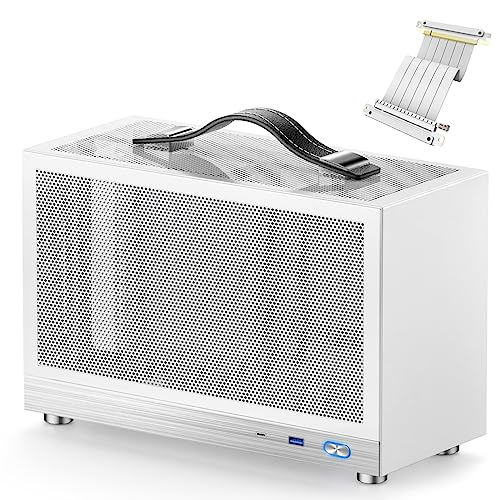
If maximum cooling capacity and full-sized GPU support take priority, the PCCOOLER CPS K101 Mini ITX PC Case offers impressive airflow features at a competitive price. Compact desk setups or minimalist HTPC configurations benefit greatly from the ultra-small footprint of the Goodisory A09 Black Typec(10g)+USB3.0 Black or the portable design of the S300 – Gaming Case – Front I/O USB 3.0 Type.
Pairing your compact desktop build with high quality displays from our computer displays category completes an efficient and visually clean workspace setup. Choose the enclosure that fits your hardware dimensions and enjoy a space-saving PC build tailored to your needs.
Frequently Asked Questions
What motherboard header is required for front panel USB-C ports?
Most modern front USB-C ports use an internal USB 3.2 Gen 2 Type-E key-A header. If your Mini-ITX motherboard only features standard 19-pin USB 3.0 headers, you will need a low-profile adapter board, which may reduce data transfer speeds.
What is the top-rated enclosure among Best Mini ITX Cases with USB-C Ports in 2026?
The Fractal Design Terra Graphite is widely considered a premier choice in 2026. Its adjustable internal spine and high-speed front connectivity make it ideal for compact gaming and workstation builds.
Can long graphics cards fit inside small form factor cases?
Yes, many compact cases support graphics cards over 300mm in length by adopting a sandwich-style internal layout. Models like the PCCOOLER CPS K101 Mini ITX PC Case accommodate GPUs up to 340mm while maintaining an 11.9L chassis volume.
Why is my display showing a black screen with a PCIe riser cable?
This issue occurs when a PCIe 4.0 motherboard and GPU attempt to communicate through a PCIe 3.0 riser cable automatically. You can resolve this by connecting the GPU directly to the motherboard first and forcing the PCIe slot mode to Gen 3 in the BIOS.
What power supply form factor do I need for a Mini-ITX chassis?
Most SFF gaming cases require an SFX or SFX-L power supply unit. Ultra-compact HTPC chassis under 4 liters generally require a Flex-ATX power supply or an external DC power adapter paired with an internal DC-ATX converter board.
How do I maintain low temperatures in a mesh SFF case?
Selecting low-profile air coolers or liquid cooling radiators designed for your case volume is critical. Utilizing slim intake and exhaust fans helps maintain directional airflow through perforated side panels, keeping temperatures manageable alongside clear screens like those in our high resolution monitors guide.
Is building in a Mini-ITX case harder than a standard tower?
Building in an SFF chassis requires a strict assembly sequence because spatial clearance is tight. Connecting power cables, front panel headers, and storage drives before securing the motherboard makes the build process much smoother.
What are the benefits of a sliding central spine in an ITX case?
A sliding central wall allows you to reallocate internal width between the CPU cooler side and the GPU side. This feature gives you the freedom to choose either a taller CPU cooler or a thicker multi-slot graphics card based on your build priorities.




