

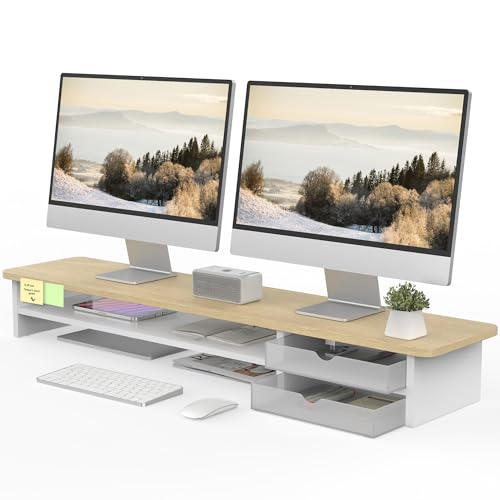
Choosing the right stand transforms your posture during long hours at your workstation. For multi-screen setups, the Fenge Dual Monitor Stand Riser provides ample surface width and built-in storage to elevate two full displays comfortably. When pairing your setup with the desktop and external monitors in our guide, a sturdy base keeps your screen at natural eye level.
If you only need to lift a single display or laptop on a tight budget, the WALI Computer Monitor Stand for Desk offers three adjustable height settings with a ventilated metal platform. We compared 7 Best Monitor Stands for Office Desks across Klearlook Maximized Clarity!, WALI, Fenge and more for October 2026 to find options for every desk size.




Best Monitor Stands for Office Desks Buying Guide
Weight Capacity and Structural Stability
Weight capacity determines whether a riser can safely support your screen without sagging over time. Single metal stands like the WALI Computer Monitor Stand for Desk support up to 44 pounds, which easily handles standard desktop displays. Dual-screen wooden platforms usually support up to 99 pounds across their reinforced frame.
Placing heavy screens on an under-rated riser creates bowing and increases the risk of tipping. Always calculate the combined weight of your display, base, and mounted accessories before purchasing. Non-slip rubber pads on the base feet protect your desktop and eliminate micro-wobbles while typing.
Platform Width and Desk Footprint
Desk dimensions dictate whether you should buy a compact single riser or an extended dual shelf. A dual riser like the Fenge Dual Monitor Stand Riser measures 42.5 inches across, requiring a substantial desk surface. For smaller offices, foldable designs let you customize width between 16.5 and 20.5 inches.
If you connect multiple external computer monitors, ensure the platform depth leaves adequate room for your keyboard in front. A shelf that extends too far forward forces your input devices to the front edge, compromising your wrist ergonomics.
Height Adjustability and Ergonomic Alignment
Proper ergonomic alignment places the top third of your display directly at eye level. Fixed risers elevate screens by approximately 5 to 5.5 inches, which works well for users of average seated height. Adjustable risers provide multiple locking positions so you can fine-tune height between 3.9 and 5.5 inches.
Mechanical articulating arms offer the highest degree of ergonomic flexibility by providing up to 13 inches of lift and full rotation. Choosing the wrong viewing height causes chronic cervical spine tension and forward neck lean during long working sessions.
Integrated Storage and Workspace Organization
Clutter reduction is a primary reason to add a riser to your workstation. Multi-tier models incorporate slide-out drawers, pen compartments, and dedicated slots for tablets or smartphones. The lower clearance underneath the shelf allows you to tuck a standard keyboard away when writing or organizing paperwork.
Dedicated cable management channels keep power bricks and video cables hidden behind the riser frame. Organizing your workspace makes it easier to manage high-bandwidth cables used with modern high resolution monitors.
Material Quality and Build Longevity
Risers are primarily constructed from powder-coated steel, solid aluminum, or high-density engineered wood panels. Heavy-duty metal stands provide superior durability and ventilation holes that dissipate heat from laptops and power supplies. Wood composite platforms deliver a warm, furniture-like aesthetic that blends nicely into home office decor.
Inspect the thickness of wood panels, aiming for at least 15 to 16 millimeters to prevent center sagging. Water-resistant and scratch-resistant finishes protect the surface against spilled beverages and everyday scuffs from office supplies.
How We Evaluated
We analyzed 7 stands from Klearlook Maximized Clarity!, WALI, Fenge and more by comparing technical specifications, load ratings, structural dimensions, and assembly mechanisms. Our evaluation focused on structural integrity under sustained loads, ergonomic adjustment ranges, and storage utility.
We examined verified build parameters to identify trade-offs between fixed desktop shelves and articulating clamp mounts. This systematic comparison ensures you receive clear, objective guidance tailored to various office desk layouts.
Common Mistakes to Avoid
Ignoring Desk Depth: Buying a wide dual monitor shelf for a shallow desk pushes your screen too close to your eyes. Maintain at least an arm length between your seating position and your display for visual comfort.
Overlooking Keyboard Width: Failing to measure keyboard clearance underneath the stand leaves no room to store your typing gear. Full-sized mechanical keyboards with numeric keypads require at least 18 inches of clear horizontal span.
Exceeding Arm Weight Limits: Mounting an ultrawide screen onto a standard arm without checking the upper payload rating causes the arm to droop. Confirm that your display weight, minus its factory base, remains within the specified capacity.
Buying Checklist
- Measure your desk width and depth to ensure the stand footprint fits comfortably.
- Confirm the stand weight rating exceeds the total weight of your monitor and accessories.
- Check the underside horizontal clearance to verify your keyboard slides completely underneath.
- Determine whether you need fixed elevation or multi-level height adjustment for eye-level alignment.
- Verify VESA pattern compatibility (75x75mm or 100x100mm) if purchasing an articulating arm mount.
- Check desk edge thickness and clamp clearance if selecting a desk-clamp monitor arm.
- Ensure the unit includes non-slip rubber pads to protect your desktop surface from scratches.
Final Thoughts
Selecting the right riser comes down to your screen setup and storage requirements. For dual-display users, the Fenge Dual Monitor Stand Riser remains our top overall recommendation due to its expansive 42.5-inch width, solid 99-pound capacity, and smooth acrylic storage drawers.
If you want maximum value on a compact desk, the WALI Computer Monitor Stand for Desk provides dependable three-stage height adjustment at an entry-level price point. Users who prefer floating screens and free desk space will appreciate the heavy-duty articulation of the Ergotron – Upgraded LX Pro Premium Monitor Arm.
Upgrading your desk elevation reduces posture fatigue and creates an organized, professional workflow. Explore our How To section and our guide to external monitors to build a complete ergonomic workspace.
Frequently Asked Questions
What is the ideal screen height for Best Monitor Stands for Office Desks in 2026?
Your monitor should sit so that the top third of the screen aligns directly with your horizontal eye level. This positioning prevents you from tilting your head upward or slumping your neck forward during long work hours.
Can a monitor riser hold two large displays at the same time?
Yes, dual-tier platforms measuring 42.5 inches or wider easily hold two standard screens side by side. Models like the Fenge Monitor Stand, Desk Computer Riser offer a 99-pound weight limit specifically engineered for multi-monitor arrangements.
Are ventilated metal stands better than wooden risers?
Ventilated metal platforms offer superior heat dissipation, making them ideal if you place a running laptop or dock directly on top. Wooden stands provide a warmer aesthetic and often include built-in storage drawers for office accessories.
What is the advantage of an articulating monitor arm over a desktop shelf?
An articulating arm clamps directly to the back of your desk, freeing up almost all usable surface space underneath. It allows seamless tilt, swivel, and height adjustments, which is helpful when switching between sitting and standing postures.
How much weight can typical Best Monitor Stands for Office Desks support?
Standard single risers typically carry between 44 and 55 pounds, while reinforced dual shelves hold up to 99 pounds. Check our overview of high resolution computer monitors to ensure your display weight matches your chosen stand.
Do foldable monitor risers sacrifice structural stability?
Quality foldable risers integrate internal metal support plates and locking hinge mechanisms that maintain rigidity. They support up to 55 pounds without wobbling while offering customizable width settings to fit your exact desk size.
How do I prevent my monitor stand from scratching my office desk?
Look for risers equipped with thick rubberized anti-slip pads on the feet or mounting clamps. These pads keep the riser firmly in place during adjustments while protecting sensitive wood and laminate surfaces from scratches.



