When building an advanced automated setup in September 2026, selecting the right central controller makes all the difference. The Home Assistant Green | Smart Home hub stands out as our top pick for enthusiasts who demand local data privacy, endless integration choices, and powerful custom scripting. Check out our how to guides for more ways to optimize home hardware control.
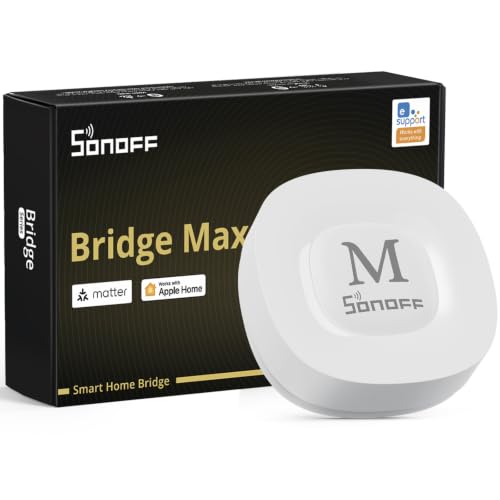
For users who want pre-tuned local execution without setting up custom software packages from scratch, the Hubitat Elevation C‑8 Pro Smart Home Hub offers an exceptional runner-up solution. Meanwhile, budget-conscious builders can look to the SONOFF Bridge Max Smart Home Hub (Bridge-M) for affordable Zigbee and Matter bridging.





Best Smart Home Hubs for Tech Enthusiasts Buying Guide
Local Processing vs Cloud Dependency
Local execution ensures your automations continue running during internet outages. Cloud-dependent hubs introduce latency and risk complete downtime whenever external servers experience service disruptions. Advanced users generally prefer controllers that handle sensor triggers and lighting scenes directly on internal hardware.
Evaluating local operation involves checking whether automation rules, security alerts, and device status logs remain stored on the local drive. Choosing local processing keeps your private household data securely within your home network without uploading activity history. The minor trade-off is that initial setup and port management may require slightly more configuration effort.
Wireless Protocol Support
Smart home devices communicate across diverse radio frequencies including Zigbee, Z-Wave, Thread, and traditional Wi-Fi. Selecting a hub with built-in multi-protocol radios prevents the need for multiple dongles cluttering your setup. Enthusiasts building expansive mesh networks should verify protocol versions and maximum node limits before purchase.
Modern hubs act as Thread Border Routers and Matter bridges, exposing legacy devices to platforms like Apple Home or Google Home. When integrating legacy sensors with new standard controllers, broad protocol support prevents orphan devices. You can read more about network management in our guide to desktop external setups.
Hardware Performance and Expansion Ports
Complex automation engines demand sufficient processor power and system memory to handle background routines. Quad-core processors and ample onboard storage prevent micro-stutters when dozens of sensors report telemetry simultaneously. Hardware with expansion ports allows long-term upgrades like adding specialized radios or external drives.
USB ports enable users to attach Z-Wave radios, Bluetooth dongles, or local backup drives as their setup grows. Without physical expansion ports, your hub remains limited strictly to its built-in radios and onboard storage capacity. Investing in extensible hardware ensures your smart controller evolves along with your changing home automation needs.
Ecosystem Bridging and Cross-Platform Support
Cross-platform compatibility allows devices from competing brands to trigger shared routines smoothly. A capable bridge syncs proprietary sub-devices into unified platforms like Home Assistant or Apple Home. This flexibility stops brand lock-in and lets you select hardware based purely on sensor accuracy and price.
Matter compatibility serves as the standard bridge for connecting distinct smart ecosystems together without custom coding. However, proprietary features like advanced energy reporting or precise sensor calibration may still require native brand applications. Evaluating bridge depth helps you balance universal voice control with deep device management.
Network Interfaces and Power Options
Reliable network connectivity forms the foundation of any responsive automation system. Ethernet ports deliver stable gigabit connections superior to wireless links in high-density radio environments. Wi-Fi options provide installation flexibility when placing hubs in central locations for optimal radio coverage across rooms.
Power over Ethernet simplifies wiring by delivering both electrical power and data over a single network line. USB-C power ports offer convenient compatibility with battery backups or uninterruptible power supplies to keep security alarms active during power outages. Choosing versatile power input methods prevents system restarts during minor grid fluctuations. Check our breakdown of computer displays for central monitoring ideas.
How We Evaluated
Our evaluation methodology focuses on objective specification analysis, protocol interoperability, local execution performance, and hardware reliability. We examined protocol support across Zigbee, Z-Wave, Thread, and Matter standards, prioritizing controllers that execute routines locally without mandatory cloud services. We also scrutinized memory allocation, expansion potential, and backup capabilities across 7 models available in 2026.
We further analyzed real-world setup flexibility, power delivery options like Power over Ethernet, and ecosystem compatibility with major voice platforms. By evaluating hardware specifications against typical enthusiast automation demands, we identified trade-offs between open-source flexibility and out-of-the-box convenience to guide your selection.
Common Mistakes to Avoid
One frequent mistake is choosing a hub based solely on price without verifying its protocol compatibility. Buying a controller that lacks Z-Wave or Thread support forces you to purchase additional USB dongles or secondary gateways later, increasing overall system clutter.
Another common error is relying entirely on cloud-based automations for mission-critical tasks like security monitoring or leak detection. Cloud reliance introduces processing lag and leaves your system vulnerable during internet provider outages. Prioritizing local rule execution prevents your routines from failing when network connectivity drops.
Finally, enthusiasts often overlook hardware expansion limits and internal storage constraints. Installing numerous custom integration scripts on low-memory hardware causes system slowdowns and random reboots. Selecting a controller with USB expansion ports or ample memory headroom ensures your setup remains stable over time.
Buying Checklist
- Verify that essential automations run locally on internal hub hardware without cloud requirements.
- Confirm built-in support for required protocols including Zigbee, Z-Wave, Thread, or Matter.
- Check for physical USB expansion ports if planning to add extra radios or local storage later.
- Ensure the controller offers an Ethernet port or Power over Ethernet for stable network communication.
- Validate cross-platform compatibility with existing voice assistants and smart home ecosystems.
- Confirm internal backup capabilities to preserve device pairings and automation rules during hardware swaps.
- Check whether custom rule creation requires programming experience or supports visual rule builders.
Final Thoughts
Selecting the right smart controller depends on your technical comfort level and network requirements. For enthusiasts who want complete sovereignty over their data alongside unlimited integration choices, the Home Assistant Green | Smart Home hub represents the ultimate open-source platform. You can pair it with high-resolution control dashboards like those found in our best hi res monitors review.
If you prefer dedicated, turn-key local automation out of the box without maintaining software containers, the Hubitat Elevation C‑8 Pro Smart Home Hub delivers robust performance with multi-protocol support. It combines fast rule processing with zero subscription fees for long-term value.
For budget-focused setups or bridging specific brand ecosystems, the SONOFF Bridge Max Smart Home Hub (Bridge-M) and Aqara Smart Home Hub M3 for Advanced Automation offer targeted bridging features. Aligning your controller selection with your primary protocols guarantees a responsive, reliable smart home experience in 2026.
FAQs
What is the top option among Best Smart Home Hubs for Tech Enthusiasts in 2026?
The top option for advanced automation enthusiasts is the Home Assistant Green | Smart Home hub due to its local processing, massive integration library, and private data handling.
Why is local control important when selecting Best Smart Home Hubs for Tech Enthusiasts?
Local control ensures your home automations continue operating during internet service disruptions while keeping private device telemetry inside your local network.
Do smart home hubs require monthly subscription fees?
Most enthusiast-grade hubs like the Hubitat Elevation C‑8 Pro Smart Home Hub run core automations, rule engines, and device updates without monthly subscription charges.
How does Matter bridging benefit a multi-brand smart home?
Matter bridging converts proprietary protocol signals into a standardized format, allowing legacy Zigbee or infrared devices to appear seamlessly inside platforms like Apple Home or Google Home.
What is the difference between Zigbee and Z-Wave protocols?
Zigbee operates on the 2.4 GHz frequency worldwide and supports fast mesh networks, while Z-Wave uses sub-gigahertz frequencies to eliminate Wi-Fi signal interference.
Can I manage automated smart home routines from a desktop monitor setup?
Yes, platforms like Home Assistant allow full web browser control, making it easy to display dashboards on external desktop displays for real-time monitoring.
What hardware expansion features should tech enthusiasts look for?
Look for USB ports to add radios or storage, Power over Ethernet capability for clean wiring, and dual-band Wi-Fi for versatile physical placement in central home locations.
How does a Thread Border Router work inside a smart home hub?
A Thread Border Router connects low-power Thread mesh device networks directly to your home LAN, enabling fast, low-latency device control without separate bridge hardware.