

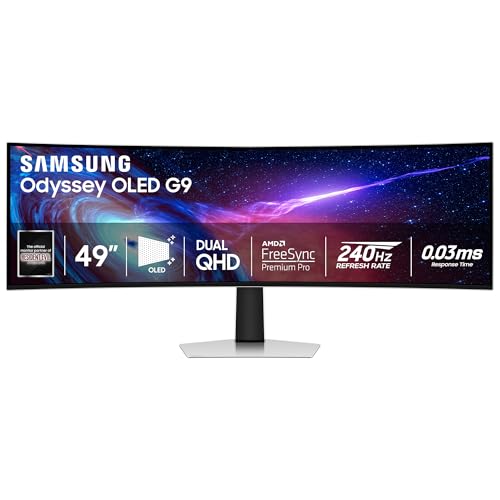
Selecting among the Best Super Ultrawide Computer Monitors requires balancing resolution, panel technology, and desk space. In October 2026, after analyzing 7 top displays, the Samsung 49″ Odyssey G93SC Series Curved stands out as the ultimate choice for gamers and creators alike. It provides unmatched contrast and vibrant colors, making it ideal if you want a high-performance display for immersive setups alongside our recommendations for 4K, 6K & 8K Monitors.
If you want maximum workspace on a budget, the CRUA 49″ DQHD 165Hz Ultrawide Curved delivers expansive Dual QHD screen real estate at an accessible entry price. Both options replace cumbersome multi-monitor configurations while eliminating central bezel seams entirely.


Best Super Ultrawide Computer Monitors Buying Guide
Understanding Screen Resolution and Pixel Density
Super ultrawide panels come primarily in two resolutions: Dual QHD (5120×1440) and Dual UHD (7680×2160). Dual QHD equals two 27-inch 1440p displays side-by-side, providing sharp text and manageable GPU demands.
Dual UHD displays match two 32-inch 4K panels in width, delivering exceptional sharpness across every window. However, driving Dual UHD requires high-end graphics hardware and modern connection standards like DisplayPort 2.1 to reach high refresh rates.
Choosing between these options depends heavily on your daily workflow and system specs. You can explore more panel setups in our guide to best high resolution monitors for comfort and value.
Panel Technologies: QD-OLED vs Mini-LED vs VA
Panel technology directly influences picture quality, contrast ratios, and color depth. QD-OLED panels offer per-pixel dimming, true blacks, and sub-millisecond response times, making them the ultimate pick for vibrant dark scenes.
Mini-LED displays use thousands of dimming zones to achieve incredible peak brightness levels, which suit brightly lit rooms. Standard VA panels provide solid contrast ratios at lower price points without risk of image retention.
If your work involves color accuracy, check the sRGB and DCI-P3 spectrum percentages. You can learn more about display panels in our guide to IPS, OLED & LED Panels.
Screen Curvature and Ergonomic Comfort
Because super ultrawide screens stretch up to 57 inches across, screen curvature is critical to maintain consistent viewing distances. Curvature ratings like 1000R, 1500R, and 1800R indicate the curve radius in millimeters.
A tight 1000R curve matches the natural field of human vision, bringing distant screen edges closer to reduce neck turning. Steeper curves like 1800R provide a flatter profile that some users prefer for spreadsheet alignment.
Ensure your desk setup includes a stand with height, tilt, and swivel adjustments. Proper height positioning reduces eye strain during extended work and gaming sessions.
Refresh Rates and Motion Handling
Refresh rates determine how smoothly motion renders across your display screen. Standard office monitors run at 60Hz, whereas super ultrawide panels feature rates ranging from 120Hz up to 240Hz.
Gamers and power users benefit from higher refresh rates because fast movements feel smoother and input lag drops significantly. Adaptive sync tech like FreeSync and G-Sync compatibility prevents screen tearing during intense visual action.
Lower response times such as 0.03ms or 1ms keep moving objects crisp without distracting trails. For general work applications, a 120Hz panel ensures fluid mouse cursor movements and smooth document scrolling.
Port Selection, USB-C Docking, and KVM Functionality
Advanced connectivity turns a monitor into a centralized desktop hub. Built-in USB-C ports with power delivery can charge your laptop with up to 90W while transmitting video signals over a single cable.
Integrated KVM switches let you control two connected computers using a single keyboard and mouse set. Picture-by-Picture (PBP) modes allow you to display inputs from two devices simultaneously on opposite halves of the screen.
Verify that your computer hardware supports the required HDMI 2.1 or DisplayPort standard before purchasing. This ensures you achieve maximum resolution and full refresh rates without bandwidth limitations.
How We Evaluated
We evaluated these displays by analyzing manufacturer specifications, connection standards, panel performance data, and verified user feedback. Our objective analysis focused on visual sharpness, ergonomic adjustability, color coverage, and overall value across various use cases.
We compared screen curvatures, port selections, dynamic ranges, and power delivery capabilities to determine how each monitor performs in real-world environments. This data-driven process allows us to recommend options tailored to specific gaming and productivity needs.
Common Mistakes to Avoid
Underestimating total desk depth and width is a frequent error when buying a 49-inch or 57-inch display. These massive stands require deep surfaces to maintain proper viewing distances without crowding your keyboard.
Ignoring graphics card output limitations can leave you unable to run the monitor at its full resolution or refresh rate. Always confirm your GPU features HDMI 2.1 or DisplayPort 1.4 or 2.1 outputs before ordering.
Assuming all ultrawide displays include high-powered USB-C docking or KVM switches can lead to unexpected cable clutter. Check port specifications carefully if single-cable laptop connectivity is essential to your setup.
Buying Checklist
- Measure your desk width and depth to ensure adequate space for a 49-inch or 57-inch chassis.
- Confirm your graphics card supports 5120×1440 or 7680×2160 output at high refresh rates.
- Decide whether you prefer a tight 1000R curve or a milder 1800R bend for daily tasks.
- Check if the display offers USB-C power delivery (65W to 90W) to charge your primary laptop.
- Verify KVM switch functionality if you plan to share peripherals between two desktop systems.
- Ensure VESA mounting compatibility if you plan to attach the screen to a monitor arm.
- Review built-in speaker support if you prefer to maintain a clean desk without external speakers.
Final Thoughts
Upgrading to the Best Super Ultrawide Computer Monitors transforms both productivity workflows and gaming immersion. For ultimate visual depth and contrast, the Samsung 49″ Odyssey G93SC Series Curved delivers top-tier performance with its vibrant QD-OLED panel. If you need maximum resolution across an unprecedented screen area, explore our pick for best external computer monitors for comfort at work.
Business users seeking clean single-cable connectivity will find the Samsung 49” Business Curved Ultrawide Dual QHD exceptionally practical. Meanwhile, buyers seeking maximum screen real estate on a modest budget should look toward the CRUA 49″ DQHD 165Hz Ultrawide Curved for incredible value.
Choosing the ideal monitor depends on balancing your desktop space, system hardware, and daily tasks. Matching your primary workflow to panel speed, resolution, and connectivity features ensures a satisfying upgrade.
Frequently Asked Questions
What graphics card is needed for Best Super Ultrawide Computer Monitors in 2026?
To run Dual QHD (5120×1440) resolution at high refresh rates, a mid-range graphics card like an NVIDIA RTX 3070 or AMD RX 6700 XT is recommended. Dual UHD displays require top-tier GPUs such as an RTX 4080 or RX 7900 XTX to utilize full performance.
Is a 1000R or 1800R curve better on a super ultrawide display?
A 1000R curvature matches the natural field of vision closely, making it ideal for deep immersion and reduced eye movement on large screens. An 1800R curve is slightly flatter, which some professionals prefer when working extensively with straight line graphics or spreadsheets.
Can you divide a super ultrawide display into two separate screens?
Yes, most models include Picture-by-Picture (PBP) functionality. This allows you to split the display into two side-by-side inputs, treating one monitor like two physical 16:9 screens connected to one or two computers.
Are super ultrawide monitors good for everyday productivity tasks?
Absolutely, as they replace dual-monitor setups without central screen bezels. You can position multiple documents, browser windows, and chat apps side-by-side effortlessly. For more workspace tips, read about Desktop & External Monitors.
Do super ultrawide monitors cause screen stretching in games?
Modern PC titles generally support 32:9 aspect ratios natively, expanding your field of view seamlessly. Games without native 32:9 support will display black bars on the sides, running in standard 16:9 or 21:9 modes.
What is the difference between Dual QHD and Dual UHD resolutions?
Dual QHD delivers a 5120×1440 resolution, equivalent to two 27-inch 1440p monitors combined. Dual UHD doubles pixel density with a 7680×2160 resolution, matching two 32-inch 4K panels placed side-by-side.
Are built-in KVM switches useful on super ultrawide monitors in 2026?
Integrated KVM switches are extremely useful for users who switch between a work laptop and a personal gaming desktop. They allow control of both systems using a single set of keyboard and mouse peripherals without swapping cables.
Do super ultrawide monitor arms need specialized heavy-duty mounts?
Yes, because 49-inch and 57-inch monitors weigh significantly more than standard displays and place heavy leverage on monitor tilts. Standard monitor arms usually sag, so purchasing a heavy-duty arm designed for ultrawide panels is essential.




