

Finding the Best Headsets for PS4 and Laptop Gaming requires balancing dual-system compatibility, low-latency audio transmission, and microphone clarity. For September 2026, we reviewed 7 configurations to determine which models seamlessly bridge the gap between console gaming on television setups and portable laptop play. If you want top-tier wireless audio with dual-device connectivity, the RIG R8 Spectre PRO HS Dual Wireless Gaming Headset delivers exceptional fidelity alongside high-speed wireless swapping.
Gamers seeking solid performance without premium price tags should consider the Razer BlackShark V2 X Gaming Headset for PC as a reliable wired alternative. Its universal 3.5mm connector ensures instant plug-and-play operation across both PlayStation hardware and portable laptops. If you also plan to pair your laptop setup with dedicated gaming monitors, choosing a versatile headset with flexible input options simplifies your entire desktop environment.


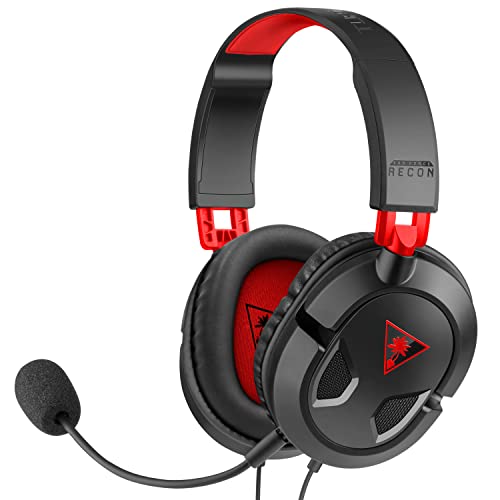


Best Headsets for PS4 and Laptop Gaming Buying Guide
Connection Protocol and Platform Compatibility
Selecting audio hardware that bridges two distinct gaming platforms starts with connection flexibility. A PS4 relies heavily on controller-mounted 3.5mm audio jacks or direct USB audio ports, while laptops offer varied USB Type-A, USB-C, or analog options. Identifying headsets with multi-mode interfaces prevents annoying adapter bottlenecks when switching systems.
Wireless headsets require specialized consideration due to platform software locks. While standard Bluetooth functions well on mobile devices and laptops, native PS4 consoles do not support general Bluetooth audio without proprietary dongles. Choosing a 2.4GHz wireless dongle ensures lossless transmission and ultra-low latency across both laptop USB slots and console bays.
If you prefer zero battery anxiety, standard analog 3.5mm headsets remain the most foolproof solution. They connect instantly to PS4 DualShock controllers and modern laptop headphone jacks without driver installations. Consulting our detailed gaming audio setup guides can help clarify complex wiring configurations for desktop workspaces.
Driver Architecture and Frequency Response
A headset acoustic performance hinges on its internal speaker drivers and magnet construction. Larger 50mm dynamic drivers push more air than standard 40mm options, resulting in deeper bass impact for explosions and cinematic soundscapes. However, refined driver materials like graphene coating deliver tighter transient response and significantly less distortion across all frequency bands.
Competitive players rely on spatial accuracy rather than heavy bass emphasis. Headsets tuned for clear mid-range frequencies allow users to pinpoint subtle footstep cues, reloading sounds, and voice chat over background ambient tracks. Evaluating driver specs guarantees that audio cues remain crisp whether playing on a console or a high-refresh screen.
Microphone Clarity and Noise Suppression
Team communication requires clean voice capture that ignores background ambient noise. Cardioid boom microphones isolate your voice by rejecting sounds from the sides and rear of the capsule. This directional pickup pattern prevents keypress clicks from mechanical keyboards or television speakers from bleeding into squad communication channels.
Hardware-level Environmental Noise Cancellation (ENC) further improves clarity for laptop users in shared rooms. Removable or flip-to-mute mic booms offer added convenience when transitioning from voice calls to solo campaign sessions. Ensuring physical mute switches on the earcup or cable control box gives immediate control without opening software menus.
Ergonomics and Long-Term Wear Comfort
Physical comfort determines how long you can play comfortably without fatigue. Headset weight distribution, headband padding thickness, and ear cushion materials directly impact pressure points around your skull. Lightweight builds under 250 grams reduce neck strain during extended evening gaming marathons.
Ear cup materials offer distinct thermal and acoustic trade-offs. Leatherette cushions create a tight seal for passive noise isolation and enhanced bass response, though they trap heat over time. Breathable fabric mesh or hybrid memory foam cushions promote airflow, keeping your ears cool during intense sessions near desktop external peripherals.
Battery Longevity and Power Management
Wireless freedom requires active power maintenance to avoid sudden shutdowns in critical moments. Modern wireless headsets range from 20 hours to over 60 hours of continuous playback per charge. Long battery lifespans mean you can game across multiple days between recharge cycles.
Features like play-while-charging capability over USB-C and quick charging docks add significant practical value. Disabling decorative RGB lighting setups often doubles overall battery endurance, extending playtime significantly when travelling with a portable laptop.
How We Evaluated
Our evaluation process focuses on objective specification analysis, platform compatibility matrix verification, and functional ergonomics. We systematically compared key parameters across all 7 models, assessing connection protocols, driver size, frequency range, weight profile, and mic cancellation technology.
We prioritized dual-compatibility scenarios to ensure seamless operation on both PS4 hardware and modern laptop operating systems. By examining user feedback data and manufacturer design specifications, our comparison highlights real-world versatility, material durability, and value across diverse price brackets in 2026.
Common Mistakes to Avoid
Assuming Bluetooth work natively for console audio is a frequent trap for buyers. Standard PS4 software blocks direct Bluetooth audio pairing, requiring a dedicated 2.4GHz USB wireless dongle or a physical 3.5mm cable connection instead.
Ignoring connector splitters for laptop use can lead to mic input issues. Many laptops feature combined TRRS headset ports, while desktop setups or older laptops require separate mic and headphone splitters included in the package.
Overlooking ear cushion materials often results in overheating during long gaming sessions. Buyers who live in warm climates should select breathable sports-mesh fabrics over dense synthetic leatherette seals.
Buying Checklist
- Confirm 3.5mm jack or 2.4GHz USB dongle compatibility with your PS4 controller or console bay.
- Verify laptop port availability (USB-A, USB-C, or 3.5mm combo audio jack).
- Check driver sizing (40mm to 50mm) to match your sound preference for competitive or cinematic audio.
- Inspect microphone features such as cardioid pickup, detachable stems, or flip-to-mute mechanisms.
- Select ear cushion materials (breathable fabric mesh vs sound-isolating leatherette).
- Ensure headband weight remains around 240g to 300g for long-term neck comfort.
- Verify battery life ratings (40+ hours recommended for low-maintenance wireless setups).
- Check for physical inline or earcup volume controls for quick adjustments mid-game.
Final Thoughts
Selecting the ideal audio gear for multi-system setups comes down to your personal balance of freedom, audio resolution, and budget. For users seeking premium wireless performance across console and laptop systems, the RIG R8 Spectre PRO HS Dual Wireless Gaming Headset offers top-tier graphene drivers, long battery endurance, and flexible dual-wireless modes.
If you want exceptional wireless utility at an accessible price point, the Acer Wireless Gaming Headset for PS5, PC, PS4 delivers reliable tri-mode connectivity alongside a lightweight suspension headband. Meanwhile, budget-conscious players who prefer passive wired simplicity will find the Razer BlackShark V2 X Gaming Headset for PC unbeatable for passive noise isolation and clean voice transmission.
Matching your headset choice with quality visual hardware like best external monitors creates a fully immersive gaming station across all your favorite titles in 2026.
Frequently Asked Questions
Can I use a 2.4GHz wireless headset with both PS4 and laptop systems?
Yes, 2.4GHz USB wireless dongles offer universal plug-and-play operation across PS4 consoles and Windows or Mac laptops. Simply insert the USB transmitter into an available port on either device for low-latency audio transmission.
Why does Bluetooth audio not connect directly to a PS4 console?
Sony restricted generic Bluetooth audio connections on PS4 to minimize latency issues and ensure wireless controller bandwidth. To connect wirelessly, you must use a headset with a dedicated 2.4GHz USB adapter.
What is the benefit of choosing the Best Headsets for PS4 and Laptop Gaming in 2026 with 3.5mm wired jacks?
A 3.5mm wired connection provides maximum platform versatility without requiring battery power or software drivers. It plugs directly into DualShock 4 controllers, laptops, tablets, and smartphones effortlessly.
Do 50mm audio drivers sound noticeably better than 40mm drivers?
Larger 50mm drivers typically deliver punchier bass and higher sound volume capability. However, overall sound quality also depends on driver material quality, cup acoustic tuning, and spatial audio support.
How do I mute my microphone quickly while playing on a laptop?
Headsets designed for multiplatform use feature physical mute buttons on the earcup or inline cable controls. Flip-to-mute microphones also allow you to mute instantly by swiveling the mic boom upwards.
Can I plug my headset into HDMI monitors with built-in audio output?
Yes, if your monitor includes a 3.5mm audio output jack, you can pass sound from your console or laptop straight to your headset. Note that monitor audio jacks typically pass headphone sound only, not microphone input.
Is leatherette or mesh fabric better for long gaming sessions?
Mesh fabric ear cushions offer superior breathability, keeping your ears cool during long sessions. Leatherette provides tighter acoustic isolation and deeper bass output, but traps heat more easily over time.


