

Finding reliable reception for an older desktop or a laptop with a broken network card can be frustrating. For most users upgrading their wireless connection in October 2026, the TP-Link USB WiFi 6 Adapter for Desktop PC -AX1800 offers the ideal balance of Wi-Fi 6 speed and flexible antenna coverage. Learn more about hardware setup on our How To guide hub.
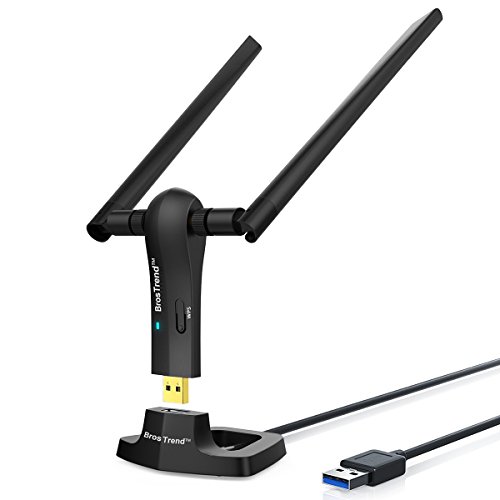
If you need flexible placement to clear signal interference behind a heavy computer chassis, the BrosTrend AC1200 Long Range USB WiFi Adapter provides a dedicated desktop cradle. We evaluated 3 options across a $27.43 – $36.99 range from BrosTrend, Nineplus, TP-Link to highlight the Best USB WiFi Antennas.

Best USB WiFi Antennas Buying Guide for 2026
Antenna Gain and Beamforming
Antenna gain measures how effectively an adapter directs wireless signals toward your router. Standard internal cards rely on tiny omnidirectional traces, whereas external high-gain antennas of 5dBi or higher focus radio energy across longer distances.
Pairing high-gain hardware with beamforming technology allows the adapter to target signals directly toward the access point. This targeted approach reduces wireless dead zones and maintains strong throughput through walls.
If you place your computer in a basement or separate room, dual external antennas offer superior reception over single-antenna dongles. You can also explore Desktop & External Monitors for organizing clean workspace setups around your PC hardware.
Wi-Fi Standard and Speed Ratings
Modern wireless adapters split into Wi-Fi 5 (802.11ac) and Wi-Fi 6 (802.11ax) standards. Wi-Fi 6 adapters achieve transfer speeds up to 1800Mbps while handling multiple concurrent device streams far more efficiently.
Older AC1200 adapters remain adequate for basic web browsing and media playback on modest internet connections. However, AX1800 devices provide lower network latency and faster download capacity for high-bandwidth tasks.
Choosing an AX1800 Wi-Fi 6 adapter ensures your desktop remains compatible with newer mesh routers and multi-gigabit access points. This prevents your wireless receiver from becoming a network bottleneck during fast data transfers.
USB Interface and Desktop Extension Cradles
The physical connection between the network adapter and your computer determines maximum bandwidth. USB 3.0 interfaces support data transfers up to 10 times faster than legacy USB 2.0 ports.
Plugging a compact dongle directly into the back of a metal PC case can block wireless signals. Desktop cradles with extension cables solve this issue by allowing you to place antennas in elevated positions.
Positioning your external antenna on top of a desk improves line-of-sight visibility to the wireless router. For dedicated home offices, pairing extended adapters with best external computer monitors for comfort at work creates an efficient workstation.
Operating System Compatibility and Driver Setup
System compatibility varies significantly between adapter chipsets and operating systems. Many modern Wi-Fi 6 receivers feature built-in drivers that install automatically upon connection to Windows systems.
Older operating systems or alternative platforms may require manual driver downloads prior to initial setup. Verifying driver availability before purchasing prevents connectivity issues on legacy machines.
Plug and play functionality saves time during initial system configuration and recovery scenarios. Choosing adapters with preloaded drivers ensures immediate internet access without needing secondary media drives.
Wireless Security Protocols
Network security protocols shield personal data from unauthorized access across wireless radio frequencies. Modern network cards support WPA3 encryption alongside legacy WPA2 standards for maximum network privacy.
WPA3 security provides robust protection against brute-force password guessing attempts on local networks. It creates individualized encryption keys for each connected device to safeguard sensitive personal information.
Upgrading to an adapter with WPA3 compliance ensures your computer meets modern cybersecurity guidelines. This security feature is especially vital when connecting to shared home or small office networks.
| Feature Standard | Wi-Fi 5 (AC1200) | Wi-Fi 6 (AX1800) |
|---|---|---|
| Max Transfer Speed | Up to 1200Mbps | Up to 1800Mbps |
| Network Efficiency | Standard MU-MIMO | OFDMA and MU-MIMO |
| Security Standard | WPA2 / WPA3 | WPA3 Native |
| Best Use Case | General Browsing | 4K Streaming & Gaming |
How We Evaluated
We evaluated these wireless network adapters by analyzing manufacturer technical specifications, signal strength metrics, and user feedback. Our review process focused on dual-band transmission capabilities, physical antenna designs, and real-world interface speeds across current network standards.
We prioritized models offering stable driver support, strong encryption protocols, and versatile mounting options. By comparing hardware architecture against common home networking demands, we selected reliable adapters that deliver sustained wireless performance.
Common Mistakes to Avoid
Plugging high-speed adapters into legacy USB 2.0 ports severely limits performance. USB 2.0 throttles connection speeds well below maximum theoretical throughput, rendering fast Wi-Fi 6 features ineffective.
Ignoring physical antenna placement often results in weak signal reception and dropped connections. Blocking antennas behind metal computer towers or near heavy electrical appliances degrades radio transmission strength.
Buying an adapter without verifying operating system driver compatibility creates setup obstacles. Always check whether your specific operating system release supports automatic driver installation before completing your purchase.
Assuming all USB dongles include high-gain antennas leads to disappointment in larger homes. Small internal-antenna adapters lack the range necessary to penetrate thick walls or travel between separate building floors.
Buying Checklist
- Verify your computer features an available USB 3.0 port for maximum data throughput.
- Confirm the adapter supports the latest WPA3 security protocol for enhanced network safety.
- Check that driver installation files support your specific operating system version.
- Determine whether your desk layout requires a flexible USB extension cradle.
- Ensure the antenna gain rating is at least 5dBi for long-range signal reception.
- Validate dual-band support for both 2.4GHz and 5GHz wireless frequencies.
- Select Wi-Fi 6 models if your home router supports 802.11ax standards.
Final Thoughts
Upgrading your wireless connection with one of the Best USB WiFi Antennas provides an immediate boost to network reliability and speed. For users seeking cutting-edge performance, the TP-Link USB WiFi 6 Adapter for Desktop PC -AX1800 delivers exceptional Wi-Fi 6 capability paired with advanced cybersecurity features. If you are building out a modern display workstation, check out our guide on best high resolution monitors for comfort and value.
Budget-conscious buyers looking for simple setup will appreciate the Nineplus USB WiFi Adapter for Desktop PC for its seamless driver-free installation on Windows systems. Meanwhile, users struggling with tight computer clearances will benefit from the extension cradle included with the BrosTrend AC1200 Long Range USB WiFi Adapter. Explore additional peripheral guides on our Computer Monitors & Displays category page.
Frequently Asked Questions
What makes Best USB WiFi Antennas better than built-in Wi-Fi cards?
External USB antennas feature higher gain ratings and adjustable positions that clear computer chassis obstruction. This physical advantage improves signal strength and network speeds compared to compact internal motherboards.
Are Best USB WiFi Antennas in 2026 compatible with older computers?
Yes, most modern USB wireless adapters work with older desktop and laptop computers featuring standard USB ports. However, you must connect the adapter to a USB 3.0 port to achieve maximum rated transmission speeds.
Do external Wi-Fi antennas require driver software to work?
Many current adapters include preloaded drivers that automatically install when plugged into modern Windows systems. Other models require downloading the driver package from the manufacturer website before full operation.
Should I choose dual-band or single-band USB network adapters?
Dual-band adapters are strongly recommended because they access both 2.4GHz and 5GHz frequency bands. The 5GHz band provides faster speeds for video streaming, while 2.4GHz offers superior coverage through walls.
How does an extension cradle help wireless signal strength?
An extension cradle allows you to place the wireless antennas on top of your desk away from metallic interference. This elevated positioning maintains line-of-sight pathing toward your home network router.
Can I use USB Wi-Fi adapters for online gaming and 4K streaming?
Wi-Fi 6 USB adapters providing AX1800 speeds offer low latency and high bandwidth suitable for gaming and 4K streaming. You can learn more about high-performance display options in our Gaming Monitors section.
What is the difference between dBi gain ratings on external antennas?
Higher dBi ratings indicate a more focused radio signal pattern over long horizontal distances. Antennas rated at 5dBi provide excellent signal amplification for multi-room home environments.




