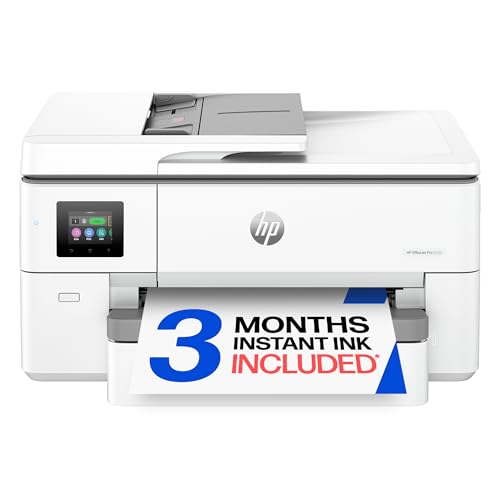
Selecting the right machine from the Best Printers for 11×17 Paper: Top Wide Format Picks collection transforms how your team handles oversized documents. For most busy workgroups, the HP OfficeJet Pro 9730 Wide-Format stands out as the premier choice thanks to its dual paper trays, fast color output, and automated two-sided scanning.
If ongoing ink savings take priority over initial purchase price, the Epson EcoTank ET-15000 Wireless Color All-in-One serves as an exceptional high-volume workhorse. For broader workspace setup guidance, explore our detailed How To tutorials before upgrading your office hardware.



Best Printers for 11×17 Paper: Top Wide Format Picks Buying Guide
Print Resolution and Color Fidelity
Tabloid printing demands sharp definition because technical blueprints, marketing materials, and complex spreadsheets contain intricate fine lines. Modern wide format inkjet models deliver resolutions up to 4800 x 2400 dpi, ensuring that small text remains legible across large sheets.
Professional documents also require precise color rendition to match digital assets on your screen. Selecting hardware with expanded P3 color gamuts provides richer color saturation than standard sRGB options, which is essential for design proofs and client presentations. For designers who review digital proofs on 4K, 6K & 8K Monitors, matching print gamut to screen fidelity prevents costly revision cycles.
Ink System Economics
Wide format pages consume more than double the ink volume of standard letter-sized sheets. Cartridge-based systems offer low entry costs but demand recurring cartridge replacements, which can become expensive for daily ledger-sized runs.
Supertank configurations utilize large refillable reservoirs that significantly reduce ongoing per-page expenses over years of service. If you prefer cartridge printers, automated ink subscription services help mitigate replacement costs while maintaining uninterrupted office output.
Paper Capacity and Media Handling
Switching trays between standard letter paper and oversized 11×17 media wastes valuable office time. Dual-tray printers hold 500 sheets total, allowing you to dedicate one cassette to letter sheets and the second to ledger stock.
Rear feed slots provide additional versatility when printing on specialty media such as cardstock, envelopes, or 13×19 super-tabloid sheets. Evaluating your monthly volume ensures you choose a paper handling configuration that prevents frequent reload interruptions.
Scanning and Document Feeder Capabilities
All-in-one wide format units streamline administrative tasks by digitizing oversized contracts, drawings, and ledgers. Look for automatic document feeders that handle multi-page 11×17 documents without requiring manual placement on the glass platen.
Single-pass duplex scanning captures both sides of a sheet simultaneously, cutting scanning time in half during large archiving sessions. This feature is particularly valuable for legal, architectural, and financial teams managing heavy document traffic alongside their Desktop & External Monitors workstations.
Print Speed and Duty Cycle
Print speed is measured in pages per minute, with top wide format office printers reaching up to 25 ppm for monochrome files. Faster output speeds prevent productivity bottlenecks when multiple team members send heavy graphics jobs to the shared queue.
Monthly duty cycle ratings indicate the maximum workload a printer can sustain reliably over time. Investing in a machine rated for tens of thousands of monthly pages protects internal components against premature mechanical wear.
Connectivity and Mobile Workflow
Modern offices rely on versatile connectivity including dual-band Wi-Fi, Ethernet networking, and direct mobile printing. Reliable wireless hardware automatically detects interference and resolves connection drops to keep your team productive.
Dedicated mobile applications allow users to scan, copy, and manage print jobs directly from smartphones or tablets. These integrated software suites also provide artificial intelligence formatting tools that eliminate awkward layouts before printing.
How We Evaluated
Our evaluation of wide format printers focused on manufacturer specifications, duty cycles, paper feed mechanics, and long-term operating costs. We analyzed resolution benchmarks, tray capacities, and duplex scanning features to assess true office productivity.
We examined connectivity reliability, software integration, and color reproduction standards across each model. This systematic comparison allows us to recommend dependable hardware configurations suited for diverse business workloads.
Common Mistakes to Avoid
Overlooking the physical footprint is a frequent error when setting up wide format hardware in compact offices. Tabloid printers require substantial desk depth and clear overhead space for the scanner lid and rear paper feed paths.
Selecting a single-tray machine when you regularly print both letter and ledger documents causes constant paper swapping. Investing in a dual-tray model saves hours of manual configuration and prevents accidental printing on incorrect paper sizes.
Ignoring long-term ink costs can result in excessive operational overhead for teams handling high-volume graphics. Match your monthly page expectations to supertank reservoirs or subscription ink plans rather than basic standard cartridges.
Buying thin, low-brightness paper often leads to distracting ink bleed-through and frequent paper jams during duplex runs. Pairing your printer with bright 20-pound ledger stock ensures clean contrast and smooth mechanical feeding.
Buying Checklist
- Confirm the maximum print width supports 11×17 inches or 13×19 super-tabloid stock.
- Verify whether the scanner platen and document feeder accommodate oversized 11×17 originals.
- Choose dual 250-sheet paper trays if your office frequently toggles between letter and ledger media.
- Check if the machine supports automatic two-sided duplex printing on ledger sheets.
- Evaluate whether a supertank reservoir or an ink subscription model best suits your monthly volume.
- Ensure the printer includes Ethernet and dual-band Wi-Fi for stable shared office networking.
- Verify color gamut specifications like P3 support for accurate marketing and design proofs.
- Select bright, acid-free 20-pound paper designed to prevent jams during heavy ledger print runs.
Final Thoughts
Selecting the right wide format printer streamlines document production and elevates the visual quality of your client-facing presentations. For comprehensive office versatility, we recommend the HP OfficeJet Pro 9730 Wide-Format because of its dual paper trays, rapid color speeds, and single-pass duplex scanning.
For organizations focused on high monthly page volumes and low ongoing running costs, the Epson EcoTank ET-15000 Wireless Color All-in-One delivers exceptional value through its refillable tank architecture. Users seeking an affordable entry point for fast wide prints will appreciate the Epson Workforce Pro WF-7310 Wireless All-in-One.
Stocking dedicated Amazon Basics Multipurpose Copy Printer Paper ensures your ledger documents maintain crisp lines and vivid contrast. To explore display configurations that complement your print workstation, check out our guide on Best Desktop Monitors for Comfort, Value and Clarity.
Frequently Asked Questions
What are the Best Printers for 11×17 Paper: Top Wide Format Picks in 2026 for office spreadsheets?
The HP OfficeJet Pro 9730 Wide-Format is our top choice for office spreadsheets and ledger charts. Its dual 250-sheet trays allow seamless switching between letter and 11×17 stock without manual reloading.
Can these wide format printers print on standard letter paper?
Yes, all wide format printers handle standard 8.5×11 letter and legal sizes in addition to 11×17 tabloid sheets. Dual-tray models enable you to keep both paper sizes loaded simultaneously for instant job processing.
What is the difference between 11×17 tabloid and 13×19 super-tabloid printing?
Tabloid paper measures 11×17 inches and is standard for architectural plans, ledgers, and newsletters. Super-tabloid or 13×19 paper provides extra border space for bleed prints and crop marks in professional graphic design.
Are refillable supertank printers worth the investment for 11×17 printing?
Supertank printers like the Epson EcoTank ET-15000 Wireless Color All-in-One save substantial money over time for busy workgroups. Because tabloid pages consume more ink, large reservoirs lower your overall cost per page significantly.
Do wide format printers require specialized copy paper?
Standard wide format printers work well with multipurpose 20-pound ledger paper such as Amazon Basics Multipurpose Copy Printer Paper. For photo presentations or marketing mockups, heavier coated or glossy wide format media provides enhanced vibrancy.
Can I scan 11×17 documents directly on all wide format all-in-one printers?
Some wide format printers only print 11×17 sheets while scanning at standard letter size. Premium models include oversized scan glass and wide automatic document feeders to digitize full ledger documents effortlessly. For additional office setup tips, review our Best HDMI Monitors for Comfort and Value You Can Trust article.
How does P3 color gamut support improve wide format prints?
P3 color support provides a wider spectrum of vivid tones compared to traditional sRGB profiles. This ensures that colors created on modern screens translate accurately to printed posters, renderings, and marketing collateral.
How fast do modern wide format inkjet printers produce color pages?
Modern wide format inkjets reach speeds between 12 and 18 color pages per minute for standard documents. Black-and-white documents print even faster, reaching speeds up to 22 or 25 pages per minute.