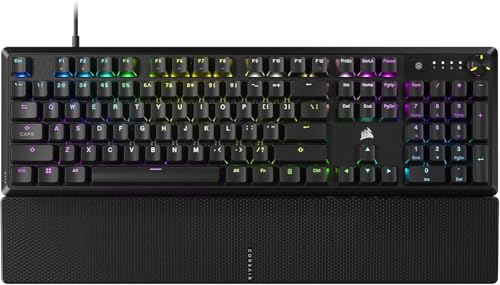
Selecting Best Keyboards for Gamers and Typing in October 2026 comes down to choosing switches that balance lightning gaming response with quiet daily comfort. For gamers who also type extensive documents, our top pick is the CORSAIR K70 CORE RGB Mechanical Wired because its pre-lubricated linear switches deliver exceptionally smooth keystrokes with dual sound dampening layers.
If you prefer a modular design or budget flexibility, we evaluated 3 competitive options including the budget-friendly Redragon K556 Wired RGB Mechanical and the understated Logitech G413 SE Full-Size Mechanical. Pair your chosen board with high-performance gaming monitors to create a complete workstation that excels at both competitive play and daily productivity tasks.

Best Keyboards for Gamers and Typing Buying Guide
Switch Characteristics and Mechanical Travel
Mechanical switches define how a keyboard feels under your fingertips during both intense gameplay and lengthy typing sessions. Linear switches offer smooth uninterrupted movement down to actuation, which benefits fast-paced gaming where rapid double-tapping is essential. Tactile switches supply a soft physical bump that confirms keystrokes, reducing typos when drafting long emails or programming.
Choosing the correct switch weighting prevents finger fatigue during extended office hours while maintaining accurate inputs. Light switches requiring forty-five grams of actuation force speed up gaming combos, whereas slightly stiffer switches prevent accidental keystrokes. You should test whether you prefer liquid linear travel or precise tactile feedback before choosing your main keyboard build.
Sound Dampening and Acoustic Engineering
Mechanical keyboards often produce hollow echoing sounds when keycaps bottom out against heavy metal frames. Modern acoustic engineering solves this issue by inserting dual layers of sound-absorbing foam inside the chassis cavity. These internal layers absorb high-frequency pinging sounds, resulting in a deeper, more satisfying thock during rapid typing.
Quiet keyboard acoustics make a dramatic difference if you share an office or stream online games. Keyboards with factory pre-lubricated switches and internal muffling maintain a muted profile without sacrificing mechanical responsiveness. Investing in dampening features protects co-workers from distracting chatter while delivering premium tactile feedback.
Keycap Materials and Long-Term Durability
Keycap quality dictates how your keyboard feels and looks after millions of keystrokes. Standard ABS plastic keycaps can develop oily surface shine and fading legends after months of continuous use. Double-shot ABS keycaps solve legend wear by molding two separate plastic layers together, ensuring letters never rub off under pressure.
PBT keycap materials represent the ultimate benchmark for longevity due to their textured, heat-resistant structure. PBT resists finger oils completely, keeping your perimeter keys grippy during warm gaming sessions. Pairing durable keycaps with reliable external computer monitors creates an ergonomic workstation built for productivity and performance.
Hot-Swappable Switch Modular Sockets
Hot-swappable sockets eliminate the tedious soldering process previously required to customize mechanical keyboards. Modders can pull out stock switches and insert aftermarket 3-pin or 5-pin variants using a simple hand tool. This flexibility allows you to mix linear switches on movement keys with clicky switches on function rows.
Modular boards extend product lifespan significantly by making switch replacement straightforward if an individual key fails. You can upgrade your typing feel gradually over time without buying an entirely new keyboard assembly. Customization enthusiasts strongly favor hot-swap compatibility for long-term versatility.
Frame Construction and Control Dial Integration
A sturdy chassis keeps your keyboard anchored firmly during energetic gaming sessions and fast typing bursts. Top plates crafted from brushed aluminum or alloy eliminate board flex and provide a solid structural backbone. Heavy metallic frames also minimize movement on smooth desk surfaces during rapid keystroke entries.
Dedicated media controls like rotary volume dials and programmable buttons enhance daily workflow efficiency. Magnetic soft-touch palm rests relieve wrist strain during long sessions at your desk. Combining ergonomic accessories with desktop display setups maximizes overall comfort during daily computer tasks.
| Feature | Linear Switches | Tactile Switches | Clicky Switches |
|---|---|---|---|
| Primary Benefit | Smooth rapid actuation | Physical bump confirmation | Audible click feedback |
| Best Use Case | Fast FPS & MOBA gaming | Hybrid typing & gaming | Dedicated typing & coding |
| Noise Level | Quiet to moderate | Moderate | Loud |
How We Evaluated
Our evaluation process relies on rigorous objective comparison of verified manufacturer specifications, material compositions, and functional capabilities. We carefully analyzed key switch mechanisms, structural rigidities, sound dampening configurations, and keycap compounds across all featured models. This data-driven framework allows us to assess real-world utility without relying on subjective manufacturer marketing claims.
We systematically rated each model based on its anti-ghosting performance, customization features, software driver requirements, and ergonomic design. By comparing features like pre-lubricated switches, rotary media dials, and hot-swappable sockets, we identified which boards offer real practical value. You can read our helpful how-to guides to learn more about our hardware comparison methodologies.
Common Mistakes to Avoid
One frequent mistake is choosing loud clicky switches for shared office environments without considering acoustic disruption. Clicky switches provide clear tactile feedback, but their high-pitched actuation noise quickly annoys co-workers or room-mates during evening typing marathons.
Another common error is buying thin single-shot ABS keycaps that polish smooth and fade within a year. Enthusiasts who ignore keycap material quality often regret having to purchase replacement keycap sets later on.
Buyers also frequently overlook N-key rollover and anti-ghosting ratings on non-gaming mechanical boards. Standard office keyboards can drop key inputs when multiple keys are pressed simultaneously during rapid gaming combos.
Finally, ignoring ergonomic palm rests or wrist support often leads to unnecessary joint strain over time. Setting up your keyboard alongside properly elevated HDMI monitors for work and play helps maintain healthy posture throughout long computer sessions.
Buying Checklist
- Confirm the mechanical switch type matches your preference for linear travel or tactile feedback.
- Verify keycaps are constructed from PBT or double-shot ABS to prevent letter fading and surface shine.
- Check for full N-key rollover and anti-ghosting capabilities to guarantee multi-key gaming inputs register.
- Ensure internal sound dampening layers are present if quiet acoustic operation is required.
- Look for hot-swappable switch sockets if you plan to customize or replace individual switches later.
- Inspect frame materials for rigid aluminum top plates to avoid chassis flexing under pressure.
- Confirm media controls or multi-function dials are accessible for quick audio adjustments.
- Evaluate wrist ergonomics and decide if a magnetic detachable palm rest is included.
Final Thoughts
Selecting the ideal peripheral from among Best Keyboards for Gamers and Typing depends on how you balance work responsibilities with gaming recreation. For maximum refinement, we recommend the CORSAIR K70 CORE RGB Mechanical Wired as our top overall pick due to its pre-lubed MLX Red switches, dual-layer acoustic dampening, and convenient rotary media dial.
Budget-conscious users who want maximum customization potential will love the Redragon K556 Wired RGB Mechanical with its hot-swappable switch design and rugged aluminum body. Meanwhile, professionals seeking a sleek understated aesthetic should consider the Logitech G413 SE Full-Size Mechanical for its wear-resistant PBT keycaps and durable build.
Frequently Asked Questions
What makes Best Keyboards for Gamers and Typing suitable for both tasks in 2026?
Keyboards designed for both gaming and typing combine fast mechanical switch actuation with acoustic sound dampening and durable keycaps. Linear and tactile switches offer low latency for gaming while providing comfortable resistance for typing long documents without finger fatigue.
Are linear or tactile switches better when choosing Best Keyboards for Gamers and Typing?
Linear switches excel in fast-paced action games due to smooth uninterrupted downward movement. Tactile switches are often preferred by typists because the subtle physical bump confirms keystrokes, which reduces accidental typing errors.
Why are PBT keycaps recommended for long daily typing sessions?
PBT keycaps feature a dense texture that resists finger oil build-up and surface shine over long periods of use. Unlike standard plastic caps, PBT caps maintain their matte feel and structural integrity through millions of keystrokes.
What is hot-swappability and why does it matter?
Hot-swappable mechanical sockets allow you to remove and change switches without soldering irons. This feature lets you customize key feel, replace worn switches easily, or try new switch types over time.
Do I need sound dampening inside a mechanical keyboard?
Internal sound dampening foam absorbs spring resonance and hollow chassis echoes when keycaps bottom out. It produces a deeper sound signature that keeps typing quiet in home offices or shared work spaces.
How does anti-ghosting help while gaming and typing rapidly?
Anti-ghosting and N-key rollover ensure every simultaneous key press registers correctly. This prevents dropped commands during complex gaming key combinations and fast touch-typing.
Should I pair my gaming mechanical keyboard with specialized displays?
Yes, combining a responsive mechanical keyboard with high-refresh rate displays optimizes overall system responsiveness. Exploring dedicated display options like IPS, OLED & LED panels ensures your visual experience matches your control input speed.