

Pairing your laptop with a wide display transforms daily workflow, giving you expansive canvas space for editing timelines and managing windows. The LG 34U650A-B 34-inch UltraWide IPS WQHD 100Hz stands out as our top recommendation due to its single-cable USB-C power delivery and vibrant IPS panel color accuracy. You can explore more choices in our guide to Desktop & External Monitors for specialized workstation configurations.
If you want smooth motion paired with robust build quality, the Dell 34 Plus USB-C Curved Monitor – S3425DW offers an impressive alternative with its fast refresh rate and high contrast panel. For budget-conscious setups needing essential curve optics, the Samsung 27″ Essential S3 (S36GD) delivers reliable everyday performance.
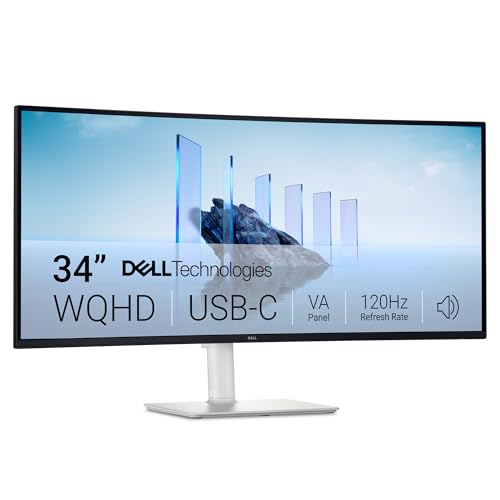

Best Curved Monitors for MacBook Pro Buying Guide for 2026
USB-C Power Delivery and Connectivity
Running an external screen alongside your laptop works best when a single cable handles both video signals and laptop power charging. USB-C ports with power delivery eliminate messy power bricks by sending up to 96W back to your host laptop while carrying high-resolution video signals simultaneously.
Lower wattage ports might fail to keep demanding laptops charged during heavy video rendering or code compiling tasks. Prioritizing displays with robust single-cable connectivity simplifies your desktop footprint and guarantees your laptop stays fully powered throughout demanding work sessions.
Display Panel Technology and Viewing Angles
Panel choice directly impacts color consistency, contrast ratios, and how images look when viewed from off-center angles. IPS panels deliver exceptional color accuracy and wide viewing angles, making them ideal for creative professionals who balance precise design work with multitasking.
VA panels offer deeper black levels and higher contrast ratios, which enhances movie watching and dark-mode software interfaces. For more panel advice, review our breakdown of IPS, OLED & LED Panels to find the best match for your daily tasks.
Screen Curvature and Ergonomics
Curvature ratings like 1800R or 3800R measure the radius of the screen arc, wrapping the display around your field of view to reduce peripheral eye fatigue. Gentler curves suit general office workflows, whereas tighter curves bring immersive depth when managing expansive spreadsheets or video timelines.
Proper ergonomic stands allow height and tilt adjustments so your eyes align naturally with the upper third of the screen. Combining an effective arc radius with flexible stand adjustments prevents neck strain during extended hours at your computer desk.
Resolution and Aspect Ratio
UltraWide 21:9 aspect ratios replace dual-monitor setups by offering broad horizontal screen real estate without central plastic bezels breaking your view. Resolutions like WQHD (3440 x 1440) keep text sharp while allowing multiple browser windows to fit comfortably side by side.
Standard 16:9 displays work well for compact desks, but ultrawide ratios significantly boost productivity for video editors and software developers. You can learn more about display clarity choices in our guide to best hi res monitors for productivity and comfort.
Refresh Rate and Motion Smoothness
Refresh rates rated at 100Hz or 120Hz create noticeably smoother cursor movement and window dragging compared to legacy 60Hz panels. Higher refresh rates decrease visual chatter, giving your workspace a fluid responsiveness that feels immediate and natural.
While extreme refresh rates target dedicated gaming rigs, moderate high-refresh displays benefit everyday desktop navigation. Choosing a screen with adaptive sync capability prevents tearing when watching high-framerate videos or casual gaming during downtime.
How We Evaluated
We evaluated these curved displays by examining verified manufacturer specifications, connectivity features, and actual user experiences across varying desktop setups. Our analysis prioritized single-cable power delivery capabilities, color space coverage accuracy, panel visual performance, and overall ergonomic flexibility.
By focusing on objective performance metrics and practical desktop compatibility, we identified screens that provide reliable daily operation for professional and casual use cases alike.
Common Mistakes to Avoid
Many buyers purchase a large display without verifying the USB-C power delivery output wattage needed for their specific laptop model. Choosing a monitor with insufficient charging power forces you to keep your factory power adapter plugged in, cluttering your workspace.
Another frequent oversight is ignoring panel type when evaluating high-contrast visual claims for graphic work. Color-critical tasks require high sRGB or DCI-P3 coverage, which typical budget panels cannot deliver effectively without professional color calibration.
Buyers also forget to check physical desk dimensions before ordering 34-inch ultrawide monitors. Measuring your desktop area beforehand ensures your new curved display fits comfortably alongside speakers and laptop stands.
Buying Checklist
- Verify that the USB-C port supplies enough wattage (at least 65W to 96W) to charge your laptop.
- Check screen resolution to ensure text rendering remains crisp at your preferred viewing distance.
- Confirm panel type matches your priority, selecting IPS for color accuracy or VA for high contrast.
- Measure desk depth to ensure the monitor curvature and stand footprint fit comfortably on your surface.
- Ensure built-in speaker output meets your basic audio needs for video calls and casual listening.
- Review available display ports like HDMI and DisplayPort for connecting secondary input devices.
- Check stand adjustment range to confirm height and tilt options support proper desk ergonomics.
Final Thoughts
Selecting the ideal curved screen depends heavily on your daily work habits, desk space, and connectivity needs. For an outstanding balance of color precision and single-cable laptop charging, we recommend the LG 34U650A-B 34-inch UltraWide IPS WQHD 100Hz for creative professionals and daily multitaskers.
Users seeking high refresh rates and deep contrast for mixed gaming and productivity will appreciate the Dell 34 Plus USB-C Curved Monitor – S3425DW. Meanwhile, those seeking an affordable curved screen for compact desks should consider the Samsung 27″ Essential S3 (S36GD). For more workspace inspiration, check out our guide on best external monitors.
Frequently Asked Questions
What are the Best Curved Monitors for MacBook Pro in 2026?
Top choices in 2026 include feature-packed ultrawide displays with single-cable USB-C support like the LG 34U650A-B and Dell S3425DW. These screens offer excellent workspace expansion and color accuracy for professional workflows.
Does a curved monitor work well with a laptop for productivity?
Yes, curved screens bring peripheral edges closer to your eye line, reducing strain when managing multiple open windows. The extra screen real estate allows you to view documents side by side without needing dual physical monitors.
Why is USB-C power delivery important for external monitors?
USB-C power delivery allows a single cable to transmit display signals, USB hub data, and charging power directly to your laptop. This reduces desktop cable clutter significantly and keeps your laptop battery topped up continuously.
What is the difference between IPS and VA panels on curved screens?
IPS panels provide wider viewing angles and more accurate color rendition across the entire screen. VA panels deliver higher contrast ratios and deeper blacks, making them great for media consumption in low-light environments. To explore high resolution options, read our guide on best high resolution monitors for comfort and value.
What refresh rate should I look for in a curved productivity monitor?
A refresh rate between 100Hz and 120Hz provides noticeably smoother cursor movement and window scrolling than traditional 60Hz panels. This subtle smoothness reduces visual fatigue during long work sessions at your desk.
Does monitor curvature affect video editing or graphics design?
Gentle curves like 3800R or 1800R maintain straight line perception across wide screens without distorting visual geometry. Graphic designers and video editors quickly adapt to subtle screen arcs for comfortable timeline management.
Are built-in monitor speakers adequate for video conferencing?
Modern monitor speakers built into ultrawide displays provide clear voice output for video calls and casual media playback. However, dedicated desktop speakers or headphones still offer superior audio quality for music production and critical listening.


