Finding a compact printing solution for home offices or personal creative spaces requires balancing footprint and output performance. For October 2026, we evaluated 5 models, and the Canon PIXMA TS6520 Wireless Color Inkjet Printer stands out as our top pick for general document and photo tasks.
If your primary focus is instant photo prints rather than everyday document handling, the Canon PIXMA TS4320 – Wireless Color Inkjet Printer provides an impressive budget alternative for multi-purpose needs. When configuring tight workspaces, pairing space-saving equipment with proper desktop workspace setups ensures maximum efficiency.



Best Compact Desktop Printers Buying Guide
Print Technology and Daily Requirements
Choosing between traditional inkjet systems and specialized thermal dye sublimation determines what types of documents you can produce. All-in-one inkjet models handle standard letter paper, envelopes, and scanning tasks for general home office requirements.
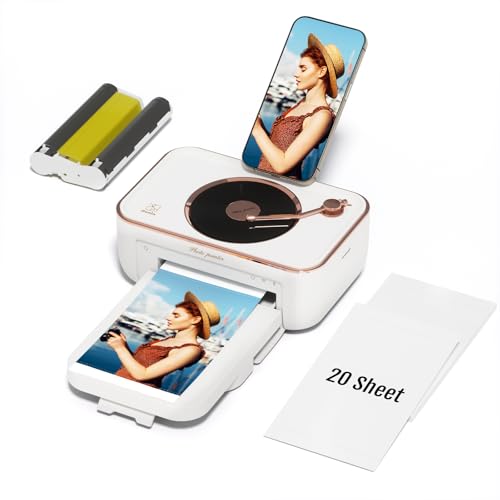
Dedicated thermal photo printers focus exclusively on standard photo sizes using heat transfer technology. They produce water-resistant prints with automated protective lamination, but they cannot print standard text documents or handle office paper.
Physical Footprint and Space Savings
Desk real estate is often limited, making chassis dimensions a critical factor when choosing desktop printing hardware. Dedicated snapshot printers feature tiny footprints that tuck away easily on side tables or shelf units.
Multifunction inkjet units require additional vertical clearance for scanner lid operation and front paper tray extensions. Measuring your available desk area before choosing a model ensures clean cable routing and comfortable access to paper trays. You can browse our how-to tech guides for extra workspace planning tips.
Wireless Connectivity and Mobile Integration
Modern desktop units rely heavily on stable wireless connections to streamline printing from mobile devices and laptops. Dual-band Wi-Fi support operating on both frequencies helps prevent wireless congestion in busy home environments.
Direct app connectivity allows quick photo selection and document scanning directly from smartphones. Direct Bluetooth connections offer alternate printing pathways, allowing guest devices to connect without requiring access to your main home network.
Paper Handling and Media Flexibility
Paper capacity and supported media types dictate how versatile your chosen desktop hardware will be over time. Standard inkjet units support borderless printing up to letter size alongside cardstock and envelope media.
Dedicated snapshot units utilize specialized cassette feeds built specifically for postcard dimensions. If your workflow requires double-sided document printing, selecting a unit with automatic duplexing saves considerable paper and time during larger jobs.
Operational Maintenance and Consumables
Understanding ink cartridge systems versus dye sublimation ribbons helps you plan for ongoing operational upkeep. Two-cartridge hybrid ink systems combine black pigment ink with dye color inks for sharp text and vivid graphic prints.
Thermal photo kits package ribbon cartridges together with matching photo paper packs for predictable replacement cycles. Evaluating how frequently you print prevents ink head clogging and ensures reliable output quality whenever a task arises.
How We Evaluated
We analyzed manufacturer specifications, physical dimensions, media compatibility, and user workflows across various home office configurations. Our analysis focused on identifying practical balance between small hardware footprints, functional connectivity options, and consistent print quality.
We compared performance capabilities across document printing, photo rendering techniques, app responsiveness, and paper handling mechanisms. By prioritizing objective technical features and actual usability trade-offs, we aim to guide your buying decisions with transparent data.
Common Mistakes to Avoid
Confusing dedicated snapshot photo printers with general document printers is a frequent purchasing error. Photo-only thermal printers cannot process standard letter paper or print text documents required for work or school tasks.
Overlooking scanner clearance when placing multifunction units under low shelves often leads to frustrating physical obstruction. Always account for lid height and tray extension paths during workspace planning.
Ignoring wireless frequency compatibility can result in connection drops on congested home networks. Choosing hardware with dual-band Wi-Fi or local Bluetooth options prevents mobile connection issues.
Buying Checklist
- Confirm whether you need standard document printing or dedicated photo snapshots.
- Measure available desk height to allow full clearance for scanner lids and paper trays.
- Verify dual-band Wi-Fi or Bluetooth support for seamless connection to mobile phones.
- Check for automatic duplex printing if double-sided document printing is essential.
- Ensure supported paper media sizes match your primary daily printing tasks.
- Review bundled starter supplies to determine necessary paper and ink extras.
- Confirm companion app compatibility with your specific mobile operating system.
Final Thoughts
Selecting the right desktop printer comes down to your primary output needs and physical space constraints. For general home office versatility, we recommend the Canon PIXMA TS6520 Wireless Color Inkjet Printer because it balances document scanning, double-sided printing, and crisp text quality in a compact package.
If you need an economical all-in-one solution for light document tasks, the Canon PIXMA TS4320 – Wireless Color Inkjet Printer serves as a practical choice. Meanwhile, users dedicated exclusively to instant photo printing will benefit from the specialized output of the HPRT Photo Printer 4×6 with 108 Sheet Photo Paper.
Balancing desk space with functionality creates a clean environment for both work and personal projects. Pairing your desktop layout with best external monitors helps maximize efficiency across all your home workspace activities.
Frequently Asked Questions
What is the main advantage of Best Compact Desktop Printers in 2026?
The primary advantage is saving valuable desk real estate without sacrificing print quality or wireless connectivity. Modern compact models combine sleek designs with efficient document handling or high-definition photo output suitable for small home offices.
Can compact thermal photo printers handle standard letter documents?
No, thermal dye-sublimation photo printers are engineered exclusively for specific snapshot media like four-by-six photos. If you need to print text documents or school papers, choose an inkjet all-in-one model.
Do Best Compact Desktop Printers support smartphone printing?
Yes, most models feature wireless app connectivity, mobile cloud printing, or direct Bluetooth pairing. This allows you to send documents and photos directly from your phone without opening a computer.
How does automatic duplex printing help in small home offices?
Automatic duplexing prints on both sides of the page without requiring manual flipping. This feature cuts paper consumption in half and speeds up multi-page document tasks significantly.
What is the difference between inkjet and dye sublimation printing?
Inkjet printers spray tiny liquid ink droplets onto paper to create text and images across various media sizes. Dye sublimation uses heat to transfer pigment onto specialized photo paper, producing water-resistant and smudge-proof photo prints.
Why is dual-band Wi-Fi important for desktop printers?
Dual-band Wi-Fi supports both 2.4GHz and 5GHz network frequencies, reducing signal interference in homes with multiple connected devices. This ensures fast response times when sending print jobs wirelessly.
Where can I find more setup tips for home office workstations?
You can check our comprehensive computer displays resource and home office guides to optimize your desk layout for comfort and productivity.