Setting up a studio for roundtable discussions requires equipment that captures voice warmth while ignoring adjacent chatter. When evaluating the Best Dynamic Microphones for Multi-Guest Podcasts in October 2026, we found that the Shure MV7+ USB-C & XLR Podcast Dynamic Microphone stands out as the ultimate choice for co-hosted shows. Its automated gain adjustments and built-in noise suppression help maintain balanced levels across all panel members.
For creators on a tighter budget or those needing flexible digital connections, the FIFINE AmpliGame AM8 USB/XLR Dynamic Microphone delivers incredible value without sacrificing voice clarity. Exploring proper workspace ergonomics through our How To guides can further refine your production desk layout. Choosing the right dynamic capsule prevents frustrating cross-talk during lively multi-person interviews.


Best Dynamic Microphones for Multi-Guest Podcasts Buying Guide for 2026
We evaluated 7 models across leading brands like Shure, FIFINE, MAONO and more to determine which hardware best solves multi-person recording challenges. Having multiple speakers seated closely around a studio table demands equipment designed specifically to reject off-axis sound.
Off-Axis Noise Rejection
The primary hurdle in multi-guest podcasting is microphone bleed, which happens when one person speaking leaks into another guest’s capsule. Dynamic capsules excel in this environment because their moving-coil design requires direct acoustic energy to vibrate, rendering them naturally less sensitive to ambient noise.
Cardioid and supercardioid pickup patterns focus sensitivity strictly toward the front of the housing while dampening sound coming from the sides and rear. Choosing dynamic capsules over condenser alternatives keeps individual audio tracks isolated, making post-production editing significantly cleaner.
Connectivity and Audio Interfaces
When hosting multiple guests, output flexibility dictates how your signal flow connects to recording gear. Traditional XLR connections allow you to plug multiple units into a multi-channel USB audio interface or hardware mixer for separate track recording.
Hybrid models featuring both USB-C and XLR outputs offer intermediate flexibility for creators who record mobile shows or lone intros before hosting group panels. If your recording desk also houses computer setups, organizing cables alongside your displays in Desktop & External Monitors configurations ensures a clean workflow.
Digital Signal Processing and Auto Leveling
Guests naturally change their vocal projection when laughing, leaning back, or emphasizing points during dynamic conversations. Onboard Digital Signal Processing (DSP) can automatically adjust gain real-time, preventing sudden clipping without requiring constant manual intervention on a mixing board.
Advanced DSP features like real-time denoisers and virtual pop filters eliminate room echo and harsh plosive sounds before the audio reaches your recording software. This internal management ensures that vocal volumes remain balanced across every guest track throughout the recording session.
Monitoring and Hardware Controls
Direct zero-latency headphone monitoring gives each co-host immediate vocal feedback, preventing them from inadvertently shouting or whispering. Dedicated volume knobs and instant tap-to-mute switches on the microphone body allow instant local control without diving into software menus.
Visual level indicators such as multi-color LED rings or touch panels give co-hosts quick visual confirmation of their signal health. Maintaining tidy desk space alongside your workstations featured in Computer Monitors & Displays helps keep monitoring controls clearly visible during live recordings.
Acoustic Mounts and Physical Isolation
Multi-guest studios experience frequent desk bumps, paper shifts, and foot taps that transmit low-frequency rumbles through microphone arms. Integrated shock mounts and internal pneumatic suspension absorb physical vibrations before they turn into muddy thumps on recorded tracks.
Heavy metal yokes and standardized threaded mounts ensure stable attachment to desktop stands or adjustable boom arms. Durable metal chassis construction also shields sensitive internal coils from electromagnetic interference generated by nearby electronics.
| Feature | XLR Microphones | USB/XLR Hybrids |
|---|---|---|
| Multi-Mic Audio Interface Needed | Yes | Optional |
| On-Mic DSP & Auto-Gain | No (Interface Dependent) | Yes (Via App/USB) |
| Setup Complexity | Moderate to High | Low to Moderate |
How We Evaluated
Our analysis focused on critical audio parameters relevant to multi-speaker environment management, analyzing specs across 7 models spanning the $56.99 – $1,099.95 range. We carefully examined polar pattern directional consistency, frequency response curves tailored for speech clarity, and signal-to-noise performance.
We also reviewed functional attributes including output versatility, onboard hardware controls, physical durability, and companion software utilities. By weighting these factors against practical podcasting scenarios, we established objective recommendations based on real studio demands.
Common Mistakes to Avoid
Using sensitive condenser microphones for multi-guest roundtable shows is a frequent error that leads to excessive room echo and co-host voice bleed. Dynamic capsules with tight cardioid patterns prevent sound spill far better in non-treated acoustic spaces.
Another common mistake is plugging multiple USB microphones directly into one computer, which often causes driver conflicts and audio drift. Utilizing dedicated XLR connections fed into a multi-channel interface guarantees separate, perfectly synced audio tracks.
Finally, neglecting physical isolation accessories often ruins otherwise crisp speech with table thumps and handling noise. Investing in solid boom arms and built-in shock mounting maintains pristine signal quality across all guest channels.
Buying Checklist
- Verify that the polar pattern is cardioid or supercardioid to minimize room bleed.
- Confirm whether your setup requires standard XLR connectors or hybrid USB-C connectivity.
- Check if your audio interface has enough preamp gain to drive dynamic capsules cleanly.
- Ensure the unit includes an integrated shock mount or standard threading for boom arms.
- Look for built-in pop filters or thick windscreens to suppress harsh plosive sounds.
- Confirm local zero-latency headphone monitoring options for co-host level checks.
- Evaluate DSP software capabilities if auto-leveling gain control is desired.
Final Thoughts
Selecting equipment from our curated list of Best Dynamic Microphones for Multi-Guest Podcasts ensures professional speech clarity without chaotic background bleed. For top overall performance, the Shure MV7+ USB-C & XLR Podcast Dynamic Microphone delivers exceptional voice isolation alongside intelligent auto-leveling features. Co-hosts who want matching aesthetic options can also opt for the sleek Shure MV7+ USB-C & XLR Podcast Dynamic Microphone in white.
Podcasters seeking value and simplified operation will find the FIFINE AmpliGame AM8 USB/XLR Dynamic Microphone to be an outstanding entry point. Alternatively, shows operating pure interface setups benefit greatly from the streamlined Shure MV7X XLR Dynamic Podcast & Recording. If you are also setting up dual-screen media stations, explore our recommendations on best external computer monitors for comfort at work.
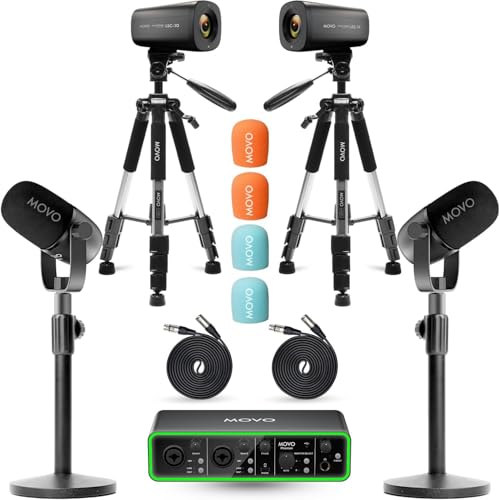
Creators needing a complete, out-of-the-box multi-host setup should consider the comprehensive Movo Video Podcast Equipment Bundle. Pairing the right dynamic hardware with clean physical desk layouts guarantees an enjoyable recording experience for hosts and listeners alike.
Frequently Asked Questions
Why are dynamic microphones preferred over condenser mics for multi-guest podcasts?
Dynamic microphones feature heavier moving-coil diaphragms that are less sensitive to ambient noise and off-axis room echo. This characteristic helps isolate each guest’s voice, preventing audio bleed between adjacent microphones in close quarters.
What is the top choice among Best Dynamic Microphones for Multi-Guest Podcasts in 2026?
The Shure MV7+ USB-C & XLR Podcast Dynamic Microphone stands out as our top recommendation for group shows. Its smart auto-leveling gain and real-time denoiser maintain consistent vocal balanced levels across every guest track.
Can I plug multiple USB dynamic microphones into one computer for a guest show?
While software workarounds exist, connecting multiple USB mics to a single computer often leads to latency and channel sync issues. Using XLR dynamic microphones connected to a dedicated multi-channel audio interface provides far more reliable multi-track recording.
Do dynamic microphones require phantom power to operate?
Passive dynamic microphones do not require 48V phantom power to function over standard XLR connections. However, hybrid models running active internal DSP via USB connections receive power directly from the connected computer port.
How close should co-hosts speak to a dynamic podcast microphone?
Because dynamic capsules are designed for close-up voice capture, speakers should maintain a distance of two to six inches from the windscreen. This proximity maximizes vocal warmth while minimizing room acoustics and background noise.
How does onboard DSP help when recording multiple podcast guests in 2026?
Onboard DSP automatically balances uneven vocal levels and filters out ambient hum in real-time. This saves considerable post-production editing time by maintaining consistent sound output across all guest channels during conversation.
What gear is essential for setting up a two-person video podcast?
A complete dual setup requires two dynamic microphones, robust desk stands or boom arms, XLR cables, and a two-channel audio interface. Solutions like the Movo Video Podcast Equipment Bundle bundle these audio tools with twin 4K cameras for a turnkey studio solution.
Can dynamic podcast mics be mounted alongside display monitors in a studio?
Yes, dynamic mics fit standard boom arm threading, letting you position them over desk setups without cluttering visual space. For ideas on organizing your workspace, check out our guide to Gaming Monitors and desk layouts.