

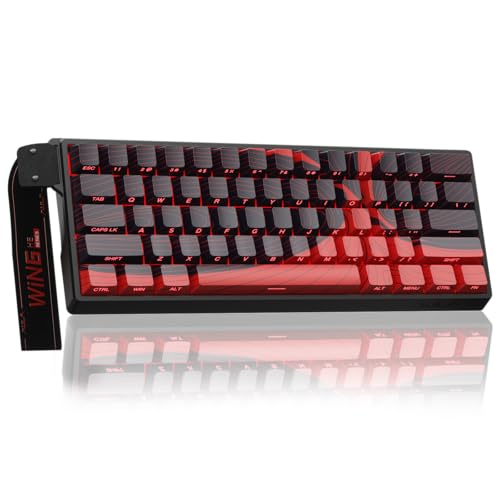
Finding the ideal competitive edge in first-person shooters requires minimal actuation delay and precise key tracking. The AULA WIN60 HE MAX – 60% Mechanical Gaming Keyboard stands out as our top recommendation for serious tactical players in October 2026. Its magnetic Hall Effect switches deliver an impressive 8000Hz polling rate and rapid trigger sensitivity.
For players seeking incredible performance on a tighter budget, the Aula WIN60 HE – 60% Mechanical Gaming Keyboard offers rapid trigger features at an accessible cost. Pair your ultra-fast setup with high-refresh gaming monitors to maximize your in-game reaction speeds.





Best FPS Gaming Mechanical Keyboards Buying Guide for 2026
Magnetic Hall Effect vs Mechanical Switches
Traditional mechanical switches rely on physical metallic contact points to send key signals to your computer. In contrast, Hall Effect magnetic switches measure magnetic flux density to detect key travel depth without physical friction.
This magnetic design allows you to customize the exact point where a keystroke registers. Gamers playing fast tactical shooters can set shallower actuation points to execute movement commands much faster.
Rapid Trigger Mode and Polling Rates
Rapid trigger functionality dynamically resets a key the instant your finger starts traveling upward. You do not need to wait for the switch to reset past a fixed physical point before pressing it again.
When paired with an 8000Hz polling rate, the keyboard sends position data to your PC eight times faster than standard boards. This combo reduces input latency, allowing rapid counter-strafing and precise quick-stop shooting.
Compact 60 Percent vs Full-Size Layouts
Desk real estate is a major factor when building a clean gaming space. A compact 60 percent layout removes the number pad, arrow keys, and navigation cluster to free up space.
This extra room allows low-sensitivity mouse users to make sweeping arm movements without hitting the edge of the keyboard frame. If you need dedicated arrow keys for daily work, explore our desktop setup guides for additional workstation layout ideas.
Keycap Material and Profile Ergonomics
Double-shot PBT keycaps resist oil buildup and finger shine over months of intense gameplay sessions. The textured surface ensures your fingers stay locked onto key caps during sudden movements.
Keycap profiles such as MDA or OEM contour to the natural curvature of your hands. Ergonomic shapes reduce wrist strain during long sessions, especially when paired with a quality wrist rest.
Sound Dampening and Acoustic Performance
Internal acoustics determine whether a keyboard sounds deep and satisfying or hollow and pingy. Multi-layer dampening foam inside the case absorbs harsh vibration echoes during rapid key presses.
Factory-lubricated linear switches provide smooth keystrokes right out of the box without scratchy mechanical resistance. For more peripheral tuning ideas, check out our detailed how-to resources.
How We Evaluated
We analyzed technical specifications across 7 leading keyboards from top brands like SteelSeries, ASUS, CORBOBO and more. Our evaluation focused on actuation precision, polling frequency, build durability, and driver software utility.
We compared key features against real-world FPS requirements, prioritizing latency reduction and ergonomic comfort. Every recommendation reflects objective design factors that directly influence fast-paced gameplay performance.
Common Mistakes to Avoid
Choosing an oversized full-size keyboard when playing with low mouse sensitivity is a common pitfall. Restricting your mouse pad area forces uncomfortable arm angles and impairs fast aiming adjustments.
Ignoring keycap materials can lead to slippery key surfaces after only a few months of intense use. Selecting double-shot PBT keycaps prevents key legends from fading and maintains grip.
Assuming higher polling rates solve poor switch technique is another misconception. Rapid trigger settings must be calibrated correctly in software to prevent accidental key registrations while resting your fingers.
Buying Checklist
- Verify if you prefer ultra-fast magnetic Hall Effect switches or traditional mechanical switches.
- Confirm the keyboard layout matches your desk size and mouse movement habits.
- Check for dynamic rapid trigger mode support if you focus on competitive tactical shooters.
- Ensure the keycaps are double-shot PBT for long-term wear resistance.
- Look for multi-layer acoustic foam insulation to minimize hollow pinging sounds.
- Confirm driver support is available either via lightweight software or web-based tools.
- Determine if you require wireless connectivity or prefer a zero-latency wired USB connection.
Final Thoughts
Selecting from the Best FPS Gaming Mechanical Keyboards comes down to matching switch speed with your desk layout. For competitive shooters, the AULA WIN60 HE MAX – 60% Mechanical Gaming Keyboard delivers unmatched rapid trigger responsiveness and high-frequency polling.
Gamers seeking fantastic value without compromising speed should consider the Aula WIN60 HE – 60% Mechanical Gaming Keyboard. Meanwhile, users wanting high performance with wireless versatility will love the ASUS ROG Strix Scope II 96 Wireless Mechanical.
Complementing your peripheral setup with high-quality computer displays ensures every frame matches your rapid key execution. Choose the keyboard layout that best fits your playstyle and desk footprint.
Frequently Asked Questions
Why are magnetic Hall Effect switches popular in Best FPS Gaming Mechanical Keyboards for 2026?
Hall Effect switches use magnetic sensors to track physical key depth continuously. This allows sub-millimeter actuation tuning and rapid trigger capabilities that standard mechanical switches cannot match.
What is rapid trigger mode and how does it help in FPS games?
Rapid trigger mode resets a key instantaneously when it moves upward, rather than waiting for a fixed reset point. This enables faster key re-presses for counter-strafing and rapid burst firing.
Is a 60 percent layout better than full-size for competitive gaming?
A 60 percent layout frees up significant desk space for low-sensitivity mouse swiping. Removing extra keys lets you position your hands at a more comfortable, natural shoulder-width angle.
Does an 8000Hz polling rate make a noticeable difference?
An 8000Hz polling rate reports key input to your PC every 0.125 milliseconds. Combined with fast display panels, like those reviewed in our display technology guides, it minimizes overall system input lag.
Can I customize key actuation points on all Best FPS Gaming Mechanical Keyboards in 2026?
Custom actuation depth is exclusive to magnetic Hall Effect keyboards. Traditional mechanical switches activate at a fixed physical location built into the switch mechanism.
Are PBT keycaps better than ABS keycaps for gaming?
PBT keycaps are denser, more durable, and resistant to oil buildup. They maintain a textured grip over time, unlike ABS keycaps which tend to become shiny and slippery.
Do web-based keyboard drivers require software installation?
Web-based drivers run directly inside your internet browser without installing heavy software applications. You can adjust lighting, macros, and rapid trigger values quickly on any compatible device.







