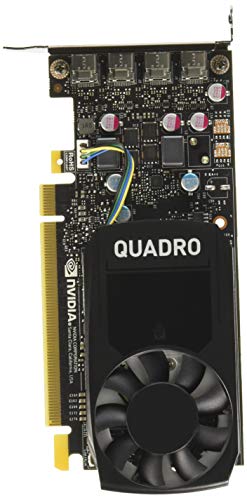
Finding the Best Graphics Cards for Dell OptiPlex 7010 requires balancing low profile physical dimensions with quiet power efficiency. For October 2026, we evaluated 3 compact GPUs, and our top pick for professional tasks is the NVIDIA Quadro P1000 Professional 4GB, gddr5.
If you need an affordable multi-monitor option for basic workplace tasks, the QTHREE GeForce GT 730 4GB Graphics Card,2X HDMI provides flexible output ports. Pairing these compact cards with best external monitors creates a highly responsive desktop workspace without needing power supply modifications.

Best Graphics Cards for Dell OptiPlex 7010 Buying Guide
Form Factor and Chassis Clearance
The Dell OptiPlex 7010 comes in multiple chassis sizes, including Mini-Tower, Small Form Factor, and Ultra Small Form Factor. Small Form Factor cases require low profile graphics cards equipped with low profile bracket plates to fit inside the narrow expansion slots.
Standard full height video cards will physically block the side panel from closing on compact OptiPlex models. You must measure the width of your expansion slot area to ensure the GPU cooler occupies only a single slot.
Power Supply Limits and Direct Motherboard Power
Factory OptiPlex 7010 workstations utilize power supplies rated between 240 and 275 watts that lack auxiliary PCI Express power connectors. Dedicated graphics cards must draw all necessary power directly through the motherboard PCIe slot, staying under typical 75 watt thresholds.
Selecting low power GPUs rated between 30W and 50W guarantees stability under full workload without triggering power supply shutdowns. Installing efficient cards maintains low thermal output and protects internal components from excess heat build-up.
Display Output Variety and Multi-Monitor Support
Expanding screen real estate requires choosing a graphics card with output ports matching your modern display setup. Connecting your system to HDMI monitors or Mini DisplayPort screens allows seamless multi-tasking without relying on passive dongle adapters.
Modern workstation GPUs feature multiple DisplayPort terminals capable of driving independent screen outputs simultaneously. Evaluating port layouts ensures your multi-monitor array functions reliably at full native desktop resolution.
Video Memory Type and GPU Architecture
Video memory capacity and bus speed directly influence visual performance during multitasking and light graphic design. Dedicated GDDR5 memory offers significantly faster memory bandwidth compared to legacy DDR3 configurations, preventing desktop lagging under heavy loads.
Selecting GPUs with modern architecture provides full DirectX support and stable driver updates on current operating systems. Pair high performance graphics hardware with high resolution monitors to maximize screen clarity across daily workstation applications.
| Card Model | VRAM | Power Draw | Bracket |
|---|---|---|---|
| Quadro P1000 | 4GB GDDR5 | 47W | Low Profile |
| GeForce GT 730 | 4GB DDR3 | 30W | Low Profile |
| Quadro P620 | 2GB GDDR5 | 40W | Low Profile |
Thermal Control and Fan Acoustic Profile
Small computer cases with restricted air intake can lead to elevated internal heat levels during extended daily operation. Compact graphics cards equipped with quiet cooling fans maintain low operating temperatures while preventing annoying fan whine.
Efficient cooling designs exhaust air effectively without accumulating dust inside the tight chassis space. Selecting well-ventilated cards preserves system stability and extends the operating lifespan of surrounding desktop components.
How We Evaluated
We analyzed low profile graphics cards based on verified hardware specifications, power draw limitations, and physical chassis compatibility for small form factor systems. Our evaluation prioritized reliable display connectivity, thermal safety within compact enclosures, and long term driver support across common operating environments.
By comparing memory bandwidth, port availability, and electrical efficiency, we identified the best video card solutions for upgrading aging office desktops. We focused on objective hardware specifications to help users maximize productivity without requiring system power supply modifications.
Common Mistakes to Avoid
Buying a full height graphics card is a common error that prevents closing the computer case on small form factor machines. Always verify that the video card includes a dedicated low profile bracket before purchasing.
Choosing a power-hungry graphics card that requires a 6-pin auxiliary cable will result in system instability or failure to boot. The factory power supply on these machines cannot supply extra power beyond the motherboard slot.
Overlooking display output types can lead to extra expenses for active adapter dongles. Double check your monitor input cables to confirm whether native DisplayPort, HDMI, or VGA connections match the GPU.
Assuming high memory capacity guarantees fast gaming performance is another frequent oversight. A card with 4GB of slow DDR3 memory will perform significantly slower than a card with 2GB of high speed GDDR5 memory.
Buying Checklist
- Confirm your chassis model is SFF or Mini-Tower to choose correct bracket size.
- Check that the graphics card TDP stays under 50 watts to avoid overloading PSU.
- Verify the card relies solely on motherboard slot power without needing 6-pin power.
- Select GDDR5 VRAM options over DDR3 memory for improved desktop responsiveness.
- Match video output ports on the card directly to your existing monitor cables.
- Confirm the cooling fan occupies only one expansion slot width inside the case.
- Ensure official driver support is active for Windows 10 or Windows 11 operating systems.
Final Thoughts
Upgrading dedicated video hardware is one of the most effective ways to extend desktop usability. For demanding workstation tasks and multi-display productivity, the NVIDIA Quadro P1000 Professional 4GB, gddr5 stands out as our best overall pick, delivering exceptional memory bandwidth in a low profile frame.
For budget-conscious users needing basic display extension for office work, the QTHREE GeForce GT 730 4GB Graphics Card,2X HDMI offers versatile multi-port output. Alternatively, the PNY NVIDIA Quadro P620—Realizing Demanding Visual provides balanced entry-level professional performance for 2D drafting and light design.
Explore our How To guide category and our guide on hi res monitors to build a comfortable, efficient workspace tailored to your daily needs.
Frequently Asked Questions
What is the top pick among Best Graphics Cards for Dell OptiPlex 7010 in 2026?
The NVIDIA Quadro P1000 Professional 4GB, gddr5 is our top recommendation for 2026. It offers outstanding GDDR5 memory performance, single-slot low profile clearance, and four display outputs without exceeding motherboard power limits.
Do I need to upgrade the power supply for an OptiPlex 7010 graphics card?
No power supply upgrade is required if you choose a low profile graphics card rated under 50 watts. These cards draw power directly from the PCIe slot, making them safe for stock 240W to 275W OptiPlex power supplies.
Can a Small Form Factor OptiPlex 7010 support full height graphics cards?
Small Form Factor cases cannot fit full height graphics cards because the enclosure side panel will not close. You must install a low profile graphics card fitted with a short bracket plate.
How many monitors can I connect to Best Graphics Cards for Dell OptiPlex 7010?
Most recommended low profile cards support between two and four monitors simultaneously. Cards with four mini DisplayPort or multi-video output configurations allow expansive multi-display productivity setups.
Is 4GB GDDR5 better than 4GB DDR3 for graphics cards?
GDDR5 memory provides significantly higher memory bandwidth than DDR3 memory, even when VRAM capacity is identical. High bandwidth GDDR5 ensures smoother video playback, faster rendering, and less lag during system multitasking.
Will low profile graphics cards work with Windows 11 on an OptiPlex 7010?
Modern low profile GPUs like the Quadro P series and GT 730 models feature updated display drivers supporting Windows 10 and Windows 11. Connecting these cards to desktop monitors ensures reliable plug-and-play visual operation.
Do these graphics cards require extra PCIe 6-pin cables?
Low profile cards designed for office desktop upgrades do not require 6-pin or 8-pin auxiliary power connectors. They receive all necessary operating power directly through the PCIe motherboard slot.
Can I play lightweight games using these OptiPlex 7010 graphics cards?
While low profile workstation cards are designed for office productivity, light 2D gaming and older 3D titles run smoothly. However, demanding modern AAA games will require dedicated gaming systems with higher power GPUs.