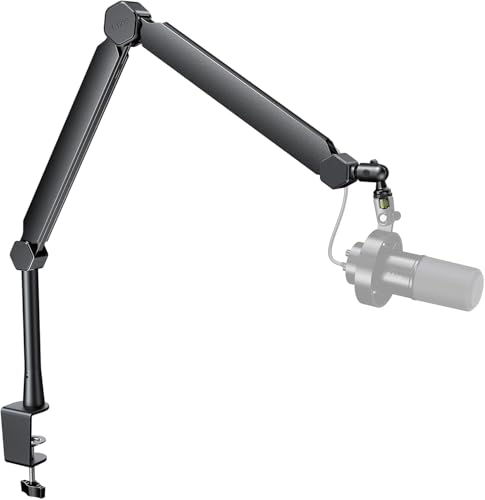
Setting up a studio for multiple hosts requires smooth adjustments and quiet operation across every station. The RØDE PSA1+ Professional Studio Boom Arm stands out as our top pick for hosting multi-person conversations because its silent internal springs prevent unwanted handling noise during live recordings.
For creators hosting guest panels on a budget, the NEEWER Low Profile Mic Boom Arm Desk Mount offers excellent clearance under monitors without obstructing eye contact between speakers. We compared 5 popular mounting solutions for October 2026 to help you build a professional multi-person broadcast space. You can also explore our guide on Desktop & External Monitors to plan your complete desk layout.



Best Microphone Arms for Multi-Guest Podcasts Buying Guide
Damped Joints and Mechanical Noise Isolation
When recording several speakers in the same room, mechanical noise from a shaky microphone mount easily bleeds into adjacent audio channels. High-grade boom arms use internal spring damping to absorb vibrations when co-hosts re-position their microphones mid-sentence.
Lower-quality arms often creak or ping whenever friction joints shift during an interview session. Investing in damped joints keeps your multi-track audio clean and minimizes post-production noise removal tasks for your team.
Low-Profile vs Overhead Boom Arm Design
Sightlines are critical when hosting multiple participants around a single podcast desk table. Standard overhead boom arms suspend the microphone capsule from above, which works well if your studio displays sit flush against nearby walls.
Low-profile designs sweep under your visual horizon to keep face-to-face eye contact completely clear between guests. Combining low-profile arms with Best External Monitors creates a clean workspace where co-hosts can view notes without blocking camera angles.
Weight Capacity and Spring Resistance Adjustments
Broadcasting microphones with heavy shock mounts and thick XLR cables can weigh over three pounds total. A boom arm with weak spring tension will slowly sag during long recording sessions, forcing guests to tilt uncomfortably forward.
Always match the load rating of the boom arm to your specific microphone equipment setup. Premium arms feature adjustable tension screws so you can calibrate resistance to match lightweight condensers or heavy dynamic units.
Integrated Cable Channels and Cable Protection
Running multiple microphone cables across a single table creates a chaotic workspace that looks messy on video streams. Modern podcast arms feature recessed channels or removable covers to conceal XLR and USB cables inside the arm frame.
Integrated channels keep cords organized and prevent accidental snags when guests swivel their seating positions. This setup preserves your cable lifespans while presenting a clean, professional appearance for recorded video shows.
Desk Mount Clamps and Vertical Extension Poles
The attachment clamp connects the entire mounting assembly securely to your studio desk structure. Heavy-duty C-clamps require thick rubber padding to grip desktop surfaces firmly without leaving deep indentations or scratches on wood.
Extension risers add extra vertical clearance, allowing the arm to swing smoothly over wide computer screens. If your studio utilizes specialized displays like 4K, 6K & 8K Monitors, vertical risers ensure full articulation without screen obstruction.
| Feature Category | Low-Profile Arm Design | Standard Overhead Arm | Extension Riser Arm |
|---|---|---|---|
| Primary Benefit | Unobstructed sightlines between guests | Maximum reach over large desks | Clears tall computer screens easily |
| Best Desk Location | Mounted directly under displays | Mounted along side or back edges | Mounted behind monitors or center console |
| Cable Routing | Under-arm recessed channels | Internal channels or exterior clips | Concealed riser tube and arm channels |
How We Evaluated
We evaluated these microphone arms by analyzing structural engineering specs, articulation range, weight capacities, and noise-damping features across top studio brands including Rode, InnoGear, TONOR and more. Our objective analysis focuses on practical studio requirements like table stability, desk surface protection, and long-term joint durability.
We compared how effectively each mounting arm accommodates different desk thicknesses and microphone weights across typical multi-guest configurations. By examining cable channel designs and joint adjustment mechanisms, we identified reliable solutions for podcasters at every budget level.
Common Mistakes to Avoid
One frequent error when setting up a multi-guest podcast space is picking boom arms that lack sufficient weight capacity. Placing heavy broadcast microphones on lightweight arms leads to sagging joints and ruined audio recordings.
Another common mistake is placing overhead arms directly in the line of sight between hosts. Co-hosts need unobstructed visual cues to maintain conversational flow, making low-profile mounts or elevated riser tubes a superior choice.
Failing to secure cable runs inside dedicated channels often leads to accidental disconnects during active shows. Always ensure your chosen boom arm provides robust cable retention clips or hidden channels to keep cords secured.
Finally, podcasters frequently overlook desk clamp depth and thickness requirements before purchasing hardware. Measure your studio table edges accurately, including any decorative trim, to ensure the C-clamp can grip securely.
Buying Checklist
- Verify that the maximum weight capacity exceeds the combined weight of your microphone, shock mount, and pop filter.
- Check desk clamp clearance to confirm it fits your table thickness, typically up to 2.4 inches.
- Confirm whether internal spring damping is present to eliminate squeaks and mechanical joint creaks.
- Determine if your studio layout requires a low-profile arm to maintain clear eye contact between guests.
- Ensure built-in cable management channels can accommodate thick XLR cables or heavy USB cords.
- Check whether thread adapters (1/4″, 3/8″, and 5/8″) are included to fit your specific microphone models.
- Review total horizontal and vertical reach measurements to verify full articulation around co-host seating areas.
Final Thoughts
Choosing the right mounting hardware transforms a cluttered multi-host podcast room into a streamlined production environment. For professional studio setups where quiet movement is essential, the RØDE PSA1+ Professional Studio Boom Arm delivers exceptional build quality, silent internal springs, and complete cable management.
If you need to maintain clear visual lines across a shared table without spending top dollar, the NEEWER Low Profile Mic Boom Arm Desk Mount provides a compact design that fits neatly under computer monitors. Meanwhile, budget-conscious creators will appreciate the InnoGear Mic Arm Microphone Boom Arm Cable for its solid steel construction and included riser extension.
Before finalizing your studio build, check our guide on How To optimize your recording desk layout for ergonomics and efficiency. Selecting sturdy, quiet boom arms ensures your team can focus on creating engaging co-hosted content in 2026.
Frequently Asked Questions
Why are Best Microphone Arms for Multi-Guest Podcasts important in 2026?
Dedicated mic arms isolate vocal tracks from desktop vibrations and allow each guest to adjust their mic position silently without interrupting the conversation flow.
What is the main advantage of low-profile boom arms for co-hosted podcasts?
Low-profile boom arms sit beneath eye level, keeping camera angles clear and allowing co-hosts to maintain direct eye contact across the podcast desk table.
How do internal springs prevent handling noise during live recordings?
Internal springs are encased within sound-dampened sleeves or channels, preventing metal friction squeaks and pinging sounds when the arm is moved mid-broadcast.
Can these microphone arms support heavy broadcast dynamic microphones?
Models rated for 3 pounds or higher easily support heavy studio microphones, provided you adjust the joint tension screws properly upon installation.
How do extension risers help when using large computer displays?
Extension risers elevate the base joint by several inches, allowing the boom arm to swing freely over tall desktop screens without hitting monitor edges.
Are thread adapters included with most studio mic boom arms?
Most quality boom arms include standard 1/4-inch, 3/8-inch, and 5/8-inch adapter screws to fit almost all popular condenser and dynamic microphones.
What desk thickness is required to secure a studio mic boom clamp?
Standard desktop C-clamps typically support table thicknesses between 0.8 inches and 2.4 inches, fitting most commercial and office studio desks.
How do built-in cable channels improve video podcast setups?
Integrated channels conceal XLR and USB cables inside the arm frame, eliminating messy cord tangles and presenting a neat look for streaming cameras. If you use RGB displays or Gaming Monitors in your studio, clean cabling keeps your visual aesthetic sharp.