

Selecting the ideal display requires balancing refresh rates, screen curvature, and panel longevity across different desktop setups. If you want unmatched visual clarity and smooth motion, the LG 45GX950A-B 45-inch Ultragear 5K2K WUHD stands out as our premier selection for high-end gaming and creative tasks in October 2026.
For gamers seeking exceptional speed and vibrant quantum dot colors without reaching flagship price tiers, we recommend the msi MAG 341CQP QD-OLED X28 34″ UWQHD Tandem as a balanced option. You can also explore our guide on IPS, OLED & LED Panels to understand how pixel illumination impacts contrast.
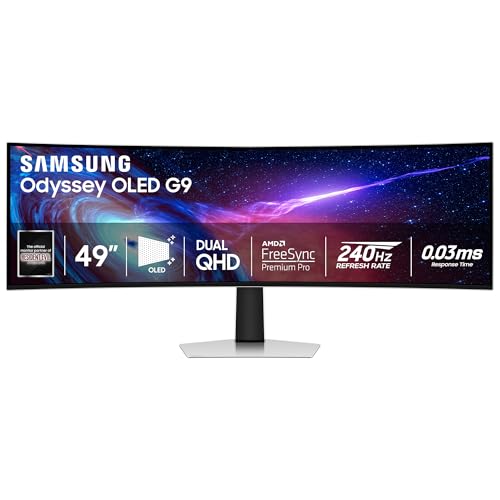
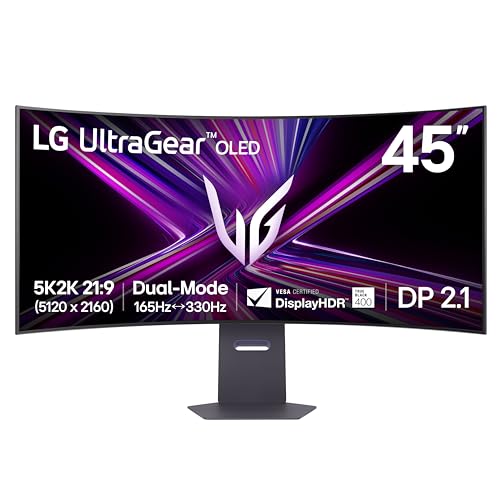


Best OLED Curved Monitors Buying Guide for 2026
Navigating the market for Best OLED Curved Monitors in 2026 means analyzing several technical factors that directly influence your daily visual experience. We reviewed 10 models across top brands like Alienware, msi, LG and more to outline the primary specifications you must evaluate before purchasing.
Screen Curvature and Ergonomics
Curvature in desktop monitors is measured in millimeters of radius, denoted by an R rating such as 800R or 1800R. A lower number indicates a steeper curve that wraps more tightly around your vision field. Displays with an 800R curve create intense peripheral immersion for simulator titles and fast-paced shooters.
Conversely, a gentle 1800R curve provides subtle depth while keeping straight lines relatively uniform for spreadsheet work and graphic design. Choosing between these designs depends on whether your desk setup prioritizes pure gaming focus or multi-purpose productivity. You can review best external monitors for additional desk setup advice.
Subpixel Layout and Text Clarity
Early OLED displays suffered from slight text fringing due to non-standard subpixel arrangements. Modern panels, including fifth-generation QD-OLED and tandem OLED designs, utilize updated RGB stripe layouts that dramatically improve font rendering across operating systems. Higher pixel densities above 110 PPI further eliminate visible artifacts during daily writing.
For users who process text documents or write code alongside gaming, high-density options like 5K2K resolution provide crisp readability. Selecting a panel with proper subpixel structure guarantees that text looks as clean as video content without distracting colored edges around characters.
Refresh Rates and Response Times
OLED technology inherently achieves response times near 0.03ms gray-to-gray, eliminating visual ghosting almost entirely. Pairing this near-instant pixel response with refresh rates from 144Hz to 240Hz produces exceptionally smooth motion clarity. Certain advanced models offer dual-mode capabilities, allowing switching to 330Hz at lower resolutions.
Competitive gamers benefit immensely from high refresh rates because inputs render instantaneously on screen. Ensure your graphics hardware supports modern DisplayPort or HDMI interfaces to fully utilize these swift refresh capabilities without bandwidth compression bottlenecks. Check out our detailed roundup on Gaming Monitors for target frame rate pairing tips.
Panel Longevity and Burn-In Mitigation
Organic light-emitting diodes gradually degrade over time when static elements remain displayed continuously. Manufacturers address this through active cooling systems, thermal modulation algorithms, and static element detection. Features like logo dimming and automatic pixel refreshing protect your investment against permanent image retention.
Hardware sensors, such as proximity detectors that turn off the panel when you leave your desk, further extend display lifespans. Choosing a display backed by a comprehensive three-year burn-in warranty offers valuable peace of mind during extended work sessions.
HDR Performance and Peak Brightness
Because OLED pixels emit their own light, they achieve absolute true black levels by turning off completely. This delivers virtually infinite contrast ratios that make High Dynamic Range content look remarkably vibrant. Peak brightness ratings often reach up to 1300 nits in small highlight windows on modern displays.
Certifications like VESA DisplayHDR True Black 400 or True Black 500 guarantee strict black level maintenance without ambient light bleed. Look for anti-reflective films or glare-free coatings if your desk sits opposite bright open windows.
| Feature Standard | Target Specification | Primary User Benefit |
|---|---|---|
| Curvature Radius | 800R to 1800R | Enhanced visual immersion and field of view wrap |
| Pixel Response | 0.03ms (GtG) | Elimination of motion blur and ghosting trails |
| Peak Luminance | 400 to 1300 Nits | Vibrant HDR highlights with deep black levels |
| Display Inputs | HDMI 2.1 / DP 2.1 / USB-C 90W | High bandwidth connection and single-cable docking |
How We Evaluated
Our evaluation approach relies on analyzing verified technical specifications, panel architecture details, and hardware capabilities across current models. We examine official color gamut measurements, contrast certifications, input port bandwidth limits, and panel protection algorithms to determine overall value across different price tiers in the $578.85 – $1,599.99 spectrum.
We systematically compare curvature radii, pixel densities, and stand adjustability features to establish real-world ergonomic suitability. This data-driven analysis ensures our recommendations highlight genuine hardware advantages while accurately identifying practical trade-offs for users.
Common Mistakes to Avoid
One frequent error is pairing a high-resolution display with older cable standards that lack sufficient bandwidth. Using legacy cables can restrict your refresh rate or force unwanted color subsampling, diminishing overall visual quality.
Another common misstep is selecting an aggressive 800R curve for work that demands precise geometry, such as CAD design or architectural drafting. Curved lines can distort straight reference points, making flat panels or subtle 1800R curves far better suited for structural layout tasks.
Lastly, buyers often disable automated panel care features to avoid minor pop-up prompts. Ignoring built-in OLED protection mechanisms significantly increases the long-term risk of static image burn-in over years of heavy daily use.
Buying Checklist
- Confirm your desktop depth accommodates wide curved display stands.
- Verify your graphics card features HDMI 2.1 or DisplayPort 1.4/2.1 outputs.
- Select an 800R curve for gaming or an 1800R curve for mixed productivity.
- Ensure the model offers automatic pixel refresh and burn-in protections.
- Check for USB Type-C power delivery if linking a laptop directly.
- Look for VESA DisplayHDR True Black certifications for proper HDR contrast.
- Confirm text density (PPI) is adequate for your daily writing needs.
- Review the manufacturer warranty coverage for burn-in replacement terms.
Final Thoughts
Investing in Best OLED Curved Monitors transforms both gaming environments and everyday desktop workflows with striking visual clarity. For users seeking top-tier 5K2K resolution and flexible dual-mode frame rates, we recommend the LG 45GX950A-B 45-inch Ultragear 5K2K WUHD as the definitive flagship choice. You can explore more display options in our guide on best high resolution monitors for comfort and value.
If you want exceptional motion performance and curved immersion at a competitive price point, the LG 34GS95QE 34-inch Ultragear OLED Curved delivers incredible value. Meanwhile, creators who require strict color space switching will find the Alienware AW3423DWF Curved QD-OLED Gaming Monitor perfectly tailored for accurate color grading tasks.
Selecting the ideal display ultimately depends on matching your primary tasks with the right curvature, resolution, and connectivity features. Explore our detailed breakdown on How To optimize your workspace for additional display setup recommendations.
FAQs
What is the top-rated option among Best OLED Curved Monitors in 2026?
The top-rated option in 2026 is the LG 45GX950A-B 45-inch Ultragear 5K2K WUHD. It combines crisp 5K2K resolution, high brightness, and dual refresh rate modes for unparalleled gaming and productivity. You can also read about display upgrades in our guide to best external computer monitors for comfort at work.
Is an 800R curve better than an 1800R curve for daily tasks?
An 800R curve offers deeper visual wrap for gaming immersion, while an 1800R curve is gentler and better suited for multi-window office work. Your preference should depend on whether you prioritize immersive entertainment or standard document workflows.
How do modern OLED monitors prevent image burn-in?
Manufacturers utilize pixel cleaning cycles, thermal management algorithms, proximity sensors, and static logo dimming. These active technologies work continuously in the background to prevent permanent image retention.
Are Best OLED Curved Monitors suitable for color-critical work in 2026?
Yes, modern QD-OLED and tandem OLED displays cover over 98% of the DCI-P3 color space and feature factory color calibration. Dedicated color space profiles like sRGB modes allow graphic designers to work with high color precision.
What GPU connectivity is required for ultrawide OLED gaming?
High-resolution ultrawide OLED displays require HDMI 2.1 or DisplayPort 1.4/2.1 connections to output high refresh rates without compression. Using up-to-date GPU hardware ensures frame syncing mechanisms work seamlessly.
Do curved OLED displays suffer from glare in bright rooms?
Modern curved OLED displays feature anti-reflective or glare-free coatings that reduce ambient light reflections. High peak brightness ratings up to 1300 nits also assist in maintaining visibility under indirect indoor lights.
What is dual-mode refresh rate functionality?
Dual-mode allows a monitor to operate at high resolution with a standard refresh rate or instantly switch to a lower resolution at ultra-high refresh rates. This lets players customize display performance for different gaming genres.
Why are OLED response times faster than traditional LCD screens?
OLED pixels change light states almost instantaneously because each self-illuminating diode switches off or adjusts luminance directly. Traditional LCD panels require physical liquid crystals to rotate, which takes significantly longer.








