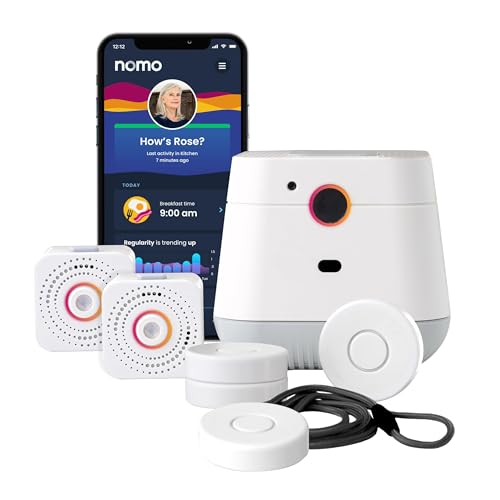

Selecting the right monitoring equipment brings genuine peace of mind to families while preserving daily independence for aging loved ones. Among the 7 models we analyzed for September 2026, the Nomo Medical Alert System with Fall Detection stands out as our top overall recommendation for comprehensive home coverage. It combines camera-free privacy, two-way voice communication, and passive motion satellites without requiring invasive installation or traditional landlines.
For families seeking affordable entry-level tracking, the WiFi Smart Bed Sensor Alarm and Fall Prevention offers excellent practical value. You can explore more technology setup advice in our How To guide collection as you plan your setup. Our comparison covers leading brands including YoLink, Smart Caregiver Corporation, Nomo Smart Care and more with options across $37.99 – $185.00 to fit every safety budget.




Best Smart Home Starter Kits for Elderly Safety Buying Guide
Fall Detection and Routine Monitoring
Fall detection capabilities represent the most critical feature when evaluating safety hardware for aging relatives. Modern systems use multi-sensor arrays and motion satellites rather than basic wearable pendants that seniors often forget to put on. Passive tracking observes daily movement patterns across hallways and bedrooms to detect unexpected inactivity or sudden impacts.
Setting up routine monitoring helps caregivers identify gradual mobility changes before serious accidents occur at home. Combining bed placement sensors with general room tracking provides full visibility without invading personal space.
Wireless Range and Communication Protocols
Wireless signal strength determines whether your alert system operates reliably across all areas of a residence. Standard Wi-Fi networks work well for single-floor apartments but can suffer from dead zones in multi-story houses or detached structures. Long-range protocols such as LoRa enable signals to pass through thick walls, basements, and outdoor outbuildings up to a quarter-mile away.
When building a broader system, consider checking our recommendations on external monitor setup guides for centralized caregiver displays. High-range transmission ensures alerts reach your hub even during localized network interruptions.
Privacy Protection and Camera-Free Designs
Maintaining dignity is vital when introducing monitoring technology into an elderly family member’s living area. Many seniors resist safety systems because they dislike feeling watched by intrusive video hardware. Camera-free starter kits utilize ambient motion sensors, door contact switches, and floor pressure pads to monitor safety without visual surveillance.
This non-invasive approach encourages higher compliance while giving family members full awareness of daily routines. Smart radar and contact sensors preserve personal privacy in sensitive areas like bathrooms and bedrooms.
Notification Speed and Emergency Response Options
The delivery speed of notification alerts directly impacts how quickly family members can respond to emergencies. Systems utilize instant app push notifications, direct SMS messages, automated voice calls, or dedicated caregiver pagers. Multi-user sharing allows several family members or neighbors to receive simultaneous alerts whenever assistance is required.
Some starter kits also offer optional professional 24/7 central monitoring dispatch services alongside self-monitoring modes. Evaluating your family’s ability to answer immediate phone alerts determines whether professional dispatch services are necessary. You can also read our related guide on desktop technology articles to learn how modern hubs process real-time notifications.
Installation Simplicity and Ongoing Subscription Costs
Complex installation procedures can create unnecessary frustration when setting up emergency monitoring hardware. The best starter kits feature plug-and-play hubs paired with peel-and-stick wireless sensors that mount securely without drilling tools. Quick installation ensures that safety equipment is operational within minutes of opening the package.
Understanding long-term operating costs helps prevent unexpected monthly financial surprises down the road. While some systems function with zero subscription fees, others charge recurring service fees for cellular backup or professional dispatch services.
How We Evaluated
We evaluated each starter kit by analyzing verified technical specifications, sensor response ranges, hardware reliability, and ease of daily operation. Our analysis focused on key metrics including power consumption, battery longevity, multi-user mobile notification flexibility, and installation requirements. We systematically compared each feature set against real-world caregiving scenarios to ensure practical recommendations.
Our focus remains purely data-driven, examining physical range limits, platform compatibility, and contract flexibility across all hardware choices. This transparent method highlights genuine functional trade-offs so families can make informed purchasing decisions.
Common Mistakes to Avoid
Relying exclusively on standard household Wi-Fi without considering signal range is a frequent oversight during installation. Wi-Fi signals frequently fail to penetrate thick basement walls, garage spaces, or remote home entrances where falls often happen. Selecting systems with dedicated sub-GHz protocols or extended wireless coverage prevents critical communication dead zones.
Overlooking battery replacement schedules can leave safety equipment completely inactive when an emergency arises. Choosing sensors with multi-year battery life or automated low-battery phone alerts prevents unexpected device outages.
Installing loud local alarms near sensitive seniors can cause severe agitation and panic during false triggers. Utilizing silent caregiver pagers or remote mobile app notifications maintains continuous safety without startling vulnerable individuals. Furthermore, failing to share app access with secondary family members creates dangerous response bottlenecks.
Buying Checklist
- Confirm the wireless protocol supports the full square footage and layout of your elder’s home.
- Verify whether the main hub requires a 2.4 GHz Wi-Fi connection or ethernet connection.
- Check if emergency fall detection functions passively without requiring manual button pushes.
- Ensure the system provides non-invasive camera-free sensor options for private living areas.
- Review monthly subscription requirements to distinguish self-monitored options from fee-based systems.
- Check battery life ratings for all door, motion, and floor sensors in the starter kit.
- Confirm mobile app compatibility with all family members’ smartphones for shared notifications.
- Ensure the hub includes two-way voice capability if immediate direct voice contact is needed.
Final Thoughts
Choosing the right safety system provides essential protection while allowing elderly relatives to maintain independent living in their own homes. The Nomo Medical Alert System with Fall Detection is our best overall pick, offering camera-free monitoring combined with instant two-way voice communication. Its comprehensive satellite approach tracks daily movement patterns without invasive visual recording.
For budget-conscious caregiving, the WiFi Smart Bed Sensor Alarm and Fall Prevention delivers reliable mobile alert functionality at an accessible price point. Families managing large properties or outbuildings should consider the YoLink Home Security Starter Kit for its impressive long-range coverage. You can explore additional helpful hardware guides in our display technology section.
Frequently Asked Questions
What are the Best Smart Home Starter Kits for Elderly Safety in 2026?
The top options in 2026 combine non-invasive motion monitoring, long-range wireless protocols, and instant mobile alerts. Systems like the Nomo Medical Alert System with Fall Detection excel by offering complete room coverage without cameras. Exploring our How To articles will provide additional insights on integrating safety hardware.
Do elderly safety starter kits require monthly subscription fees?
Many smart home starter kits offer self-monitoring modes with zero required monthly fees or contracts. Systems like YoLink deliver app push alerts and email notifications completely free of charge. Optional subscriptions are generally only required if you choose professional 24/7 dispatch services or extra SMS messaging bundles.
How do camera-free fall detection systems work?
Camera-free systems utilize radar, passive infrared motion satellites, and door contact sensors to monitor activity. These components record movement timing and directional patterns throughout living spaces without capturing video footage. If movement stops unexpectedly during active hours or an impact is detected, the hub generates instant emergency alerts.
Can multiple family members receive safety alerts simultaneously?
Yes, most modern smart safety starter kits support multi-user account sharing through their official mobile applications. You can invite several family members, neighbors, or professional caregivers to join a care circle. Everyone connected receives real-time app notifications, emails, or call alerts whenever a sensor triggers.
What happens if the home internet connection goes down?
Standard Wi-Fi starter kits require an active local internet connection to send mobile notifications to your smartphone. However, advanced systems utilizing device-to-device local pairing can still trigger local sirens or pagers even when offline. Selecting systems with cellular backup ensures continuous off-site alert delivery during power or internet outages.
Where should floor mat sensors and motion detectors be placed?
Floor mat sensors operate best when placed directly beside the bed or immediately inside exit doors to detect nighttime wandering. Motion detectors should be mounted in main hallways, kitchens, or living areas where seniors pass through frequently. Avoid placing motion sensors directly facing heating vents or sunny windows to prevent false alerts.
How difficult is it to install a smart home safety starter kit?
Most modern starter kits are designed for straightforward DIY installation without requiring professional technicians or tools. Hubs plug directly into standard wall outlets while sensors attach using pre-applied heavy-duty adhesive tape. Pairing devices typically involves scanning a QR code using your smartphone app, taking only a few minutes.


